treefmt: one command to run every formatter in a mixed-language repository
the formatter multiplexer [maintainers=@zimbatm,@brianmcgee]
At a glance
- What is it?
- treefmt is an MIT-licensed Go tool that runs all of a repository's formatters in parallel from a single `treefmt.toml`, and only reformats files that changed since the last run. The judgement is that the change tracking is the genuinely differentiating feature rather than the parallelism, and that the tool's compatibility contract with formatters is narrow enough to matter.
- Who is it for?
- treefmt fits a team maintaining a repository with several languages, each with its own formatter, that has outgrown a Makefile of sequential format targets and wants a single command with one output format. It does not fit a project whose formatters do not follow the treefmt specification, and it does not fit a team that wants formatting to be enforced before commit through a hook, since pre-commit hooks are listed as an upcoming feature rather than a shipped one.
- Can I use it commercially?
- Yes. MIT is a permissive licence: you can use, modify and sell software built on it, as long as you keep its copyright and licence notices.
- Is it still maintained?
- Yes. The repository last received commits 12 days ago.
- What is it written in?
- Mainly Go, according to GitHub's language statistics.
Answers come from the project's GitHub data, last synced on November 7, 2026, and from our analysis. They are not legal advice.
Star history
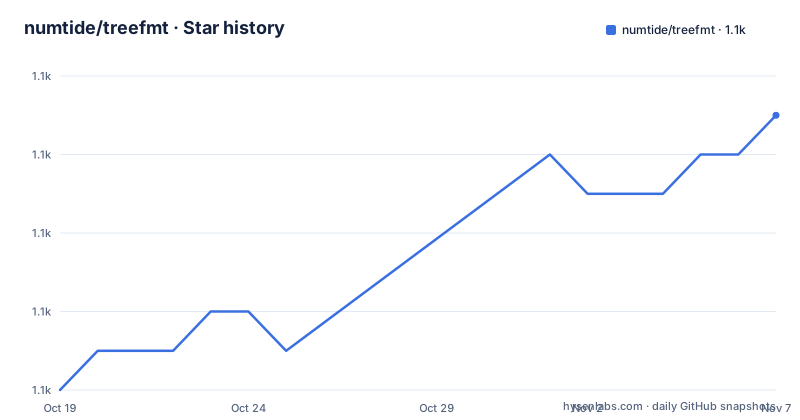
- numtide/treefmt1,091 ★ · +7
| Repository | 2026-10-19 | 2026-11-07 |
|---|---|---|
| numtide/treefmt | 1.1k | 1.1k |
7 Stars in the last 19 days, measured from the daily GitHub snapshot. Compare with other projects
Editorial analysis
The problem is that every repository rewrites the same script
treefmt is described as the formatter multiplexer, and it is a numtide project. It reduces the process of applying formatters to your project to a single command line.
The motivation section is where the design comes from. Modern code repositories are rarely written in a single language, and they often contain a mix of languages, each with its own formatting requirements. Then the observation that started the project: while working for their customers, the maintainers noticed that projects each tended to re-implement the same formatter multiplexing logic, which is a script that invokes all the formatters.
The three questions in the README are the feature list in disguise. What if that script was a single command? What if that single command would handle all the formatters in parallel? And what if it would only format files that have changed since the previous run?
That is what treefmt is about, and the third question is the one that distinguishes it from a plain parallel runner. The tool's stated main features are a unified CLI and output, running all the formatters in parallel, and tracking file changes.
The unified output is worth pausing on too. When formatters are run by a script, each one prints its own diagnostics in its own format, and the script has to decide what to do with them. treefmt gives you a single standardized output for all of them, which means a formatter that fails is reported the same way as one that fails later in the list.
The primary language is Go, the module path is `github.com/numtide/treefmt/v2`, and the licence is MIT.
The configuration is a list of formatters with globs
Configuration lives in `treefmt.toml`, usually in the project root folder, and the generic shape of a formatter entry is short.
[formatter.<name>]
command = "<formatter-command>"
options = ["<formatter-option-1>"...]
includes = ["<glob>"]
So a formatter is a command, a list of options, and a list of globs. The example in the documentation shows two formatters for two languages:
[formatter.nix]
command = "nixpkgs-fmt"
includes = ["*.nix"]

[formatter.rust]
command = "rustfmt"
options = ["--edition", "2018"]
includes = ["*.rs"]
The `includes` globs are what make the multiplexing work, because they are how treefmt decides which files each formatter sees. A formatter whose glob does not match a file is not invoked for it, and a file matched by no glob is not formatted by anything.
The one operational note the documentation gives is that before specifying a formatter in the config, make sure it is installed. treefmt does not install your formatters, it drives them.
The TOML parsing is handled by `github.com/BurntSushi/toml` in the dependency list, and the glob matching by `github.com/gobwas/glob`. The command line itself is Cobra, with Viper for configuration handling and pflag for flags, and `mvdan.cc/sh/v3` is in the dependency list for running shell commands, which is how formatters that are themselves shell scripts get invoked.
The formatter contract is a written specification
The compatibility section is short but the requirement behind it is the one that decides whether treefmt works for you.
treefmt works with any formatter that adheres to a written specification, linked from the README as the formatter spec document in the repository. The examples given are clang-format for C, C++, Java, JavaScript, JSON, Objective-C, Protobuf and C#, gofmt for Golang, and Prettier for JavaScript, HTML and CSS.
That word, specification, is doing real work. treefmt is not shelling out blindly and hoping; it expects a formatter to behave in a particular way, presumably accepting files on stdin or in place and reporting which ones it changed, and the spec is what tells an author what to implement. A formatter that does not follow it will not behave correctly under treefmt even if the command runs.
The documentation also has a page listing supported formatters, and a section for finding and sharing existing formatter recipes.
There is a Nix angle too, and it is more than a wrapper. There is a `treefmt-nix` project for using treefmt with Nix, which is described as a way to use Nix to configure and bring in formatters. That is a meaningful difference in approach, since a Nix-based setup can have the formatters themselves declared as part of the configuration rather than assumed present on the machine.
The repository layout reflects the feature set. There is a `walk/` directory for the file traversal, a `git/` directory, a `format/` directory for the formatter driving logic, a `config/` directory for configuration handling, a `cmd/` directory for the command definitions, a `jujutsu/` directory, a `stats/` directory, a `nix/` directory, and `build/`, `docs/` and `test/` alongside them.
Change tracking is what makes it more than a parallel runner
The change tracking feature deserves its own examination, because it is the one that changes how the tool behaves rather than just how fast it runs.
The contrast the documentation draws is this. When formatters are run in a script, they process all the files they encounter, regardless of whether or not they have changed. treefmt tracks file changes, and only attempts to format files which have changed.
The benefit in a local development loop is straightforward: you run the formatter after editing one file, and you do not wait for the formatter to rewrite and re-check every other file in the tree. It also means a formatter that would make an unrelated change to a file you did not touch does not get the chance to make it, which keeps diffs clean.
The cost is in how the state is stored. treefmt keeps its own record of what it has seen, and the dependency list includes `go.etcd.io/bbolt`, which is the obvious candidate for holding that state. The `git/` and `jujutsu/` directories in the repository suggest that the tool can derive its notion of change from version control history.
For continuous integration, the picture is different, and this is the case worth thinking about before adopting. On a CI runner the working tree is usually fresh, cloned at a particular commit, so there is nothing to compare against and every file looks changed. The incremental benefit disappears and the first run in a pipeline has to format the whole tree. The tool does not fail in that situation, it simply loses the advantage that made it worth choosing.
The parallelism is the more visible feature but the less differentiating one. A standard script loops over your folders and runs each formatter sequentially, and treefmt runs them in parallel so the formatting job takes less time. That is a real saving on a tree with many formatters, though it is the kind of saving that a Makefile with the right dependencies would also give you.
IDE integration exists as a separate extension
treefmt currently has support for vscode via an extension, treefmt-vscode, which is linked in the README from the Visual Studio Marketplace with a link to its GitHub repository under the isbecker account.
The fact that the editor integration lives outside the main repository is a normal pattern, and it also tells you something about the project's priorities. The upcoming features list names more IDE integration and pre-commit hooks as things still to come, and the list opens with the statement that this project is still pretty new.
The pre-commit gap is the one that matters for a team with a formatting policy. If your process expects formatting to be checked before a commit lands, you currently need pre-commit, which the README lists as a related project, and the framework is described as a framework for managing and maintaining multi-language pre-commit hooks. That is a separate tool with its own configuration, and it solves the enforcement half of the problem while treefmt solves the running half.
The other related projects are worth reading as a map of the surrounding space. EditorConfig unifies file indentations configuration on a per-project basis, and it is a good comparison because it solves a different slice of the same problem, configuration rather than execution. Prettier is an opinionated code formatter for a number of languages, and it is the most interesting comparison of all because a single formatter that handles many languages overlaps with treefmt's reason for existing. Super-Linter is a project by GitHub to lint all of your code, and pre-commit is the hook framework.
The distinction is that Prettier is one formatter with opinions, and treefmt is the multiplexer that lets you keep using whatever each language's community formatter already is.
A commercial project with an MIT core and a v1 lineage
treefmt is a numtide project, and the README carries a commercial support section. Looking for help or customization, get in touch with Numtide to get a quote, with the pitch that they make it easy for companies to work with open source projects.
The licence is MIT, and the contribution terms are spelled out: unless explicitly stated otherwise, any contribution intentionally submitted for inclusion will be licensed under the MIT license without any additional terms or conditions.
The maintainers are named in the repository description, @zimbatm and @brianmcgee, with Brian McGee also credited in the README's link list, and there is a Matrix chat linked in the header for the project at treefmt:numtide.com.
The release history is regular. v2.4.1 came on 2026-02-27, v2.5.0 on 2026-04-07, and v2.6.0 on 2026-08-31. The last push was on 2026-10-14 and the repository is not archived, so the code is being worked on.
There is a version 1 branch referenced in the README's link list, `github.com/numtide/treefmt/tree/v1`, which is a reminder that the tool predates the current major version. The module path carries the `/v2` suffix, and the `go.mod` requires Go 1.26.1, so the toolchain floor is a current one.
The build and release infrastructure is visible in the repository: a `.goreleaser.yaml` for the release workflow, a `flake.nix` and `flake.lock`, a `default.nix` and a `shell.nix`, a `.golangci.yaml` for the linter, a `renovate.json` for dependency updates, and a `format/` directory that is the project's own formatting setup, which is the obvious place to look for how a project formats itself with its own tool.
Editorial conclusion
treefmt fits a team maintaining a repository with several languages, each with its own formatter, that has outgrown a Makefile of sequential format targets and wants a single command with one output format. It does not fit a project whose formatters do not follow the treefmt specification, and it does not fit a team that wants formatting to be enforced before commit through a hook, since pre-commit hooks are listed as an upcoming feature rather than a shipped one. Verify first that the formatters you want to drive match the formatter specification the project links, since treefmt works with any formatter that adheres to it, that the `includes` globs you write match the files each formatter expects, and that the change tracking behaves the way you need in CI, where the tree is usually fresh rather than incrementally modified.
Frequently asked questions
How do I install and set up treefmt?
You can install it by downloading the binary for your architecture from the releases page, or build it from source with Go or with the help of Nix. In a project, generate the config with `treefmt --init` and then edit `treefmt.toml` to list the formatters you want.
What does a treefmt formatter entry look like in treefmt.toml?
Each entry is a `[formatter.<name>]` table with a `command`, a list of `options` and a list of `includes` globs. The globs decide which files each formatter is given, and the formatters themselves must already be installed.
Which formatters can treefmt drive?
treefmt works with any formatter that adheres to the formatter specification linked in the README. The documented examples are clang-format for C, C++, Java, JavaScript, JSON, Objective-C, Protobuf and C#, gofmt for Golang, and Prettier for JavaScript, HTML and CSS.
Does treefmt only reformat files that changed?
Yes. Unlike a script that runs each formatter over everything it finds, treefmt tracks file changes and only attempts to format files that have changed since the previous run, which is one of its three main features alongside a unified CLI and parallel execution.
Is there a pre-commit integration for treefmt?
Not yet. The upcoming features list names pre-commit hooks as something to add in the future, so today you would use the separate pre-commit framework for the enforcement side. Editor integration does exist, through the treefmt-vscode extension for Visual Studio Code.
Official sources
Add this badge to your README
If you maintain this project, the badge below links readers to this analysis and shows its maintenance status from the daily GitHub snapshot. Paste the markdown into your README; add ?metric=license or ?metric=stars to the image URL for a different field.

[](https://hysenlabs.com/projects/numtide-treefmt)Star history chart for your README
[](https://hysenlabs.com/projects/numtide-treefmt)Was this useful?