NVIDIA DCGM Exporter for Prometheus GPU Monitoring
NVIDIA GPU metrics exporter for Prometheus leveraging DCGM
At a glance
- What is it?
- DCGM Exporter turns NVIDIA Data Center GPU Manager telemetry into Prometheus text metrics. It fits Prometheus and Grafana operators who need NVIDIA GPU visibility, with deployment complexity centered on DCGM compatibility.
- Who is it for?
- Adopt DCGM Exporter when Prometheus-based NVIDIA GPU monitoring is required and the deployment can coordinate DCGM, compatible versions, driver access, and scrape configuration. Do not choose it for non-NVIDIA accelerators or for environments where paired DCGM deployment and maintenance are impractical.
- Can I use it commercially?
- Yes. Apache-2.0 is a permissive licence: you can use, modify and sell software built on it, as long as you keep its copyright and licence notices.
- Is it still maintained?
- Yes. The repository last received commits 34 days ago.
- What is it written in?
- Mainly Go, according to GitHub's language statistics.
Answers come from the project's GitHub data, last synced on October 23, 2026, and from our analysis. They are not legal advice.
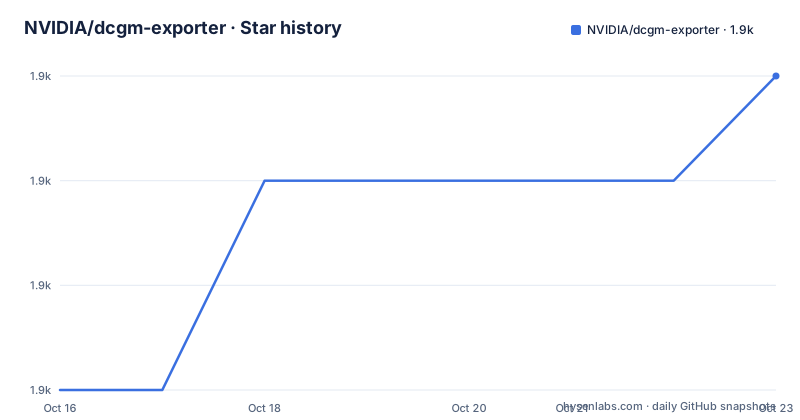
Star history
- NVIDIA/dcgm-exporter1,912 ★ · +6
| Repository | 2026-10-16 | 2026-10-23 |
|---|---|---|
| NVIDIA/dcgm-exporter | 1.9k | 1.9k |
6 Stars in the last 7 days, measured from the daily GitHub snapshot. Compare with other projects
Editorial analysis
DCGM Exporter's Prometheus Monitoring Boundary
NVIDIA DCGM Exporter solves a narrow observability problem: NVIDIA DCGM collects GPU telemetry, but Prometheus needs that telemetry in its text exposition format. The exporter bridges that boundary rather than implementing a general-purpose monitoring stack or collecting metrics from arbitrary hardware. Its intended users are operators of NVIDIA GPU systems who already use Prometheus or Grafana and need GPU health and utilization data in that telemetry path.
The project is not tied to Kubernetes as its only deployment model. The repository contains package builds, container builds, a Helm chart, tests, and checked-in Grafana resources, while the README directs readers to an installation guide covering deployment, configuration, verification, administration, and troubleshooting. This range indicates support for several operational contexts, but the README does not enumerate every supported package or remote-connection mode.
DCGM remains a required part of the mechanism. The exporter exposes data obtained through NVIDIA Data Center GPU Manager; it does not turn an arbitrary GPU runtime into a monitoring source. The `go.mod` dependency on `github.com/NVIDIA/go-dcgm` supports that division of responsibility. In practical terms, adoption starts with an existing NVIDIA telemetry foundation, not with a replacement for DCGM itself.
DCGM-to-Prometheus Metrics and Repository Architecture
The data flow is straightforward at a conceptual level. DCGM provides NVIDIA GPU telemetry, DCGM Exporter retrieves that telemetry through its DCGM-facing Go dependencies, and the exporter serves the resulting samples in Prometheus text format. Prometheus can then scrape the exporter endpoint and store the metrics for queries, alerts, and dashboards. The README does not document the endpoint path, listen port, or default configuration, so those details should be taken from the linked command reference or official installation guide rather than inferred.
The repository layout separates concerns beyond the executable. `cmd/` and `internal/` sit alongside `pkg/`, which is consistent with a Go command application organized into implementation and reusable package layers. `etc/default-counters.csv` identifies the checked-in default metric collectors, making collector selection a project-specific configuration concern. The dependency on `github.com/prometheus/client_golang` connects the application to Prometheus client conventions, while `github.com/NVIDIA/go-nvml` shows that NVIDIA management interfaces are also represented in the codebase.
For dashboards, the repository includes `grafana/dcgm-exporter-dashboard.json` and points to NVIDIA's Grafana dashboard. These are useful starting points, but a dashboard cannot repair missing telemetry. Host discovery, DCGM access, version pairing, scrape reachability, and counter availability still need to be correct before the visualization is useful.
DCGM Exporter Installation and First Deployment
The README does not provide a self-contained installation command, package name, container image reference, or Kubernetes release command. It directs users to NVIDIA's installation guide for deployment, configuration, and verification. Copying an unverified command would bypass the compatibility requirements that govern this project.
The documented starting sequence is to open the official “Install DCGM Exporter” guide, select a deployment method appropriate to the target environment, and pair the DCGM Exporter release with the DCGM version specified for that release. The README also links to the command reference and the version compatibility documentation. Those are the appropriate sources for the listener, configuration file, startup flags, container arguments, Helm values, and verification request.
After installation, the official guide covers verification, but the README does not state the exact endpoint or expected response. Follow the guide's verification procedure and confirm that the returned payload is Prometheus text metrics rather than merely checking that the process starts. Then use the linked Prometheus configuration guide to add the scrape target, reload Prometheus according to its own deployment, and confirm that the expected DCGM metric series arrive.
The repository's Helm chart is documented in `deployment/README.md`. Kubernetes users should consult that file for chart configuration and troubleshooting rather than treating a generic Helm installation as sufficient. The chart's existence does not establish that NVIDIA drivers, DCGM libraries, device access, or host configuration are already present on every node.
DCGM Version Pairing as an Upgrade Constraint
The clearest upgrade rule is explicit: run DCGM Exporter with the DCGM version paired with that exporter release. The compatibility page also governs supported package and remote-connection combinations. This makes version selection a deployment dependency rather than a routine application-only update. An exporter upgrade can therefore require coordination with the DCGM installation and possibly its packaging or connection method.
The maintenance record indicates recent project work. The repository is not archived, its last push was on 2026-09-18, and release 4.8.4 was published on 2026-09-18. Those facts support a current release line, but they do not establish compatibility with every GPU driver or every installation method. The version compatibility documentation remains the authority for those combinations.
Recent releases also carry a naming pattern that deserves attention: `4.8.4`, `4.6.0-4.8.3`, and `4.5.3-4.8.2`. The README does not explain that naming scheme, so operators should not infer upgrade rules from the labels alone. Check the linked release notes for changes and follow the paired-version guidance. For organizations operating many nodes, this compatibility work is likely more significant than rebuilding the Go binary itself.
DCGM Exporter Constraints on Kubernetes and Non-NVIDIA Systems
The first hard boundary is hardware and software scope. DCGM Exporter is built to expose NVIDIA GPU telemetry through DCGM. It is the wrong tool for AMD or other non-NVIDIA accelerators unless an independently supported path exists, and the README documents no such path. Even on NVIDIA systems, a failed DCGM connection can prevent useful metric output; the official troubleshooting guide, rather than the repository overview, is the place to diagnose that condition.
There is a second boundary around Prometheus itself. The exporter produces the text format, but it is not a complete monitoring platform. Query storage, alert rules, retention, authentication, network reachability, and scrape configuration remain responsibilities of Prometheus and the surrounding stack. The presence of a Grafana dashboard can conceal an incomplete scrape setup during initial evaluation if operators inspect only the dashboard.
The Kubernetes path also requires more than deploying a Helm chart. The repository includes Kubernetes integration and end-to-end tests, as well as container tests and image examples, but the README does not document node prerequisites or supported Kubernetes distributions. Treat device access, DCGM availability, and per-node configuration as items to verify against NVIDIA's installation guidance. A chart release cannot be considered healthy until each intended GPU node actually exposes the expected series.
DCGM Exporter Versus a Direct Prometheus Collector
A direct collector is a genuine alternative, although it is not presented as a packaged project in this repository. A team could build a Go service using `github.com/NVIDIA/go-dcgm` to obtain telemetry and `github.com/prometheus/client_golang` to expose Prometheus metrics. That approach removes the separate DCGM Exporter process from the data path and gives the team direct control over Go types, collector selection, and scrape behavior.
The trade-off is ownership. A custom collector requires the team to maintain its DCGM integration, metric definitions, lifecycle handling, error behavior, container or service packaging, and compatibility with the deployed DCGM version. DCGM Exporter already packages that bridge and also provides default collectors, release packaging, a Helm chart, tests, and dashboard resources. The exporter therefore offers less application code to own, but it introduces a component whose release must remain paired with DCGM.
For Prometheus and Grafana evaluations, the comparison is operational rather than philosophical. Choose the direct collector when building a custom telemetry service is already part of the work and the team accepts full integration ownership. Choose DCGM Exporter when the priority is NVIDIA's packaged bridge and its associated deployment resources. Neither choice removes the need to confirm what metrics are available on the actual GPUs.
Apache-2.0 Rights and Operational Obligations
The repository declares the Apache License 2.0 through `LICENSE`, `Copyright.txt`, and licensing-related entries. It also includes `THIRD_PARTY_NOTICES` and a `licenses/` directory, reflecting that the executable depends on third-party Go modules. Anyone redistributing a built artifact should account for the repository's license materials as well as the dependency notices that apply to that build.
The README does not state that Apache-2.0 eliminates deployment obligations, and it does not provide legal advice. The relevant distinction is that an open-source license governs rights and conditions, while DCGM compatibility, driver access, scrape configuration, and version upgrades remain technical responsibilities. Security reports also have a separate route: the README directs potential vulnerabilities to NVIDIA's Product Security process rather than a public issue.
For upgrades, the concrete cost is not limited to changing a container tag or package version. Operators need to inspect release notes, verify the paired DCGM version, confirm the supported package or remote-connection combination, and retest metric collection. The checked-in dashboard may also need review when metric names or collector behavior change, although the README documents no specific breaking change.
Editorial conclusion
Adopt DCGM Exporter when Prometheus-based NVIDIA GPU monitoring is required and the deployment can coordinate DCGM, compatible versions, driver access, and scrape configuration. Do not choose it for non-NVIDIA accelerators or for environments where paired DCGM deployment and maintenance are impractical. Before installation, verify the exporter and DCGM compatibility matrix, the supported package or remote-connection combination, and the target node's access to required NVIDIA runtime components.
Frequently asked questions
What is DCGM Exporter used for?
It exposes NVIDIA GPU telemetry from NVIDIA Data Center GPU Manager in Prometheus text format. Prometheus can scrape the result, and Grafana can visualize the stored metrics.
Which DCGM version should I use with DCGM Exporter?
Use the DCGM version paired with the selected DCGM Exporter release. The README directs users to its version compatibility documentation for supported package and remote-connection combinations.
How do I install and verify DCGM Exporter?
The README directs users to NVIDIA's official installation guide, which covers deployment, configuration, verification, administration, and troubleshooting. Prometheus setup is covered by a separate linked configuration guide.
Does DCGM Exporter support Kubernetes deployment?
The repository includes a Helm chart and separate documentation for Helm configuration and Kubernetes integration and end-to-end tests. The README does not document every node prerequisite or supported Kubernetes distribution.
Official sources
Add this badge to your README
If you maintain this project, the badge below links readers to this analysis and shows its maintenance status from the daily GitHub snapshot. Paste the markdown into your README; add ?metric=license or ?metric=stars to the image URL for a different field.

[](https://hysenlabs.com/projects/nvidia-dcgm-exporter)Star history chart for your README
[](https://hysenlabs.com/projects/nvidia-dcgm-exporter)Was this useful?