enroot gives you a Docker image as an unprivileged chroot
A simple yet powerful tool to turn traditional container/OS images into unprivileged sandboxes.
At a glance
- What is it?
- enroot is an NVIDIA tool that turns container and OS images into sandboxes running as an ordinary user, using Linux user and mount namespaces rather than a daemon, a setuid binary or cgroup inheritance. It trades isolation for speed, and it is built for HPC and virtualised environments where reproducibility matters more than a security boundary.
- Who is it for?
- Adopt enroot if you run GPU workloads on a cluster where a full container runtime is more isolation than you need and less portability than you can afford, since enroot gives you a Docker image as a plain user space sandbox. Do not adopt it where a security boundary is the point, because the tool states plainly that it provides little to no isolation and removes much of what containers give you.
- Can I use it commercially?
- Yes. Apache-2.0 is a permissive licence: you can use, modify and sell software built on it, as long as you keep its copyright and licence notices.
- Is it still maintained?
- Yes. The repository last received commits 17 days ago.
- What is it written in?
- Mainly Shell, according to GitHub's language statistics.
Answers come from the project's GitHub data, last synced on November 7, 2026, and from our analysis. They are not legal advice.
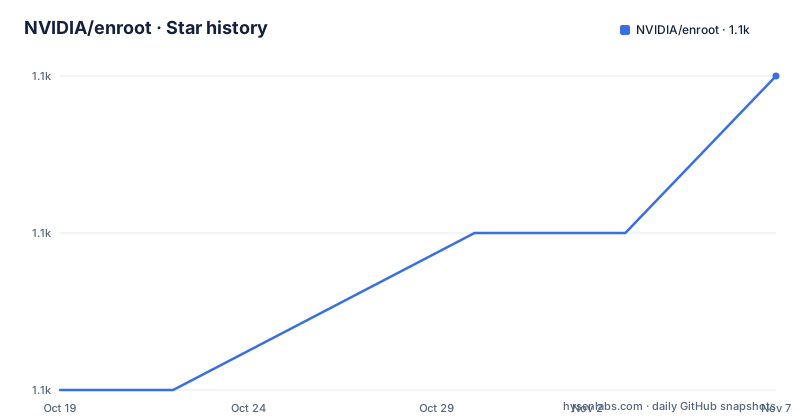
Star history
- NVIDIA/enroot1,119 ★ · +2
| Repository | 2026-10-19 | 2026-11-07 |
|---|---|---|
| NVIDIA/enroot | 1.1k | 1.1k |
2 Stars in the last 19 days, measured from the daily GitHub snapshot. Compare with other projects
Editorial analysis
An enhanced chroot rather than a container
The description is precise: enroot is a simple yet powerful tool to turn traditional container and OS images into unprivileged sandboxes, and it can be thought of as an enhanced unprivileged `chroot(1)`. It uses the same underlying technologies as containers but removes much of the isolation they inherently provide while preserving filesystem separation. That is the whole proposition in one sentence, and it is worth holding on to. The filesystem separation is what you usually want from a container in an HPC setting, where you want the same libraries and the same Python environment as your colleague. The isolation is what you usually do not want, because it costs performance and it makes the job scheduler and the GPU runtime awkward.
When enroot is the right answer
The documentation states the audience directly. This approach is generally preferred in high-performance environments or virtualized environments where portability and reproducibility is important, but extra isolation is not warranted. The point about reproducibility is the one that matters most in practice, because a sandbox built from an image you imported is byte-identical to the one your colleague built, and it can be brought up on a node that has no container runtime installed at all. The key concepts list expands on that: it adheres to the KISS principle and the Unix philosophy, it is standalone with no daemon, and it is fully unprivileged and multi-user capable, with no setuid binary, no cgroup inheritance and per-user configuration and container store. A user on a shared login node can create their own sandbox without root and without affecting anyone else.
Three commands from a Docker Hub image
The usage example is the whole workflow, and it is short enough to memorise:
# Import and start an Ubuntu image from DockerHub
$ enroot import docker://ubuntu
$ enroot create ubuntu.sqsh
$ enroot start ubuntu
The three verbs separate the concerns. The import fetches an image and converts it into enroot's own single file squashfs format, which is what the create step consumes and what the start step mounts. The image format is documented in its own page in the docs directory, along with requirements, installation, configuration, standard hooks and usage, which is the reading order if you want the full picture. The `docker://` prefix on the import argument is what selects Docker Hub, and the same facility is described as importing well known container image formats.
Namespaces instead of a fake root
enroot is similar to other tools such as `proot(1)` or `fakeroot(1)`, but the documentation is specific about the difference: it relies on more recent features from the Linux kernel, namely user and mount namespaces. That is the technical core of the design. Instead of intercepting system calls to fake a root, enroot gets a real user namespace in which it is mapped to root, and a mount namespace in which it can set up the filesystem view it needs, and then it uses a set of helper binaries to perform the switch. The helper list in the Makefile shows the shape of it: `enroot-aufs2ovlfs` and `enroot-mksquashovlfs` for the filesystem layer, `enroot-mount` for the mount handling, `enroot-switchroot` for the root switch itself, and `enroot-nsenter` for entering the namespaces. Because it is built on kernel features, the requirements page in the docs is the first thing to check on a new machine.
Speed comes from not doing isolation work
The performance claims are stated as consequences of the design rather than as benchmark numbers, which is honest. Little to no isolation means no performance overhead, and the documentation says that simplifies HPC deployments. The import path is where a concrete figure appears, with fast Docker image import giving a 3x to 5x speedup on large images. For anyone who has watched a multi-gigabyte image pull and convert, that is the part that changes the workflow, since an enroot import produces a single file you can copy to a node rather than a set of layers. The other performance-relevant point is the GPU path: built-in GPU support through libnvidia-container, with a hook for NVIDIA and another for Mellanox in the hook list, and extra hooks for Slurm, PyTorch and multi-GPU configuration.
Hooks and mounts are the extension points
The configuration surface is more conventional than the sandboxing. The Makefile shows the hook set the package installs, and the names describe what each one does: `10-aptfix.sh`, `10-cgroups.sh`, `10-devices.sh`, `10-home.sh`, `10-localtime.sh`, `10-shadow.sh`, `98-nvidia.sh` and `99-mellanox.sh`. The numbering is a priority convention, which lets a system administrator add their own hook and know where it lands. There are also mount definitions, `10-system.fstab` and `20-config.fstab`, with an extra one for LXCFS, and a bash completion file and an AppArmor profile among the extra configuration. The documentation describes standard hooks in their own page, and the key concepts list calls the whole thing entirely composable and extensible, with system-wide and user-specific configurations.
The build is shell scripts with a set of small utilities
The primary language of the repository is shell, and the source list in the Makefile shows the shape of it: `src/common.sh`, `src/bundle.sh`, `src/docker.sh` and `src/runtime.sh` are the main scripts, and they are shipped as a makeself self-extracting archive, with `deps/dist/makeself/bin/enroot-makeself` in the dependencies. The version is set in the Makefile rather than being read from a file, and the install layout follows the usual autoconf-style variables, with the binaries going to `bindir`, the library directory under `libdir/enroot`, the configuration under `sysconfdir/enroot` and the data under `datadir/enroot`. The project is released under the Apache 2.0 licence, and the security reporting instructions are the vendor standard: do not open an issue or a pull request, send the details to the PSIRT address instead.
Editorial conclusion
Adopt enroot if you run GPU workloads on a cluster where a full container runtime is more isolation than you need and less portability than you can afford, since enroot gives you a Docker image as a plain user space sandbox. Do not adopt it where a security boundary is the point, because the tool states plainly that it provides little to no isolation and removes much of what containers give you. Verify first that your cluster's kernel supports user and mount namespaces, that the GPU setup on your nodes matches the libnvidia-container path the tool expects, and that the configuration you need lives in a system or user config file rather than in a container runtime policy.
Frequently asked questions
What is enroot and how does it differ from a container runtime?
Enroot is a tool that turns container and OS images into unprivileged sandboxes, and it can be thought of as an enhanced unprivileged chroot. It uses the same underlying technologies as containers but removes much of the isolation they provide while preserving filesystem separation.
How do I run a Docker image with enroot?
Run `enroot import docker://ubuntu` to fetch and convert the image, `enroot create ubuntu.sqsh` to build the sandbox from it, and `enroot start ubuntu` to enter it.
Does enroot need root or a setuid binary?
No. The key concepts list describes it as fully unprivileged and multi-user capable, with no setuid binary, no cgroup inheritance, and per-user configuration and container store, and it runs standalone with no daemon.
How does enroot handle GPUs?
GPU support is built in through libnvidia-container, and the packaged hook set includes a hook for NVIDIA and one for Mellanox, with extra hooks for Slurm, PyTorch and multi-GPU configuration.
What licence is enroot released under?
The project is released under the Apache License 2.0, with the licence file in the repository root. The most recent release is v4.2.1 from 2026-06-09, and the last push to the main branch was on the same day.
Official sources
Add this badge to your README
If you maintain this project, the badge below links readers to this analysis and shows its maintenance status from the daily GitHub snapshot. Paste the markdown into your README; add ?metric=license or ?metric=stars to the image URL for a different field.

[](https://hysenlabs.com/projects/nvidia-enroot)Star history chart for your README
[](https://hysenlabs.com/projects/nvidia-enroot)Was this useful?