cuVSLAM visual tracking and sensor modes
CUDA-accelerated visual odometry and SLAM library for fast, accurate, low-latency camera tracking
At a glance
- What is it?
- cuVSLAM is NVIDIA's CUDA-accelerated C++ and Python library for visual odometry, visual-inertial tracking, and SLAM. Its strongest documented fit is a calibrated camera rig whose sensors match a supported tracking mode, while Multisensor remains experimental.
- Who is it for?
- cuVSLAM fits developers building NVIDIA-oriented visual odometry, stereo, visual-inertial, or SLAM applications with accurate calibration and synchronized inputs. It is a poor choice for an uncalibrated rig, a non-pinhole Multisensor camera, or a deployment that requires predictable experimental-mode behavior.
- Can I use it commercially?
- Check first. The repository uses a licence we do not classify automatically, so read its LICENSE file before any commercial use.
- Is it still maintained?
- Yes. The repository received new commits within the last day.
- What is it written in?
- Mainly C++, according to GitHub's language statistics.
Answers come from the project's GitHub data, last synced on October 23, 2026, and from our analysis. They are not legal advice.
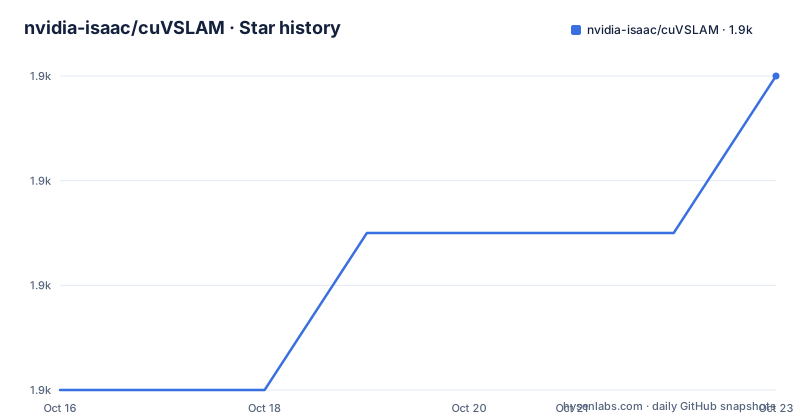
Star history
- nvidia-isaac/cuVSLAM1,874 ★ · +6
| Repository | 2026-10-16 | 2026-10-23 |
|---|---|---|
| nvidia-isaac/cuVSLAM | 1.9k | 1.9k |
6 Stars in the last 7 days, measured from the daily GitHub snapshot. Compare with other projects
Editorial analysis
cuVSLAM's target problems and tracking boundaries
cuVSLAM addresses camera tracking and map localization for robotics and computer-vision systems. It offers visual odometry, visual-inertial odometry, and simultaneous localization and mapping through C++ and Python interfaces. The primary audience is an engineering team that already understands camera calibration, sensor timing, and camera rig geometry. The library expects two inputs before its internal defaults can do much of the work: accurate intrinsic and extrinsic calibration, plus a sensor configuration that matches a tracking mode.
This is not a general-purpose package that accepts an arbitrary video file and always returns a useful trajectory. Sensor selection determines both the required hardware and what the resulting scale means. A single monocular camera is the least demanding setup, but its trajectory is scale-ambiguous. Stereo or another overlapping camera pair supplies geometric scale information. Depth, inertial measurements, and mixed sensor arrangements add other constraints or signals, but they also increase the importance of calibration and synchronization.
The project positions itself for real-time, low-latency processing and uses CUDA acceleration internally. The README says its algorithms use engineered defaults or adapt to the environment and motion profile, with parameter tuning described as unnecessary or unexpected. That claim does not remove engineering work outside the estimator. Calibration quality, image exposure, camera synchronization, timestamps, frame rate, and available GPU capacity still affect whether tracking behaves as intended.
Choosing among cuVSLAM sensor modes
The central design choice is `Odometry::Config::odometry_mode` in C++ or `cuvslam.Odometry.OdometryMode` in Python. The mode is more than a performance option. It defines the minimum sensor set, whether extra sensors can be fused, and how scale is handled.
`Mono` requires one camera and supports the simplest visual-tracking setup, although scale remains ambiguous. `RGBD` requires aligned RGB and depth from one RGB-D camera and has mode-specific `RGBDSettings`. `Multicamera` requires at least two cameras with an overlapping stereo pair and accepts as many as 32 cameras. The README calls it the most accurate purely visual mode, but that statement should be read within the project's own documentation rather than as a guarantee for every scene or rig.
`Inertial` requires a stereo pair and an IMU. Its inertial fusion is always enabled, making this mode a direct fit for stereo visual-inertial odometry. `Multisensor` accepts an RGB-D camera or an overlapping camera pair, with additional RGB or RGB-D cameras and either zero or one IMU. It is the most flexible documented arrangement, but it has the strictest build requirement. Only this mode requires a cuNLS-enabled build, while the other modes work with the default build.
That distinction affects evaluation. A team can start with the default build and still have `Mono`, `RGBD`, `Multicamera`, or `Inertial` available. Access to `Multisensor` is not automatic. Its additional sensor combinations should therefore be checked against the exact build being planned rather than inferred from the general feature list.
cuVSLAM multisensor trade-offs and cuNLS boundary
Multisensor mode is the part of cuVSLAM that needs the most cautious adoption decision. The README labels it experimental and explicitly warns that tracking may be inaccurate or fail for some sensor configurations and scenes. It also states that the current implementation supports pinhole cameras only. Those are concrete limits, not abstract warnings.
The mode supports several useful arrangements: one RGB-D camera, an overlapping camera pair, additional RGB or RGB-D cameras, and an optional IMU. When `Rig::imus` is non-empty, IMU fusion is automatically enabled. This makes the mode relevant to mixed rigs, but its experimental designation means that acceptable hardware combinations are not established by the feature table alone.
The cuNLS requirement is another operational boundary. `Multisensor` is unavailable in the default build, unlike the four other listed modes. A build or packaging decision that follows the README's general quick-start language without checking the mode table could therefore lead to an avoidable mismatch between the intended sensor rig and the available feature.
For evaluation, the README identifies a multisensor walkthrough under `examples/multisensor/`. It is specifically described as a runnable walkthrough for a multi-RGB-D and IMU rig. The broader C++ and Python API references are linked for field-level configuration, but the README excerpt does not provide the full field list, so this review does not invent one.
PyCuVSLAM installation and first-use limits
The README identifies PyCuVSLAM from a pre-built wheel as the quickest installation route, and it links to `examples/` as the place to begin using the library. However, the README text available here ends before the installation commands and does not show a complete first-use program. It would be misleading to invent a pip command, environment variable, dataset path, or Python invocation.
A new user should therefore first retrieve the installation section and example instructions from the project's README or release documentation. The repository also contains `python/`, `examples/requirements.txt`, `examples/euroc/`, `examples/kitti/`, `examples/tum/`, `examples/realsense/`, `examples/oak-d/`, `examples/orbbec/`, and `examples/zed/`. These paths show that support examples span research datasets and named camera families, but the README does not document which wheel version, Python version, operating system, or CUDA version pairs with a specific release.
A first use cannot be reduced to a generic "call the tracker" instruction without verified details. The documented starting contract is to assemble a rig configuration with accurate camera intrinsics and extrinsics, choose the matching odometry mode, and supply synchronized sensor inputs with correct relative timestamps. For a Python project, consult the Python API reference for the exact constructor and configuration fields. For a C++ project, consult the C++ API reference. For ROS2 work, the README directs users to the separate Isaac ROS cuVSLAM repository, documentation, and user manual rather than presenting ROS2 setup as part of this library's quick start.
Calibration, synchronization, and runtime input quality
cuVSLAM's out-of-the-box defaults do not remove physical-integration requirements. The README identifies intrinsic and extrinsic calibration as a cause of tracking problems and directs readers to `examples/euroc/README.md#distortion-models` for image undistortion guidance. It also links to a calibration guide from Isaac ROS for custom sensor placement.
Multi-camera synchronization is treated as equally concrete. Images from multiple cameras should be captured simultaneously, ideally through hardware synchronization, and their relative timestamps must be correct. The repository includes `examples/realsense/multicamera_hardware_assembly.md`, which the README names as the assembly reference for synchronized RealSense cameras. That matters because a configuration with suitable extrinsics can still fail when messages describe observations made at different times.
Frame rate and resolution should match the motion and available compute budget. The README says 30 FPS is typically suitable for human-speed motion and recommends VGA resolution or higher. It also warns that GPU overload can cause dropped frames or leave too little computation for cuVSLAM. In that situation, the README recommends disabling intensive visualization or image-saving operations. Those operations may be irrelevant to core tracker throughput while still disrupting the same system under load.
Image quality is another boundary. Suitable lenses, exposure, and white balance help prevent clipped regions, and significant distortion needs attention. These controls occur upstream of the estimator. cuVSLAM's internal adaptations cannot be assumed to compensate for bad timing, incorrect transforms, saturated images, or absent GPU capacity.
cuVSLAM alternatives and integration choices
The README itself identifies ROS2 as an alternative integration route, but this is not a competing SLAM implementation in the same sense as another standalone library. Isaac ROS cuVSLAM packages cuVSLAM for a ROS2 environment, with its own repository, documentation, and user manual. A team already standardized on ROS2 may therefore adopt that interface rather than wire the core Python or C++ API into its own graph.
The practical difference is integration overhead. Direct cuVSLAM use exposes the library's C++ or Python API and asks the application to assemble calibration, rig configuration, timestamps, and input delivery. The Isaac ROS route adds the conventions of a ROS2 package and its documentation. The README does not provide enough information to claim a performance difference between those integration choices, so none is assumed.
Another valid alternative for a simple application is selecting a less demanding cuVSLAM mode rather than using `Multisensor`. A monocular application can use `Mono` and accept scale ambiguity. A depth-aligned RGB-D application can use `RGBD`. A stereo rig that needs IMU fusion can use `Inertial`. This is often more defensible than choosing the broadest mode: it avoids the cuNLS-enabled build requirement and the documented experimental status of `Multisensor` when those features are not needed.
cuVSLAM release, licence, and maintenance considerations
The repository is not archived, and its last push was on 2026-10-16. Recent releases include `v17.0.1` on 2026-10-13, `v17.0.0` on 2026-07-23, and `v16.0.0` on 2026-06-02. The release cadence indicates that version selection matters. Version-matched offline documentation is available as `cuvslam-docs-<version>.tar.gz` on the latest release, where it can be extracted and opened through `python/index.html` or `cpp/index.html`.
That packaging detail reduces some documentation drift, but it does not remove upgrade work. API and behavior changes should be checked through `CHANGELOG.md`, release notes, and the API documentation matching the selected version. An upgrade may also affect the chosen tracking mode, especially when a deployment uses experimental `Multisensor` behavior.
The repository's licence is listed as a custom licence that GitHub cannot classify. The `LICENSE` file is the controlling project document, so users must examine it directly for permitted use, redistribution, and integration terms. This review does not infer standard Apache, MIT, BSD, or NVIDIA SDK terms from the fact that the project is maintained by NVIDIA. The repository also includes `DCO`, `CONTRIBUTING.md`, and `SECURITY.md`, but the README does not reproduce their terms.
Based on the available status facts, cuVSLAM is receiving repository activity, with the latest release on 2026-10-13 and the last push three days later. That observation applies specifically to the dates above; it is not evidence that every sensor mode will remain stable.
Editorial conclusion
cuVSLAM fits developers building NVIDIA-oriented visual odometry, stereo, visual-inertial, or SLAM applications with accurate calibration and synchronized inputs. It is a poor choice for an uncalibrated rig, a non-pinhole Multisensor camera, or a deployment that requires predictable experimental-mode behavior. Verify the hardware load, calibration, timestamps, frame rate, and selected sensor mode before adoption. For Multisensor projects, the current pinhole-camera restriction and documented possibility of inaccurate or failed tracking are the first project-specific boundaries to check.
Frequently asked questions
Which cuVSLAM mode should I use for a calibrated camera rig?
Choose the mode whose required sensors match the rig: `Mono` for one camera, `RGBD` for aligned RGB and depth, `Multicamera` for at least two cameras with an overlapping pair, or `Inertial` for a stereo pair plus an IMU. `Multisensor` covers mixed arrangements but requires a cuNLS-enabled build.
Is cuVSLAM Multisensor mode production-ready?
The README explicitly labels Multisensor tracking as experimental and warns that it may be inaccurate or fail for some sensor configurations and scenes. Its current implementation also supports pinhole cameras only.
What must I provide before using cuVSLAM?
The README says to provide accurate camera intrinsics and extrinsics and a sensor configuration matching the chosen tracking mode. It also identifies synchronization, timestamps, frame rate, resolution, image quality, and hardware load as factors that can affect tracking.
Does cuVSLAM require tuning to track a scene?
The README says internal algorithms use engineered defaults or adapt automatically to the environment and motion profile, and that parameter tuning is not required or expected. Calibration and input quality still need to be handled by the integrator.
How does cuVSLAM integrate with ROS2?
The README points ROS2 users to the separate Isaac ROS cuVSLAM repository, Isaac ROS cuVSLAM documentation, and Isaac ROS cuVSLAM User Manual. It does not provide ROS2 setup commands in the README excerpt.
Official sources
Add this badge to your README
If you maintain this project, the badge below links readers to this analysis and shows its maintenance status from the daily GitHub snapshot. Paste the markdown into your README; add ?metric=license or ?metric=stars to the image URL for a different field.

[](https://hysenlabs.com/projects/nvidia-isaac-cuvslam)Star history chart for your README
[](https://hysenlabs.com/projects/nvidia-isaac-cuvslam)Was this useful?