NVIDIA NeMo Agent Toolkit: Instrumentation and Optimization Layer for Existing Agent Frameworks
The NVIDIA NeMo Agent toolkit is an open-source library for efficiently connecting and optimizing teams of AI agents.
At a glance
- What is it?
- NeMo Agent Toolkit is an Apache-2.0 Python library that wraps agentic frameworks such as LangChain, CrewAI and Google ADK with profiling, evaluation and optimization tooling instead of replacing them. The interesting question is not what it does but whether your workflow shape fits its configuration-driven model.
- Who is it for?
- Adopt it if you already have an agent built on LangChain, LlamaIndex, CrewAI, Semantic Kernel or Google ADK and you need profiling down to the token level plus an offline evaluation loop, because that instrumentation is the part you would otherwise write yourself. Do not adopt it if you need a framework to author agent logic from scratch, or if a YAML-defined workflow graph does not match how your system is assembled.
- Can I use it commercially?
- Yes. Apache-2.0 is a permissive licence: you can use, modify and sell software built on it, as long as you keep its copyright and licence notices.
- Is it still maintained?
- Yes. The repository last received commits 1 day ago.
- What is it written in?
- Mainly Python, according to GitHub's language statistics.
Answers come from the project's GitHub data, last synced on November 15, 2026, and from our analysis. They are not legal advice.
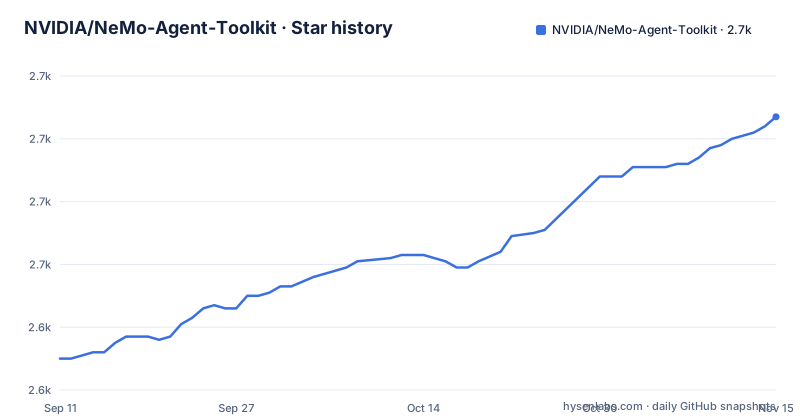
Star history
- NVIDIA/NeMo-Agent-Toolkit2,707 ★ · +77
| Repository | 2026-09-11 | 2026-11-15 |
|---|---|---|
| NVIDIA/NeMo-Agent-Toolkit | 2.6k | 2.7k |
77 Stars in the last 65 days, measured from the daily GitHub snapshot. Compare with other projects
Editorial analysis
The Gap NeMo Agent Toolkit Fills Is Measurement, Not Agent Construction
Most agent frameworks answer the question of how to build an agent. They give you chains, tools, memory and a way to wire them together. What they generally do not give you is a consistent way to see what the assembled system actually did at runtime. The NeMo Agent Toolkit README positions the project on that second question. Its own framing is that it works "side-by-side with agentic frameworks to add the instrumentation necessary for observing, profiling, and optimizing your agents." The target reader is therefore an engineer who already has a working agent and now needs to know where the latency and the tokens went. The listed integration targets are LangChain, LlamaIndex, CrewAI, Microsoft Semantic Kernel and Google ADK, plus what the README calls custom enterprise agentic frameworks and simple Python agents. That list matters more than any feature bullet: the toolkit is claiming it can attach to code you already wrote rather than asking you to rewrite it. If you are starting from nothing and want an opinionated agent framework, this is not that, and the README does not pretend otherwise.
Workflows Are Declared in YAML and Executed by a Registered Component Graph
The mechanism visible in the README is a component model. The toolkit describes reusability as building components once and using them multiple times, and customization as starting from a pre-built agent, tool or workflow and modifying it. Combined with the plugin documentation referenced under the third-party plugin API, the picture is a registry: agents, tools and workflows are registered components, and a workflow is assembled from them. The registration surface is what the public plugin API exposes, and the README points to a page titled third-party-plugins.md for building provider-managed integrations against it. Three externally maintained plugins are named in the README: NeMo-Agent-Toolkit-Tavily, NeMo-Agent-Toolkit-Redis and NeMo-Agent-Toolkit-ATR. The README is explicit that these live outside the repository and "may release, change, or run CI on schedules independent of NeMo Agent Toolkit." That is a real operational fact, not a footnote. A plugin you depend on can move without the core moving, and the core's release notes will not tell you when it does. On top of the component graph sit the optimization features: a profiler that the README says works "from the agent level all the way down to individual tokens," an offline evaluation system, and a hyper-parameter and prompt optimizer that searches configuration and prompt variants. The optimizer is the piece that most clearly depends on the declarative workflow: it can only search a configuration space that the framework can enumerate, which is a consequence of the YAML-first design and a boundary on what it can tune.
Installation and the Commands the Documentation Actually Names
The package is published on PyPI as nvidia-nat, which is the name the README's badge links to. Beyond that distribution name, the README does not spell out a pip command, so treat any install line you write as something to confirm against the docs site rather than something quoted from this repository. What the README does name concretely is a set of files and paths you will end up reading: the migration guide at docs/source/resources/migration-guide.md, the profiler page at docs/source/improve-workflows/profiler.md, the evaluation page at docs/source/improve-workflows/evaluate.md, the optimizer page at docs/source/improve-workflows/optimizer.md, the observability page at docs/source/run-workflows/observe/observe.md, the UI page at docs/source/run-workflows/launching-ui.md, and the FastMCP publishing page at docs/source/run-workflows/fastmcp-server.md. The one migration fact stated directly in the README is that version 1.5.0 "simplifies package installation and dependency management," with a pointer to that migration guide. If you are pinning a version, that is the boundary to read around. The README also mentions an AGENTS.md file at the repository root containing coding-agent skills, which is a sign the project expects contributors to use coding agents against its own codebase.
Publishing a Workflow as an MCP Server Is the Deployment Story
The README lists FastMCP workflow publishing as a feature: NeMo Agent Toolkit workflows can be published as MCP servers using the FastMCP server runtime. That is a narrower and more concrete deployment path than a general serving story, and it is worth being precise about what it implies. The workflow you declared in configuration becomes an MCP endpoint rather than a bespoke HTTP service. For teams already standardizing on MCP as the integration surface between agents and tools, that removes a layer of glue. For teams whose deployment target is a container behind an existing API gateway, the README does not describe that path, and you should not assume it exists in the form you want. The same section of the README also describes a built-in UI chat interface for interacting with agents, visualizing output and debugging workflows, launched from a documented page. Both of these are developer-facing surfaces. Neither is described in the README as a production serving layer with the operational properties (scaling, health checks, rollout) that phrase usually implies, so do not read more into them than the text supports.
Where the Toolkit Stops Being the Right Tool
The clearest limitation is structural rather than incidental. A toolkit that optimizes configuration and prompts can only optimize what is expressible in that configuration. If your agent's behavior lives in imperative Python that the component registry does not wrap, the profiler may still observe it, but the optimizer has nothing to search. That is a design consequence, not a bug, and it means the value of the optimization half of the toolkit scales with how much of your system you are willing to declare rather than code. The second limitation is version coupling. The README documents a migration notice at 1.5.0 that changed installation and dependency management, and the release cadence visible in the repository is roughly monthly (1.6.0, 1.7.0, 1.8.0 across three consecutive months). A monthly minor cadence on a library that instruments other frameworks means integration drift is a standing cost, especially for the framework adapters, which track upstream projects that release on their own schedules. The third is the third-party plugin boundary already noted: plugins maintained outside the repository can change independently, and the README says so explicitly. If your integration depends on one of them, your upgrade planning has two independent clocks to reconcile, not one.
LangSmith and the Difference Between Tracing and Optimization
The README documents a native LangSmith integration for observing end-to-end agent execution, running evaluation experiments, comparing outcomes and managing prompt versions. That gives a useful comparison point, because LangSmith is the obvious thing an engineer already using LangChain would reach for. The two overlap on tracing and on evaluation experiments. They diverge on the optimization loop. LangSmith's described role in the README is observation, experiment comparison and prompt version management: a human looks at results and decides what to change. NeMo Agent Toolkit adds an optimizer that the README says automatically identifies the best configuration and prompts, which is a search procedure rather than a dashboard. The other divergence is scope. LangSmith is a hosted product tied to the LangChain ecosystem; NeMo Agent Toolkit is an Apache-2.0 library that the README says works across LangChain, LlamaIndex, CrewAI, Semantic Kernel and Google ADK. If you are all-in on LangChain and want a managed trace store, LangSmith covers that. If you have agents in two or three different frameworks and want one profiler and one optimizer across them, that is the gap NeMo Agent Toolkit is aimed at, and it is a genuinely different product shape rather than a competing implementation of the same one.
Licence, Release Cadence and What an Upgrade Actually Costs
The repository is Apache-2.0, and the README carries the standard Apache header with SPDX identifiers on the source files. That is a permissive licence, and it is the same licence the third-party plugins would need to be compatible with, though the README does not state their licences and you should check each one before depending on it. Nothing here is legal advice; if you are redistributing or embedding the toolkit, read the licence text and the NOTICE handling yourself. On upgrade cost, there are a few concrete observations. Releases are roughly monthly, so a pinned minor version will be behind within weeks. Version 1.5.0 changed installation and dependency management, which is the kind of change that touches lockfiles and CI rather than application code, and it has a dedicated migration guide. The framework adapters track upstream frameworks that release on their own schedules, so an adapter upgrade and a framework upgrade are separate events you will occasionally have to sequence. The third-party plugins add a third clock. None of this is unusual for a library in this space, but it does mean the honest cost of adoption includes a recurring integration check, not just an initial install.
Editorial conclusion
Adopt it if you already have an agent built on LangChain, LlamaIndex, CrewAI, Semantic Kernel or Google ADK and you need profiling down to the token level plus an offline evaluation loop, because that instrumentation is the part you would otherwise write yourself. Do not adopt it if you need a framework to author agent logic from scratch, or if a YAML-defined workflow graph does not match how your system is assembled. Verify first that the framework integration page lists your framework at the version you run, and read the v1.5.0 migration guide before pinning a version, since the package layout changed there.
Frequently asked questions
What is the NeMo agent toolkit?
It is NVIDIA's instrumentation layer for existing agent frameworks, published to PyPI as the Python distribution nvidia-nat and requiring Python 3.11 through 3.13 with one dependency, nvidia-nat-core at the matching version. It works beside LangChain, LlamaIndex, CrewAI, Microsoft Semantic Kernel, and Google ADK, and adds profiling from workflow level down to individual tokens, production tracing, an offline evaluation suite, a hyper parameter and prompt optimizer, reinforcement learning fine tuning, and a built in chat UI. It is a library rather than a model: the fine tuning entry tunes an LLM the team supplies.
nemo agent toolkit vs langchain
The toolkit wraps rather than replaces it, since the feature block says to work side by side with frameworks such as LangChain to add the instrumentation needed for observing, profiling, and optimizing agents, and its own performance primitives are documented on LangChain's site in the LangChain integrations page for NVIDIA. The repository carries no benchmark table or comparison, so the trade off is architectural and stated rather than measured.
How do you install the NVIDIA NeMo Agent Toolkit?
The README here never reaches an installation section: the badge row links to the project site, and the file's final heading block ends partway through the Protocol Support bullet. The name to look for on the index is nvidia-nat, taken from the project name in pyproject.toml, and the page rendered for that distribution comes from packages/nvidia_nat_core/src/nat/meta/pypi.md rather than from the root README.
Which Python versions does the nvidia-nat package support?
3.11, 3.12, and 3.13. requires-python is set to >=3.11,<3.14, so 3.14 is ruled out outright instead of left unclassified, and the project classifiers name those same three versions. The build needs setuptools>=64, setuptools-scm>=8, and setuptools_dynamic_dependencies>=1.0.0 before any metadata can be resolved.
Who releases the NeMo Agent Toolkit plugins for Tavily, Redis, and ATR?
Not NVIDIA. Those three integrations live in repositories owned by tavily-ai, redis-developer, and Agent-Threat-Rule, and the feature block states they are managed outside this repository and may release, change, or run CI on schedules independent of it. Pinning a toolkit version therefore does not pin a plugin version.
Is the NVIDIA NeMo Agent Toolkit's Dynamo support finished?
The feature block labels both Dynamo entries experimental: Dynamo Runtime Intelligence under New Features, and NVIDIA Dynamo Integration under Agent Optimization. Both links resolve into examples/dynamo_integration/, and no date is given anywhere for when the label is expected to change.
Official sources
Add this badge to your README
If you maintain this project, the badge below links readers to this analysis and shows its maintenance status from the daily GitHub snapshot. Paste the markdown into your README; add ?metric=license or ?metric=stars to the image URL for a different field.

[](https://hysenlabs.com/projects/nvidia-nemo-agent-toolkit)Star history chart for your README
[](https://hysenlabs.com/projects/nvidia-nemo-agent-toolkit)Was this useful?