Megatron Bridge: Hugging Face checkpoints into Megatron training recipes
Training library for Megatron-based models with bidirectional Hugging Face conversion capability
At a glance
- What is it?
- Megatron Bridge is NVIDIA's training library for Megatron-based LLMs and VLMs, built around bidirectional Hugging Face checkpoint conversion and per model recipes, with each supported model carrying a verification card that states what was actually tested.
- Who is it for?
- Megatron Bridge fits teams that already train with Megatron on NVIDIA hardware and want Hugging Face checkpoints to load without hand written conversion, especially when a model has a verification card showing a tested recipe. It does not fit teams that need a stable, documented install on an arbitrary Python version, or that treat a Hugging Face model as supported on the strength of a news entry alone.
- Can I use it commercially?
- Yes. Apache-2.0 is a permissive licence: you can use, modify and sell software built on it, as long as you keep its copyright and licence notices.
- Is it still maintained?
- Yes. The repository received new commits within the last day.
- What is it written in?
- Mainly Python, according to GitHub's language statistics.
Answers come from the project's GitHub data, last synced on November 7, 2026, and from our analysis. They are not legal advice.
Star history
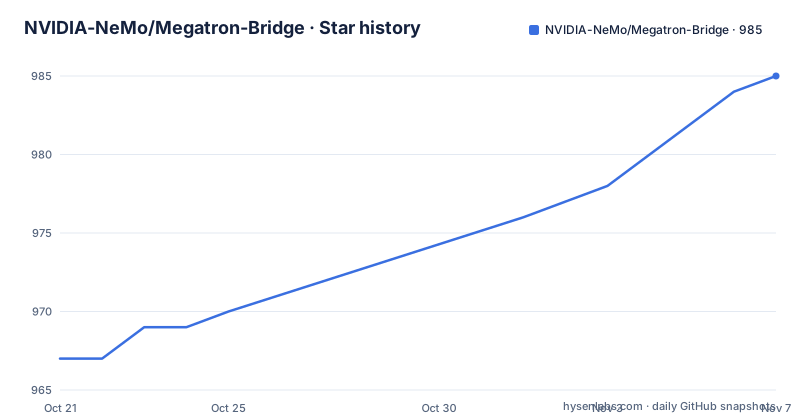
- NVIDIA-NeMo/Megatron-Bridge985 ★ · +18
| Repository | 2026-10-21 | 2026-11-07 |
|---|---|---|
| NVIDIA-NeMo/Megatron-Bridge | 967 | 985 |
18 Stars in the last 17 days, measured from the daily GitHub snapshot. Compare with other projects
Editorial analysis
The gap it fills is between a Hugging Face checkpoint and a Megatron run
Megatron-based training expects a particular parameter layout, particular parallelism assumptions and particular checkpoint files. A model published on the Hugging Face Hub is not in that layout. Closing that distance by hand is the kind of work that is tedious once and quietly blocks everyone after.
Megatron Bridge is the library NVIDIA built around that distance. The project description calls it a training library for Megatron-based models with bidirectional Hugging Face conversion capability, and the package metadata describes it as Training Recipes for Megatron-based LLM and VLM models. Bidirectional is the operative word: checkpoints can go from Hugging Face into Megatron format and back out again.
The audience is research and platform engineers who are already committed to Megatron style training and need a maintained path for a specific model rather than a general purpose trainer. Recent support announcements show the shape of the work: Beam-1.0-501B-A23B, Nemotron 3.5 Super VL, and Muse-Spark-Open-816B-A42B each arrived with conversion, inference and training recipes attached.
Conversion is a first class part of the repository, not an afterthought
The examples/ directory is organised by workflow rather than by model alone, and one of those directories is examples/conversion/. The repository root also carries 3rdparty/ and a .gitmodules file, so some dependencies are pulled in as submodules rather than resolved from a package index.
The design bet is that conversion is the fragile part. Megatron training recipes change as Megatron-LM changes, and the README records that the 0.5.0 release included Megatron Inference and tokenizer unification with Megatron-LM. A conversion path tied to a specific Megatron-LM state has to be updated in step with it, which is why keeping the conversion code inside the same repository as the recipes is a defensible choice rather than a convenience.
What this buys the user is a single library that owns both halves of the round trip. What it costs is that you are accepting a particular Megatron-LM alignment, and there is no independent converter in this project that you can use on its own terms.
Verification cards state what was tested and what was not
Several recent model announcements in the README point at two places: an examples README under examples/models/ and a verification card under examples/model_verification_cards/. The Nemotron entry spells out what the card contains, namely supported workflows, verified configurations and current limitations. The Beam entry refers to a verification card for verified configurations and current limitations in the same way.
This is the most useful thing in the repository for anyone deciding whether to adopt it, and it is also unusual. Most training libraries announce model support and leave the caveats implicit. Here the caveats live in a YAML file next to the recipe, per model, in a directory that can be read before a job is scheduled.
The directory name is singular, model_verification_cards, with subdirectories per model such as examples/model_verification_cards/beam/ and examples/model_verification_cards/nemotron-3.5-super-vl-120b-a12b/. Reading the card for your model before the first run is the cheapest verification step available, and it is a concrete one: the card tells you which configurations were verified and what limitations remain.
Recipes are the unit of reuse, from pretraining to LoRA
The workflow directories under examples/ give a picture of what a recipe is here: conversion, distillation, inference, megatron_mimo, model_verification_cards, models, peft, quantization, rl and training_features. Alongside them are tutorials/, docs/ and scripts/ directories at the repository root.
The announcements show the recipe vocabulary: pretraining, SFT, long-context SFT and LoRA PEFT for a text model; pretraining, SFT and LoRA plus image inference for a vision-language model; and for the 816B-total / 42B-active Muse-Spark-Open model, long-context SFT at 32K and 64K with context parallelism, image-text SFT and LoRA, with HybridEP MoE dispatch.
The 0.6.0 release notes add a piece of plumbing worth noticing: unified training and conversion launchers. That is a change in how you invoke things rather than in what the library can do, and it is the kind of release item that makes a project easier to live with once it lands. The same release mentions improved checkpoint and LoRA workflows and more reliable VLM data and sequence packing, which are exactly the places where a multimodal recipe tends to be fragile.
Installing is constrained by a narrow Python window
The install path is not spelled out in the README excerpt, which points to the documentation site instead. What the repository does state is in pyproject.toml, and it is worth reading carefully. The build system requires setuptools<80.0.0, pybind11, torch and wheel, with a setuptools build backend, a src layout declared by package-dir = {"" = "src"}, and packages found under the megatron.bridge and megatron.bridge.* names. The distribution name is megatron-bridge, and the license field points at the LICENSE file.
requires-python = ">=3.12,<3.13"
name = "megatron-bridge"
The Python constraint is the part that will decide whether your environment works at all. The README badge advertises Python 3.10+, while pyproject.toml states >=3.12,<3.13. The narrower constraint in the packaging metadata is the one your installer will enforce, so a 3.11 interpreter or a 3.13 interpreter is outside the declared range.
The repository also ships a uv.lock file, a .python-version file and a .pre-commit-config.yaml with a ruff.toml and a .flake8 in the tree, which tells you the project expects a pinned environment and enforced linting rather than an improvised setup.
Pre-release tags and branch based model support
The release history shows a project shipping through two channels at once. The recent releases include v0.6.2 dated 2026-09-18, then 26.09-alpha.rc1 dated 2026-09-21 and 26.09-beta.rc1 dated 2026-10-06. Two of the three most recent tags are release candidates rather than stable versions.
The model support announcements add a second wrinkle. K-EXAONE-2 was announced with day-0 support available on the k-exaone-2 branch of the repository, with users pointed at the branch documentation for setup instructions and examples. Support for a model therefore does not necessarily exist on main.
Neither point means the project is unstable in the sense of abandoned work. The repository is not archived, and the last push was on 2026-10-20. But if you pin a version in a production training pipeline, the choice between a numbered release, an rc tag and a model specific branch is a decision you have to make deliberately, and the README news entries point you at branches rather than at a single stable artefact.
The licence is Apache-2.0, the same terms as the source file headers in pyproject.toml. It covers this library's own code; model licences and the terms of the weights you convert are separate questions.
When Megatron Bridge is the wrong layer
If you are not running Megatron style training, this library is the wrong shape. It is a set of recipes and a checkpoint conversion path for a specific training stack, and its value collapses if you are training with a different framework or on hardware without the parallelism features these recipes assume.
The stated alternative is Megatron-LM itself. The README says the 0.5.0 release brought Megatron Inference and tokenizer unification with Megatron-LM, which is an acknowledgement that Megatron-LM is the underlying system and that Bridge sits on top of it. Working with Megatron-LM directly means you own the configuration of parallelism, checkpoint format and tokenizer handling yourself. You also lose the Hugging Face conversion layer and the per model recipes, which is the entire reason the project exists.
Another framing of the same boundary: the README describes Megatron Bridge as the packaging layer for the NeMo 26.06 training stack, and it cites DeepSeek-V3 training numbers from NVIDIA's own MLPerf blog, where the README reports 1,648 TFLOPS/GPU on GB300. Those are the vendor's figures for a specific configuration, not a promise about your run. The check that matters for you is whether the verification card for your model lists a configuration close enough to what you intend to launch.
Editorial conclusion
Megatron Bridge fits teams that already train with Megatron on NVIDIA hardware and want Hugging Face checkpoints to load without hand written conversion, especially when a model has a verification card showing a tested recipe. It does not fit teams that need a stable, documented install on an arbitrary Python version, or that treat a Hugging Face model as supported on the strength of a news entry alone. Before you adopt it, check two things: whether the model you care about has a verification card under examples/model_verification_cards/ naming verified configurations and current limitations, and whether your interpreter satisfies the >=3.12,<3.13 constraint that pyproject.toml states, since the README badge advertises Python 3.10+.
Frequently asked questions
What Python version does Megatron Bridge require?
pyproject.toml states requires-python = ">=3.12,<3.13", while the README badge advertises Python 3.10+. The packaging metadata is the constraint your installer enforces, so a 3.11 or 3.13 interpreter falls outside the declared range.
How does Megatron Bridge handle Hugging Face checkpoints?
The project description calls it a training library for Megatron-based models with bidirectional Hugging Face conversion capability, and a conversion workflow has its own directory at examples/conversion/. The 0.5.0 release notes also mention Megatron Inference and tokenizer unification with Megatron-LM.
How can I tell which model configurations have been verified?
Each model announcement links a verification card under examples/model_verification_cards/, and the README describes those cards as holding supported workflows, verified configurations and current limitations. Example cards exist for beam and for nemotron-3.5-super-vl-120b-a12b.
What is the package called and how is it built?
The distribution name is megatron-bridge. pyproject.toml uses a setuptools build backend with setuptools<80.0.0, pybind11, torch and wheel as build requirements, a src layout, and packages found under the megatron.bridge and megatron.bridge.* names.
Official sources
Add this badge to your README
If you maintain this project, the badge below links readers to this analysis and shows its maintenance status from the daily GitHub snapshot. Paste the markdown into your README; add ?metric=license or ?metric=stars to the image URL for a different field.

[](https://hysenlabs.com/projects/nvidia-nemo-megatron-bridge)Star history chart for your README
[](https://hysenlabs.com/projects/nvidia-nemo-megatron-bridge)Was this useful?