telescope.nvim: A Fuzzy Finder Built as a Lua Framework, Not a Command
Find, Filter, Preview, Pick. All lua, all the time.
At a glance
- What is it?
- telescope.nvim is a fuzzy finder over lists for Neovim, built on plenary.nvim and split into pickers, sorters and previewers. It rewards configuration and punishes anyone who wants a single binary that just works.
- Who is it for?
- Adopt telescope.nvim if you already live in Neovim, are willing to install plenary.nvim plus ripgrep, and want pickers you can reshape per call through opts. Skip it if you want one binary with no Lua dependency, or if you are pinned below Neovim 0.11.7 with LuaJIT, since the README states only stable and nightly are tested.
- Can I use it commercially?
- Yes. MIT is a permissive licence: you can use, modify and sell software built on it, as long as you keep its copyright and licence notices.
- Is it still maintained?
- Yes. The repository last received commits 1 day ago.
- What is it written in?
- Mainly Lua, according to GitHub's language statistics.
Answers come from the project's GitHub data, last synced on November 14, 2026, and from our analysis. They are not legal advice.
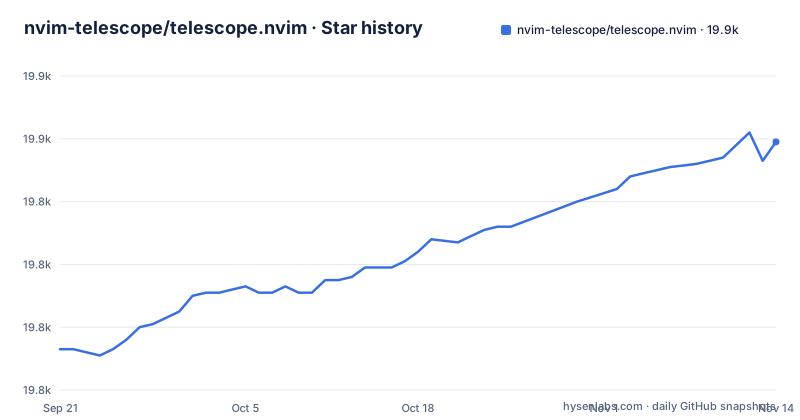
Star history
- nvim-telescope/telescope.nvim19,859 ★ · +66
| Repository | 2026-09-21 | 2026-11-14 |
|---|---|---|
| nvim-telescope/telescope.nvim | 19.8k | 19.9k |
66 Stars in the last 54 days, measured from the daily GitHub snapshot. Compare with other projects
Editorial analysis
The problem telescope.nvim solves, and who it is actually for
Neovim ships with no built-in way to fuzzy search a list and act on the result. You can use :find, you can use grep, you can drop into a shell, but none of those gives you a live-filtered candidate list with a preview pane and a key that opens the selection in a split. telescope.nvim fills that gap. The README describes it as "a highly extendable fuzzy finder over lists", built on features from Neovim core and centered on modularity.
The audience is narrower than the install count suggests. This is a plugin for people who write Lua in their Neovim config and are comfortable reading :help telescope.setup(). The README states that customization happens either globally through setup() or individually per picker by passing opts to a builtin, and it points at a wiki page of configuration recipes for ideas. If your config is a .vimrc you never intend to touch, the setup path is still available (the README shows wrapping the Lua snippet in lua << EOF and EOF inside a .vim file), but you lose most of the reason to pick this over a simpler finder.
The name is a small trap. Telescope has nothing to do with astronomy, and search results for it collide with the telescope hardware and the other software that shares the word. Everything below concerns the Neovim plugin.
How the picker, sorter and previewer split works
Telescope is not one program with flags. It is a set of three cooperating concepts, and the README lists them as separate sections: pickers, sorters and previewers. A picker produces the list of candidates. A sorter orders them as you type. A previewer renders whatever is under the cursor, whether that is file contents, a buffer, or help text.
The pickers themselves are builtin functions exposed through require('telescope.builtin'). The README's own keymap example wires four of them: find_files, live_grep, buffers and help_tags. Because they are plain Lua functions, you can call them from anywhere in your config, bind them to different keys per filetype, or wrap them. That is the architecture's real payoff. A picker call accepts an opts table, so the same find_files can behave differently in two places without a global change.
The data flow is worth being explicit about, because it explains the dependency list. find_files and live_grep do not walk your project in Lua. The README states that ripgrep is required for live_grep and grep_string and is "the first priority for find_files", and that fd is listed as a finder. So the candidate list is produced by an external process, piped back, then filtered and ordered inside Neovim. When something returns nothing, the failure is often that the external binary is missing or not on PATH, not that Telescope is broken. That is why the README tells you to run :checkhealth telescope after installing.
Sorting is the part with a performance story. The README strongly suggests installing a native sorter, telescope-fzf-native.nvim or telescope-fzy-native.nvim, and links to a wiki page for more information and a performance benchmark. The Lua sorters work without either. The native ones are a build step you take on deliberately.
Installing telescope.nvim with lazy.nvim and running a first picker
The README's requirements are specific: Neovim >= v0.11.7 built with LuaJIT (check :version), plus nvim-lua/plenary.nvim. It adds an important note in a callout: only the latest stable release and the latest commit of HEAD (nightly) are tested and supported, and you should confirm a problem persists on the latest release before opening an issue. That is a real constraint on distributions that ship older Neovim builds.
The README recommends pinning to the latest release tag, and gives this lazy.nvim spec as the example. Note the version key and the two dependencies, one of which builds itself with make.
{
    'nvim-telescope/telescope.nvim', version = '*',
    dependencies = {
        'nvim-lua/plenary.nvim',
        -- optional but recommended
        { 'nvim-telescope/telescope-fzf-native.nvim', build = 'make' },
    }
}
After the plugin loads, the README says to run :checkhealth telescope to confirm everything is set up correctly. Then test with the command the README names for exactly this purpose.
:Telescope find_filesIf a filtered list of files in your working directory appears with a preview pane, the install is sound. The next step is binding the builtins you will actually use. The README gives this block verbatim, mapping four pickers under a leader prefix.
local builtin = require('telescope.builtin')
vim.keymap.set('n', '<leader>ff', builtin.find_files, { desc = 'Telescope find files' })
vim.keymap.set('n', '<leader>fg', builtin.live_grep, { desc = 'Telescope live grep' })
vim.keymap.set('n', '<leader>fb', builtin.buffers, { desc = 'Telescope buffers' })
vim.keymap.set('n', '<leader>fh', builtin.help_tags, { desc = 'Telescope help tags' })
Global settings go through setup(), with three top-level keys: defaults, pickers and extensions. The README's skeleton shows the shape, including a mappings table under defaults with an insert-mode example that rebinds which_key from its default of <C-/>.
require('telescope').setup{
  defaults = {
    mappings = {
      i = {
        ["<C-h>"] = "which_key"
      }
    }
  },
  pickers = {},
  extensions = {}
}
The pickers key is where per-picker configuration lives, so a setting placed there applies every time that builtin is called. For the full list of options the README points at :help telescope.setup(), and for picker-specific opts at :help telescope.builtin.
Where telescope.nvim gets in your way
The dependency chain is the first friction point. plenary.nvim is mandatory, not optional, and it is a separate plugin you must keep in sync. ripgrep is effectively mandatory for the two pickers most people install Telescope for, live_grep and grep_string. On a machine where you cannot install extra binaries, or in a container image you do not control, those pickers simply will not work, and the README's guidance to run :checkhealth is the intended way to discover that.
The version floor is aggressive. Neovim >= v0.11.7 with LuaJIT, with only stable and nightly tested, rules out long-term-support distributions and any Neovim built without LuaJIT. The README is direct that issues on other builds are out of scope. If your editor is whatever your package manager shipped two years ago, this is the wrong plugin for you until you upgrade Neovim itself.
The third cost is the one nobody advertises: configuration surface. Telescope exposes global defaults, per-picker defaults, per-call opts, and extension config, plus a mappings table that is itself per-mode. That flexibility is the point, and it is also why a broken Telescope setup is usually a config bug you wrote rather than a bug in the plugin. The README's own framing, that Telescope can be customized globally or individually per picker, is a description of the surface area you are signing up for.
Finally, release tags exist (v0.2.1, v0.2.0, v0.1.9), and pinning to a tag is the recommended install path, so pinning is your escape hatch.
telescope.nvim against fzf and fzf-lua
The honest comparison is not Telescope versus fzf as programs. It is Telescope versus fzf-lua, which is the Lua-native alternative people weigh against it, and versus driving fzf from a shell or a thin Vim wrapper.
The difference in approach is where the list and the filtering live. fzf is an external binary that owns the terminal UI, the matching and the preview command; a Neovim integration is a bridge that hands it a list and reads back a selection. Telescope inverts that. The picker, sorter and previewer are Lua objects running inside Neovim, and the external tools (ripgrep, fd) only supply candidates. The README's extension model follows from that inversion: extensions are configured under the extensions key in setup(), and the README directs you to the extension's own README for its config keys. fzf-lua sits closer to the fzf end, wrapping the same external tools but keeping the integration in Lua.
What you gain from Telescope's inversion is composability. Because builtin.find_files is a function taking opts, you can define a picker variant for a subdirectory, a filetype or a keymap without shelling out or duplicating a command string. What you pay is the LuaJIT requirement and the plenary.nvim dependency, neither of which fzf needs. If you already run fzf everywhere, including outside the editor, adding Telescope means maintaining two fuzzy-finding stacks with different keybindings and different config files. If your Neovim config is Lua and you want one stack, Telescope's model is the more coherent fit.
Maintenance, licence and what an upgrade actually costs
The repository is not archived, and the last push was on 2026-10-26. Releases are tagged and reasonably close together: v0.2.1 on 2025-12-31, v0.2.0 on 2025-11-29, v0.1.9 on 2025-11-06. The README links a changelog file in doc/ for the details, which is where you should look before moving a pin.
The licence is MIT, which places few conditions on use and redistribution. That is a statement about the licence identifier in the repository, not legal advice; read the LICENSE file for the terms that bind you.
Upgrade cost depends on how you pinned. If you followed the README and pinned to a release tag, an upgrade is a deliberate version bump you can test and revert. If you track master, you inherit whatever lands, and the README's support policy (only stable and nightly Neovim are tested) means a break can arrive from either side of the boundary. The repository's Makefile shows the project's own checks: test runs the PlenaryBustedDirectory suite headlessly against scripts/minimal_init.vim, and lint runs luacheck over lua/telescope. Those targets are the maintainers' gate, not a guarantee about your config, but they tell you what a pull request has to pass. Extensions are the other upgrade risk. An extension configured under the extensions key is versioned separately from Telescope, and the README defers entirely to each extension's README for its configuration.
Editorial conclusion
Adopt telescope.nvim if you already live in Neovim, are willing to install plenary.nvim plus ripgrep, and want pickers you can reshape per call through opts. Skip it if you want one binary with no Lua dependency, or if you are pinned below Neovim 0.11.7 with LuaJIT, since the README states only stable and nightly are tested. Before committing, run :checkhealth telescope and confirm that ripgrep resolves on your PATH, because live_grep and grep_string depend on it.
Frequently asked questions
What does telescope.nvim do in Neovim?
It provides a fuzzy finder over lists, described in the README as highly extendable and built on Neovim core features. Its builtin pickers cover files, live grep, buffers and help tags, with a preview pane for the current selection.
How do I open telescope.nvim in Neovim?
Run the command :Telescope find_files, which the README names as the way to check that the plugin is installed correctly. After that, builtin pickers are usually bound to keymaps so you do not type the command each time.
How do I install and set up telescope.nvim?
Install Neovim >= v0.11.7 built with LuaJIT and nvim-lua/plenary.nvim, then add the plugin through your manager; the README recommends pinning to the latest release tag and gives a lazy.nvim spec. After loading, run :checkhealth telescope to confirm the setup.
How do I find files in Neovim with telescope.nvim?
The find_files picker is the builtin for this, and the README's keymap example binds it to <leader>ff. It relies on external tools to produce candidates, with ripgrep listed as the first priority for find_files and fd listed as a finder.
How do I use telescope.nvim?
Call a builtin picker, either through the :Telescope command or through require('telescope.builtin') in Lua. The README's example binds find_files, live_grep, buffers and help_tags to leader-prefixed keys, and per-picker behaviour is changed by passing an opts table.
How do I configure telescope.nvim?
Use require('telescope').setup() with the defaults, pickers and extensions keys, as shown in the README's setup skeleton. Global options go under defaults, per-picker options under pickers, and the full list is documented at :help telescope.setup().
Official sources
Add this badge to your README
If you maintain this project, the badge below links readers to this analysis and shows its maintenance status from the daily GitHub snapshot. Paste the markdown into your README; add ?metric=license or ?metric=stars to the image URL for a different field.

[](https://hysenlabs.com/projects/nvim-telescope-telescope-nvim)Star history chart for your README
[](https://hysenlabs.com/projects/nvim-telescope-telescope-nvim)Was this useful?