diff-so-fancy reformats diff text after git has produced it
Make your diffs human readable for improved code quality and faster defect detection. :tada:
At a glance
- What is it?
- diff-so-fancy is a Perl pager that rewrites unified diff output on its way to your terminal, wired into git with a global config line. It does formatting only, and it reads every option from git config, which is where its gaps start.
- Who is it for?
- Take diff-so-fancy if you read diffs in a terminal and want rulers, a simplified header and no leading + or - on every line, and if you can live with configuring it through git. Leave it if your diffs come from something other than git and you need to tune the ruler, or if your terminal mangles Unicode box drawing.
- Can I use it commercially?
- Yes. MIT is a permissive licence: you can use, modify and sell software built on it, as long as you keep its copyright and licence notices.
- Is it still maintained?
- Yes. The repository last received commits 27 days ago.
- What is it written in?
- Mainly Perl, according to GitHub's language statistics.
Answers come from the project's GitHub data, last synced on November 13, 2026, and from our analysis. They are not legal advice.
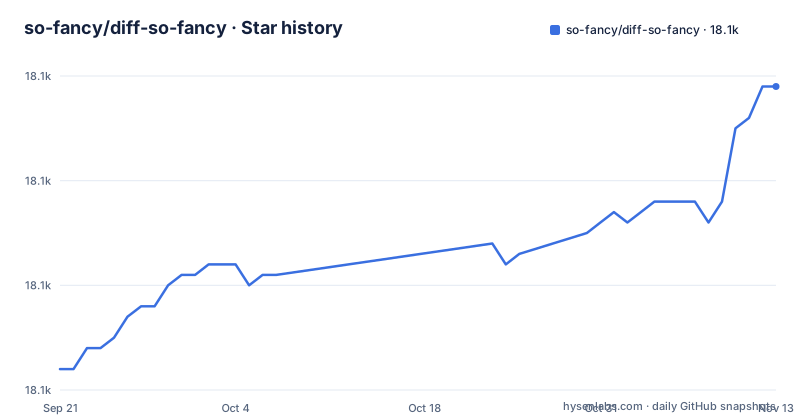
Star history
- so-fancy/diff-so-fancy18,119 ★ · +27
| Repository | 2026-09-21 | 2026-11-13 |
|---|---|---|
| so-fancy/diff-so-fancy | 18.1k | 18.1k |
27 Stars in the last 53 days, measured from the daily GitHub snapshot. Compare with other projects
Editorial analysis
The pager rewrites diff text after git has produced it
diff-so-fancy never computes a diff. It sits at the end of a pipe, reads diff text on standard input and rewrites that text for a person to read. Wiring it into git takes two config lines, and the tail of the first one does not belong to the tool at all:
git config --global core.pager "diff-so-fancy | less --tabs=4 -RF"
git config --global interactive.diffFilter "diff-so-fancy --patch"
--tabs=4 and -RF are less options, so changing them alters paging rather than diff rendering. The --patch on the second line is diff-so-fancy's own flag, passed for interactive diffs. Both lines carry --global, which means the change reaches every repository on the machine, and the README documents no repository-scoped alternative, so a team that wants this in one checkout has to set those keys locally on its own.
diff -u first, because unified output is the input it expects
Outside git the same script works, with one precondition. Produce unified output with -u and pipe it in:
diff -u file_a file_b | diff-so-fancyFor directories, add recursive mode, spelled -r or --recursive:
diff --recursive -u /path/folder_a /path/folder_b | diff-so-fancyThe -u in both lines is the part that matters. Unified output is the format the rewriter is built around, and the README does not say what happens to context-style or ed-style input, so running plain diff without -u gives you no guarantee of a readable result. The larger gap is configuration. Every documented option is a git config key, there is no command-line flag section and no documented environment variable, so a pipeline that emits diffs without git underneath, a build script or a review tool, gets the default rendering and no documented way to change it.
Copy the release script and keep lib/ relative to it
Installing means putting one file on your PATH. The project's own instruction is to copy the diff-so-fancy script from the latest GitHub release into $PATH. To test development features you clone the repository and put the same script there instead, a symlink will do, with one constraint: the lib/ directory must stay relative to the core script. Move the script without lib/ and it has nothing to load.
Five other channels are named, and each one is a separate supply chain: the NPM registry, brew, Fedora, the Arch extra repo, and ppa:aos for Debian and Ubuntu. Packaging complaints are routed to those packages' own repositories and issue trackers, which is where a stale version gets fixed. The cost of the copy-the-script route is that nothing updates it. A brew or Arch install moves when the package moves, while a script copied from a release page keeps the behavior of the day you copied it, and nothing on your PATH tells you which day that was.
Eight options, four booleans that default to on and two that do not
All eight options are git config keys, and the four booleans start enabled, so the first thing most people do is switch one off:
git config --bool --global diff-so-fancy.markEmptyLines false
git config --bool --global diff-so-fancy.changeHunkIndicators false
git config --bool --global diff-so-fancy.stripLeadingSymbols false
git config --bool --global diff-so-fancy.useUnicodeRuler false
markEmptyLines controls the colorized first block of an empty line, changeHunkIndicators replaces git's header chunks with a readable form, and stripLeadingSymbols removes the + or - at the start of each line. Four more take values. rulerWidth sets the width of the ruler lines and defaults to the screen width, so a wide terminal gives you a wide ruler. fileNameRulerShape draws a box around file names in git show output by default and takes ruler for full width lines instead. shortHeaders collapses filename and line number onto a single line, and it defaults to false. semIntegration is the eighth, also off by default, and it pulls a summary from sem into the header of each changed file.
useUnicodeRuler false is the documented way out of box drawing
Two of those keys are really about what your terminal can render. useUnicodeRuler defaults to true and draws the ruler lines with Unicode characters; setting it to false switches to ASCII. markEmptyLines sits in the same family, since it also depends on your terminal drawing the first block of an empty line as intended.
What the project does not offer is any detection. No terminal capability check and no environment variable to force ASCII for a single run are documented, so a machine with a mixed set of terminals is handled by setting the key globally, or by appending your own flag on the pager line yourself. The platform story has the same shape. The distribution list covers Homebrew, Fedora, Arch extra and a Debian and Ubuntu PPA, with no Windows entry and no note about what runs there, and the README does not document a Windows install path, so anyone on that platform is working from the release script and the git config lines alone.
The npm artifact is one fatpacked script while the tree reads 1.4.6
The NPM package is not the repository. package.json declares a single bin named diff-so-fancy pointing at dist/diff-so-fancy, and its files array holds that one path, so npm installs a built script with its dependencies packed inside. The build target in the Makefile shows how that file is produced:
perl third_party/build_fatpack/build.pl --output dist/diff-so-fancyThat is why the two install routes feel different. The git route needs the core script and lib/ together, while the npm route is a single file, at the price of a build step that does not run on your machine. package.json in the tree reads 1.4.14, matching the newest published release, v1.4.14. Tests run through ./test/bats/bin/bats test, a bash suite vendored under test/, and the Makefile carries a docs target that runs pod2man diff-so-fancy docs/diff-so-fancy.1 to generate a man page.
Delta, difftastic and Lazygit are named without a comparison
The README closes with an Alternatives section naming three things: Delta, difftastic, and Lazygit with a diff-so-fancy integration. Nothing follows. There is no feature matrix, no statement about which handles which kind of diff, and no note about performance. The approach difference is visible in the repository layout instead. diff-so-fancy is a standalone script that computes nothing, it takes text another tool generated and reformats it, which is why it belongs on a pager line, and why the Lazygit entry is described as an integration rather than a replacement: a terminal UI can hand its diff text to the same rewriter. Someone choosing between these three is left to run each one against a real diff, and the project points at no measurement to settle it.
Pull requests target next, and the last push was on 2026-09-28
The state of the project is easy to read off the repository. The last push was on 2026-10-18, and the three most recent releases are v1.4.10 on 2026-04-09, v1.4.12 on 2026-08-16 and v1.4.14 on 2026-10-03, so both commits and tags are moving. The default branch is next rather than master, and the contributing notes ask that pull requests target next, which means a fresh clone hands you the development line and not the last tagged release. That matters more here than in most projects, because the clone route is also the install route. The license is MIT, and roles are spelled out in a table: @scottchiefbaker leads, @OJFord does bug triage, @GenieTim handles Travis OSX fixes, @AOS packages for Debian, and @Stevemao and @Paul Irish handle NPM releases. Longer notes sit in docs/ under pro-tips, reporting-bugs, hacking-and-testing and history.
Editorial conclusion
Take diff-so-fancy if you read diffs in a terminal and want rulers, a simplified header and no leading + or - on every line, and if you can live with configuring it through git. Leave it if your diffs come from something other than git and you need to tune the ruler, or if your terminal mangles Unicode box drawing. Check first which version is on your PATH, because the documented install is a copied script and the newest release is v1.4.14.
Frequently asked questions
How to install diff-so-fancy?
The project's instruction is to copy the diff-so-fancy script from the latest GitHub release into your PATH, keeping the lib/ directory relative to the core script. It is also published to the NPM registry, brew, Fedora, the Arch extra repo, and a PPA for Debian and Ubuntu.
How do I use diff-so-fancy?
Set it as git's core.pager and interactive.diffFilter with two git config commands, or pipe unified output into it using diff -u and add --recursive for directories. The documented options are all set through git config keys named after each one, such as diff-so-fancy.rulerWidth and diff-so-fancy.shortHeaders.
Can diff-so-fancy render diffs that did not come from git?
Rendering works, configuration does not. The README shows diff -u output piped into the script, including recursive directory diffs, but every documented option is a git config key and the project has no command-line flag section, so a non-git pipeline gets the default appearance.
Official sources
Add this badge to your README
If you maintain this project, the badge below links readers to this analysis and shows its maintenance status from the daily GitHub snapshot. Paste the markdown into your README; add ?metric=license or ?metric=stars to the image URL for a different field.

[](https://hysenlabs.com/projects/so-fancy-diff-so-fancy)Star history chart for your README
[](https://hysenlabs.com/projects/so-fancy-diff-so-fancy)Was this useful?