SimFoundry: a video becomes a physics scene, in thirteen stages
Modular and Automated Scene Generation for Policy Learning and Evaluation
At a glance
- What is it?
- An NVIDIA Research pipeline that takes a short real-world video, segments it, reconstructs geometry, generates textured meshes and compiles the result into an OmniGibson scene with physical parameters, digital cousins and task proposals. The install asks for 250 GB of disk, two cloud accounts and, on a 24 GiB card, a flag because stage seven wants 29 GiB.
- Who is it for?
- SimFoundry is for robotics research groups who need simulation scenes without annotating them by hand, and its strongest argument is structural rather than promotional: every stage is swappable, so a better segmentation or texturing model improves the pipeline without anyone rewriting it. Three things to check before you plan an afternoon around it.
- Can I use it commercially?
- Yes. Apache-2.0 is a permissive licence: you can use, modify and sell software built on it, as long as you keep its copyright and licence notices.
- Is it still maintained?
- Yes. The repository last received commits 79 days ago.
- What is it written in?
- Mainly Python, according to GitHub's language statistics.
Answers come from the project's GitHub data, last synced on November 13, 2026, and from our analysis. They are not legal advice.
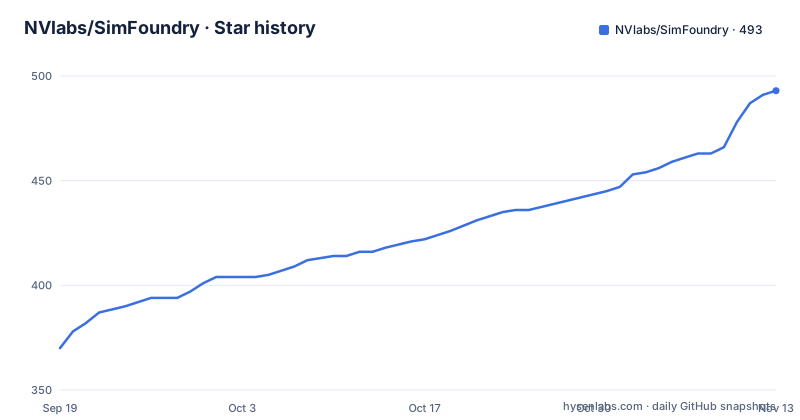
Star history
- NVlabs/SimFoundry493 ★ · +123
| Repository | 2026-09-19 | 2026-11-13 |
|---|---|---|
| NVlabs/SimFoundry | 370 | 493 |
123 Stars in the last 55 days, measured from the daily GitHub snapshot. Compare with other projects
Editorial analysis
A short video becomes a scene in under an hour
The claim is the one line that makes the project worth reading: a short piece of real-world video becomes a physics-ready simulation scene in under an hour, with no manual annotation.
What that involves is spelled out as a sequence. Point the pipeline at a tabletop and it segments every object, reconstructs geometry, generates textured 3D meshes, and compiles the result into an OmniGibson scene carrying physical parameters, digital cousin variations and task proposals.
So the output is not a mesh collection. It is a scene that a physics simulator accepts, annotated with the parameters a simulator needs, plus variants of the objects and suggested manipulation tasks. The gallery makes the granularity explicit: each object in the simulation column was produced automatically from a single 2D crop using a 3D generation model, then compiled into the scene.
The design principle is stated twice, in the introduction and again in the pipeline overview, and it is the part that matters for anyone extending it. The pipeline is fully modular, every stage is an independently swappable component, and the stated consequence is that the pipeline improves as the underlying foundation models improve.
That is a different bet from a research artefact that freezes its own models. It also means the quality ceiling is set by the models it wraps, not by the engineering around them.
Three pipelines, and the first has thirteen stages
The organisation is three pipelines, named by letter, and the letters are the interface you see in every command.
Pipeline A is reconstruction: turning a simulation-ready scene out of a real video across thirteen stages. The named stages are video processing, depth estimation, ground segmentation, object decomposition, mesh generation, pose estimation, physics compilation, and USD and OmniGibson export.
Thirteen stages is the number to keep in mind, because the low-memory flag is applied by naming one of them. It also explains why a run has a shape: the stages are not independent calls, they are a fixed sequence where each consumes the last one's output.
Pipeline B is augmentation: digital cousin variations of the reconstructed objects, spanning geometry, topology and visual appearance, plus proposed manipulation tasks per scene.
Pipeline C is application: loading the scene into OmniGibson for robot policy evaluation, teleoperation data collection and pipeline smoke testing.
The pipeline overview adds the mechanism behind the letters. The system extracts per-object information such as segmentation masks and depth, generates 3D meshes using 2D-to-3D generation models, and compiles the scene by annotating relevant physical parameters and sanity checking the overall configuration in a physics simulator.
So the sanity check happens against a simulator, not against a file format, which is the difference between a scene that loads and a scene that is physically coherent.
A 24 GiB card needs a flag, because stage seven wants 29
The most useful paragraph in the quick start is the one about video memory, and it is a paragraph rather than a table.
The streamed stages budget VRAM as a fraction of the card, 90 percent by default, which means the same command works unchanged on a 24 GiB card or a 96 GiB one. An absolute cap is available as a flag, but only to pin one.
Then the exception: on a 24 GiB card you also have to pass a stage-specific low-memory setting, because the default needs roughly 29 GiB for mesh shape generation at stage seven.
That arithmetic is worth pausing on. The claim of being card-agnostic holds for the pipeline as a whole and fails for one stage, and the fix is not a global memory setting but a named override attached to the mesh generation stage. Anyone budgeting hardware time needs to read that rather than the 90 percent figure.
The reconstruction command itself is otherwise plain:
bash scripts/pipeline/A_reconstruction/run.sh \
  --scene-name my_scene \
  --video-fpath /path/to/video.mov
Articulation decomposition is a flag on the same script rather than a separate pipeline, and it needs the optional articulation environments installed first.
The install is 250 GB and two accounts
The requirements list is where the project tells you what it costs.
Linux with an NVIDIA GPU and CUDA. Mamba or Conda with mamba. ffmpeg. About 250 GB of free disk for a full install. A Hugging Face account. And a Google Cloud project or a Gemini API key.
The account requirements are not incidental, because the pipeline depends on hosted models. Access has to be requested in advance for three gated models on the Hugging Face Hub, and the readme warns that approval can take time. A fourth, a text-to-image model, is optional.
Then the vision-language stages, which run on Google's cloud. The documented path sets up a project with Vertex AI enabled, exports the project name, and authenticates twice, once for Google and once for the hub. The alternative is a Gemini API key from AI Studio, exported instead, for people without a cloud project.
There is also a helper that covers every service at once, which is the sane choice for a first run:
bash scripts/installation/login_services.shCheckpoints are a separate download step, with a flag on the full installer that folds the two together if the hub login is already done. The whole install is one script, and the readme suggests you can hand it to an agent with the agent installation document rather than running it yourself.
Configuration overrides travel through a double dash
The augmentation pipeline shows how configuration reaches the stages, and the mechanism is worth copying.
bash scripts/pipeline/B_augmentation/run.sh \
  --scene-name my_scene \
  -- prompt_cousin_structured.max_objects=2 \
       prompt_cousin_structured.max_generated_images_per_object=1
Everything after the bare double dash is a configuration override rather than a script flag, and the keys are dotted paths into a nested config tree: a cousin generation section, a maximum object count, and a maximum number of generated images per object.
That shape comes from the configuration framework in the dependency list, and it is the reason you do not need a new command-line flag for every knob. Stage internals are addressable without the pipeline author enumerating them, which for a thirteen-stage pipeline is the difference between a usable tool and a tool where each knob needs a code change.
The third pipeline takes the same shape with a mode argument, and there is a unified dispatcher that exposes help for any of the three letters, so you can discover the interface without reading the scripts.
install_requires is empty and requirements.txt has thirty-five entries
The packaging has a gap in it, and it is the kind that costs an afternoon.
The setup script declares the distribution name, filters the packages to the project's own, sets a Python floor of 3.10, ships the configuration data files explicitly, and then declares an empty dependency list.
Meanwhile the requirements file lists around thirty-five packages, including the deep learning stack, geometry libraries, a physics engine, two different cloud SDKs, a training framework, and a coverage tool.
So a plain installation of the package pulls nothing, and the environment has to be built from the requirements file and the install script instead. The empty list is defensible for a research repository that expects a scripted install, and it is also a trap for anyone who tried to consume the package as a library.
The comment in the setup script explains the data handling: the configuration directory holds data rather than code, so it is not a package and its contents are shipped explicitly. That part is deliberate and correct.
The version is 0.1.0, the first release, and there are no GitHub releases to fall back on.
The dependency pins carry their reasons
Reading the requirements file tells you what has already gone wrong for someone.
Two packages carry upper bounds. setuptools is held below 80, and pyglet below 2. One holds a lower bound only, transformers above 4.55.
One carries an explanation in a comment: a mouse-control library is held below 2.0 because 2.0 causes breaking API changes in the teleoperation component.
Two carry environment markers excluding one architecture, an acceleration library and a video decoding library, both skipped on ARM Macs. So the project is not usable on Apple Silicon without work, and the requirements say so instead of leaving it to a failed import.
The dependency list also contains all three major cloud model interfaces at once: Google's AI platform SDK, the newer Google generative interface, and OpenAI's client. That combination tells you the pipeline supports several model backends rather than committing to one.
Below those sit the pieces a simulation pipeline actually needs: a physics engine, a 3D geometry and point cloud library, mesh processing, image processing, a convex optimisation solver, embeddings, a gradient configuration framework, and a reproducible bayesian optimisation library. The last two are an odd inclusion for scene generation, which suggests the pipeline does parameter fitting somewhere a grid search was not enough.
Vendored dependencies are patched, and provenance is recorded
The top level tells you how the project handles code it does not own.
There is a patches directory and a file dedicated to patch provenance. That pairing means third-party code is vendored, patched in place, and each modification is recorded. Two more files handle licensing of that borrowed code, one listing licences and one listing notices, with a matching directory at the top level.
That is a more careful arrangement than a requirements file alone, and it comes with a cost: you cannot upgrade a patched dependency without reconciling the patch.
There are four requirements files, which map onto the install options: the base set, a development set, one for the texturing or generation model used in the gallery, and one for teleoperation data collection. Each optional capability has its own dependency island rather than being added to the core.
The byline is long and marked. The author list carries eighteen names, with asterisks on two for equal contribution and daggers on the last two as corresponding authors.
The news timeline is honest about what is not there: the initial release in mid-August covering rigid-body and articulation generation, example scenes a fortnight later, and two entries still marked as coming soon, automated background generation and robotics data generation with training and evaluation.
The last push is dated 27 August 2026, and there is no release history to consult beyond that.
Editorial conclusion
SimFoundry is for robotics research groups who need simulation scenes without annotating them by hand, and its strongest argument is structural rather than promotional: every stage is swappable, so a better segmentation or texturing model improves the pipeline without anyone rewriting it. Three things to check before you plan an afternoon around it. A full install is 250 GB of disk and depends on four gated models and a cloud project. Two dependency lists are involved and the package metadata installs neither. And the VRAM arithmetic is tight on smaller cards, so the low-memory flag for mesh generation is something to plan for rather than discover.
Frequently asked questions
What does NVlabs SimFoundry do with a video?
It segments every object, reconstructs geometry, generates textured 3D meshes, and compiles an OmniGibson scene with physical parameters, digital cousin variations and task proposals, in under an hour and without manual annotation.
What are the three SimFoundry pipelines?
A is reconstruction from a real video across thirteen stages, from video processing to physics compilation and export. B is augmentation, producing digital cousin variations and proposing manipulation tasks. C is application, loading the scene into OmniGibson for policy evaluation, teleoperation data collection and smoke testing.
Can SimFoundry run on a 24 GiB GPU?
Yes, with one caveat. The streamed stages budget VRAM as a fraction of the card, 90 percent by default, so the same command works on 24 or 96 GiB. But mesh shape generation at stage seven needs about 29 GiB by default, so on a 24 GiB card you must also pass the stage-specific low-memory setting.
What does installing SimFoundry require?
Linux with an NVIDIA GPU and CUDA, mamba, ffmpeg, about 250 GB of disk, a Hugging Face account with approved access to three gated models, and either a Google Cloud project with Vertex AI enabled or a Gemini API key.
Official sources
Add this badge to your README
If you maintain this project, the badge below links readers to this analysis and shows its maintenance status from the daily GitHub snapshot. Paste the markdown into your README; add ?metric=license or ?metric=stars to the image URL for a different field.

[](https://hysenlabs.com/projects/nvlabs-simfoundry)Star history chart for your README
[](https://hysenlabs.com/projects/nvlabs-simfoundry)Was this useful?