EverRoom: the agent runtime ships as a stub named fake, and the default connector is a hosted service
EverRoom - A workspace that remembers your projects, decisions, and sources.
At a glance
- What is it?
- A desktop workspace that aims to keep documents, conversations and model output connected, built as a room-based context layer where an agent only sees what one room contains. The product model is the most careful part of the file. The configuration is where the surprises are, starting with a runtime that defaults to doing nothing and a connector layer that defaults to talking to someone else's server.
- Who is it for?
- EverRoom is worth reading if the problem you have is that context gets scattered across files, chats and past decisions, because the room model and the evidence ledger are a more disciplined answer to that than another chat window. Three things to know before you try it.
- Can I use it commercially?
- Check first. The repository uses a licence we do not classify automatically, so read its LICENSE file before any commercial use.
- Is it still maintained?
- Yes. The repository last received commits 6 days ago.
- What is it written in?
- Mainly TypeScript, according to GitHub's language statistics.
Answers come from the project's GitHub data, last synced on November 15, 2026, and from our analysis. They are not legal advice.
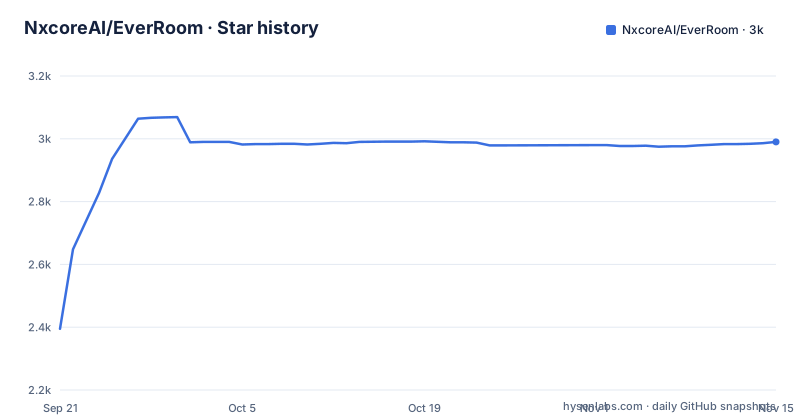
Star history
- NxcoreAI/EverRoom2,990 ★ · +595
| Repository | 2026-09-21 | 2026-11-15 |
|---|---|---|
| NxcoreAI/EverRoom | 2.4k | 3k |
595 Stars in the last 55 days, measured from the daily GitHub snapshot. Compare with other projects
Editorial analysis
The agent runtime defaults to a stub that does nothing
The environment template sets a variable choosing which agent runtime to use, and its value is the word fake. A comment above it says to switch to the real one after configuring the AI values. That single line is the most consequential line in the file for anyone evaluating the product, because it means a fresh checkout starts with an agent runtime that is not talking to a model. Everything the readme describes about scoped tools, reviewable edits and cancellable runs is behind a setting that is off by default. Two further defaults describe how many agents can run at once: sub-agents are enabled, each with a timeout of three hundred thousand milliseconds, and no more than four concurrently. Five minutes per sub-agent is a long leash for something the product model calls a scoped worker.
The default connector mode is a hosted service, not a local one
The readme describes the product as local-first and, under its boundaries, says explicitly that it does not begin with mandatory cloud synchronisation. The environment template complicates both claims for the connector layer. A comment states that the connector layer defaults to a hosted mode in which, after signing in, the desktop obtains a base URL and a per-user runtime token from the hosted service and then talks to that service directly, with the phrase no local instance at the end. The overrides that would point the connector at something you control are all present but commented out, including the external URL, the token and the data directory. So the layer that reaches out to other services, which is the layer most likely to touch your credentials, is the one configured by default to be someone else's. A local-first product can certainly have a hosted option, but here the hosted option is what you get unless you edit a template.
The desktop ships two versions of the same page and shows you one
One of the few comments in the template is a design note rather than a setting description. It says the desktop exposes exactly one of the duplicate source and connector pages, that the default is the data sources page, and that a different value enables connector sync instead. The variable carrying that choice is set to the sources page. So the codebase contains two surfaces that do the same job, and configuration decides which one exists at runtime, which is an unusual way to resolve a duplication and one that means a bug report may be about a page the reporter cannot see. The same template also notes that the desktop is bundled with and manages its own connector binary by default, with a path override commented out for development.
Five of the seven features are not simply available
A status table at the end of the readme lists seven areas, and it uses three different availability labels rather than two. Three are marked simply available: the desktop workspace, the local gateway, and agent sessions. Three carry an evolving qualifier, covering evidence and ingest, knowledge rooms, and context documents. One is marked available only when enabled, which is the memory area. So the count of things that work out of the box is three of seven, and the row for context documents stops partway through its final entry. A separate boundaries section is candid about scope, stating that the product intentionally does not begin with continuous screen recording, an autonomous multi-agent swarm, enterprise administration, or mandatory cloud synchronisation, and that these may come later. The current-state paragraph adds that some features need local services or model credentials and that the desktop can still start with an isolated development runtime.
Generated output is fed back in as evidence
The architectural claim is in the second diagram rather than the prose. The chain runs from sources through unified ingest, to an evidence ledger holding identity, versions and provenance, then to knowledge and memory, then to a room, then to agents and documents, and finally to new decisions and artifacts, which then loop back into the evidence ledger. So a summary the model wrote becomes an input the system later treats as evidence, one layer above raw source material. The file is explicit that this is intentional and that the loop is deliberately reversible, on the grounds that a generated summary is only useful when a person can inspect where it came from and correct it. The room description backs that up: document changes are committed through a document kernel, recorded as operations, and sent back through the same ingest path, and an agent receives only the room-scoped tools.
Four packages exist to hold contracts, and eight typechecks run in sequence
The root manifest is named for a different product than the one the readme is about, and its version is a low pre-release number that matches the nightly application version rather than any release. From there the scripts show the shape of the codebase: the typecheck command chains eight package typechecks together with ampersands, and four of those eight packages have contract in their name, covering agents, connectors, documents and something called reality. The test command chains five, and the continuous integration variant runs five specific test files rather than a suite, naming configuration and server tests on the service side and three on the desktop side. A serial chain of eight typechecks is a fair summary of a monorepo where the contracts are the architecture, and it is also a build that gets slower as packages are added rather than parallelising.
Three working documents and an agent instruction file sit in the root
The top level of the repository is worth reading as a snapshot of how the project is run. Three markdown files sit there whose names describe process rather than documentation: a research note about a connector for two specific services, a review of that same note, and a plan for exporting documents. So the research, its review and the plan derived from it are versioned alongside the code, which is either excellent practice or leftover working state. Alongside them is a file of instructions for a coding agent, a submodules declaration, a directory for vendored submodules and another for patch files, and a JavaScript entry point at the root of a package-manager workspace. The Chinese readme sits next to the English one as a first-class translation rather than a generated copy.
Every visible release is a nightly on the same application version
The three releases in the list are all nightly builds of the desktop application, all carrying the same application version and differing by a build counter and a date. No stable release appears among them, and the application version has not moved across the three. That matches the readme's own warning, which says the product is under active development, that macOS is the current development target, and that the programming interfaces, storage schemas and agent contracts may change while the first complete local workflow is finished. One thing does not line up: the root manifest defines packaging scripts for macOS and for Windows, so a Windows build path exists even though only macOS is named as the target and the desktop is described as an Electron and React workspace.
Editorial conclusion
EverRoom is worth reading if the problem you have is that context gets scattered across files, chats and past decisions, because the room model and the evidence ledger are a more disciplined answer to that than another chat window. Three things to know before you try it. It is an in-progress macOS-first product whose storage schemas and agent contracts are declared liable to change, so pin a nightly rather than tracking the branch. Its default agent runtime does not call a model at all, so nothing you see out of the box exercises the interesting half. And its connector layer defaults to a hosted mode that fetches a per-user token from a remote service, which is a larger claim about where your data goes than the word local-first alone conveys.
Frequently asked questions
What is EverRoom?
A local-first personal context workspace for files, conversations, memory and AI agents, described as the layer between your data and a model. You gather sources into a Context Room for a project, topic, person or responsibility, and an agent scoped to that room works from it. The readme names macOS as the current development target.
What is a Context Room in EverRoom?
More than a folder. Sources are linked with a stable identity and version history, routing and evidence checks decide whether material becomes a wiki page, an entity candidate, a memory document or only a link, and the room profile summarises goal, status, people, risks and decisions from settled material. An agent receives only the tools and documents scoped to that room.
What does the EverRoom product loop actually do?
Connect information from local files, repositories, meetings, audio and optionally chat, notes and mail services; build a room; write and remember in versioned documents; then let an agent move work forward. The loop is closed by feeding new decisions and artifacts back into the evidence ledger, which the file describes as deliberately reversible so a person can correct a generated result.
What does the EverRoom environment configuration default to?
The agent runtime is set to a stub named fake, with a comment to switch to the real one after configuring AI values. The gateway binds to loopback on one port, sub-agents are enabled with a timeout of three hundred thousand milliseconds and a concurrency limit of four, and the connector layer defaults to a hosted mode in which the desktop fetches a per-user runtime token from a remote service and talks to it directly.
Which platforms does EverRoom support?
macOS is named as the current development target in the readme's own warning, while the root manifest defines packaging scripts for both macOS and Windows. The desktop is an Electron and React workspace and the local gateway is a Fastify service supervised by Electron, with health and readiness checks.
How much of EverRoom is available today?
A status table covers seven areas and uses three labels. The desktop workspace, the local gateway and agent sessions are marked available; evidence and ingest, knowledge rooms and context documents are marked available and evolving; memory is marked available only when enabled. The readme also states that the product intentionally does not yet begin with screen recording, an autonomous multi-agent swarm, enterprise administration or mandatory cloud synchronisation.
Official sources
Add this badge to your README
If you maintain this project, the badge below links readers to this analysis and shows its maintenance status from the daily GitHub snapshot. Paste the markdown into your README; add ?metric=license or ?metric=stars to the image URL for a different field.

[](https://hysenlabs.com/projects/nxcoreai-everroom)Star history chart for your README
[](https://hysenlabs.com/projects/nxcoreai-everroom)Was this useful?