cargo-semver-checks: Rust API Compatibility Checks
Scan your Rust crate for semver violations.
At a glance
- What is it?
- cargo-semver-checks is a Rust command-line tool for comparing a crate's current API with a baseline and reporting possible semantic versioning violations. It is useful for library maintainers, especially before publishing a release.
- Who is it for?
- Adopt cargo-semver-checks when maintaining a published or unpublished Rust library and needing an automated API compatibility gate before release. Do not treat its output as proof that every semantic versioning rule is satisfied.
- Can I use it commercially?
- Yes. Apache-2.0 is a permissive licence: you can use, modify and sell software built on it, as long as you keep its copyright and licence notices.
- Is it still maintained?
- Yes. The repository last received commits 2 days ago.
- What is it written in?
- Mainly Rust, according to GitHub's language statistics.
Answers come from the project's GitHub data, last synced on November 6, 2026, and from our analysis. They are not legal advice.
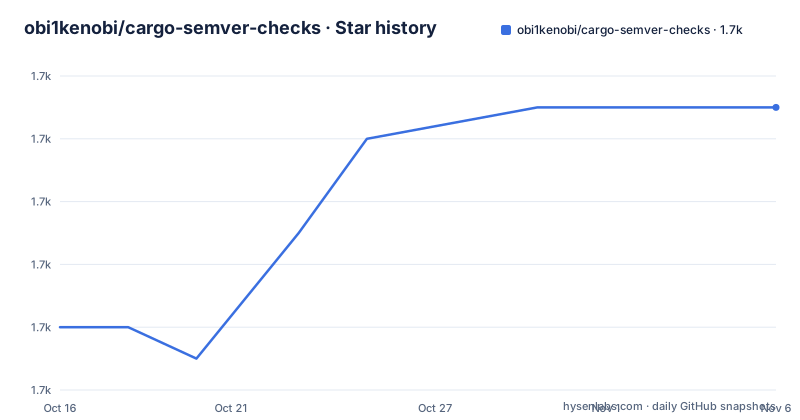
Star history
- obi1kenobi/cargo-semver-checks1,703 ★ · +7
| Repository | 2026-10-16 | 2026-11-06 |
|---|---|---|
| obi1kenobi/cargo-semver-checks | 1.7k | 1.7k |
7 Stars in the last 21 days, measured from the daily GitHub snapshot. Compare with other projects
Editorial analysis
Why cargo-semver-checks Exists
cargo-semver-checks addresses a specific release-engineering problem: detecting API changes in a Rust crate that may break downstream users. A crate can compile successfully while removing a public function, changing a public type, or altering an interface in a way that violates Semantic Versioning expectations. The tool is aimed at maintainers who want to identify those changes before `cargo publish`, rather than discovering them through downstream build failures.
The project is also relevant to unpublished crates. The README states that the checked crate does not need to be published anywhere. This makes the tool usable for internal libraries, repositories that have not reached a public registry, and projects whose release history is managed through Git rather than crates.io.
The tool does not replace a general API design review. Its scope is compatibility linting. It compares API information and reports items associated with known semantic versioning concerns, while the maintainer remains responsible for deciding whether a reported change is intentional and whether the release should be adjusted.
How Rustdoc Data Becomes Compatibility Findings
The documented mechanism starts with rustdoc. `cargo-semver-checks` uses rustdoc's JSON output to analyze a crate's API, then compares the current API with a baseline version. Each failing check includes the name of the relevant item, its file location, a reference to the Cargo SemVer reference or another relevant reference page, and a link to the implementation of the corresponding query in the current tool version.
That design makes the findings inspectable. A maintainer can trace a report from the changed API item to the documentation describing the relevant compatibility rule and then to the query implementation. It also means the tool is dependent on rustdoc's JSON format, which is unstable and can change between Rust releases.
The baseline is normally selected for the comparison rather than inferred from the current working tree. The default behavior looks up the previous version of the crate on crates.io. Explicit flags allow a registry version, Git revision, local manifest root, or rustdoc JSON file to serve as the baseline. This is important for release branches and for crates whose published history does not match the repository's current state.
Installing the Checker and Running a Release Check
The README offers two installation paths. `cargo-binstall` is intended for users who already use that tool for faster installations. The alternative is `cargo install`, with the `--locked` option shown in the README. The package name is `cargo-semver-checks`, and the command is installed as `cargo-semver-checks`.
If you already use `cargo-binstall`, install the command with:
$ cargo binstall cargo-semver-checksOtherwise, use the documented Cargo installation command:
$ cargo install cargo-semver-checks --lockedFor the first real use, run the checker from the crate being reviewed:
$ cargo semver-checksThe README describes this as a check intended to run before `cargo publish`. With the default configuration, the command looks to crates.io for the previous version and compares that baseline with the current crate. The result is a set of compatibility checks rather than a release command, so the next step is to review any reported changes before publishing.
The repository also documents a GitHub Action, but it belongs to the separate `cargo-semver-checks-action` repository. The example workflow step is:
- name: Check semver
  uses: obi1kenobi/cargo-semver-checks-action@v2
The README says the action defaults to recent versions of both the checker and stable Rust. A self-hosted workflow should still account for the tool's rustdoc compatibility constraints.
Choosing a Baseline for Unpublished Crates
The baseline options are the main operational choice when a crate is not published on crates.io. The README documents four explicit forms. `--baseline-version` selects a version to look up in a registry. `--baseline-rev` selects a Git revision. `--baseline-root` points to a directory containing baseline crate source. `--baseline-rustdoc` points directly to a rustdoc JSON file.
This flexibility is useful for repositories that tag releases, maintain branches, or generate API data in a separate job. It also prevents the tool from being tied permanently to a registry. The documented limitation is narrower: custom registries are not currently supported, and the README links that limitation to issue #160.
For an unpublished crate, choosing a baseline is therefore part of the check, not an incidental detail. A maintainer should choose the same source that downstream users will see as the previous release. Using a Git revision can represent an unreleased API, while using a local root can make a local comparison reproducible if the directory is available to the command.
The README also has separate FAQ entries for Git repository detection, Git configuration, and jujutsu, but it does not provide the full configuration details for those cases. Those cases should be checked against the complete project documentation before assuming automatic repository detection will behave as required.
Rust Versions, Nightly Builds, and Analysis Scope
The project is tightly coupled to the rustdoc JSON format. According to the README, each released version supports, at minimum, the stable and beta Rust versions current when that release is made. Some nightly versions may be supported, but nightly compatibility is best effort. The documented failure pattern is specific: after rustdoc changes its JSON format on nightly, an existing `cargo-semver-checks` release may be unable to analyze that nightly until a newer tool release adds support. The README says this gap often lasts several days to several weeks.
There is another maintenance boundary. A nightly-only rustdoc format can be superseded before becoming stable, after which support for that format may be dropped. The README gives `cargo-semver-checks` v0.24 as an example: it supported rustdoc formats v24, v26, and v27, but not the nightly-only v25 format.
The project recommends pinning to a specific nightly version when nightly support is mandatory. Stable Rust is the safer default for automation, but even stable workflows should update `cargo-semver-checks` when updating Rust versions. The repository's current `Cargo.toml` declares `rust-version = "1.93"`, while the dependency configuration enables several rustdoc feature versions, including v57, v60, and v61. Those details show that the checker itself is version-sensitive.
What the Checker Does Not Guarantee
The README includes a FAQ entry titled "Will `cargo-semver-checks` catch every semver violation?" but does not provide its answer. It would be inaccurate to claim complete coverage. The documented output is a set of checks with references, which makes the tool useful evidence, not a formal proof of compatibility.
The clearest limitation is the dependence on API data produced by rustdoc. Conditional compilation with `--cfg`, feature selection, and target triples can affect which API is visible to the analysis. The README has dedicated FAQ entries for cfg handling, enabled features, and multiple target triples, so these are real areas of project-specific behavior rather than hypothetical concerns. The README does not provide detailed answers in the available documentation, so teams should consult those sections before claiming that every configuration is covered.
The tool also cannot decide whether a public breaking change is acceptable. A project may intentionally remove deprecated API, change a public type, or revise behavior while preparing a major release. In such cases, the report is a review signal and a release classification decision remains with the maintainer. Manual API review is the practical alternative: it can consider context, implementation behavior, and release intent that an automated comparison cannot establish, but it is slower and less repeatable.
Maintenance, Licensing, and Adoption Cost
The repository is not archived, and its last push was on 2026-10-12. Recent releases include v0.51.0 on 2026-10-03, v0.50.0 on 2026-08-01, and v0.49.0 on 2026-07-18. The release history and repository status indicate continuing project activity, although compatibility work remains tied to Rust and rustdoc changes.
The package manifest declares `license = "Apache-2.0 OR MIT"`. The repository includes `LICENSE-APACHE` and `LICENSE-MIT`. This is a licensing choice to account for when integrating the tool into development workflows, but this article does not provide legal advice about how a particular organization should apply those licenses.
The upgrade cost is primarily operational. Teams may need to update the checker when they update Rust, especially when rustdoc's JSON format changes. A GitHub Action simplifies installation for one workflow, while local installation uses `cargo-binstall` or `cargo install`. Baseline selection also affects CI design: the job must have access to the registry version, Git revision, local source directory, or rustdoc JSON file selected for comparison.
Compared with manual API review, cargo-semver-checks offers a repeatable automated pass and traceable findings. Manual review offers contextual judgment but lacks a standardized comparison command. The two approaches serve different purposes, so the strongest adoption pattern is automated checking followed by human inspection of reported changes.
Editorial conclusion
Adopt cargo-semver-checks when maintaining a published or unpublished Rust library and needing an automated API compatibility gate before release. Do not treat its output as proof that every semantic versioning rule is satisfied. Verify the Rust and rustdoc compatibility first, then inspect each reported change and choose the baseline that matches your release process.
Frequently asked questions
Does cargo-semver-checks require the Rust crate to be published on crates.io?
No. The README says the crate does not have to be published. You can provide a baseline with `--baseline-version`, `--baseline-rev`, `--baseline-root`, or `--baseline-rustdoc`.
Can I use cargo-semver-checks with nightly Rust?
Nightly support is best effort because rustdoc's JSON format changes. The README recommends pinning a specific nightly version when nightly compatibility is mandatory.
Will cargo-semver-checks catch every semantic versioning violation?
The README does not provide the answer to this FAQ entry. The tool reports compatibility checks, so maintainers should review its documented coverage and inspect the findings rather than treat the command as a complete guarantee.
Official sources
Add this badge to your README
If you maintain this project, the badge below links readers to this analysis and shows its maintenance status from the daily GitHub snapshot. Paste the markdown into your README; add ?metric=license or ?metric=stars to the image URL for a different field.

[](https://hysenlabs.com/projects/obi1kenobi-cargo-semver-checks)Star history chart for your README
[](https://hysenlabs.com/projects/obi1kenobi-cargo-semver-checks)Was this useful?