OCaml-LSP and the build-state problem behind OCaml editor tooling
OCaml Language Server Protocol implementation
At a glance
- What is it?
- OCaml-LSP is the OCaml implementation of the Language Server Protocol, shipped as the opam package ocaml-lsp-server and installed as the binary ocamllsp. It is worth understanding for one specific reason: the server describes your project from the last build, so a watch-mode Dune build, not the editor plugin, is what makes its diagnostics correct.
- Who is it for?
- OCaml-LSP is the right server for OCaml teams that already build with Dune, and the Dune tools install path is the one to prefer because it compiles the server with the same compiler as the project. It is the wrong choice if you expect a language server to analyse unsaved source, since every diagnostic comes from the last completed build, or if you want Merlin behaviour without passing the fallback flag.
- Can I use it commercially?
- Check first. The repository uses a licence we do not classify automatically, so read its LICENSE file before any commercial use.
- Is it still maintained?
- Yes. The repository last received commits 2 days ago.
- What is it written in?
- Mainly OCaml, according to GitHub's language statistics.
Answers come from the project's GitHub data, last synced on November 7, 2026, and from our analysis. They are not legal advice.
Star history
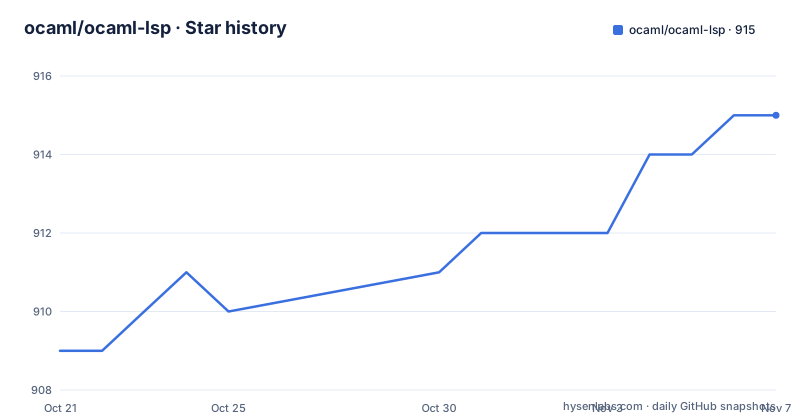
- ocaml/ocaml-lsp915 ★ · +6
| Repository | 2026-10-21 | 2026-11-07 |
|---|---|---|
| ocaml/ocaml-lsp | 909 | 915 |
6 Stars in the last 17 days, measured from the daily GitHub snapshot. Compare with other projects
Editorial analysis
The package is ocaml-lsp-server but the executable is ocamllsp
The naming split is the first thing that trips people up. The opam package is called ocaml-lsp-server, while the program that actually gets put on your path is called ocamllsp. Every command in the documentation uses the second name, and every install instruction uses the first.
Installing through opam goes into whichever switch is currently active, which means the switch is part of the decision rather than an implementation detail.
$ opam install ocaml-lsp-serverThe consequence is stated plainly: you need ocaml-lsp-server in every switch where you want to use it. A team that maintains several switches, one per compiler version or per project, ends up installing the server repeatedly. Esy projects have their own route, where the package is added as an opam dependency of the project rather than to a shared switch.
$ esy add @opam/ocaml-lsp-serverThe point of the second form is isolation. The server is added to the project's own dependency set, so it travels with that project rather than with the machine.
dune tools install binds the server to the project's compiler
The most interesting installation path is the one tied to Dune's package management, which needs the latest nightly build or version 3.24 or later.
$ dune tools install ocamllspWhat that buys you is stated in the documentation: ocamllsp is compiled with the same OCaml compiler as the project itself, and the documentation names this a requirement for the server being able to analyze the code in the project. The reasoning is not hard to reconstruct. A language server that loads build artefacts produced by a different compiler version can be reading type information it cannot interpret, so matching the compiler removes a class of confusing failures.
The trade-off is that the editor has to be pointed at the right binary. The documentation tells you to run the following from your shell before launching the editor from that same shell.
$ eval $(dune tools env)Editors that are not launched from a terminal need plugin support to find the executable that Dune installed. The documentation points at the OCaml Platform plugin for VSCode and at the ocaml-eglot package for Emacs, with instructions to follow. The `eval $(dune tools env)` line can also be placed in a .envrc file at the project root and used with direnv, which is the cleaner arrangement for a project where several people launch their editor in different ways.
Diagnostics come from the last build, not from your buffer
This is the constraint that shapes how OCaml-LSP feels in daily use, and the documentation puts it as an important note: the language server has its information about the files from the last time you built the project. The recommended answer is the Dune build system running in watch mode, so the build artefacts the server reads are never stale.
$ dune build --watchWithout that background build, the server still responds, and completion still works to some degree, but the error and warning set belongs to an older state of the tree. In a refactor, that gap is where confusion comes from, because the editor will report problems that no longer exist and stay silent about ones that do.
The server is normally launched by the editor, or by a plugin installed in the editor, so there is no daemon to start by hand. What the user owns is the build. Separating those two responsibilities is unusual compared with an editor that analyses source text directly, and it is a deliberate design choice rather than an oversight: the build system already knows how to typecheck OCaml, and re-implementing that inside the editor is exactly the kind of duplication the build was supposed to prevent.
Dune RPC adds new diagnostics and file promotion, if you start it yourself
Since version 1.11.0, OCaml-LSP can talk to Dune's RPC system, and the documentation is clear about the division of labour: the server will not launch Dune's RPC, it will detect a running instance and communicate with it automatically. The user launches it by running Dune in watch mode.
What that buys is a set of diagnostics the server could not produce on its own. The example given is a mismatching interface and implementation file, which is exactly the kind of error that lives in the relationship between two files rather than inside one. The catch is that such a diagnostic only refreshes when the file is saved, because Dune does not see unsaved files, and the server updates diagnostics after each completed build in watch mode. So you may briefly see warnings or errors that are no longer correct, until the next save and build cycle.
The second feature is Dune file promotion. If a project uses ppx_expect and a test is failing, the server can report that your file can be promoted, and a code action called Promote performs the promotion. That is a small feature with a real effect on workflow, because promoted snapshot files are otherwise a manual step that developers tend to postpone.
The bargain is that the improvement is opt-in and depends on you keeping a Dune RPC session alive.
Formatter choice is decided by config proximity, not by you
Formatting support is an add-on rather than part of the core, and it needs an external formatter to be installed: either ocamlformat or ocp-indent. The selection rule is documented precisely, and it is worth knowing because it means the answer depends on where you are editing.
Configuration discovery walks from the document's directory up to its containing workspace root, and the closest formatter configuration wins. If a directory contains both .ocamlformat and .ocp-indent, OCaml-LSP selects ocamlformat. With neither configuration present, it prefers ocamlformat when that program is available and otherwise falls back to ocp-indent. The two formatters are not equivalent: the documentation notes that ocp-indent only adjusts indentation.
There is a second moving part, ocamlformat-rpc, which the server uses to format code that is generated or displayed by the server itself, for instance when you hover over a module identifier and see it typed in nicely formatted form. That program ships with ocamlformat at version 0.21.0 or later, and it used to be a standalone package.
Indentation as you type comes from a different helper, the ocp-indent-rpc package. The server starts it lazily and keeps it running, so ocp-indent is not executed separately on every keystroke. The lazy start matters for startup cost on large projects, and the choice of helpers is a reason the server has optional packages to install rather than being self-contained.
Merlin compatibility needs an explicit fallback flag
If you want OCaml-LSP to respect your .merlin files, the server has to be invoked with the --fallback-read-dot-merlin argument, and a further requirement is named in the same paragraph of the documentation. The flag is not enabled by default, so a team that ports an existing Merlin setup has to change how the editor launches the server, not just drop in a configuration file.
That is a sensible default for most projects. Merlin was a development environment with its own conventions, and honouring .merlin files silently could change behaviour for people who keep the file around without relying on it. The cost is one more thing to know about when the server is not doing what you expect, and the argument has to reach the server through whatever plugin launches it.
For a team already using OCaml-LSP the same question comes up in reverse during a migration: the .merlin file has to be removed or ignored eventually, since a source of truth that only applies when a flag is set is a second source of truth. The repository root carries .ocamlformat and .ocamlformat-ignore, which shows where the project expects formatting configuration to live today.
Building from sources means submodules and a pinned switch recipe
Source installation is documented as a three step sequence, and the clone step carries a flag that is easy to miss.
$ git clone --recurse-submodules http://github.com/ocaml/ocaml-lsp.git
$ cd ocaml-lsp
$ make install
The submodules exist for a dependency isolation reason: the documentation explains that they are used so that users who install ocaml-lsp-server into their sandbox do not share dependency constraints with the same packages that ocaml-lsp-server itself uses. Skipping the recursion gives you a checkout that does not build as documented.
The Makefile shows the same philosophy in the development target, which creates a local switch pinned to a specific compiler.
$ opam switch create --no-install . ocaml-base-compiler.5.5.0
$ opam install -y dune-release merlin ocamlformat utop ocaml-lsp-server
$ opam install --locked --deps-only --with-doc -y .
The install target itself is a two step Dune operation, building the install targets and then placing them.
$ dune build @install && dune installThe Makefile also separates concerns that are often lumped together: a bench target that runs ocaml_lsp_bench.exe with the bench profile, a test target that builds the runtest targets of the jsonrpc, lsp, lsp-fiber, jsonrpc-fiber and ocaml-lsp-server directories, and a fmt target that builds @fmt with auto-promote. There is a comment explaining why the test dependencies are installed separately, noting that including test dependencies in the main install pulls extra packages that end up conflicting.
A 1.x line with preview builds and a licence GitHub cannot classify
On maintenance, the repository is not archived and the last push was on 2026-10-18. The release list shows 1.28.0 published on 2026-10-12, a 1.28.0-506 preview build on 2026-07-31, and 1.27.0 on 2026-06-23. A preview tag in the middle of that list indicates that nightly style builds are part of the release flow, which matters for a server that has to keep up with compiler changes.
The repository is a multi package opam project rather than a single one. The root holds separate opam files for jsonrpc, lsp, ocaml-lsp-server and ocp-indent-rpc, with matching directories, and the source tree also contains lsp-fiber, jsonrpc-fiber, vendor, submodules and patches. Fibre is the concurrency library, and the split into a fiber variant of the server and of the JSON-RPC layer explains why the Makefile builds runtest targets for both variants.
Licensing is the least settled point. The repository declares a licence that GitHub cannot classify, and the text lives in the LICENSE.md file at the root, so anyone using the code for anything beyond reading it needs to open that file and read the terms rather than rely on a standard label. A server that is installed as a tool inside a developer environment raises less licence exposure than a library embedded in a shipped product, but the classification still has to be checked before it goes into a commercial codebase.
Editorial conclusion
OCaml-LSP is the right server for OCaml teams that already build with Dune, and the Dune tools install path is the one to prefer because it compiles the server with the same compiler as the project. It is the wrong choice if you expect a language server to analyse unsaved source, since every diagnostic comes from the last completed build, or if you want Merlin behaviour without passing the fallback flag. Before adopting it, check that your Dune version is 3.24 or later if you want dune tools install, and confirm that a watch-mode build is running in every shell where an editor will be launched.
Frequently asked questions
How do I install OCaml-LSP?
The documentation gives three routes. With opam, run opam install ocaml-lsp-server in the switch you want to use it in. With esy, run esy add @opam/ocaml-lsp-server in the project. With Dune package management on version 3.24 or later, run dune tools install ocamllsp to get a server compiled with the project's own compiler.
Why does OCaml-LSP show stale errors in my editor?
Because the server takes its information about your files from the last time the project was built, so it reports on build artefacts rather than on unsaved source. The documentation recommends running the build in watch mode, for example dune build --watch, and notes that with Dune RPC you have to save the file for refreshed diagnostics.
What is the difference between the ocaml-lsp-server package and the ocamllsp binary?
The opam package is called ocaml-lsp-server, and the installed program is called ocamllsp. The package name is what you install, and the binary name is what the editor plugin launches and what dune tools install places in the project.
How do I make OCaml-LSP respect my .merlin file?
The server has to be invoked with the --fallback-read-dot-merlin argument, and the documentation names a further requirement in the same paragraph. The flag is off by default, so it must be passed through whatever plugin launches the server.
Which formatter does OCaml-LSP use, and can I choose?
The choice is made automatically. Discovery walks from the document's directory up to the workspace root and the closest configuration wins, .ocamlformat and .ocp-indent together means ocamlformat is selected, and with no configuration the server prefers ocamlformat when installed and falls back to ocp-indent. You need to install one of them yourself, and ocp-indent only adjusts indentation.
Official sources
Add this badge to your README
If you maintain this project, the badge below links readers to this analysis and shows its maintenance status from the daily GitHub snapshot. Paste the markdown into your README; add ?metric=license or ?metric=stars to the image URL for a different field.

[](https://hysenlabs.com/projects/ocaml-ocaml-lsp)Star history chart for your README
[](https://hysenlabs.com/projects/ocaml-ocaml-lsp)Was this useful?