Octobox: a second archived state for GitHub notifications, and what self-hosting it costs
📮 Untangle your GitHub Notifications
At a glance
- What is it?
- Octobox is a Ruby on Rails web app that adds an archived state, stars and CI status on top of GitHub's own notification list, and it can be hosted at octobox.io or run yourself. Hosting it means Postgres, Redis, a GitHub OAuth app and an AGPL decision.
- Who is it for?
- Octobox is worth the setup for a maintainer whose notification list is longer than one sitting, and who can host a Rails app with Postgres and Redis and register a GitHub OAuth app. It is not worth it for a single user who only wants a browser popup, because the archived state lives in Octobox's own sync.
- Can I use it commercially?
- Yes, with strict conditions. AGPL-3.0 is a network copyleft licence: if people use a modified version over a network, for example as a hosted service, you must offer them its source code under the same licence.
- Is it still maintained?
- Yes. The repository received new commits within the last day.
- What is it written in?
- Mainly Ruby, according to GitHub's language statistics.
Answers come from the project's GitHub data, last synced on November 14, 2026, and from our analysis. They are not legal advice.
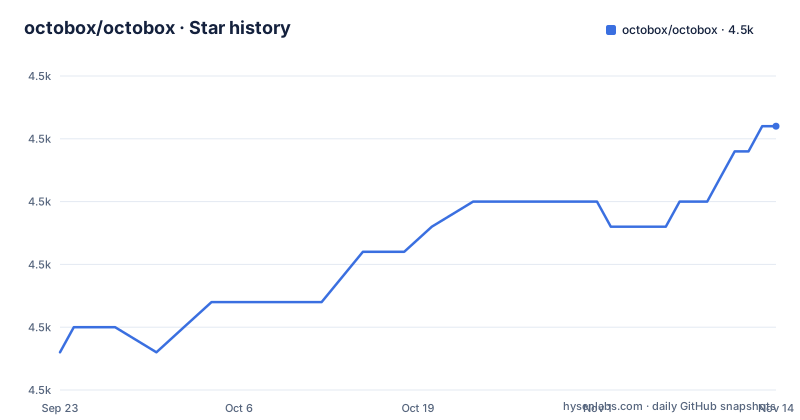
Star history
- octobox/octobox4,493 ★ · +9
| Repository | 2026-09-23 | 2026-11-14 |
|---|---|---|
| octobox/octobox | 4.5k | 4.5k |
9 Stars in the last 52 days, measured from the daily GitHub snapshot. Compare with other projects
Editorial analysis
Archived is a state GitHub itself does not have
The core idea is one extra state. GitHub marks a notification as read the moment you load the page or open the email version of it, so the list loses the difference between something you have seen and something you have handled. Octobox keeps an `archived` state on top of that, so an item can be marked done and still be listed. If anything happens afterwards on the archived thread, issue or pull request, the next sync unarchives it and moves it back into the inbox.
Three consequences follow from that design. The archive lives in Octobox, not in GitHub, so it follows you only as far as your Octobox instance and its database. The mechanism is pull based: nothing comes back until the app syncs, so a busy thread can go quiet in Octobox while it is still moving on GitHub. And the reason it exists is stated plainly in the README: most open source maintainers and GitHub staff end up using a combination of filters and labels in Gmail, and Octobox is meant for people who would rather avoid email.
Threads are public beta, and an icon is the only sync signal
Two prerequisites sit before any of the features work. Web notifications must be enabled in your GitHub settings, and vulnerability notifications have to be enabled separately if you want those.
The thread view is described as being in public beta. You switch it on by choosing `on octobox` from the `Open notifications` menu in `/settings`, and threads then have to be synchronised before they can be read. The catch is how you tell the difference between an empty thread and an unsynchronised one: a notification with no associated thread, or one whose thread has not been synced yet, still shows the `:link-external:` icon from the notification window. So an icon you cannot resolve means look at sync state, not at the thread.
Beyond that the list adds issue and pull request status, CI status and labels next to the title, organisation, repository and type, and filters run across repository, organisation, type, action, state, CI status and reason, with bot notifications kept alongside your own labels, authors and assignees.
The whole triage loop is ten single-key shortcuts
There is no mouse path worth learning, and the key list is short enough to memorise in one sitting.
 - `a` - Select/deselect all
 - `r` or `.` - Refresh list
 - `j` or `↓` - Move down the list
 - `k` or `↑` - Move up the list
 - `p` or `←` - Previous page
 - `n` or `→` - Next page
 - `s` - Star current notification
 - `x` - Mark/unmark current notification
 - `y` or `e` - Archive current/marked notification(s)
 - `m` - Mute current/marked notification(s)
 - `d` - Mark current/marked notification(s) as read here and on GitHub
 - `o` or `Enter` - Open current notification in a new window
Press `?` for the help menu. Note the split in `d`: marking as read happens both in Octobox and on GitHub, while `x` only touches the Octobox mark. That distinction is the one to internalise, because the two states are what the archived layer is built on top of. Stars are the second layer, a highlight for the handful of items you want to find again later, and search takes prefix filters so you can narrow the list without opening the filter panel.
The REST API ships as an openapi.yaml at the repository root
Octobox exposes a REST API for notifications, users and pinned searches, and the specification is not hidden behind a documentation site: `openapi.yaml` sits in the top level of the repository. Authentication is a Bearer token, and the stated coverage is notification management, user settings and pinned search operations.
openapi.yamlThe README also links an interactive explorer, which is a third-party Swagger UI page that loads the spec by URL, pointed at the raw file on the `main` branch. That arrangement has a practical effect: the browser fetches your specification from an external page rather than from your own instance, so anyone who opens that link is reading the spec from the repository, not from the deployment in front of them. What the README does not state is anything about token scopes, token lifetimes or rate limits, so an integrator has to read the spec itself to find out what a token is allowed to do.
Self-hosting means three services and a GitHub OAuth app
The installation instructions are not in the README. They live in `docs/INSTALLATION.md`, which the README points at for deployment to Heroku, Docker and other targets, and the top level carries the usual Rails deployment furniture: `Procfile`, `app.json` for Heroku, an `openshift/` directory and a `Dockerfile`.
The one configuration file that is visible is the development compose file, and it is labelled as such at the top. It pulls `octoboxio/octobox:latest`, publishes port 3000, and expects a Postgres service and a Redis service on an internal network with service-name addresses.
version: '3'
services:
  app:
    image: octoboxio/octobox:latest
    ports:
      - "3000:3000"
    environment:
      - RAILS_ENV=development
      - GITHUB_CLIENT_ID=${GITHUB_CLIENT_ID}
      - GITHUB_CLIENT_SECRET=${GITHUB_CLIENT_SECRET}
      - OCTOBOX_DATABASE_NAME=postgres
      - OCTOBOX_DATABASE_USERNAME=postgres
      - OCTOBOX_DATABASE_PASSWORD=development
      - OCTOBOX_DATABASE_HOST=database.service.octobox.internal
      - REDIS_URL=redis://redis.service.octobox.internal
So a real deployment is a Rails app, Postgres 16 on Alpine, Redis, and a registered GitHub OAuth application whose client id and secret you supply. The default database password in that file is the word `development`, and the compose file is not a production template; its own header says to override it or create your own.
If you only want a local copy of the hosted app, the single install command in the README wraps the site in a desktop shell.
npm install -g nativefier
nativefier "https://octobox.io" # Or your own self-hosted URL
An instance reachable from the internet needs GITHUB_WEBHOOK_SECRET set
The environment example is short enough to read in full, and one comment in it is the most important line in the repository for anyone running their own instance.
# Only needed when running as a GitHub App (see docs/INSTALLATION.md).
# GITHUB_WEBHOOK_SECRET is required for any publicly reachable deployment;
# without it, /hooks/github accepts unsigned requests.
GITHUB_APP_ID=
GITHUB_APP_SLUG=
GITHUB_APP_CLIENT_ID=
GITHUB_APP_CLIENT_SECRET=
GITHUB_APP_JWT=
GITHUB_WEBHOOK_SECRET=
In other words, the webhook endpoint keeps accepting requests with no signature check when that variable is empty, so it belongs in the first hour of a deployment rather than in a later hardening pass. The same file holds the OAuth pair, `ADMIN_GITHUB_IDS` as a comma separated list of GitHub IDs for the people who get admin access on the instance, and two Bugsnag keys for error reporting. Choosing who is an administrator is therefore a configuration decision made with a list of numeric IDs, which is worth reviewing whenever somebody leaves the team.
Monthly tags named after the month, and an AGPL-3.0 default
Release tags follow the calendar rather than a version number: `september-2026` on 2026-09-01, `october-2026` on 2026-10-01 and `november-2026` on 2026-11-01, with the default branch pushed on 2026-11-02. So a deployment has an obvious monthly cadence to pin to, and an equally obvious consequence, which is that a security fix depends on rebuilding and redeploying whenever that month's tag appears.
The container image is where the runtime assumptions are visible. It builds on `ruby:4.0.6-alpine` in two stages, installs gems with `bundle config --global frozen 1` and the `test` and `development` groups excluded, forces the ruby platform, enables YJIT through `RUBY_YJIT_ENABLE=1` and preloads jemalloc with `LD_PRELOAD=/usr/lib/libjemalloc.so.2`. A `.ruby-version` file sits at the root next to a `Guardfile` for local development, and `SECURITY.md` is where a vulnerability report is meant to go.
The licence is AGPL-3.0, with `LICENSE.txt` at the root. That is the item to settle before anything else in this list, because self-hosting a modified copy and serving it over a network is exactly the situation the licence was written about. Read the file, and take your own advice on it.
Editorial conclusion
Octobox is worth the setup for a maintainer whose notification list is longer than one sitting, and who can host a Rails app with Postgres and Redis and register a GitHub OAuth app. It is not worth it for a single user who only wants a browser popup, because the archived state lives in Octobox's own sync. Before deploying, confirm that web notifications are enabled in your GitHub settings, set GITHUB_WEBHOOK_SECRET if the instance is publicly reachable, and read LICENSE.txt before you fork it, because the project is AGPL-3.0.
Frequently asked questions
how to use octobox
Sign in with GitHub and keep web notifications enabled in your GitHub settings, otherwise Octobox has nothing to sync. Triage is done from the keyboard: `j` and `k` move, `x` marks, `y` or `e` archives, `s` stars, `d` marks as read both in Octobox and on GitHub, and `?` opens the help menu.
what is octobox
It is a web app for managing GitHub notifications, hosted at octobox.io or self-hosted. It adds an archived state so a notification can be marked done, brings back anything with new activity on the next sync, and adds stars, issue and pull request status, CI status, labels and filters on top of the GitHub list.
What does it take to self-host Octobox?
The installation guide is `docs/INSTALLATION.md`, which covers Heroku, Docker and other deployments. The development compose file in the repository shows the shape of it: the `octoboxio/octobox` image on port 3000, a Postgres 16 service, a Redis service, and your own GitHub OAuth client id and secret.
Does Octobox have an API for scripting my notification triage?
There is a REST API for notifications, users and pinned searches, with Bearer token authentication, and the full specification is the `openapi.yaml` file in the repository root. The README links an interactive explorer that loads that same file from its raw URL.
Why do some Octobox notifications show an external link icon instead of a thread?
The thread view is in public beta and has to be switched on by selecting `on octobox` from the `Open notifications` menu in `/settings`. Threads also have to be synchronised, and a notification with no associated thread, or one that has not synced yet, still shows the `:link-external:` icon.
Official sources
Add this badge to your README
If you maintain this project, the badge below links readers to this analysis and shows its maintenance status from the daily GitHub snapshot. Paste the markdown into your README; add ?metric=license or ?metric=stars to the image URL for a different field.

[](https://hysenlabs.com/projects/octobox-octobox)Star history chart for your README
[](https://hysenlabs.com/projects/octobox-octobox)Was this useful?