Oxidized: six of the eight feature highlights are REST endpoints
Oxidized is a network device configuration backup tool. It's a RANCID replacement!
At a glance
- What is it?
- Oxidized is a network device configuration backup tool that describes itself as a replacement for the older tool of the same job, covering over 130 operating system types. Its feature list is mostly an HTTP interface, its configuration is two files merged in a fixed order so credentials stay in one place, and its container image replaces the system shell so that command hooks work.
- Who is it for?
- Oxidized fits a network team that wants configuration history and a diff per change instead of only the current file, since the value is in the history rather than the backup, and the audit hooks are the reason to care. Three things to check before you install it.
- Can I use it commercially?
- Yes. Apache-2.0 is a permissive licence: you can use, modify and sell software built on it, as long as you keep its copyright and licence notices.
- Is it still maintained?
- Yes. The repository last received commits 1 day ago.
- What is it written in?
- Mainly Ruby, according to GitHub's language statistics.
Answers come from the project's GitHub data, last synced on November 13, 2026, and from our analysis. They are not legal advice.
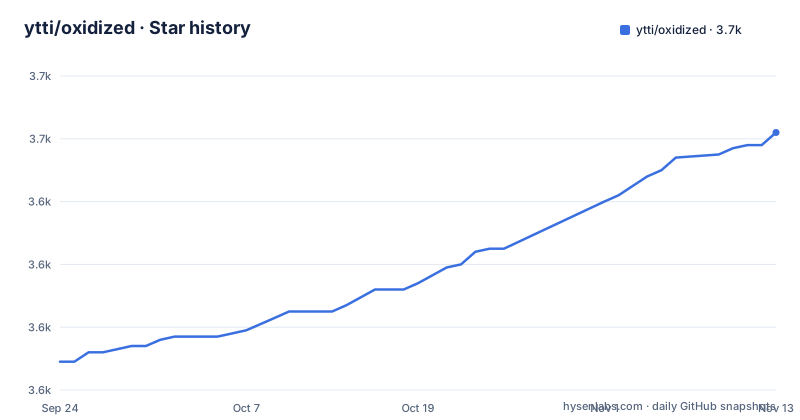
Star history
- ytti/oxidized3,662 ★ · +73
| Repository | 2026-09-24 | 2026-11-13 |
|---|---|---|
| ytti/oxidized | 3.6k | 3.7k |
73 Stars in the last 50 days, measured from the daily GitHub snapshot. Compare with other projects
Editorial analysis
Six of the eight feature highlights are REST endpoints
The feature list is eight bullets long, and six of them are HTTP interface rather than capability.
There is an endpoint to move a node to the head of the queue so it is fetched immediately rather than waiting for its interval, another to reload the node list without a restart, another to trigger a fetch for one node or for a group, another to list the nodes, and another to show the stored versions for a node along with diffs between them.
The first bullet is the exception: it describes the tool automatically adding and removing threads to meet a configured retrieval interval, which is the scheduling behaviour underneath everything else.
So the shape of the project is a background poller with an HTTP control plane on top, and the paths are published in the feature list rather than left to the documentation. That is a deliberate choice about who the tool is for: a team that wants to re-fetch one device now, or see what changed on one device, does it with one request.
There is one trap in that list, and it is in the installation section rather than here. The web interface and the REST interface are an optional gem, described as not required to run the tool. A default install therefore has none of these six endpoints until a second gem is added.
Configuration is two files merged in a fixed order, and the password goes in the second
The configuration section is short, and the design decision in it is the reason to read the whole thing.
Configuration is YAML. Files are sourced from a system location first and then a per-user location, and the resulting structures are merged. The file then says what that is for: it is useful to store source information in the system-wide file and user-specific configuration in the home directory, in order to include only a staff member's own username and password there.
So on a shared machine, the thing that describes which devices to poll lives where every local account can read it, and the thing containing a human's credentials lives in that account's home directory. The merge is what makes the split possible without either file being complete.
That pattern is not Oxidized's invention, and the file points at the script-based extension as the place it comes from, noting that many users run that tool. The interesting part is that the main tool adopted the convention and made it the documented default rather than an afterthought.
The same section recommends running the tool under its own account rather than as root, and gives the command to create one:
useradd -s /bin/bash -m oxidizedIt is a small thing to state and a significant thing to get wrong, because this tool holds credentials that reach every device it polls.
The container gives it a fixed user id and replaces the system shell
The container build is where this project's operational habits become visible, and three of them are worth reading.
The first is the account. A group and a user are created with a fixed numeric id of 30000, a home directory, and a login shell changed to a specific interpreter. The configuration directory is then created and owned by that user, and given permissions that grant the owning user and group read and write while removing all access for others. A recursive ownership change is applied across the entire home directory, not just the configuration subdirectory.
The second is the shell. One instruction replaces the system's default shell with a different one as a symbolic link, and the comment above it cites a specific pull request as the reason: Ruby runs the default shell, and a different one is wished for the command hooks. So the image changes what every program in the container sees as the system shell, in order for one class of hook to behave.
The third is what is not done. There is a comment explaining that no package upgrade step is run, on the grounds that the base images are rebuilt for security issues. That is a defensible choice and an unusual one to find written down.
The service supervision is conventional: three services are installed from files in the repository, for the tool itself, for reloading configuration automatically, and for updating the certificate store, on a lightweight supervisor with a separate small init process for signal handling.
The syslog path turns a config change into an attributed line in the history
One feature highlight is the most interesting thing in the list, and it needs reading carefully.
There is an example configuration that takes syslog over UDP and over a file, for two operating systems, and uses it to catch configuration change events and trigger a configuration fetch. That alone is unremarkable: polling becomes event-driven.
The rest of the bullet is the point. The signal says which user made the change, that information can then be used by output modules over HTTP, and the git output module uses it, so a blame-style query on the history shows who changed each line.
So the audit trail in this tool is not something you assemble afterwards. A change arrives as a log message naming the user, a fetch is triggered, and the attribution is written alongside the line into the version control history.
For anyone deploying this, the consequence is about retention rather than capability. An attribution trail stored in a configuration repository outlives the people in it, and the syslog source itself is only half of the mechanism: the other half is whoever can write to the repository.
Six hook types, five of which send data outward
The documentation index lists the hook types, and reading them as a set says more about the tool's reach than the feature list does.
One runs a command. One opens or updates a repository on a code-hosting service. One publishes to a cloud messaging service. One posts a diff to a chat service. One posts a diff to an instant messaging service, and one posts a diff to a vendor's collaboration service.
Only the first is local. The other five are configured destinations, so the configuration file for a network backup tool can hold credentials for a code host, a cloud queue and up to four chat endpoints.
That is a normal thing for a change-notification tool to do, and it is also a reminder of the trust boundary: the process that holds every device's credentials is also the process that can post to those services.
Two details sharpen it. The command hook is the reason the container replaces the system shell, so that class of hook has a working interpreter in that environment. And the output side has an encrypted variant, so a deployment can keep the configuration history in a version control repository without leaving it readable.
Instructions verified on three distributions, and the software itself untested on a fourth
The installation section covers four platforms, and each one has its own level of honesty.
For the Debian and Ubuntu family the file names two supported releases as a floor, one specific release name and one code name, and warns that on Ubuntu you must first enable the extra package repository because a development library comes from there. The dependency line is long and includes a build toolchain, a library for SQLite, an SSH library, a compression library and two compiler front ends.
For the Rocky and Red Hat family it says the instructions have been verified on two Rocky releases and on Fedora, and gives the three steps those systems need first: install the extra packages repository, enable a specific component repository, and enable a specific Ruby module version. The package list ends with a shell utility, which is an odd thing to require and suggests the list was assembled by running the build until it stopped complaining.
For FreeBSD there is a warning, and it distinguishes two things: the installation instructions have been tested on one release, but the tool itself has not been tested on that platform. A ports route is offered alongside the gem route.
The from-source route is four commands, and the fourth is a Rake task rather than a gem install.
Over 130 operating system types, one maintainer, and a lint backlog
The last things worth reporting are about the shape of the project rather than its features.
The scale claim is in the second paragraph of the file: light and extensible, supporting over 130 operating system types, with the supported list living in a separate document. That is a lot of device models maintained by one person, and the file says so in the loudest way available, in a warning banner asking whether your company uses the tool and has Ruby developers on staff, because an extra maintainer would be welcome.
The links point the same way. There is a chat room badge from a service that has largely been superseded, and the most prominent piece of documentation linked from the top of the file is a conference presentation from 2014, linked with a timestamp that jumps three hours into the recording.
The tree shows the same story at a smaller scale. There is a lint configuration and, beside it, a separate file that holds the outstanding lint offences, which is the usual way a project records what it has decided to live with rather than fix. There is a file listing things still to do, two automation configuration files for different tools, an agent instruction file, a changelog and a contributing guide.
The release history is unhurried for a tool people depend on: three releases across the six months to May 2026, moving through the 0.35, 0.36 and 0.37 series, with the branch itself pushed at the end of September.
Editorial conclusion
Oxidized fits a network team that wants configuration history and a diff per change instead of only the current file, since the value is in the history rather than the backup, and the audit hooks are the reason to care. Three things to check before you install it. The tool needs credentials that reach every device it backs up, so give it its own unprivileged account rather than running it as root, and remember that one of its documented hook types runs commands and several others send data to external services, so the blast radius is wider than a backup tool's sounds. The REST interface people read about in the feature list lives in an optional gem, not in the default install. And the freebsd instructions are labelled as tested for the steps and untested for the software, so treat that platform as yours to validate.
Frequently asked questions
how to install oxidized
On Debian and Ubuntu, enable the extra package repository first because a development library comes from it, install the dependency list, then install the gem. Two optional gems add the web interface and the REST interface, and the script-based extensions; neither is needed to run the tool. From source it is a clone, a bundler gem and a Rake task.
Where does Oxidized store its configuration?
In YAML, sourced first from a system-wide directory and then from the user's own configuration directory, with the two merged. The stated purpose is to keep shared source information in the system file and a staff member's own username and password in their home directory.
Does Oxidized need to run as root?
No, and the documentation recommends against it. It says to create a dedicated user account with the standard user-add command and switch to it, because the tool holds credentials that reach every device it polls.
What do the Oxidized hooks do?
Six types are documented. One runs a command, one updates a repository on a code-hosting service, one publishes to a cloud messaging service, and three post diffs to chat, instant messaging and vendor collaboration services respectively.
Is Oxidized supported on FreeBSD?
The installation section carries a warning that the instructions have been tested on one FreeBSD release but that the tool itself has not been tested on it. Both a gem route and a ports route are given.
Official sources
Add this badge to your README
If you maintain this project, the badge below links readers to this analysis and shows its maintenance status from the daily GitHub snapshot. Paste the markdown into your README; add ?metric=license or ?metric=stars to the image URL for a different field.

[](https://hysenlabs.com/projects/ytti-oxidized)Star history chart for your README
[](https://hysenlabs.com/projects/ytti-oxidized)Was this useful?