Odoo Documentation Build, Languages, and Version Switching
Odoo documentation sources
At a glance
- What is it?
- The odoo/documentation repository builds the Odoo documentation with Sphinx and Make. It supports multilingual output, version-specific builds, guideline tests, and optional local source integration.
- Who is it for?
- Adopt odoo/documentation when maintaining or contributing to the Odoo documentation, especially for multilingual or multi-version output. Do not choose it as a substitute for running Odoo itself.
- Can I use it commercially?
- Yes, with credit. CC-BY-SA-4.0 allows commercial use as long as you credit the authors and indicate what you changed. It is written for creative content, so check how it applies to any code.
- Is it still maintained?
- Yes. The repository received new commits within the last day.
- What is it written in?
- Mainly reStructuredText, according to GitHub's language statistics.
Answers come from the project's GitHub data, last synced on November 7, 2026, and from our analysis. They are not legal advice.
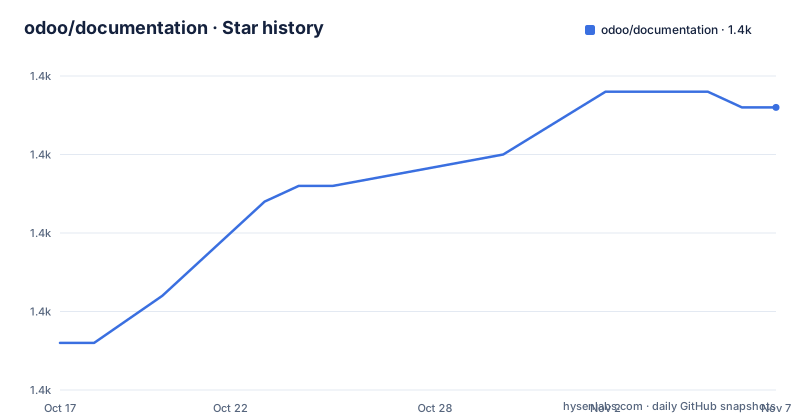
Star history
- odoo/documentation1,373 ★ · +15
| Repository | 2026-10-17 | 2026-11-07 |
|---|---|---|
| odoo/documentation | 1.4k | 1.4k |
15 Stars in the last 21 days, measured from the daily GitHub snapshot. Compare with other projects
Editorial analysis
A documentation repository for Odoo contributors
odoo/documentation contains the source files used to build the Odoo documentation website. Its primary language is reStructuredText, and its structure is built around Sphinx rather than an installable runtime application. The `content/` directory contains documentation material, `conf.py` configures the build, `extensions/` contains project-specific Sphinx code, `locale/` stores translation-related files, and `static/` contains assets. Other top-level entries, including `redirects/`, `invs/`, and `tests/`, support navigation, cross-references, and documentation checks.
The intended users are documentation contributors, translators, and maintainers who produce or review the published documentation. The README points content contributors to the Introduction Guide and directs content issues, requests, and questions to the issue tracker. This repository does not document how to launch an Odoo server, initialize a database, or operate Odoo modules. Its optional relationship to local Odoo source repositories is specifically for including Python docstrings during a documentation build.
The repository is not archived, and its last push was on 2026-10-15. That is a recent recorded change, but it does not establish release frequency or a support commitment. The repository has no GitHub releases, so users cannot select documentation packages by named GitHub releases. Its `CC-BY-SA-4.0` license permits reuse under attribution and share-alike conditions. License obligations should be checked separately when copying or adapting substantial documentation content.
The Sphinx build path from content to HTML
The Makefile defines the documentation build. Its default source directory is `content`, its configuration directory is `.`, and its default output directory is `_build/html`. The `html` target invokes `sphinx-build` with the HTML builder, sends it project settings, and uses `-j $(WORKERS)` for parallel processing. The default `WORKERS` value is `auto`; setting `WORKERS=1` selects a single-worker build.
The command passes settings such as `project_root`, `canonical_version`, `versions`, `languages`, `language`, and `is_remote_build` to Sphinx. It also accepts analytics-related values including `GOOGLE_ANALYTICS_KEY`, `PLAUSIBLE_SCRIPT`, and `PLAUSIBLE_DOMAIN`. The README does not explain every configuration value or describe the production deployment process, so the Makefile is the authoritative source for those build inputs.
The output path changes when language or version options are used. The default build is available at `documentation/_build/html/index.html`. A non-English build adds its language directory. When `VERSIONS` is supplied, the Makefile also adds the current `20.0` directory before adding a non-English language directory. The README identifies the broader output patterns as `documentation/_build/html/<language>/`, `documentation/_build/html/<version>/`, and `documentation/_build/html/<version>/<language>/`.
The `test` target runs documentation guideline tests. This is useful for checking documentation conventions, but it is not presented as a test suite for Odoo application behavior. The README does not claim that the build tests every generated link or validates the operation of Odoo modules.
Installing dependencies and producing the first HTML build
The README lists Git, Python 3.10 to 3.14, Make, and packages from `requirements.txt` as build requirements. A local copy of `odoo/odoo` is optional, as is a local copy of `odoo/upgrade-util`. Neither checkout is required for the basic build sequence documented in the README.
Create and activate a virtual environment on Linux or macOS with:
python3 -m venv .venv && source .venv/bin/activateThe README provides a separate Windows PowerShell command:
py3 -m venv .venv; .\.venv\Scripts\Activate.ps1After activation, install the repository's pinned Python dependencies:
pip install -r requirements.txtThe requirements file specifies `docutils==0.17.0` and `sphinx==4.3.2`, along with packages for styling, syntax highlighting, and Sphinx output formats. These exact pins make the documented setup reproducible, but they also mean that dependency upgrades require explicit file changes and build verification. The README does not document a separate dependency-upgrade procedure.
Run the initial documentation build from the repository root:
make htmlAfter the build finishes, open `documentation/_build/html/index.html` in a browser. The command produces static documentation, not a running Odoo instance. For a faster build with a shallow menu, use `make fast`. If file-layout changes cause stale build output, the README recommends `make clean`, which deletes files under the configured build directory.
French, language switching, and version-specific output
The default `CURRENT_LANG` value is `en`. A French-only build is invoked with:
make html CURRENT_LANG=frThe README states that this creates French documentation under the language-specific HTML path. To enable several entries in the language switcher, pass them through `LANGUAGES`:
make html CURRENT_LANG=fr LANGUAGES=en,fr,deIn this example, French is built while English, French, and German are enabled as available switcher languages. The README also says that the command must be invoked for each `CURRENT_LANG` that should be built. Merely including a language in `LANGUAGES` therefore does not establish that its output was generated by that invocation.
Version selection follows a related pattern:
make html VERSIONS=17.0,18.0,saas-18.4,19.0,masterThis command builds the current documentation version and enables the listed entries in the version switcher. The README requires a separate invocation for each `VERSIONS` entry that should be built. The language names available to the configuration are listed in the `languages_names` variable in `conf.py`.
This model makes output generation explicit, but it also creates a practical failure mode. A switcher can link to a page that does not exist if the required language or version was not generated. The README identifies this problem and tells contributors to check that all available languages and versions have been built. It also notes that Developer documentation is available only in English, so translation coverage does not extend to every documentation area.
Optional local source integration and its version constraint
The README documents optional integration with two related repositories: `odoo/odoo` and `odoo/upgrade-util`. Place either checkout as a sibling of the documentation repository, or place it inside the `documentation` directory. When one of these locations contains a matching version, the documentation build can include Python docstrings from that repository.
Version alignment is the central constraint. The README says docstrings are included when the source version matches the documentation version. A local checkout from another branch or release may not supply the expected content. Contributors using this feature should confirm the source version before interpreting missing API documentation as a Sphinx or Makefile failure.
Neither related repository is downloaded automatically by the documented setup. The README does not provide a command that fetches a specific revision, updates a local checkout, or verifies a branch mapping. The repository also does not document a command that tests whether every included docstring is present. The version comparison and resulting generated section still need to be checked directly.
This optional mechanism is useful for contributors who edit both code and documentation because it connects matching Python docstrings to the generated site. For documentation-only work, the same mechanism adds setup complexity without being mandatory. The appropriate first check is whether the target page actually requires Python docstrings and whether the matching local source version is available in one of the two documented locations.
Maintenance limits, contribution paths, and unsuitable uses
The repository's maintenance status can be stated precisely. It is not archived, and the last push was on 2026-10-15. It has no GitHub releases, so there is no documented release-based upgrade path in this repository. Upgrade work is tied to the documentation branch, dependency compatibility, and build configuration instead.
The pinned versions of `sphinx==4.3.2` and `docutils==0.17.0` define the documented build baseline. The README does not provide a dependency compatibility matrix or instructions for moving to another Sphinx release. Changing a pin may alter output, so the resulting HTML and guideline tests would need verification through the repository's own `make html` and `make test` targets.
For contribution handling, the README sends documentation authors to the Introduction Guide and sends content issues, requests, and questions to the issue tracker. It does not document a rollback procedure for this repository or explain how its default branch relates to publication. It also does not describe a process for automatically synchronizing every documentation change with an Odoo runtime release.
The repository is unsuitable for installing, configuring, or operating Odoo itself. It is also unsuitable for a team that expects a single command to generate every language and version in a switcher, because the README requires separate invocations. Conversely, it is more capable than a plain text repository because it supplies Sphinx configuration, translation directories, redirects, static assets, inventories, custom extensions, build targets, and guideline tests.
Editorial conclusion
Adopt odoo/documentation when maintaining or contributing to the Odoo documentation, especially for multilingual or multi-version output. Do not choose it as a substitute for running Odoo itself. Verify first that Python 3.10 to 3.14, Make, and the pinned dependencies work in your environment, then confirm that your content belongs in the repository's Sphinx source structure.
Frequently asked questions
How do I build the Odoo documentation locally?
Create and activate a virtual environment, run `pip install -r requirements.txt`, and then run `make html`. Open `documentation/_build/html/index.html` after the build finishes.
How do I build the Odoo documentation in French?
Run `make html CURRENT_LANG=fr`. The README states that language-specific output is written under `documentation/_build/html/<language>/`.
How do I enable the Odoo documentation language switcher?
Use `make html CURRENT_LANG=fr LANGUAGES=en,fr,de`. The command must be invoked for each `CURRENT_LANG` that should be built.
Can the Odoo documentation build use local Odoo source files?
Yes. Local checkouts of `odoo/odoo` and `odoo/upgrade-util` are optional and must be siblings of this repository or reside inside its `documentation` directory. Matching versions are required for included Python docstrings.
Official sources
Add this badge to your README
If you maintain this project, the badge below links readers to this analysis and shows its maintenance status from the daily GitHub snapshot. Paste the markdown into your README; add ?metric=license or ?metric=stars to the image URL for a different field.

[](https://hysenlabs.com/projects/odoo-documentation)Star history chart for your README
[](https://hysenlabs.com/projects/odoo-documentation)Was this useful?