sysprog21/lkmpg keeps a 2001 kernel module book compiling against 6.x kernels
The Linux Kernel Module Programming Guide (updated for 5.0+ kernels)
At a glance
- What is it?
- The Linux Kernel Module Programming Guide is a TeX book plus a directory of C examples, kept current for 5.x and 6.x kernels. Building it needs a full TeX Live or the twtug/lkmpg container, and the Makefile treats the example modules as inputs to the book rather than as things it compiles.
- Who is it for?
- This suits a reader who wants to read and build the guide on 5.x or 6.x kernels and can spare a full TeX Live or a container runtime for it. It does not suit anyone who needs a reference for the internals of the exact kernel running on their box, and it will not compile the example modules for you.
- Can I use it commercially?
- Yes, with conditions. OSL-3.0 is a weak copyleft licence: you can use it inside commercial and closed-source software, but if you distribute changes to its own files, you must publish those changes under the same licence.
- Is it still maintained?
- Yes. The repository last received commits 68 days ago.
- What is it written in?
- Mainly TeX, according to GitHub's language statistics.
Answers come from the project's GitHub data, last synced on November 14, 2026, and from our analysis. They are not legal advice.
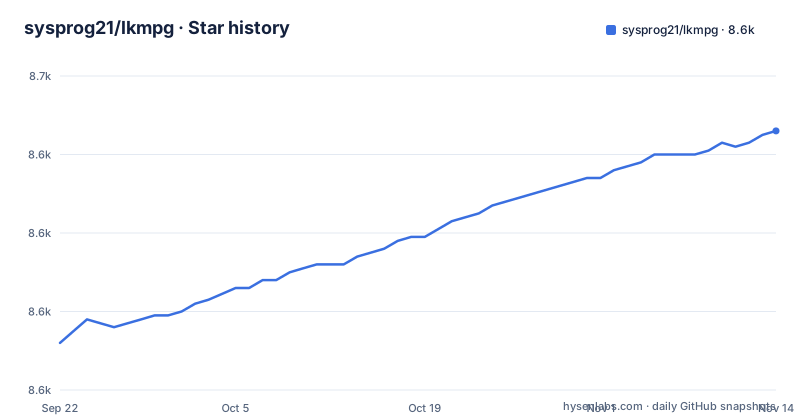
Star history
- sysprog21/lkmpg8,646 ★ · +54
| Repository | 2026-09-22 | 2026-11-14 |
|---|---|---|
| sysprog21/lkmpg | 8.6k | 8.6k |
54 Stars in the last 53 days, measured from the daily GitHub snapshot. Compare with other projects
Editorial analysis
make all stops with one line when latexmk is missing
The PDF target is four lines long and the first one is a guard rather than a build step. The top of the Makefile looks like this:
PROJ = lkmpg
all: $(PROJ).pdf

$(PROJ).pdf: lkmpg.tex
	@if ! hash latexmk; then echo "No Latexmk found. See https://mg.readthedocs.io/latexmk.html for installation."; exit 1; fi
	rm -rf _minted-$(PROJ)
	latexmk -shell-escape lkmpg.tex -pdf
The hash test does not look for the program on your PATH so that it can install it, it only checks whether latexmk is resolvable at all, and if it is not, the build prints the message above and exits 1 before touching anything. It is a hard stop rather than a warning. Once the guard passes, the target removes the minted cache directory and hands the document to latexmk with --shell-escape and -pdf. The shell escape flag is required because minted runs external highlighters, which is also why the prerequisite list later mentions Pygments. The dependency is only lkmpg.tex, so editing a chapter rebuilds the whole PDF rather than a page range.
The HTML target drags in a font file, the example sources, and an inline Python fixup
make html is the heavier of the two build targets, and its dependency line shows why. It waits on lkmpg.tex, html.cfg, assets/Manrope_variable.ttf, and a wildcard over examples/*.[ch] plus examples/other/*.[ch], so a change to any C file in the tree can invalidate the HTML output even though the HTML is mostly prose. The target then runs sed to turn every tab in lkmpg.tex into four spaces and writes the result to lkmpg-for-ht.tex. After make4ht emits the HTML, an inline python3 -c script rewrites two things: it rescales the padding inside spans of class ecrm-0500 from monospace to proportional width using a factor of 4/7, and it strips a newline that lands before a closing span. Those are cosmetic repairs to highlighted code blocks, which means line numbers in the rendered listings depend on a patch applied outside TeX. The target finishes by symlinking html/index.html to the generated file and copying the variable font next to it.
The prerequisite commands install very different amounts of TeX per distro
Generating the book needs TeXLive, or MacTeX on macOS, and the three supported package managers are given three different recipes:
# Debian / Ubuntu
$ sudo apt install make texlive-full

# Arch / Manjaro
$ sudo pacman -S make texlive-binextra texlive-bin

# macOS
$ brew install mactex
$ sudo tlmgr update --self
The Debian line asks for texlive-full, which is the whole distribution and is a multi-gigabyte install. The Arch line names two narrower packages instead. What you get in either case has to be enough for latexmk, make4ht, and minted, and the project treats latexmk as the piece it expects to find already on your machine, pointing at an external installation guide otherwise. Two follow-on gaps are named rather than solved: Pygments may not be pre-installed on macOS, and make4ht is required by the html target without a matching note about installing it. On macOS the second line, sudo tlmgr update --self, updates the TeX Live package manager itself.
The container replaces the install step only, not the build
The recommended alternative to installing TeX by hand is the published image, and the reasoning given is dependency parity rather than speed:
# pull docker image and run it as container
$ docker pull twtug/lkmpg
$ docker run --rm -it -v $(pwd):/workdir twtug/lkmpg
Two things follow from those flags. The --rm means the container is thrown away on exit, so nothing you install inside it survives, which is fine because the point is that you install nothing. The -v mounts your current directory at /workdir, so the checkout you just cloned is what gets built and every artifact lands back in your own tree rather than in an anonymous container filesystem. The README offers Docker as the alternative to installing the step-two prerequisites by hand. The same commands work with nerdctl, which is offered as a drop-in for anyone on containerd rather than Docker.
Two licenses sit in one tree, and they cover different halves of it
The repository carries both a LICENSE file and a separate GPL-2 file, because the prose and the code are under different terms. The book itself is a free work under the Open Software License, a copyleft license, and you may reproduce or modify it on those terms. The complementary sample code is licensed under GNU GPL version 2, described as the same license as the Linux kernel itself. The top-level entries explain why the code has to be there in a separate tree: alongside lkmpg.tex, contrib.tex, html.cfg, and the Makefile sit assets/, devtools/, examples/, lib/, scripts/, and a .ci/ directory next to .github/. The examples directory is a substantial body of code in its own right, carrying its own Makefile, its own .clang-format, and source files named for what they demonstrate, from hello-1.c through hello-5.c up to chardev.c, chardev2.c, dma.c, devicetree.c, blkram.c, dht11.c, and the synchronization set example_mutex.c, example_atomic.c, example_spinlock.c, example_rwlock.c, example_rcu.c, and example_tasklet.c. Copying one of those files into your own project puts your project under GPL-2, which is the practical consequence of the split.
make all builds the book and never compiles the modules inside it
The top-level Makefile has exactly four targets, all, html, indent, and clean, and none of them build the C examples. The only one that touches that directory is indent, which recurses:
indent:
	$(MAKE) -C examples indent
So the example kernel modules are inputs to the book, as listings that get highlighted and typeset, and not outputs you get from running make at the top. examples/Makefile is a separate build system that you enter yourself, which means a reader who wants a loadable module rather than a page about one has to change directory and figure out that second build on their own. The clean target has the same one-sidedness: it removes *.dvi, *.aux, *.log, *.ps, *.pdf, *.out, the bibliography artefacts, and the html directory, and it does not recurse into examples/. Anything you compile there survives a clean at the top level. The html target is the exception that proves the pattern, since its wildcard dependency list makes every example C file a reason to rebuild the HTML.
The examples target 5.x and 6.x, and the prebuilt devtools tag names one kernel
The project's own claim is narrow and worth repeating exactly: working examples for recent 5.x and 6.x kernel versions. Most other copies of this book on the web still describe 2.6.x kernels, which is the gap this repository exists to close, and it does not go further than that in either direction. It is not a reference for the internals of whatever kernel happens to be running on your machine, and it does not carry the source of the kernel to read alongside the chapters. The prebuilt side has the same shape. The releases include an artifact named devtools-v6.12.6-x86_64, tagged for kernel 6.12.6 on x86_64, alongside a plain latest tag for the book itself. The last commit to master landed on 2026-09-07, so the tree does still move.
Editorial conclusion
This suits a reader who wants to read and build the guide on 5.x or 6.x kernels and can spare a full TeX Live or a container runtime for it. It does not suit anyone who needs a reference for the internals of the exact kernel running on their box, and it will not compile the example modules for you. Before building, read the OSL-3.0 and GPL-2 split before lifting any example into your own tree.
Frequently asked questions
Is kernel programming difficult?
The project does not make that claim either way. What it states is that the guide has been around since 2001 and that most copies of it on the web only describe old 2.6.x kernels, so the problem being addressed is staleness, solved by working examples for recent 5.x and 6.x kernel versions.
What did Linus Torvalds use to write the Linux kernel?
That history is not covered in this repository. The code here is example module source, with character device, synchronization, DMA, device tree, and block RAM examples sitting under examples/ next to a Makefile of their own, intended to be read against the chapters.
How do I see my kernel?
The README does not cover inspecting a running kernel. It does pin down which kernel its prebuilt tooling targets, since the devtools release artifact is named devtools-v6.12.6-x86_64, meaning kernel 6.12.6 on x86_64.
How does kmalloc work?
The example set includes files named for the subjects it covers, such as example_mutex.c, example_atomic.c, example_spinlock.c, example_rwlock.c, example_rcu.c, and example_tasklet.c, plus blkram.c. The README does not describe how kmalloc works.
Official sources
Add this badge to your README
If you maintain this project, the badge below links readers to this analysis and shows its maintenance status from the daily GitHub snapshot. Paste the markdown into your README; add ?metric=license or ?metric=stars to the image URL for a different field.

[](https://hysenlabs.com/projects/sysprog21-lkmpg)Star history chart for your README
[](https://hysenlabs.com/projects/sysprog21-lkmpg)Was this useful?