Owl UI Framework: Installation, Reactivity, and Component Design
OWL: A web framework for structured, dynamic and maintainable applications
At a glance
- What is it?
- Owl is Odoo's TypeScript UI framework for building component-based applications with signals, XML templates, plugins, and asynchronous rendering. It is small and dependency-free, but the current 3.0 release remains alpha and its API may change.
- Who is it for?
- Application teams that want Odoo's component model, XML templates, and signal-based state should first build a small proof of concept using the online playground and a pinned release. Projects that require a documented stable API should avoid depending on Owl 3.0 while it is alpha.
- Can I use it commercially?
- Check first. The repository uses a licence we do not classify automatically, so read its LICENSE file before any commercial use.
- Is it still maintained?
- Yes. The repository last received commits 5 days ago.
- What is it written in?
- Mainly TypeScript, according to GitHub's language statistics.
Answers come from the project's GitHub data, last synced on November 6, 2026, and from our analysis. They are not legal advice.
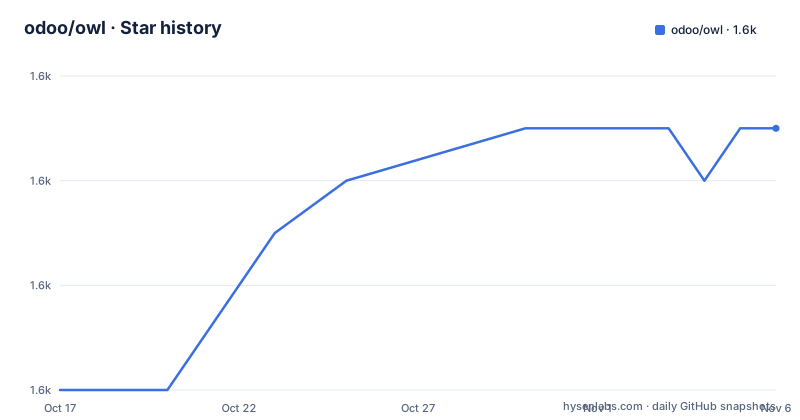
Star history
- odoo/owl1,601 ★ · +5
| Repository | 2026-10-17 | 2026-11-06 |
|---|---|---|
| odoo/owl | 1.6k | 1.6k |
5 Stars in the last 20 days, measured from the daily GitHub snapshot. Compare with other projects
Editorial analysis
Owl's Place in Odoo Web Application Development
Owl addresses the problem of organizing browser interfaces that contain substantial interactive state. It is intended for developers building structured applications, including maintainers of the Odoo web client, but the README also positions it for smaller projects and prototypes. The repository identifies TypeScript as its primary language, while the public package exposes JavaScript-oriented examples. Its central design combines class-based components, XML templates, signal-based state, plugins, and asynchronous rendering rather than requiring developers to coordinate page elements through direct DOM mutation.
The package is described as approximately 30 KB gzipped and has zero dependencies. That is a useful deployment constraint for teams evaluating a UI framework, although the README does not provide independent bundle measurements for a particular application. The documentation also says that Owl powers Odoo's web client. This gives the project a production context, but the documentation does not explain which Odoo versions use which Owl versions, so compatibility with a specific Odoo release should not be inferred.
Owl is a web UI framework, not a complete application stack. The README does not say that it supplies routing, server communication, authentication, forms, database access, or deployment infrastructure. Those concerns may come from the host application or another layer. Owl's scope is narrower: component structure, template rendering, reactive state, plugins, and the browser-side runtime.
Signals, Computed Values, and Owl's Render Cycle
The quick example shows Owl's state flow through `signal.Array`, `computed`, template expressions, and `mount`. A component defines `todos` as a signal-backed array. Its `remaining` computed value filters that array and counts incomplete entries. The XML template reads both `this.todos()` and `this.remaining()`, while the event handler mutates the array with `this.todos.push`. The README states that the interface reacts to those changes without manual subscription management.
This model has a useful division of responsibility. State is represented by signals, derived data is expressed through computed values, and components own the interaction methods that change state. Templates consume the resulting values using call expressions. There is no requirement in the example to subscribe to changes, call a render function, or query the affected list element after every update.
Owl also describes its rendering mode as asynchronous and concurrent. The documentation does not explain scheduling details, cancellation behavior, or the precise concurrency guarantees, so applications with complex asynchronous transitions need the full documentation rather than relying on the label alone. Still, the architecture clearly treats rendering as framework-managed work instead of an entirely synchronous sequence of DOM edits.
Plugins extend the same composition model. According to the README, they provide type-safe sharing of state and services. The project therefore offers more than local component reactivity, but the quick example does not show plugin registration or lifecycle behavior. That omission makes plugins a documentation checkpoint for teams whose architecture depends on shared application services.
Class Components and XML Template Boundaries
Owl components are ES6 classes that extend `Component`. A class can declare a static XML template and keep event handlers as methods, while signals and computed values remain ordinary class fields. This structure is visible in `TodoList`, where `template`, `todos`, `remaining`, and `onKeydown` are declared together. It gives teams an explicit location for presentation and interaction logic without introducing a separate component syntax in the example.
The template language covers conditional rendering through `t-if`, collection rendering through `t-foreach`, identity through `t-key`, attributes through `t-att-class`, form binding through `t-model`, and output through `t-out`. These constructs map directly to the todo example. Each item has a `t-key` value based on `todo.id`, the checkbox updates `todo.done`, and completed items receive a CSS class.
This is less flexible than allowing arbitrary JavaScript syntax throughout a template, but it creates a constrained boundary between markup and application code. The documentation does not cover template debugging, compilation errors, custom components, slots, portals, accessibility behavior, or server-side rendering. The README recommends the interactive playground for guided examples, which is the documented path for learning features not shown in the quick start.
Installing Owl and Mounting the First Component
The README gives npm installation as the normal package-based route. The repository itself requires Node.js `>=20.0.0`, although that engine declaration belongs to the private `owl-monorepo` workspace rather than necessarily being a runtime requirement declared by `@odoo/owl`. If the goal is to contribute to or build the repository, Node.js 20 or later is the confirmed prerequisite. If the goal is only to consume the published package, the README does not state a separate Node.js requirement for application builds.
Install the published package with:
npm install @odoo/owlAfter installation, create a module that imports `Component`, `signal`, `computed`, `mount`, and `xml` from `@odoo/owl`. This is the import list used by the README's `TodoList` example:
import { Component, signal, computed, mount, xml } from "@odoo/owl";The component begins with a class extending `Component` and a static `xml` template. Its list state is declared as `signal.Array`, and `remaining` is derived from the current array contents:
class TodoList extends Component {
  static template = xml`
    <input placeholder="Add todo..." t-on-keydown="this.onKeydown"/>
    <ul>
      <t t-foreach="this.todos()" t-as="todo" t-key="todo.id">
        <li t-att-class="{ done: todo.done }">
          <input type="checkbox" t-model="todo.done"/>
          <t t-out="todo.text"/>
        </li>
      </t>
    </ul>`;
Continue the same class with the signal, computed value, and event handler from the README. `this.todos.push` adds an object when Enter is pressed with a nonempty input value. It also clears the input after insertion.
  todos = signal.Array([
    { id: 1, text: "Learn Owl", done: false },
    { id: 2, text: "Build something", done: false },
  ]);

  remaining = computed(() => this.todos().filter((t) => !t.done).length);

  onKeydown(ev) {
    if (ev.key === "Enter" && ev.target.value) {
      this.todos.push({
        id: Date.now(),
        text: ev.target.value,
        done: false,
      });
      ev.target.value = "";
    }
  }
}
Mount the completed component into the document:
mount(TodoList, document.body);The expected result is the README's todo interface: two initial items, a checkbox for each item, an input for adding another item, and remaining-item text that responds to the signal-backed state. The README also identifies the online playground as the recommended learning environment, with interactive examples, live editing, guided tutorials, reactivity, components, and plugins.
Owl 3.0 Alpha Stability and Repository Maintenance
The README explicitly labels Owl 3.0.0 as alpha and warns that its API and features may change without notice. The listed releases, `v3.0.0-alpha.47`, `v3.0.0-alpha.48`, and `v3.0.0-alpha.49`, are all prerelease versions rather than evidence of a stable 3.0 contract. Teams should pin a specific package version and review release changes before upgrading an application.
Maintenance information comes from the repository metadata. It is not archived, and the last push was on 2026-10-15. That is recent activity, but it says nothing about the stability of the current public API. Repository structure also separates concerns into `packages/owl-core`, `packages/owl-compiler`, `packages/owl-runtime`, and `packages/owl`, while the root workspace includes the playground. Contributors therefore face a multi-package build rather than a single-source demonstration project.
The root package defines separate build commands for core, compiler, runtime, the main package, bundle output, type declarations, devtools, documentation, and the playground. Upgrading from source can involve rebuilding several workspaces, regenerating types, or updating devtools. The README also points to Owl 2 documentation on the `owl-2.x` branch, which is relevant to teams maintaining an older integration, although the repository does not provide migration instructions from Owl 2 to Owl 3.
The README badge and prose identify LGPL v3, while the repository metadata classifies the top-level license as a custom license that GitHub cannot classify. This discrepancy should be resolved by reading the repository's `LICENSE` file for the exact revision being deployed. It is a licensing verification point, not legal advice.
Direct DOM Code as an Alternative to Owl
A real alternative is to use framework-free browser DOM code for a small interface. That approach can create elements, attach event listeners, read input values, and update text or attributes directly. For a short-lived prototype with little shared state, it avoids adopting Owl's component, signal, compiler, and plugin conventions. The todo example shows the corresponding Owl path: a class owns a signal array, a computed value derives the count, and the XML template declares the relationship between state and visible elements.
The trade-off appears as application structure accumulates. Direct DOM code gives complete control over the exact mutation, but state consistency, repeated rendering, and component reuse must be handled by the application author. Owl adds framework conventions and a compiler-oriented template model. The repository does not publish a direct comparison with React, Vue, Angular, or another named framework, so claims about migration effort or application size against those projects would be speculative.
Owl is also the wrong choice when a production application needs a stable 3.0 API immediately, because the README warns that API changes may occur without notice. It is a poor fit for teams unwilling to adopt XML templates or class-based components. For teams already aligned with Odoo's frontend model, however, the documented component and reactivity model removes much of the manual coordination from small interactive interfaces.
Editorial conclusion
Application teams that want Odoo's component model, XML templates, and signal-based state should first build a small proof of concept using the online playground and a pinned release. Projects that require a documented stable API should avoid depending on Owl 3.0 while it is alpha. Before adoption, verify the exact `LICENSE` file, confirm that Node.js 20 or later is available for repository-level development, and check whether the component and plugin patterns fit the application rather than relying only on the quick example. For Owl 3.0, compatibility is the decisive boundary.
Frequently asked questions
How do I install Owl?
The README directs application developers to install the published package with `npm install @odoo/owl`. Repository development is a separate path, and the root `package.json` requires Node.js `>=20.0.0`.
What is the simplest Owl component example?
The README defines a `TodoList` class using `Component`, an `xml` template, `signal.Array`, `computed`, and an `onKeydown` method. It finishes by mounting the class into `document.body` with `mount`.
Is Owl 3.0 stable?
No. The README labels Owl 3.0.0 as an alpha release and states that its API and features may change without notice. The listed 3.0 releases all use alpha version identifiers.
Official sources
Add this badge to your README
If you maintain this project, the badge below links readers to this analysis and shows its maintenance status from the daily GitHub snapshot. Paste the markdown into your README; add ?metric=license or ?metric=stars to the image URL for a different field.

[](https://hysenlabs.com/projects/odoo-owl)Star history chart for your README
[](https://hysenlabs.com/projects/odoo-owl)Was this useful?