OGAM: on-device AI in a React Native app at version 0.0.111, with a Pro tier whose price climbs on purpose
The Swiss Army Knife of Offline AI. Chat, see, speak, and generate images on your phone or Mac — GGUF LLMs, vision, Whisper speech-to-text, Stable Diffusion, tool calling, and local-network servers. Runs on your CPU, GPU, or NPU. No account, no API key, zero data leaves your device.
At a glance
- What is it?
- Off Grid AI runs language, vision, image, and speech models on a phone or Mac with no account and no API key. Its README is unusually candid about what breaks, naming the quant formats its experimental NPU path mishandles and the models that come out garbled. The build scripts are less candid: the iOS lint target cannot fail, and the test command forces an exit while asking for handle detection.
- Who is it for?
- Use it if you need local models on a phone and can accept the sharp edges, which the project itself documents rather than hides: the Hexagon NPU path is experimental and silently falls back for K-quants, and the Pro tier exists for the parts the free app leaves out. Three things to verify before relying on it.
- Can I use it commercially?
- Yes. MIT is a permissive licence: you can use, modify and sell software built on it, as long as you keep its copyright and licence notices.
- Is it still maintained?
- Yes. The repository last received commits 3 days ago.
- What is it written in?
- Mainly TypeScript, according to GitHub's language statistics.
Answers come from the project's GitHub data, last synced on November 14, 2026, and from our analysis. They are not legal advice.
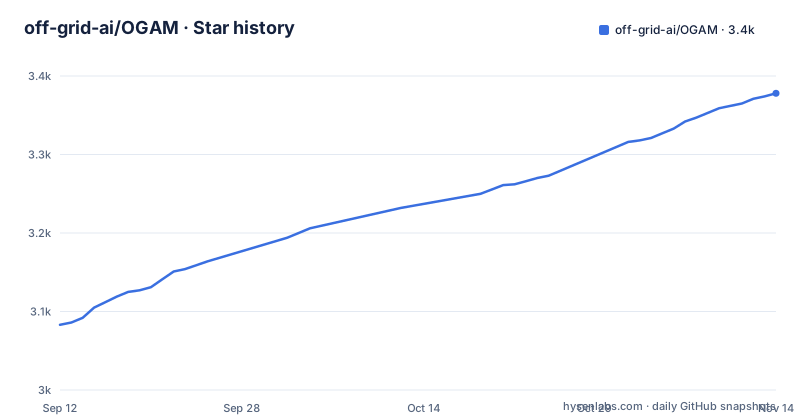
Star history
- off-grid-ai/OGAM3,378 ★ · +295
| Repository | 2026-09-12 | 2026-11-14 |
|---|---|---|
| off-grid-ai/OGAM | 3.1k | 3.4k |
295 Stars in the last 63 days, measured from the daily GitHub snapshot. Compare with other projects
Editorial analysis
A React Native app with native lint on both platforms
The application is React Native, and the repository carries the whole toolchain for both platforms rather than a wrapper around a native app.
The JavaScript side is App.tsx, index.js, app.json, a Babel config and a Metro config, with Jest configured through jest.config.js and jest.setup.ts and the tests in a directory at the root. The native sides are real: Android has its own directory and its own Gradle lint task, run as :app:lintDebug, and iOS has its own directory with SwiftLint driven from a script.
The device tests are not Jest. They are run with the Node test runner over .mjs files under a device directory and a scripts/physical-sync directory, and there are separate targets for iOS knowledge sync, mesh pairing, an Android device parser and generated image sync. Release work goes through fastlane, and the Ruby files at the root, a Gemfile and a Gemfile.lock, are the CocoaPods side of the iOS build rather than anything server side.
The manifest declares the package as private at version 0.0.111, which is worth noticing: a three-digit patch number, still below 1.0, on an app that already sells a paid tier.
The Pro price climbs as people join, and the readme says so
The paid tier is described in the README's opening third, before any feature is listed.
It is positioned as optional and additive: a voice that talks back, personas you shape, and the tools to draft real actions you approve. The price is given twice, once as $69 for life or $49 per year, and once with the mechanism spelled out: $69 once and it is yours forever, with the note that the price climbs as more people join and never down.
That is an unusual pricing statement to find in a readme, and it is the kind of thing a potential buyer should notice before buying rather than after. It also means the price a reader sees today is not the price a later reader will see.
Two further details. One licence covers both your phone and your Mac, and the desktop half lives in a separate repository whose releases are linked from the same paragraph. And the payment page is on a different domain from the product homepage named at the top, one being the domain in the project metadata and the other the domain in the purchase link.
Pro adds four things, and one of them puts a second device on your network
The additions are listed as four bullets, and each names the free behaviour it changes.
Voice mode is the first. The free app transcribes your speech; Pro adds on-device Kokoro text-to-speech so the assistant talks back, which the readme frames as running the whole thing hands-free. The note that the voice runs in your phone's RAM connects it to the memory limits described later.
Custom personas give each assistant its own system prompt, voice and persistent memory, so it stays in character across conversations.
Draft, then approve is the third: connect Calendar, email, and MCP servers such as Linear, Notion and GitHub, and the assistant drafts the reply or files the ticket and waits. The README's emphasis is that nothing sends without your tap, which is a guardrail statement rather than a mechanism description.
Personal Mesh sync is the fourth, and it is the one with a network surface. Your phone and your Mac share chats, files and settings over your own network, and the readme states there is no relay, pointing at a Personal Mesh guide in the docs directory.
The NPU path is labelled experimental and lists three ways it fails
The acceleration section is the most useful paragraph in the document, because it separates what works from what does not.
The baseline is CPU text generation at 15 to 30 tokens per second on flagship devices. Adreno GPUs through OpenCL are claimed at 20 to 40 tokens per second on a Snapdragon 8 Gen 2 or later, and Apple Silicon uses Metal. The app detects the hardware and defaults to the fastest backend that works, with an override in Settings.
The Hexagon NPU on Snapdragon is described as present but marked experimental, and three reasons are given. It only accelerates the Q4_0 and Q8_0 quant formats. A K-quant silently falls back to the CPU, with the word silent doing real work in that sentence. And some model architectures come out garbled on it.
One usability decision follows from those limits: models that can use the GPU or NPU are badged in the model list, so the quant format can be chosen before a several-gigabyte download rather than after it.
Three memory policies, a visible eject, and a chat that admits eviction
Memory is treated as a first-class part of the interface rather than as a background failure.
The framing is a phone has finite RAM and a 4GB model does not politely share it. The model manager shows what is resident at that moment and what each model is costing, with a per-model eject control.
Loading is a policy choice with three named settings. Lean keeps one model in memory at a time. Balanced co-resides the models that fit and swaps the ones that do not. Aggressive commits a larger share of RAM so that bigger models load at all.
Two escape hatches are documented. If a load is refused, a Load Anyway control overrides the refusal, described as your device, your call. And when a model gets evicted mid-conversation, the chat says so and offers to bring it back, rather than failing silently.
The performance table supports the same framing by refusing to give mid-range numbers where none exist. Text generation on the GPU has a flagship figure and an em dash for mid-range, and image generation on the NPU is the same shape, while CPU text, CPU image and vision all have both columns.
Web search is a built-in tool inside an app that promises nothing leaves
The headline claim appears three times: no account, no API key, zero data leaves your device, and for voice, no audio ever leaves your phone.
Three features sit next to that claim and deserve to be read with it.
The first is the built-in tool set. Models that support function calling can use web search, calculator, date and time, device info, and knowledge base search, with an automatic tool loop that has runaway prevention. Web search is the one of those five that inherently involves the network.
The second is Remote LLM Servers. The app connects to any OpenAI-compatible server on your local network, naming Ollama, LM Studio and LocalAI, discovers models automatically, streams over SSE, and stores API keys in the system keychain. Inference then happens wherever that server is, not on the phone.
The third is Personal Mesh sync, which shares chats, files and settings between two of your own devices and is stated to have no relay.
None of these contradicts the stated design, since a local network is not the internet. But an offline claim and a web search tool in the same product is a distinction a reader has to make for themselves, not one the readme draws.
The iOS lint step cannot fail
Three scripts in the manifest are worth reading as a group, because each one quietly changes what a passing run means.
The iOS lint is the clearest case:
"lint:ios": "swiftlint lint --quiet || echo 'SwiftLint not installed, skipping iOS lint'"SwiftLint runs, and if it exits non-zero, or is not installed at all, the command still succeeds because of the fallback on the right of the operator. In a lint aggregate that chains the JavaScript lint and the Android Gradle lint before it, a missing or failing SwiftLint produces a green run.
The test script has a related tension:
"test": "jest --coverage --forceExit --detectOpenHandles && npm run test:android && npm run test:ios"Handle detection and a forced exit are opposite instructions in one command line. The detection is there to report work that outlives a test, and the force exit ends the process regardless.
The third is the prepare hook, which runs husky and then, inside the pro directory, sets a separate git hooks path, discarding any error from that attempt.
Dependencies are patched after install, and the debug build has its own app id
The install step is not just an install step:
"postinstall": "patch-package"A patches directory sits at the root, so the dependency tree is modified in place after every install rather than being consumed as published. Anyone who installs this project gets a different node_modules than npm would produce, and anyone auditing the lockfile is looking at the pre-patch state.
The Android script carries its own identity:
"android": "react-native run-android --mode=debug --appId ai.offgridmobile.dev"That debug app id is not the one the store listings use, so a debug build installs alongside the released app rather than replacing it. The same pair of flags appears again in the end-to-end build script, which means the distinction is deliberate rather than accidental.
The rest of the root is quality tooling in unusual quantity: a dependency-cruiser config, a knip config for unused code, two Sonar property files, a codecov config, a CodeRabbit config, EditorConfig and Prettier configs, a SwiftLint config, a Watchman config, husky hooks, and three agent-facing files, being AGENTS.md, CLAUDE.md, and a .claude directory, plus an altstore-source.json for a distribution channel outside the store, a .gitmodules file, and directories named rules.md and FAST_FOLLOW.md that the readme never mentions.
Editorial conclusion
Use it if you need local models on a phone and can accept the sharp edges, which the project itself documents rather than hides: the Hexagon NPU path is experimental and silently falls back for K-quants, and the Pro tier exists for the parts the free app leaves out. Three things to verify before relying on it. The version is still 0.0.111, so treat the manifest as the source of truth rather than the release name. The price of Pro is stated to rise as more people join, so buying later costs more. And if you intend to contribute, note that the iOS lint step reports success even when SwiftLint is missing.
Frequently asked questions
Is there an AI app that works without internet?
This repository is built for that case. It is a React Native app described as a complete offline AI suite covering text generation, image generation, vision, voice transcription, tool calling and document analysis, with no account and no API key, and the stated design that zero data leaves the device. Its remote server support is scoped to OpenAI-compatible servers on your own local network.
Is there a free offline AI app for Android?
There is a free app and an optional paid tier described as additive, at $69 once or $49 per year, with the readme noting the one-time price climbs as more people join. What Pro adds is on-device text-to-speech, custom personas, action drafting connected to your own calendar, mail and MCP servers, and sync between phone and Mac. The Android build is distributed through Google Play.
Does Off the Grid use AI?
That question is about a mobile game rather than this repository, which contains an on-device AI application. What it runs is GGUF language models including Qwen 3, Llama 3.2, Gemma 3 and Phi-4, on-device Stable Diffusion for images, SmolVLM and Qwen3-VL for vision, Whisper for transcription, and a bundled MiniLM model for embeddings.
What are the top 5 AI applications?
Nothing here ranks applications. The capability table names six areas, with onboarding, attachments and tool calling listed beside text generation, image generation and vision, and the rest of the readme covers model loading policies, a download manager, remote servers on a local network, and a project knowledge base backed by on-device embeddings in SQLite.
Does Off Grid AI send my data anywhere?
The stated design says no: no account, no API key, zero data leaves the device, and no audio ever leaves the phone. Three features are worth reading alongside that. Built-in tools include web search, remote inference is possible against any OpenAI-compatible server on your local network with keys held in the system keychain, and Personal Mesh sync moves chats and files between your own two devices with no relay.
Official sources
Add this badge to your README
If you maintain this project, the badge below links readers to this analysis and shows its maintenance status from the daily GitHub snapshot. Paste the markdown into your README; add ?metric=license or ?metric=stars to the image URL for a different field.

[](https://hysenlabs.com/projects/off-grid-ai-ogam)Star history chart for your README
[](https://hysenlabs.com/projects/off-grid-ai-ogam)Was this useful?