OfficeDex is a desktop client for a binary it pins, and its manifest trails the newest release tag
OfficeDex is the first Al-Native VibeOfficing platform for documents, slides, and spreadsheets
At a glance
- What is it?
- A Wails and Go desktop app that turns a sentence into a native Word, PowerPoint or Excel file, with the pitch that there is no intermediate HTML in the pipeline. The repository is more interesting than that pitch: it pins a sibling project's binary at a fixed version, injects its own version from a JavaScript manifest at build time, keeps its tests at the root named after user-visible behaviours, and treats licence bundling and code signing as build steps.
- Who is it for?
- OfficeDex suits someone who wants finished office files with charts and layout rather than a document drafted in a chat window, and the local-first arrangement with a bring-your-own model is the part that holds up under scrutiny. It is a poor fit if you need reproducible output, because the only numbers on the page are a typical page count and a typical generation time with no methodology behind them, and the comparison against web assistants is self-assessment.
- Can I use it commercially?
- Yes, with conditions. GPL-3.0 is a copyleft licence: if you distribute software that includes it, you must release that software's source code under the same licence. Running it internally without distributing it does not trigger that obligation.
- Is it still maintained?
- Yes. The repository last received commits 10 days ago.
- What is it written in?
- Mainly Go, according to GitHub's language statistics.
Answers come from the project's GitHub data, last synced on November 24, 2026, and from our analysis. They are not legal advice.
Star history
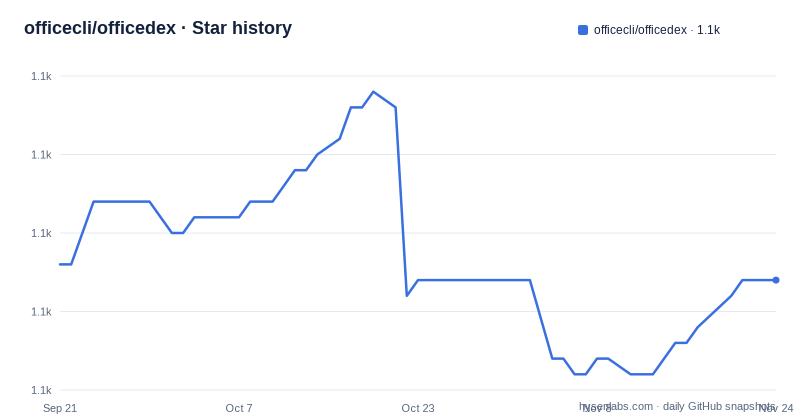
- officecli/officedex1,062 ★ · -1
| Repository | 2026-09-21 | 2026-11-24 |
|---|---|---|
| officecli/officedex | 1.1k | 1.1k |
-1 Stars in the last 64 days, measured from the daily GitHub snapshot. Compare with other projects
Editorial analysis
The manifest calls the app a client for someone else's binary
The repository presents OfficeDex as a platform, and the package manifest describes it as something narrower: a Wails v2 and React 19 client for OfficeCLI. That distinction runs through the whole build. A dedicated field, `officecliVersion`, pins the sibling binary at 0.2.121, and two prefetch scripts run before development and before any build, one fetching the OfficeCLI binary and one staging a PowerPoint runtime. Neither is a library dependency; both are external artifacts downloaded by Node scripts, which means the build reaches outside the repository for something the application cannot run without. Settings then offer a custom OfficeCLI binary path for developers, and the page mentions a hosted runtime as the alternative to bringing your own. What the documentation never does is explain what OfficeCLI is. It appears as a binary to fetch, bundle, sign, upgrade and override, and the homepage is the OfficeCLI site rather than a documentation page. The repository description also spells its own category differently from the page, using a lowercase letter in the second character of the phrase the page spells with a capital I.
The version is injected from a JavaScript manifest into the Go binary
There is no version constant in the Go source, because the build writes it in. The build script runs wails build with a linker flag that sets `main.appVersion` from the version field in `package.json`, read at build time rather than compiled in. That is a clean single source of truth, and it has an observable consequence: the manifest reads 0.6.8 while the newest release tag is v0.6.9, published weeks after the manifest version was set. So the tag and the string baked into the binary disagree, and nothing in the build fails when they do, because the build has no idea a tag exists. A second build variant exists alongside it, using the `officedex_demo` build tag and the same version injection, which is how a demo build is produced from the same source without a separate branch. That tag is not incidental: the repository root carries two test files named for the demo flow, so the demo path is a tested code path rather than a packaging afterthought.
The Go module is named officedex and pulls three direct dependencies
The module line is just `module officedex`, with no host and no path, even though the repository lives at a GitHub URL and the manifest declares that URL as its repository field. A module named this way cannot be fetched by import path, which is fine for an application and would be wrong for a library. The direct requirement list is short: a UUID generator, Wails v2, and `modernc.org/sqlite`, the pure-Go SQLite implementation, which is what lets the app avoid cgo entirely. The indirect list is where the platform story appears. Three separate notification stacks are pulled in, one for Windows toasts, one over D-Bus for Linux, and one through OLE, matching a repository root that holds a notifications test. A Windows webview library and a Windows loader cover the webview side on that platform. `pkg/browser` is there to open URLs in the system browser, which is what a provider login flow needs. One entry is an odd fit: a transitive HTML-to-text converter, in a product whose central claim is that no intermediate HTML exists anywhere in the pipeline.
The tests sit at the repository root and their names are the feature list
There is no tests directory for the Go code. Instead the root, next to `main.go` and `app.go`, holds around seventeen test files whose names read as a changelog. Cancel persistence, plan recovery, custom provider login, image watermarking, notifications, runtime snapshot, PowerPoint modification through the embedded editor, real end-to-end runs against a real client, and the demo flow twice over. Two behaviours in that list are the interesting ones. Cancel persistence means a cancelled generation is remembered rather than lost, and plan recovery means an interrupted plan resumes. Preview trusted roots is a security name: the inline preview is restricted to a set of trusted paths, and there is a test asserting it. Platform differences are handled the idiomatic way, by filename suffix, with macOS-specific files for the launcher and the updater sitting beside a generic updater for everything else. Browser-level tests live separately, with a Playwright config and an `e2e/` directory alongside the Go suite.
Inline preview renders four formats without Office, from three JavaScript libraries
The preview is the feature that removes the round trip to Word, and it is implemented in the frontend rather than the Go side. Three libraries do the rendering: one for Word documents, one for PDF, and one for spreadsheets, and the claim is that DOCX, PPTX, XLSX and PDF all preview inside the window with no Office installation required. That is also the largest local attack surface in the app, because arbitrary documents from an unknown source are being parsed and rendered by the user's own machine rather than by a remote service. The repository root answers for it in the way you would hope: there is a test named for preview trusted roots, which implies the renderer will not open anything outside a trusted set. The settings screen adds a second control over what runs locally, since the OfficeCLI binary path is configurable and the runtime can be checked and upgraded in place, with the page noting it also works offline against a local binary.
One example carries every number on the page
There is a single worked example, and it is where the quantitative claims live. The input is a sentence asking for a third-quarter sales analysis focused on the eastern region, with year-over-year and quarter-over-quarter charts, aimed at a chief financial officer. The stated output is a Word file named `Q3-East-Sales.docx` at twelve pages, containing four data charts and three trend analyses, with typical generation given as 45 to 90 seconds and a one-click inline preview. Every figure is hedged as typical, and none has a methodology: no hardware, no model, no token count, no repeat count. The filename is also illustrative rather than literal, since a real output would need its own naming rules. Beside this, the comparison table sets the app against web assistants and command line tools across seven dimensions, from native feel to data sovereignty, and every cell in the OfficeDex column is a checkmark with no measurement behind it. Read the table as a statement of intent rather than as a result.
Licence compliance and code signing are build steps, not paperwork
The project is GPL-3.0, recorded as `GPL-3.0-only` in the package manifest, and the root carries a licence file, a NOTICE file and a separate third-party notices file. That trio is not decorative, because the build has scripts that act on it. Two bundling scripts walk the built application and collect licences into the packaged output, one targeting the macOS application bundle and one targeting the Windows build directory. A third script bundles the OfficeCLI binary and then code-signs it, so a downloaded third-party executable is signed as part of producing a macOS build rather than shipped unsigned. This is what a GPL desktop distribution actually has to do, and it is unusual to see it expressed as four named npm scripts rather than a paragraph in a contributing guide. It also means a build cannot be reproduced from the source tree alone: the prefetch steps fetch the pinned runtime first, so the network is part of the build.
Windows downloads its runtime on first launch, macOS ships it bundled
The installer table covers two platforms and splits macOS by architecture, with separate disk images for Apple Silicon and Intel, both installed by dragging into Applications, plus a Windows setup executable for Windows 10 and 11. The behaviour after install differs, and the table says so in a note. On Windows, first launch auto-downloads the OfficeCLI runtime; on macOS it is already inside the bundle, which is consistent with the macOS-only code-signing step in the build. Either way the runtime is a moving part the user can update in place, and the settings screen lets a developer substitute their own binary path. No Linux installer is listed anywhere in the table. That is worth noting against the dependency list, which pulls in D-Bus and Linux notification support, so the code compiles for a platform the release page does not offer. The root also holds directories with no counterpart in the user-facing story, among them a marketing folder, a third-party folder, and an examples folder containing image templates.
Editorial conclusion
OfficeDex suits someone who wants finished office files with charts and layout rather than a document drafted in a chat window, and the local-first arrangement with a bring-your-own model is the part that holds up under scrutiny. It is a poor fit if you need reproducible output, because the only numbers on the page are a typical page count and a typical generation time with no methodology behind them, and the comparison against web assistants is self-assessment. Before building it, know three things: the manifest carries 0.6.8 while the newest release tag is v0.6.9, the Windows installer downloads its runtime on first launch while the macOS build bundles and code-signs one, and nothing on the page explains what OfficeCLI is, only how to fetch, bundle and override it.
Frequently asked questions
What is OfficeCLI and how do I install it?
This page does not explain it. OfficeDex treats OfficeCLI as a separate binary: the manifest pins `officecliVersion` at 0.2.121, a prefetch script fetches it before dev and build, macOS build steps bundle and code-sign it, and Settings accepts a custom binary path. Installation instructions for OfficeCLI itself are not given here.
Do I need Microsoft Office installed to use OfficeDex?
No. The inline preview renders DOCX, PPTX, XLSX and PDF inside the application using three JavaScript libraries, described as preview-able with no Office installation required.
Which platforms does OfficeDex ship an installer for?
macOS on Apple Silicon and macOS on Intel, as two separate disk image architectures, and Windows 10 and 11 as a setup executable. No Linux installer is listed, even though the Go dependencies include Linux notification support.
Which LLM providers can OfficeDex use?
The settings name OpenAI, Anthropic, Azure and self-hosted vLLM, and the comparison table claims any provider plus GUI configuration rather than a locked vendor. The page also offers a hosted runtime as an alternative to bringing your own model.
How long does OfficeDex take to produce a document?
The only timing figure given is a typical generation of 45 to 90 seconds, for one example prompt that yields a twelve-page Word file with four data charts and three trend analyses. No hardware, model or methodology is stated behind it.
Official sources
Add this badge to your README
If you maintain this project, the badge below links readers to this analysis and shows its maintenance status from the daily GitHub snapshot. Paste the markdown into your README; add ?metric=license or ?metric=stars to the image URL for a different field.

[](https://hysenlabs.com/projects/officecli-officedex)Star history chart for your README
[](https://hysenlabs.com/projects/officecli-officedex)Was this useful?