react-tagsinput: Customizable React Tag Entry
Highly customizable React component for inputing tags.
At a glance
- What is it?
- react-tagsinput is a controlled React component for entering, validating, removing, and formatting tags. It fits applications that need a tag editor with custom rendering, but its documentation does not cover installation or server-side rendering.
- Who is it for?
- Adopt react-tagsinput when a React application needs a controlled tag editor and can own the tag array, input presentation, and validation rules. Do not choose it for a project that needs documented installation steps, accessibility guarantees, asynchronous validation, or a complete accessibility audit.
- Can I use it commercially?
- Yes. MIT is a permissive licence: you can use, modify and sell software built on it, as long as you keep its copyright and licence notices.
- Is it still maintained?
- Yes. The repository last received commits 10 days ago.
- What is it written in?
- Mainly JavaScript, according to GitHub's language statistics.
Answers come from the project's GitHub data, last synced on November 6, 2026, and from our analysis. They are not legal advice.
Star history
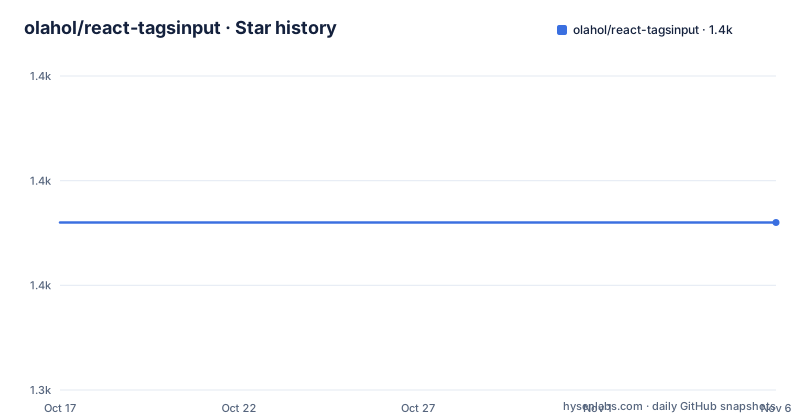
- olahol/react-tagsinput1,356 ★ · +0
| Repository | 2026-10-17 | 2026-11-06 |
|---|---|---|
| olahol/react-tagsinput | 1.4k | 1.4k |
0 Stars in the last 20 days, measured from the daily GitHub snapshot. Compare with other projects
Editorial analysis
What react-tagsinput Solves
react-tagsinput addresses the interface problem of collecting multiple short values in one React form field. Its intended users are developers building editors, metadata forms, filtering controls, or configuration panels where each entered value should become a removable tag. The component keeps the tag collection separate from the text currently being typed, then combines the existing tags and the active input into one component.
The integration is controlled rather than self-contained. The README requires both `value`, an array of tags, and `onChange`, a callback that receives the new tag array. It also reports `changed` and `changedIndexes`, which can help a parent application update dependent state without searching for every difference itself. That contract suits applications that already keep form values in React state.
The component covers more than the basic add and remove cycle. Applications can limit the number of tags, reject duplicates, validate each value, define custom confirmation keys, split pasted text, and replace the visual representation of tags, the input, or the complete layout. This makes it a building block for a product-specific control rather than a fixed search-filter interface. It does not, however, provide a model for loading saved tags, submitting an asynchronous request, or returning server-side validation errors. The README does not document those behaviors.
Controlled State and Change Data Flow
The documented example stores the tag array with React's `useState`. Rendering `TagsInput` sends that array through `value`, while `setTags` handles `onChange`. This arrangement makes the parent the source of truth for committed tags. The component does not expose a standalone uncontrolled tag collection in the documented interface.
The text inside the entry field has a separate path. `onChangeInput` reports its content, but the README states that it is called only when the input is controlled. That requires both `inputValue` and `onChangeInput`. `currentValue` is described as setting the input value, while `inputValue` is specifically associated with controlled operation. This distinction can matter when an application implements search suggestions or derives the pending text from another state value.
When committed tags change, `onChange` receives three arguments: the complete new array, an array of changed tags, and an array of their indexes. Tags are added when a key in `addKeys` is pressed, with `Tab` and `Enter` as the defaults. `Backspace` is the default removal key. `accept()` attempts to add the current input, while `addTag(tag)` adds a supplied value through the convenience method.
The parent therefore handles both kinds of state transition. A normal tag update goes through `onChange`, whereas edits to the pending input require the controlled-input callback path. Documentation should remain explicit about which state owns each value so that typing does not accidentally alter the committed tag array.
Validation, Limits, and Bulk Paste Behavior
Four documented props cover common admission rules. `onlyUnique` defaults to `false`, so duplicate checking is opt-in. `validate` accepts a function that receives one `tag` and returns whether it may be added. Its default accepts every value. `validationRegex` supplies a regular-expression check, while `onValidationReject` receives the array of rejected tags.
These controls are intentionally independent, but the README does not describe their interaction in detail. An application using several of them would need to define the expected precedence itself or verify it against the source. The documentation does not explain whether a rejected value remains in the input, whether a callback receives one item or the complete pasted batch, or how duplicate handling applies to bulk input.
`maxTags` supplies a count limit, with `-1` representing no limit. The component does not document a distinct callback for reaching that limit. Applications that need to explain rejection should therefore avoid assuming that `onValidationReject` covers capacity failures.
Bulk paste is disabled by default. Setting `addOnPaste` enables tag creation from HTML5 paste events, while `pasteSplit` decides how the pasted text becomes multiple values. The default function splits on spaces and trims each result. A comma-separated enterprise taxonomy would need a different `pasteSplit`, which makes the default unsuitable as-is for values that can contain spaces or follow another delimiter format.
Rendering Hooks and the Bundled CSS
Custom presentation is the component's main extension point. `renderTag` receives each tag's properties and can replace the default removable span. `renderInput` receives input handlers, the current value, and `addTag`. `renderLayout` receives `tagElements` and `inputElement`, allowing the parent application to decide their enclosing structure. These hooks are useful when the tags need avatars, metadata, custom controls, or a layout different from the default sequence.
They also transfer responsibility for behavior and markup to the application. A custom `renderTag` must preserve the removal behavior supplied through `onRemove` if tags must remain removable. A custom `renderInput` must retain the supplied event handling and value props if typing is expected to work. `renderLayout` can place the input before, between, or after tags, but the README does not discuss how that ordering affects keyboard focus or screen reader announcements.
The default class names are concrete integration points: `react-tagsinput` for the wrapper, `react-tagsinput--focused` for its focused state, `react-tagsinput-tag` for tags, `react-tagsinput-remove` for removal controls, and `react-tagsinput-input` for the input. The README points to `react-tagsinput.css` for basic styling. The package file lists `react-tagsinput.css` under `files`, but it also sets `react-tagsinput.js` as the main entry. The documentation does not explain package installation or CSS bundler configuration, so those details need verification before adoption.
Installing react-tagsinput and Starting a Controlled Editor
The README does not provide installation steps. It links to the package page at `https://npmjs.com/package/react-tagsinput`, and the repository's `package.json` identifies the package as `react-tagsinput`. The peer dependency range is `^19.0.0 || ^18.0.0 || ^17.0.0 || ^16.0.0 || ^15.0.0`.
The first functional use can begin with the README example. It keeps tags in React state, passes that state to `value`, and updates it through `onChange`:
react-tagsinput Example and Package Limits
The following example is copied from the README. It imports the component and its stylesheet, initializes an empty tag array, and passes `setTags` directly as the change handler. A user can enter text and press the default `Tab` or `Enter` key to add it.
import {useState} from 'react'
import TagsInput from 'react-tagsinput'

import 'react-tagsinput/react-tagsinput.css'

function Example () {
  const [tags, setTags] = useState([])

  return <TagsInput value={tags} onChange={setTags} />
}
The package is not a full page or form. It does not supply a submit button, persistence layer, or server request. Applications must render it inside their own form and decide how the `tags` array is serialized. The README also does not document React Server Component behavior, hydration requirements, or browser accessibility guarantees. Those omissions matter for applications that expect an accessibility-ready picker, modal, or combobox. The component should be evaluated as a customizable input primitive rather than as a complete tagging product.
Maintenance, Upgrades, and MIT License
The repository is not archived, and its last push was on 2026-10-04. The package version in `package.json` is `3.21.0`, while the repository has no GitHub releases. Upgrade planning must account for the peer dependency range and the component's broad React compatibility claim rather than a documented release cadence.
The source and build scripts show a modest package structure. `main` points to `react-tagsinput.js`, and the build command compiles `src/index.js` into that file. The test command runs linting followed by Mocha with Babel registration. The package declares a `prepublishOnly` build hook, so source changes are compiled before package publication.
The license is MIT. That permits use, modification, distribution, and private incorporation subject to the license conditions. The README links to an MIT license summary, and the repository includes a `LICENSE` file. Consumers should preserve the required license and copyright notice when redistributing the package or a modified copy. The license does not by itself establish compatibility with an application's React version or remove the need to review accessibility and validation behavior.
Editorial conclusion
Adopt react-tagsinput when a React application needs a controlled tag editor and can own the tag array, input presentation, and validation rules. Do not choose it for a project that needs documented installation steps, accessibility guarantees, asynchronous validation, or a complete accessibility audit. Before adoption, verify compatibility with the application's React version and confirm that its custom `renderTag`, `renderInput`, and `renderLayout` functions produce the required markup and keyboard behavior.
Frequently asked questions
How do I install react-tagsinput?
The README does not give an installation command. It links to the package page at `https://npmjs.com/package/react-tagsinput` and documents `react-tagsinput` as the package name.
How do I control tag values in react-tagsinput?
Pass the tag array through `value` and handle `onChange`. The callback receives the new array, changed tags, and changed indexes. To control the pending input separately, use `inputValue` together with `onChangeInput`.
Which keys add and remove tags in react-tagsinput?
The default `addKeys` are `Tab` and `Enter`, and the default `removeKeys` value is `Backspace`. Both props accept keyboard key names or key codes.
Can react-tagsinput split pasted text into tags?
Yes. Set `addOnPaste` to enable paste handling, then use `pasteSplit` to define the splitting function. The default splits pasted data on spaces and trims each item.
Official sources
Add this badge to your README
If you maintain this project, the badge below links readers to this analysis and shows its maintenance status from the daily GitHub snapshot. Paste the markdown into your README; add ?metric=license or ?metric=stars to the image URL for a different field.

[](https://hysenlabs.com/projects/olahol-react-tagsinput)Star history chart for your README
[](https://hysenlabs.com/projects/olahol-react-tagsinput)Was this useful?