OldSuns/pi-open-tui: a Pi agent front end with a footer you can switch off piece by piece
A polished TUI for Pi coding agent: animated logo header, Starship-style footer, rounded editor with model metadata, and prompt-box user messages.
At a glance
- What is it?
- A terminal interface for the Pi coding agent that adds a model header, a footer assembled from individually toggled segments, per-turn telemetry and an inline thinking ticker, all configured from a dialog and stored in one JSON file. Two mechanisms are worth understanding before you install it: the icon mode that reads the terminal rather than your font file, and the wheel-speed setting that rides a shim pinned to one Pi version.
- Who is it for?
- Install this if you spend your day inside Pi and want to see what each turn actually cost in time and tokens, plus Git state for the project you are editing. The requirements are modest: Pi 0.85 or later and a UTF-8 terminal with color, with a Nerd Font optional rather than mandatory.
- Can I use it commercially?
- Yes. MIT is a permissive licence: you can use, modify and sell software built on it, as long as you keep its copyright and licence notices.
- Is it still maintained?
- Yes. The repository last received commits 20 days ago.
- What is it written in?
- Mainly TypeScript, according to GitHub's language statistics.
Answers come from the project's GitHub data, last synced on October 4, 2026, and from our analysis. They are not legal advice.
Star history
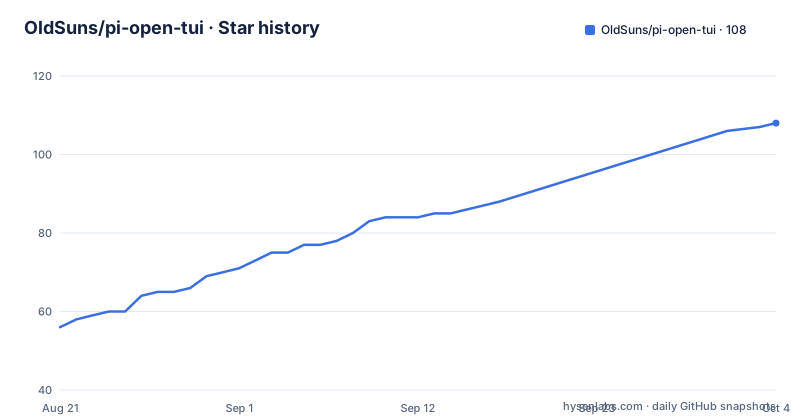
- OldSuns/pi-open-tui108 ★ · +52
| Repository | 2026-08-21 | 2026-10-04 |
|---|---|---|
| OldSuns/pi-open-tui | 56 | 108 |
52 Stars in the last 44 days, measured from the daily GitHub snapshot. Compare with other projects
Editorial analysis
wheelScrollLines rides a shim aimed at one Pi version
The one setting with a caveat attached is fullscreen wheel speed, and the reason is spelled out. Pi does not yet expose a public setter for it, so the extension reaches into an isolated compatibility shim built against Pi 0.84.2's runtime field. On a Pi version without a compatible field, the setting is ignored and Pi's own default scrolling stays active, which is the behaviour the highlights summarise as a version-guarded shim that falls back when runtime support changes. The value itself runs from 1 to 10 lines per mouse-wheel notch and defaults to 4. Adjusting it from the settings dialog means pressing Enter on that item and typing a number, with values clamped to the 1 to 10 range rather than rejected.
auto icon mode reads the terminal, not your font file
Icon selection is the setting people get wrong, because `auto` never looks at the font file you installed. It inspects the terminal environment and decides from that. In an interactive UTF-8 TTY it picks Nerd Font icons, including terminals reached through a runner or a subshell. For an SSH session it drops to portable Unicode icons, on the reasoning that the client terminal controls the font and usually has no Nerd Font. For non-interactive output, `TERM=dumb`, or an explicitly non-UTF-8 locale it uses plain ASCII. The explicit modes override all of that: `nerd` forces Nerd Font, `unicode` uses portable glyphs such as folder, branch, laptop, bulb, plug and hourglass with emoji handled by the terminal's own fallback, and `ascii` needs no patched font at all.
If auto picks wrong, the fix is on your side too
Two cases get called out because no setting can repair them. If a Nerd Font is installed and `auto` still selects ASCII, choose `nerd` explicitly rather than reinstalling anything. And in VS Code, Windows Terminal and similar applications, the font has to be selected in the terminal profile rather than only installed into the operating system, because that is the layer the terminal actually renders with. The same logic applies to SSH from the other direction: if your SSH client terminal does ship a Nerd Font and you want the full icon set over the connection, set the mode to `nerd`, since the automatic rule will otherwise protect you from a font the extension cannot verify.
The footer is a set of independent switches
The footer is not a fixed status bar but a collection of segments you toggle one at a time, stored alongside the rest of the settings in `~/.pi/agent/open-tui.json`. The defaults show the intended weighting: working directory, Git branch, Git status, detected runtime, context usage, token counts, cost and extension status are on, while host name, session name and Git commit are off. Two segments have conditions attached. `sessionName` appears only when the session actually has a name. `gitCommit` shows the short hash and tag, and does so in the detached HEAD state. `hostname` shows the short form, the first label of the machine's host name, so `mba.example.com` appears as `mba` with a server icon. Disabling `extensionStatuses` hides the entire extension status line, MCP status included.
inlineFooter moves two rows into the editor border
One option exists to save vertical space in short terminals. With `inlineFooter` enabled, the two normal Footer rows render inside the editor frame, in its top and bottom borders, instead of below it; the default is `false`. The ordering inside the top border is specified rather than left to layout: the Git branch goes on the left, CWD appears first in the right-hand group, and the session title joins the left side when `sessionName` is enabled. The Header and the extension status row stay separate either way. When space runs out, narrow terminals truncate the lowest-priority footer data first, and the right-hand statistics and the border corner are the parts protected from that truncation.
TPS counts the whole turn, including what you cannot see
After each complete agent run the extension prints one transient line, and tool-call turns are folded into that single result.
> TPS 42.5 tok/s | ~ TTFT 1.2s | + 29.7s | ↑ 567 | ↓ 1.2k | ! stall 1x / 4.3s | $ $3.60/MThe rate is all provider-reported assistant output tokens divided by the total generation time across the run. Timing starts at `turn_start` and ends at the assistant `message_end`, which means the figure includes time to first token, hidden reasoning, buffering and stalls, while tool execution between turns is excluded. A run with no output tokens or no measurable generation time prints the label followed by a dash rather than a number. The `$ / M` field is the model's list-price rate taken from `usage.cost.total`, which is a different quantity from the cumulative session cost the footer displays.
One install command, or one session at a time
Installing the extension is a single command.
pi install npm:pi-open-tuiTo try it without committing to it, the same package runs for one session only.
pi -e npm:pi-open-tuiRequirements are Pi 0.85 or later, a terminal with UTF-8 and colour support, and a Nerd Font only if you want the full icon set. The package is version 0.3.10, publishes `extensions/`, `assets/`, both READMEs and the LICENSE, and registers `./extensions/open-tui/index.ts` as its Pi extension. Its three peer dependencies on the Pi coding agent, ai and tui packages all require 0.85 or later and are all marked optional. Tests run through `node --test` over six named files covering the settings command, fullscreen scrolling, footer, editor, telemetry and peek.
It merges three other Pi front ends
The project describes itself as bringing the strongest ideas from pi-haiku, pi-claude-code-tui and pi-zentui together into one configurable extension, which is useful context if you have used any of them. What the merged result adds on top is a header carrying the model, thinking level, working directory and slash-command hints, project awareness across more than 50 runtimes with detailed Git states including ahead and behind, staged, modified, untracked, stashed and detached HEAD, and the thinking peek, an inline ticker that replaces Pi's hidden `Thinking...` label with the tail of the model's reasoning, sized by `thinkingPeek.lines` at 0, 1 or 2. The settings dialog itself has General, Appearance, Footer and Telemetry tabs and can run in English or Simplified Chinese, matching the two READMEs.
Editorial conclusion
Install this if you spend your day inside Pi and want to see what each turn actually cost in time and tokens, plus Git state for the project you are editing. The requirements are modest: Pi 0.85 or later and a UTF-8 terminal with color, with a Nerd Font optional rather than mandatory. Before you settle on settings, remember that the wheel speed setting only works against the Pi version field it was written for and is otherwise ignored, and that the icon mode decides from the terminal environment rather than from the font you installed, so set it explicitly if the automatic choice is wrong. Version 0.3.10 is the current package version.
Frequently asked questions
What is the Pi CLI agent?
Pi is the coding agent this repository extends. pi-open-tui installs into it with pi install npm:pi-open-tui, requires Pi 0.85 or later, registers itself as ./extensions/open-tui/index.ts, and keeps its own settings in ~/.pi/agent/open-tui.json.
How do I install pi-open-tui?
Run pi install npm:pi-open-tui to install the extension, or pi -e npm:pi-open-tui to try it for a single session. You need Pi 0.85 or later and a terminal with UTF-8 and colour support; a Nerd Font is optional because portable Unicode and ASCII icon modes are built in.
Why are my pi-open-tui icons showing as boxes?
The default auto mode inspects the terminal environment rather than the font file you installed. Open /open-tui and choose an icon mode under Appearance: nerd to force Nerd Font icons, unicode for portable glyphs, or ascii for plain text. If the font is set in the operating system but not in the terminal profile, that is the usual cause.
What does the TPS figure in pi-open-tui actually measure?
All provider-reported assistant output tokens divided by the total generation time across the run. Timing starts at turn_start and ends at the assistant message_end, so it includes time to first token, hidden reasoning, buffering and stalls, but excludes tool execution between turns. Runs with nothing measurable print TPS followed by a dash.
Where are pi-open-tui settings stored and which tabs exist?
In ~/.pi/agent/open-tui.json, edited through the /open-tui dialog, which has General, Appearance, Footer and Telemetry tabs. Notable keys include inlineFooter, cursorStyle, icons.mode, the footerSegments flags and thinkingPeek.lines, and settingsLanguage switches the dialog between en and zh.
Official sources
Add this badge to your README
If you maintain this project, the badge below links readers to this analysis and shows its maintenance status from the daily GitHub snapshot. Paste the markdown into your README; add ?metric=license or ?metric=stars to the image URL for a different field.

[](https://hysenlabs.com/projects/oldsuns-pi-open-tui)Star history chart for your README
[](https://hysenlabs.com/projects/oldsuns-pi-open-tui)