GodotHub: a manager for Godot projects, engine versions and git
What if Unity Hub and GitHub Desktop had a Baby but its Adopted? Yeah..
At a glance
- What is it?
- GodotHub is a Tauri and React desktop application that does for the Godot workflow what Unity Hub and GitHub Desktop each do for part of it, and the two mechanisms worth understanding are the launcher alias, which gives scripts and MCP servers a Godot path that follows whichever version you pinned, and tags that are read out of project.godot rather than stored in a second database. The rest is a project library, an engine downloader, templates and a git panel.
- Who is it for?
- GodotHub fits a solo developer or small team running several Godot projects across several engine builds who wants one place to install versions, keep a project library and commit without leaving the desktop, and who will benefit most from the pinned launcher if their tooling invokes the engine from scripts or an MCP server. It does not replace the Godot editor or a full git client, since the panel covers everyday operations rather than history rewriting or rebases.
- Can I use it commercially?
- Yes. MIT is a permissive licence: you can use, modify and sell software built on it, as long as you keep its copyright and licence notices.
- Is it still maintained?
- Yes. The repository received new commits within the last day.
- What is it written in?
- Mainly TypeScript, according to GitHub's language statistics.
Answers come from the project's GitHub data, last synced on November 24, 2026, and from our analysis. They are not legal advice.
Star history
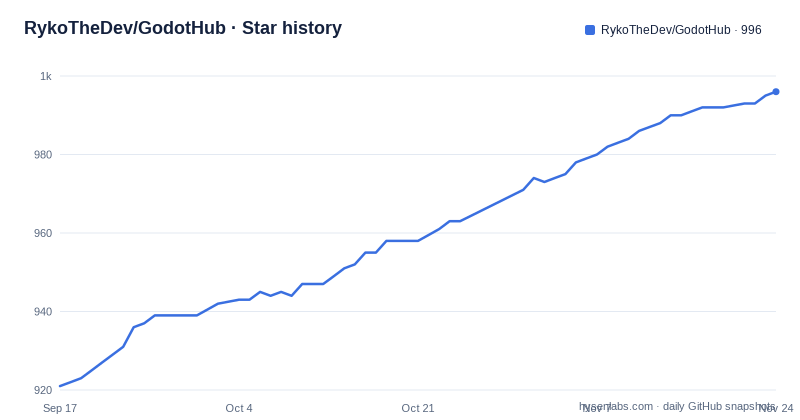
- RykoTheDev/GodotHub996 ★ · +75
| Repository | 2026-09-17 | 2026-11-24 |
|---|---|---|
| RykoTheDev/GodotHub | 921 | 996 |
75 Stars in the last 68 days, measured from the daily GitHub snapshot. Compare with other projects
Editorial analysis
Pin a version, and a Godot launcher follows the pin
The version management feature that matters to anyone with scripts is Pin as Current. You mark one installed version as the current one, and GodotHub drops a `Godot` launcher into its aliases folder. Scripts, test runners and MCP servers then get a stable path that follows the pin, which is the whole problem a per-project version manager creates: a hardcoded path to an engine binary breaks the moment you install a second version.
The alias mechanism generalises that. Version Aliases give extra command names to specific versions, and the names are yours to choose, with `godot-mono` and `godot-next` given as examples. They are managed from the Versions view.
The two-way sync is the part that makes it safe rather than clever. Delete a launcher from the folder and the alias disappears from the app, so the folder on disk stays the single source of truth. Auto-Cleanup does the same job for versions you removed elsewhere, pruning missing executables from the registry automatically.
Installed versions can also carry custom names, so the list reads the way you want rather than the way the release tarball is spelled.
Tags are read out of project.godot, not stored alongside it
Most project managers keep their own database and then have to reconcile it with the project. GodotHub reads tags straight from `project.godot`, which is why the description says they stay in sync with the Godot launcher. Edit a tag in the app, add one, or delete one, and the sync follows.
Reading from the project file is the right trade for this engine, because that file is what the launcher itself reads. A sidecar database would drift the first time someone launched a project outside the manager.
The same principle shows up in version warnings. GodotHub flags a project when its bound Godot version is missing or when there is a major version mismatch, which is the check that matters when a project pins `config_version` to a 4.x engine you have uninstalled.
Around that sit the project library operations: create from scratch or from a template, import existing projects from disk, or clone straight from a Git repository, plus drag-and-drop reordering within and between categories, pinning to a dedicated section at the top, batch operations across a multi-selection, search by name or path, sorting by custom order, name, date, last opened or size, a file breakdown by type with sizes and counts, custom launch arguments, and quick actions to open the folder, open in an external editor or open a terminal at the project path.
Downloads resume, and up to ten run at once
The engine side pulls the full list of official Godot builds from GitHub and filters it for your platform, so the catalogue is the upstream one rather than a curated subset.
Download and Install gives progress tracking, resume support, and concurrent downloads that are configurable up to 10 at a time. Resume is what makes the feature usable on a real connection, since a half-finished Godot build is not something you want to restart because a laptop lid closed.
Versions can also be imported rather than downloaded: an existing Godot install from any folder, or a `.zip` you drag and drop onto the app.
The list is grouped by `major.minor` with collapsible sections, which is how a real install tends to accumulate, several patch builds per minor version. Filtering is by build type, Standard or Mono or both, and by channel, Stable or Unstable or both, so a Mono project can hide the standard builds without losing the unstable ones.
Combined with custom names and the alias mechanism, that grouping is what makes a multi-version install usable rather than merely possible.
The git panel polls every thirty seconds
Git Integration is a full panel rather than a commit dialog, and one entry sets the tone: Auto-Refresh, where git status polls every 30 seconds.
Everything else is the usual set with a couple of additions worth noting. There is a Status Overview with branch name, uncommitted changes and repo status at a glance. Stage and unstage work on individual files or everything at once. Commit supports an optional amend. Push, pull and fetch cover the remotes, and Branch Management lists, switches, creates and deletes. Stash can be pushed, listed, applied and dropped.
The two entries that are not table stakes are an inline diff viewer with syntax-coloured additions and deletions, and Undo, which covers the last commit or a pull. Discard Changes exists too, and it asks for confirmation first.
Init and Remote round it out: initialise a repository and set or remove remotes from inside the app, which is what you need when a folder becomes a project before it has version control.
Templates watch the folder, so the library updates itself
The Templates section is built around the idea that a template is a folder, not an archive.
Save as Template turns any existing project into a reusable template. Create from Template starts a new project pre-populated with that content. Preview Contents lets you browse a template's full directory tree before using it, which matters when a template has grown an `addons` folder you forgot about.
The two automatic paths are the interesting ones. Sync from Directory auto-imports templates from a configured scan folder, and a File Watcher watches the template directory so editing a template folder updates the library without a manual re-import.
That combination is a small quality-of-life feature with a real effect: you can keep one template directory per client or per genre, edit it in place, and every new project starts from the current version. Templates are listed among the screenshots alongside Projects, Versions, the Asset Store and Git Integration.
Workspaces separate clients, and categories can be hidden entirely
Workspaces are the top-level grouping: separate workspaces for different projects, clients, or game jams, each with its own icon and colour, switchable from a dropdown in the sidebar.
Categories live inside a workspace and do more than group. They take custom names and colours from a rich palette, they collapse and expand, and they can be hidden: right-click a category to hide it along with its projects, then bring it back from the Hidden Categories section. They can be enabled or disabled globally from Settings, which is the switch for dropping a whole organising scheme out of the way.
Dragging projects between categories is `@dnd-kit`-powered, the same drag-and-drop dependency that handles reordering within a category, and the project list can be filtered by any category.
The appearance panel is where the screenshots stop being representative, because the captions say everything shown is customizable. Dark and light themes, 18 preset accent colours or any custom hex, background colours from presets or generated at random, and a `Feeling Lucky` button that generates a whole colour scheme in one click. Corner radius is adjustable from 0 for sharp corners upward, which is the dependency that makes that possible rather than a hand-rolled CSS variable.
Version 1.4.6 in the manifest, v1.4.5 as the newest tag
The manifest and the tags have drifted by one patch. `package.json` says `1.4.6`, the newest release is `v1.4.5` from 2026-09-28, and the last push to `main` was 2026-09-29. If you pin a build, pin the commit or the tag rather than trusting the manifest.
The lockfiles tell a similar story: the tree carries both `bun.lock` and `package-lock.json`. The scripts lean on bun, since `validate` runs `tsc --noEmit` and then `bun run i18n:check -- --check-values`.
Internationalisation is the most tooled part of the project. There are seven dedicated scripts, checking keys, generating types, adding, syncing, finding unused keys, removing unused keys and checking for duplicate keys, plus a `todo-i18n-source.txt` at the repository root that looks like the list of strings still to translate.
The build is `tsc` followed by `vite build`, the shell is `src-tauri/`, and `tauri:build` is not just `tauri build`: it appends a bash script that patches the AppImage for Wayland. The Tauri side carries the updater, process and opener plugins, and the front end is React 19 with Framer Motion, i18next and react-i18next. The licence is MIT.
Editorial conclusion
GodotHub fits a solo developer or small team running several Godot projects across several engine builds who wants one place to install versions, keep a project library and commit without leaving the desktop, and who will benefit most from the pinned launcher if their tooling invokes the engine from scripts or an MCP server. It does not replace the Godot editor or a full git client, since the panel covers everyday operations rather than history rewriting or rebases. Check three things before you rely on it: that your engine builds are the official GitHub ones, since the version list comes from upstream and Mono or unstable filtering is what you use to narrow it; that the alias folder mechanism works in your workflow, since tools pointing at a Godot path will follow the pin rather than a version you chose once; and which lockfile your build actually uses, because the repository ships both a bun lockfile and an npm one and the validate script runs bun. If you keep templates per client, the file watcher is the feature that will save you the most time.
Frequently asked questions
What is GodotHub?
A desktop application for the Godot workflow, built with Tauri 2 and React. It manages a project library with categories and workspaces, downloads and pins official Godot builds from GitHub, turns projects into templates, includes a git panel with staging, commits, branches, stashes, an inline diff viewer and 30-second status polling, and adds an RSS news feed and a themed appearance panel.
How does GodotHub pin a Godot version?
You mark one installed version as the current one, and GodotHub drops a Godot launcher into its aliases folder so scripts, test runners and MCP servers get a stable path that follows the pin. You can add extra command names per version, such as godot-mono or godot-next, and deleting a launcher from the folder removes the alias from the app as well.
Where do GodotHub project tags come from?
Straight from project.godot, so they stay in sync with the Godot launcher rather than living in a separate database. Editing, adding or deleting a tag in the app follows through to the project file. GodotHub also flags a project when its bound Godot version is missing or there is a major version mismatch.
Can GodotHub download several Godot builds at once?
Yes. It pulls the full list of official builds from GitHub, filters it for your platform, and offers progress tracking, resume support and concurrent downloads configurable up to 10 at a time. You can filter by build type, Standard or Mono, and by channel, Stable or Unstable, and you can import an existing install from any folder or drop in a .zip instead of downloading.
Does GodotHub include git features?
Yes, in its own panel: a status overview with branch and uncommitted changes, staging individual files or everything, commits with optional amend, push, pull and fetch, branch management, stashes, an inline diff viewer with syntax colouring, discard with confirmation, repository init and remote management, undo for the last commit or a pull, and auto-refresh that polls git status every 30 seconds.
Official sources
Add this badge to your README
If you maintain this project, the badge below links readers to this analysis and shows its maintenance status from the daily GitHub snapshot. Paste the markdown into your README; add ?metric=license or ?metric=stars to the image URL for a different field.

[](https://hysenlabs.com/projects/rykothedev-godothub)Star history chart for your README
[](https://hysenlabs.com/projects/rykothedev-godothub)Was this useful?