React Native OneSignal SDK for iOS and Android Notifications
OneSignal makes engaging customers simple and is the fastest, most reliable service to send push notifications, in-app messages, SMS, and emails. This plugin makes it easy to integrate your React Native app with OneSignal. https://onesignal.com
At a glance
- What is it?
- react-native-onesignal connects React Native applications on iOS and Android to OneSignal push notifications, in-app messages, SMS, and email services. Its main adoption constraint is the React Native version boundary: 5.4.x and later require React Native 0.79.0 or newer, while older applications remain on 5.3.x.
- Who is it for?
- Adopt react-native-onesignal 5.5.x for a React Native 0.79.0 or newer application that already uses OneSignal and can tolerate the documented migration considerations. Do not adopt it for React Native 0.76 to 0.78 or Expo SDK 52 without choosing 5.3.x first.
- Can I use it commercially?
- Check first. The repository uses a licence we do not classify automatically, so read its LICENSE file before any commercial use.
- Is it still maintained?
- Yes. The repository last received commits 6 days ago.
- What is it written in?
- Mainly TypeScript, according to GitHub's language statistics.
Answers come from the project's GitHub data, last synced on October 23, 2026, and from our analysis. They are not legal advice.
Star history
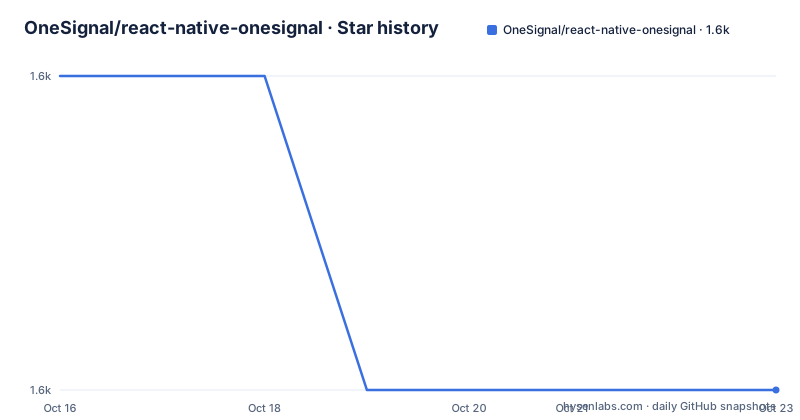
- OneSignal/react-native-onesignal1,591 ★ · -1
| Repository | 2026-10-16 | 2026-10-23 |
|---|---|---|
| OneSignal/react-native-onesignal | 1.6k | 1.6k |
-1 Stars in the last 7 days, measured from the daily GitHub snapshot. Compare with other projects
Editorial analysis
What react-native-onesignal Adds to a React Native App
This package is the React Native bridge to OneSignal's messaging services. The README identifies push notifications, in-app messages, SMS, and email as the service categories, while the package itself is intended to integrate native React Native applications on iOS and Android. It is therefore aimed at mobile product teams that want one service interface for customer messaging without implementing separate native integration paths for every channel. The repository includes native Android and iOS code, TypeScript source, a podspec, build files, and example projects. That layout matters because this is more than a JavaScript convenience wrapper. The published package includes `dist`, `src/NativeOneSignal.ts`, Android sources, iOS sources, Gradle files, and `react-native-onesignal.podspec`.
The package is a client SDK, not a complete messaging backend. It does not replace the OneSignal account, dashboard, delivery configuration, or support process. The README directs account issues to OneSignal support and SDK-specific bugs or feature requests to the repository issue tracker. This distinction matters when deciding whether the package is suitable for a new application or a migration. Teams still need a OneSignal project and native platform configuration even after the JavaScript dependency is added.
TurboModule and React Native Compatibility Boundary
The most consequential engineering detail in the README is the React Native version requirement. Version 5.4.x and later require React Native `>=0.79.0`. The README explains that the TurboModule registers through `codegenConfig.ios.modulesProvider`, a field added in React Native 0.79. With earlier React Native versions, enabling the New Architecture can produce the runtime error `TurboModuleRegistry.getEnforcing(...): 'OneSignal' could not be found`.
Applications using React Native `0.76` to `0.78`, including Expo SDK 52, are directed to stay on `5.3.x`. That release line uses the legacy bridge module and is described as working with the New Architecture through its interop layer. This creates a concrete version decision before installation. A team cannot choose the current package solely because its JavaScript API is the preferred one. It must first check the React Native version used by the host application.
The repository metadata declares `react-native` as a peer dependency of `>=0.79.0`, which reinforces the current package boundary. The README also says that current user-centric APIs and v5.x.x SDKs may not yet have full feature parity with earlier versions. For an existing production app, the documented phased rollout capability for iOS and Google Play is relevant because the migration can expose edge cases that are not visible in package installation alone.
Installation Path and a First Native Build Check
The README does not provide a standalone `npm install` or `bun add` command. Instead, it directs users to the Setup Guide at `https://documentation.onesignal.com/docs/react-native-sdk-setup`. The package metadata identifies the npm package as `react-native-onesignal`, but the repository README does not show the exact installation command, initialization call, or application identifier configuration. Those steps should be taken from the linked setup guide rather than inferred.
There is one concrete build check documented directly in the README. By default, the package includes OneSignal's native location module. An application that does not use OneSignal location features can exclude that module during dependency resolution and native builds. The environment variable `ONESIGNAL_DISABLE_LOCATION` is case-insensitive, and `1` is also accepted. The README gives these commands, with iOS commands run from the `ios` directory and Android commands run from the `android` directory:
ONESIGNAL_DISABLE_LOCATION=true pod install        # iOS, from the ios directory
ONESIGNAL_DISABLE_LOCATION=true ./gradlew assembleDebug   # Android, from the android directory
For Android, the equivalent persistent property is documented in `android/gradle.properties`:
onesignal.disableLocation=trueThis is a build configuration step, not a substitute for the OneSignal application setup. After changing the setting, the README says iOS requires a fresh CocoaPods resolution and gives the following procedure from the `ios` directory:
cd ios
pod deintegrate
rm -rf Pods Podfile.lock
ONESIGNAL_DISABLE_LOCATION=true pod install
Gradle re-reads the environment variable or property during configuration, so the README says a clean Android build is sufficient after changing it. When the module is disabled, `OneSignal.Location.requestPermission()` and `OneSignal.Location.setShared()` no-op on native builds, while `OneSignal.Location.isShared()` resolves `false`. An application that depends on those behaviors should not apply this optimization without reviewing its location code.
Native Build, CI, and Cache Constraints
The location setting is read when native dependencies are resolved, which creates a subtle deployment issue for iOS builds. CocoaPods pins the resolved pods in `Podfile.lock`. If a CI cache restores older pod state, changing the environment variable alone may not change the native module that gets included. The README specifically says to key CocoaPods or Gradle caches on `ONESIGNAL_DISABLE_LOCATION` in GitHub Actions. A job-level or step-level environment setting is documented as follows:
env:
  ONESIGNAL_DISABLE_LOCATION: true
The same section warns that Xcode or Android Studio launched from the Dock or Finder may not inherit a variable exported only in a terminal shell profile. This is not an abstract CI concern. It means the build process that the developer sees in an IDE can differ from the process that produced the expected dependency state. For an organization with shared build infrastructure, the cache key and the launch environment are part of the configuration contract.
The package includes both Android and iOS native components, and the README requires the host application to be a React Native application with compatible versions. The repository also contains `/examples`, including a location-disabled demo, plus `examples/setup.sh`, `examples/run-android.sh`, and `examples/run-ios.sh`. These files are useful references for reproducing the intended native workflow, but the README excerpt does not document their exact invocation.
When 5.3.x Is the Better Choice
For React Native `0.76` to `0.78`, including Expo SDK 52, version `5.3.x` is the documented alternative to the current line. The difference is architectural. The older line uses the legacy bridge module and can work with the New Architecture through the interop layer. The 5.4.x and later line uses a TurboModule registration path that depends on React Native 0.79.0 or newer.
This is a better choice when upgrading React Native would create more risk than the OneSignal SDK upgrade itself. It is also a direct warning against selecting a package solely because it is newer. A team with an Expo-managed application on SDK 52 should follow the README's version boundary rather than install 5.5.x and attempt to repair a missing native module. For an application already on React Native 0.79.0 or newer, 5.5.x is the line represented by the current package metadata.
The repository also contains `MIGRATION_GUIDE.md`, but the README excerpt does not reproduce its contents. It should be consulted for migration-specific API changes before converting an existing integration. The README's phased rollout guidance provides a release process to consider for mobile stores, especially because the new APIs may not yet be at feature parity with previous versions.
Maintenance, Releases, and Package Metadata
The repository is not archived, and its last push was on 2026-10-14. Recent releases include 5.5.15 on 2026-10-13, 5.5.14 on 2026-09-23, and 5.5.13 on 2026-09-22. This indicates recent release activity, but the README does not define a support policy or promise of ongoing compatibility for every React Native version. The practical maintenance issue is the native matrix: React Native versions, Expo SDK versions, Android Gradle state, iOS CocoaPods state, and the New Architecture setting all affect adoption.
The repository description labels the license as a custom license that GitHub cannot classify and points to the `LICENSE` file. In contrast, `package.json` declares `"license": "MIT"`. That discrepancy should be checked against the repository's actual `LICENSE` file before redistribution or integration decisions. This article does not interpret the legal meaning of either file.
The package manager is declared as `[email protected]`, and the repository includes `bun.lock`. The package's published entry points are `dist/index.js` and `dist/index.d.ts`, with `react-native-onesignal.podspec` for iOS and Android source directories included in the package. These details make the native build and publication boundary more concrete than the README alone, but they do not replace checking the exact lockfile and build outputs in the host project.
Limits of the Available OneSignal Integration Guidance
The README confirms that the SDK connects React Native applications to OneSignal and supports several OneSignal messaging services. It does not document a complete initialization example, permission request sequence, notification listener API, dashboard workflow, or delivery guarantee. It also does not explain how to configure APNs or Firebase credentials in the repository README. Those topics may be covered by the linked Setup Guide, but they cannot be assumed from the package description alone.
The clearest documented limitations are version compatibility, possible feature-parity differences in newer APIs, and the behavior of the optional location module. There is also a deployment distinction between iOS and Android: CocoaPods resolves the setting and may need pods to be cleared, while Gradle rereads the setting during configuration. IDE environment inheritance and CI cache keys can therefore affect whether a build actually excludes the module.
The SDK is a poor fit for a non-React Native application, a project unwilling to maintain native iOS and Android configuration, or an application that requires the 5.4.x TurboModule path on React Native below 0.79.0. It is also a poor fit for teams that need a complete backend messaging system in one repository. This package addresses the mobile client integration boundary, while OneSignal's service configuration and account operations remain external concerns.
Editorial conclusion
Adopt react-native-onesignal 5.5.x for a React Native 0.79.0 or newer application that already uses OneSignal and can tolerate the documented migration considerations. Do not adopt it for React Native 0.76 to 0.78 or Expo SDK 52 without choosing 5.3.x first. Before upgrading an existing app, verify the native iOS and Android setup, the exact React Native version, location-module requirements, and whether the custom LICENSE file changes the package metadata.
Frequently asked questions
What React Native version does react-native-onesignal 5.5.x require?
Version 5.5.x requires React Native `>=0.79.0` for the current TurboModule registration path. React Native `0.76` to `0.78`, including Expo SDK 52, should use `5.3.x` according to the README.
How can I disable the OneSignal location module in a React Native build?
Set `ONESIGNAL_DISABLE_LOCATION=true` before resolving or building, or use `onesignal.disableLocation=true` in `android/gradle.properties` for Android. On iOS, the README documents clearing CocoaPods state and reinstalling pods after changing the setting.
Where should I start when installing react-native-onesignal?
The README directs users to the OneSignal Setup Guide at `https://documentation.onesignal.com/docs/react-native-sdk-setup`. It does not provide a complete standalone installation command or initialization example in the README.
Official sources
Add this badge to your README
If you maintain this project, the badge below links readers to this analysis and shows its maintenance status from the daily GitHub snapshot. Paste the markdown into your README; add ?metric=license or ?metric=stars to the image URL for a different field.

[](https://hysenlabs.com/projects/onesignal-react-native-onesignal)Star history chart for your README
[](https://hysenlabs.com/projects/onesignal-react-native-onesignal)Was this useful?