master is 2.0, master378 is the 1.x line, and nuget.org sees neither by default
OPC Unified Architecture .NET Standard
At a glance
- What is it?
- The OPC UA .NET Standard Stack is the OPC Foundation's reference implementation for .NET, split across two maintained branches with parallel release trains. Preview builds go only to the GitHub Packages feed, nuget.org gets a version through manual promotion, and the migration from 1.5.378 ships as a Roslyn analyzer with 26 rules and four exclusions.
- Who is it for?
- This is the stack to build on if your requirement is a certified OPC UA implementation in .NET with the companion specs already implemented. Plan the branch before you plan the code: master is 2.0 with breaking changes, master378 is the supported 1.x line taking security and critical fixes only, and both shipped releases in the last three months.
- Can I use it commercially?
- Check first. The repository uses a licence we do not classify automatically, so read its LICENSE file before any commercial use.
- Is it still maintained?
- Yes. The repository received new commits within the last day.
- What is it written in?
- Mainly C#, according to GitHub's language statistics.
Answers come from the project's GitHub data, last synced on November 15, 2026, and from our analysis. They are not legal advice.
Star history
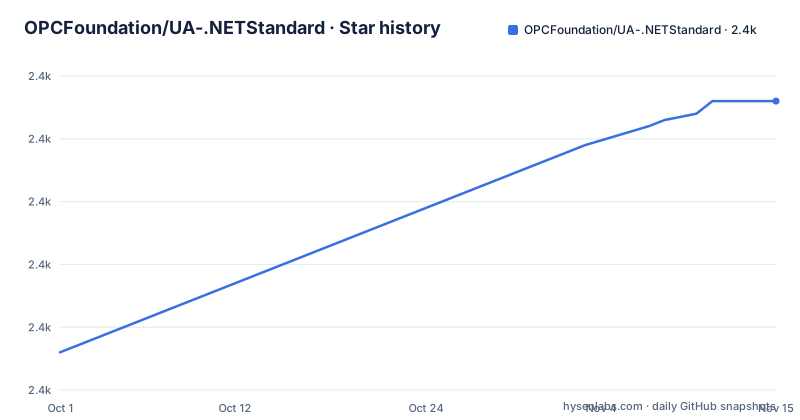
- OPCFoundation/UA-.NETStandard2,436 ★ · +40
| Repository | 2026-10-01 | 2026-11-15 |
|---|---|---|
| OPCFoundation/UA-.NETStandard | 2.4k | 2.4k |
40 Stars in the last 45 days, measured from the daily GitHub snapshot. Compare with other projects
Editorial analysis
Two branches ship releases in parallel
The first thing the documentation does is tell you which branch you are reading. Current `master` is version 2.0 of the stack, and the supported 1.x release lives on `master378`, whose last release is 1.5.378. New feature work happens on master; master378 continues to receive security and critical bug fixes for the 1.x line.
That split is visible in the release list. The newest tag is 1.5.378.176, titled OPC UA 1.05 Maintenance Update, published on 2026-09-11. The one before it is 2.0.0-preview.2, V2.0 Preview 2, from 2026-08-24. The third is another maintenance update, 1.5.378.156, from 2026-07-10.
So the maintenance line is not a frozen archive: it shipped a build after the 2.0 preview, and it shipped two in three months. Anyone on 1.x is receiving fixes while waiting, and anyone evaluating 2.0 is reading previews of an unreleased major. The last push to master was on 2026-10-03.
Previews go to one feed, nuget.org goes through promotion
The packaging rules are unusual enough to change how you set up a build.
Preview builds from every successful master build are published to the GitHub Packages NuGet feed, and the README states plainly that this is the only feed they are published to. nuget.org receives a version only through a manually approved promotion from a `release/<major>.<minor>` branch. The `2.0.0-preview.N` packages already sitting on nuget.org came that way, through the earlier `release/2.0.0` line.
To consume them from nuget.org you enable prerelease packages and float `2.0.0-preview.*` until 2.0.0 is released. On the GitHub feed you take the artifact of the build you want.
There is a second layer that catches people. Even after the root version is promoted to stable, a list of package families stays in preview and keeps its own `-preview.N` versions on nuget.org: XRegistry, WoT Connectivity, Vision, Robotics, Redundancy, Positioning, OpenUSD, ISA95, AI and DI. So a stable root version does not mean a fully stable dependency graph. The release process is written up separately in `docs/ReleaseProcess.md`.
Three CI systems and a root file named real_rows.txt
The root listing is long, and three entries in it are unusual for a single .NET repository.
There is AppVeyor in `appveyor.yml`, Azure Pipelines in `.azurepipelines/`, and GitHub Actions in `.github/`, whose workflow files appear in the badges as `buildandtest.yml` and `codeql-analysis.yml`. Coverage has its own configuration in `codecov.yml` and `coverage-thresholds.json`.
Then there are the files nobody explains. `real_rows.txt` is a text file at the root of a repository that contains no tabular data. `format-report.json` sits next to it as a committed artifact of a formatting run. `plans/` is a directory whose contents the documentation index does not reference. `.mcpgraderc.json` configures a toolchain that has nothing else in this tree, and `.whitesource` points at a dependency scanning service.
Versioning is spread across seven files: `global.json` pins the SDK, `version.json`, `version.props` and `version.targets` carry the number, and `preview-version.props` exists to handle the preview case. Builds go through `UA.slnx`, the newer solution format, with `Directory.Build.props`, `Directory.Build.targets` and `Directory.Packages.props` for shared settings and central package versions.
The 1.x to 2.0 migration is an analyzer with 26 rules
The 2.0 release carries breaking API changes, and the project has automated most of the mechanical work rather than describing it in prose.
The `OPCFoundation.NetStandard.Opc.Ua.MigrationAnalyzer` package installs into your project and reports through a single diagnostic ID, `UA0030`, covering 26 analyzer rules. Four are excluded: UA0013, UA0016, UA0017 and UA0029, the last of which is described as shim only. Each rule comes with a one-click code fix, and the fixes are applied with `dotnet format analyzers`.
Alongside it there is an agent skill, `opcua-v20-migration`, that walks a coding agent through the same sequence: install the NuGet package, run the formatter to apply the auto-fixes, then handle the residual patterns that no rule covers. The skill is written to load only the sub document that matches the symptom you are looking at. A prescriptive migration guide and a per-area set of documents under `docs/migrate/2.0.x/` back it up.
The skill installs into any repository with two commands:
copilot plugin marketplace add OPCFoundation/UA-.NETStandard
copilot plugin install opcua-v20-migration@opcua-dotnet
Inside a clone, a Copilot CLI session is said to discover it without either command.
An MCP server inside an industrial protocol stack
One developer tool in this repository is aimed squarely at language models. The OPC UA MCP Server is an installable .NET tool and container that exposes OPC UA client operations as MCP tools for LLMs and Copilot, so a model can drive a client rather than only read about one.
It ships twice over. There is the tool and container, and there are libraries, including `Opc.Ua.Mcp.Core`, `.PubSub`, `.Diagnostics` and `.PubSub.Diagnostics`, so an application can embed the same tools next to its own MCP surface instead of shelling out to the tool. That distinction matters when the thing you are automating is a production client.
The README frames this as part of a broader modern surface, alongside first class `Microsoft.Extensions.DependencyInjection` hosting through `services.AddOpcUa()`, fluent server and client builders, and source generated NodeManagers and DataTypes.
The MCP configuration file at the repository root, `.mcpgraderc.json`, belongs to the toolchain that project uses to build and publish its MCP servers, and it is one of the few places in the tree where you can see that pipeline from the outside.
Companion spec coverage is the real feature list
What the stack covers is spelled out as a list of companion specifications, and it is long: Part 9 for Alarms and Conditions, Part 11 for Historical Access, Part 13 for Aggregates, Part 16 for State Machines, Part 17 for Alias Names, Part 18 for Role Management, Part 20 for File Transfer, Part 100 for Device Integration, Parts 210 and 211 for spatial location and positioning, Part 200 for Industrial Automation, plus OPC-10030 for the ISA-95 Common Model with OPC-10031-4 Job Control, OPC 30270 for the Asset Administration Shell, OPC 10100-1 for Web of Things connectivity, OPC 34100 for energy consumption, OPC 30081, OPC 40010-1 for robotics, OPC 40223 for pumps and vacuum pumps, and OPC 40200 for weighing technology with OPC 30050 for PackML.
Compliance is asserted rather than implied. The reference server has been certified through an OPC Foundation Certification Test Lab and is continuously verified against the Compliance Test Tool. The sample tree includes `UAReferenceServer.ctt.xml`, which is the configuration that ties the reference server to that test suite.
The libraries themselves are organised as Core, Client, Server, PubSub, GDS, LDS, Complex Types, Device Integration and Positioning, over UA-TCP and HTTPS transports. The package you reference first is usually the meta package `OPCFoundation.NetStandard.Opc.Ua`, which pulls in everything, or a single package such as `OPCFoundation.NetStandard.Opc.Ua.Client`.
Cross platform here includes .NET Framework 4.8
The platform claim is a list of runtimes: .NET 10, .NET 9, .NET 8 as the LTS entry, and .NET Framework 4.8. The assemblies are described as Native-AOT-friendly.
Building the repository is a separate matter from running it, and needs the newest of those: the .NET 10 SDK. From the repository root it is two commands.
dotnet restore UA.slnx
dotnet build UA.slnx
The solution file is `UA.slnx`, and the shared build settings live in `Directory.Build.props`, `Directory.Build.targets` and `Directory.Packages.props`, which is where central package version management for a repository with this many packages would sit. Targeting frameworks and platform notes are pointed at a developer guide rather than repeated here.
Samples are organised the same way as the specifications, with directories for AI, DI, FluentApi, Gds, Isa95, Lds, Machinery, MinimalApi, OpenUsd, PubSub, Pumps, Quickstarts.Servers, Redundancy, Reference, Robotics, Scales, Vision and WotCon, and a companion repository holds the platform specific examples.
A licence file at the root and NOASSERTION in the metadata
The repository root holds `LICENSE.txt`. The license recorded for the repository reads NOASSERTION, which is the placeholder a detector emits when it does not classify what it found.
Those two facts sit side by side in the file listing without anything reconciling them, and this article will not pick a licence for you. For a stack intended for production systems in industrial control, the terms are worth reading directly out of the file rather than inferring from a badge.
There is also a `SECURITY.md` and a `CONTRIBUTING.md`, plus a `fuzzing/` directory and a `tests/` directory, so the project does carry the artefacts a security conscious contributor would look for even when the licence field is empty.
One last detail about the documentation itself. The README's final visible sentence begins, if you are still on 1.x and not ready to upgrade, stay, and stops there. The advice for 1.x users who are not ready to move is the one thing the page does not finish.
Editorial conclusion
This is the stack to build on if your requirement is a certified OPC UA implementation in .NET with the companion specs already implemented. Plan the branch before you plan the code: master is 2.0 with breaking changes, master378 is the supported 1.x line taking security and critical fixes only, and both shipped releases in the last three months. Three things to verify first: that the preview packages you need actually exist for your platform, because a long list of families including Robotics, Vision, WoT and Positioning stay in preview even after the root version goes stable; whether you can reach the GitHub Packages feed, since it is the only place master previews are published; and the licence, which is a LICENSE.txt file at the root while the recorded license metadata reads NOASSERTION.
Frequently asked questions
What is the OPC UA .NET Standard stack?
The OPC Foundation's reference implementation of OPC UA for .NET, with Core, Client, Server, PubSub, GDS, LDS, complex types, device integration and positioning libraries over UA-TCP and HTTPS. The current master branch is version 2.0, and the supported 1.x line lives on master378 with a last release of 1.5.378.
Which .NET versions does UA-.NETStandard support?
The README states .NET 10, .NET 9, .NET 8 as the LTS target and .NET Framework 4.8, shipping Native-AOT-friendly assemblies. Building the repository itself needs the .NET 10 SDK, and the developer guide covers the supported target frameworks and platform notes.
How do I get preview packages of the OPC UA 2.0 stack?
Every successful master build publishes previews to the GitHub Packages NuGet feed, which is the only feed they are published to. nuget.org only receives a version through manually approved promotion from a release branch, so on nuget.org you enable prerelease packages and float 2.0.0-preview.* until 2.0.0 is released.
How do I migrate from OPC UA 1.5.378 to 2.0?
Install the OPCFoundation.NetStandard.Opc.Ua.MigrationAnalyzer package, which reports 26 rules through UA0030 while excluding UA0013, UA0016, UA0017 and the shim-only UA0029. Apply the one-click fixes with dotnet format analyzers, then handle the residual patterns using the migration guide and its per-area documents.
Can an LLM drive an OPC UA client with UA-.NETStandard?
The repository includes an OPC UA MCP Server, an installable .NET tool and container that exposes OPC UA client operations as MCP tools for LLMs and Copilot. It also ships as libraries such as Opc.Ua.Mcp.Core, .PubSub and .Diagnostics, so an application can embed the tools beside its own.
Official sources
Add this badge to your README
If you maintain this project, the badge below links readers to this analysis and shows its maintenance status from the daily GitHub snapshot. Paste the markdown into your README; add ?metric=license or ?metric=stars to the image URL for a different field.

[](https://hysenlabs.com/projects/opcfoundation-ua-netstandard)Star history chart for your README
[](https://hysenlabs.com/projects/opcfoundation-ua-netstandard)Was this useful?