GSD Pi: a coding agent with worktree-aware project workflows
A powerful meta-prompting, context engineering and spec-driven development system that enables agents to work for long periods of time autonomously without losing track of the big picture
At a glance
- What is it?
- GSD Pi is a local-first TypeScript coding agent that plans, implements, verifies and tracks project work from the command line, distributed as the scoped npm package `@opengsd/gsd-pi`. The project restarted public development from a 1.0.0 baseline and has since continued releasing newer versions. Check the release notes and installed package contents for the version you use.
- Who is it for?
- GSD Pi is a reasonable pick if your team wants an agent that owns milestones, slices and tasks inside a Git worktree and keeps its state in a plain directory you can delete. Four things to settle before you rely on it.
- Can I use it commercially?
- Yes. MIT is a permissive licence: you can use, modify and sell software built on it, as long as you keep its copyright and licence notices.
- Is it still maintained?
- Yes. The repository received new commits within the last day.
- What is it written in?
- Mainly TypeScript, according to GitHub's language statistics.
Answers come from the project's GitHub data, last synced on November 15, 2026, and from our analysis. They are not legal advice.
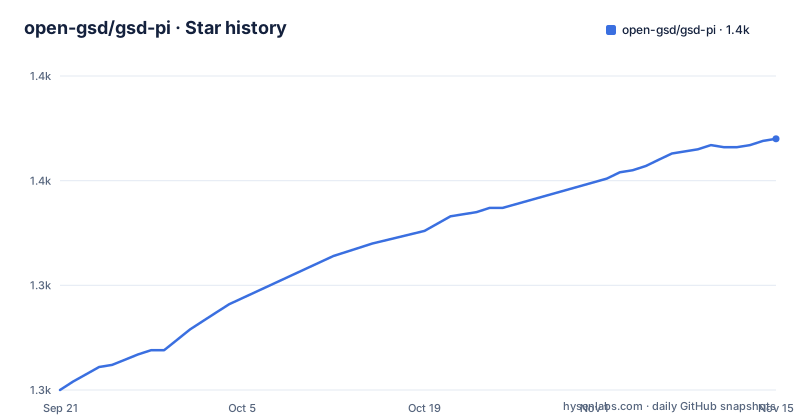
Star history
- open-gsd/gsd-pi1,370 ★ · +120
| Repository | 2026-09-21 | 2026-11-15 |
|---|---|---|
| open-gsd/gsd-pi | 1.3k | 1.4k |
120 Stars in the last 55 days, measured from the daily GitHub snapshot. Compare with other projects
Editorial analysis
A 1.0.0 baseline followed by later releases
The README says public development restarted from a clean 1.0.0 baseline and that subsequent releases continue from it. Older release history is archived separately. A later package version or tag is therefore not a contradiction of that baseline. To pin a version, inspect the npm package version and the matching changelog and release notes; the current README identifies the latest release separately.
A global install puts four binaries on PATH, and three of them are the same file
The `bin` map registers four executables:
"bin": {
  "gsd": "dist/bootstrap.js",
  "gsd-cli": "dist/bootstrap.js",
  "gsd-mcp-server": "packages/mcp-server/bin/gsd-mcp-server.js",
  "gsd-pi": "scripts/install.js"
}
`gsd` and `gsd-cli` point at the identical bootstrap file, so they are the same program under two names. `gsd-pi` is not the agent at all; it is `scripts/install.js`, the installer. Only `gsd-mcp-server` is a separate program, and it comes from a workspace package rather than from `dist`.
That matters because of the shadowing problem described further down. Once four executables share one global bin directory, a leftover from a previous install is enough to make `gsd` run the wrong code, and the fix is not obvious from a version mismatch alone.
The runtime floor is `engines.node >= 22.18.0`, with the package marked `"type": "module"` and `packageManager` pinned to `[email protected]`.
The migration exists because an old global binary can win the name `gsd`
GSD Pi installs from the scoped package `@opengsd/gsd-pi`. The older unscoped `gsd-pi` package must be removed first, otherwise its global binary shadows the new one. The guided migration is four steps:
npm uninstall -g gsd-pi @opengsd/gsd-pi
rm -f ~/.gsd/.update-check ~/.gsd/agent/managed-resources.json
npx @opengsd/gsd-pi@latest
command -v gsd
followed by `gsd --version`. The `command -v gsd` step is the actual test: it prints which binary your shell resolves, which is the only way to confirm the old one is gone.
Note the two state files deleted by hand in the middle of that block. Nothing regenerates them, and they sit under `~/.gsd/`, so a user upgrading across the package rename has to clear them explicitly. Installs that used `sudo npm install -g` need the matching `sudo npm uninstall -g gsd-pi`.
After migration, routine upgrades are one command, `gsd upgrade`. There are parallel PowerShell and pnpm-owned variants of the whole block.
Users install with npm, contributors build with pnpm workspace filters only
Four install routes are offered: the guided installer `npx @opengsd/gsd-pi@latest`, the same with `--yes` for CI or scripted installs, `npm install -g @opengsd/gsd-pi@latest`, and a pnpm-owned global using `pnpm setup`, `exec $SHELL -l` and `pnpm dlx @opengsd/gsd-pi@latest`.
The build side is narrower than that. Every script in the manifest is a pnpm filter: `pnpm --filter @gsd/pi-tui run build`, `@gsd/pi-ai`, `@gsd/pi-agent-core`, `@gsd/pi-coding-agent`, `@gsd/agent-core`, `@gsd/agent-modes`, `@gsd/native`, plus a `build:contracts` step that `@gsd/pi-coding-agent` chains in front of itself. There is a `pnpm-workspace.yaml` and a `pnpm-lock.yaml` at the root, and four separate TypeScript projects in `tsconfig.json`, `tsconfig.extensions.json`, `tsconfig.resources.json` and `tsconfig.test.json`.
So a consumer can install through npm or pnpm, but a contributor has no npm build path at all. The uninstall section makes the same split: `pnpm remove -g @opengsd/gsd-pi` for a pnpm-owned package and `npm uninstall -g gsd-pi` for the old npm one, then the state directory.
The published tarball ships `src/resources` and no `extensions/` directory
The `files` allow list is explicit, and it is the clearest statement of what an installed copy actually contains. It carries `dist`, the compiled `packages/*/dist/**`, `packages/*/bin/**` and each package's `package.json` and `README.md`, plus `pkg`, `src/resources`, `integrations/hermes` and its `plugin.yaml`, four install scripts under `scripts/`, and the top-level `package.json` and `README.md`.
Two absences stand out. Only `src/resources` ships from `src/`, so the TypeScript sources behind `dist` do not. And `extensions/` is not on the list at all, even though the feature roll-up leads with an extension surface for project-specific commands, tools, skills and UI integrations, and the repository carries both an `extensions/` directory and a separate `vscode-extension/`. Community extensions installed into a project are a different path from extensions shipped inside the tarball, but the distinction is left to the reader.
Smaller details in the same list are worth noting. `scripts/link-workspace-packages.cjs` and `scripts/lib/workspace-manifest.cjs` are CommonJS files that ship inside a package declared `"type": "module"`, and they run at install time. `publishConfig` sets `access: public` with `provenance: true`.
The runtime container installs GSD Pi from npm, so the image tracks the registry and not the branch
The Dockerfile defines two images. The CI builder, `ghcr.io/open-gsd/gsd-ci-builder`, starts from `node:24-bookworm`, installs rustup with a minimal stable toolchain, adds the `aarch64-linux-gnu` gcc and g++ cross compilers and the matching rustup target, then prints `node --version`, `rustc --version` and `cargo --version`.
The end user image, `ghcr.io/open-gsd/gsd-pi`, starts from `node:24-slim` and installs one system package, `git`, with the comment that it is required for GSD's git operations. Then:
ARG GSD_VERSION=latest
RUN npm install -g @opengsd/gsd-pi@${GSD_VERSION}
WORKDIR /workspace
ENTRYPOINT ["gsd"]
CMD ["--help"]
Two consequences. The runtime image holds whatever the registry serves at build time, and the default is `latest`, so a tagged image does not correspond to the commit it was built from. And a single `git` binary is the entire userland available to the worktree-aware git automation.
A third target, `runtime-local`, exists for PR-time end-to-end smoke tests under `tests/e2e/docker/`, and it builds the current source from a tarball argument instead of pulling from npm. That target is the admission that the default path cannot test a branch. The images run Node 24 against a manifest floor of 22.18.0.
Six of the eight v1.20.1 fixes are guardrails against the agent corrupting its own state
The release highlights for v1.20.1 read as a list of repairs to state the agent maintains about itself. Markdown skip projections are rebuilt when the write is already applied, so replays stop diverging. Milestone leases are reclaimed from workers that are verifiably dead, so a crashed run stops blocking the phase. Discarded scheduled wakeups on non-completed units are journalled and surfaced rather than dropped. `gsd_plan_slice` now warns when it persists zero non-skipped tasks, which is the shape of a slice that recorded progress without doing any. Milestone projections resolve on flat-phase-layout projects.
One line is a verification fix rather than a bookkeeping fix: `uat_result_save` now rejects a PASS check that cites failed `uat_exec` evidence. Before that change, a passing result could be recorded against execution output that had failed.
The last two entries are about keeping an external agent out of the same state. Claude Code's native task tools are disallowed under gsd-pi, and skills owned by gsd-core are shielded from the interactive Skill surface. Two directions of protection: the external agent cannot write GSD's tasks, and GSD's own skills are not editable through the interactive surface.
State lives in `.gsd/` and `.gsd-backups/`, and a 30 day prune waits on an unfinished migration
Project planning and runtime state go under `.gsd/`, which is also the configured `configDir` and the `piConfig` name holder. Alongside it sit gitignored runtime directories such as `.gsd-backups/` holding migration snapshots. The pruning rule is conditional: stale `.gsd-backups/migrate-*` snapshots are removed after 30 days, but only once the flat-phase `.gsd/phases/` migration is complete. Until that migration lands, the snapshots accumulate.
The consequence for a user is that removal is all or nothing. Uninstalling is `rm -rf ~/.gsd`, and on PowerShell the equivalent `Remove-Item "$env:USERPROFILE\.gsd" -Recurse -Force -ErrorAction SilentlyContinue`. There is no partial teardown and no export.
The repository itself keeps more state directories than the runtime needs: `.plans/`, `.project/` and `plans/` at the root, plus `.config/`. Two of the root files are scan allowlists, `.prompt-injection-scanignore` and `.secretscanignore`, which matters for a tool whose agent reads the working tree, and neither is explained in the visible text. There are also three documentation systems in `docs/`, `gitbook/` and `mintlify-docs/`, and a `screenshot-context-breakdown.jpg` committed at the top level.
Editorial conclusion
GSD Pi is a reasonable pick if your team wants an agent that owns milestones, slices and tasks inside a Git worktree and keeps its state in a plain directory you can delete. Four things to settle before you rely on it. The Status section describes 1.0.0 as the restart baseline, not the current release; check the registry and release notes for the version you install. Confirm your Node runtime clears 22.18.0, which the manifest requires and the container images sit well above. Check that `extensions/` is not something you need from the tarball, because it is absent from the published files list. And read the eight v1.20.1 fixes before trusting verification, since one of them makes a PASS check citing failed execution evidence a rejection case.
Frequently asked questions
What is GSD Pi?
It is a local-first coding agent for planning, implementing, verifying and tracking project work from the command line, written in TypeScript and released under the MIT licence as the scoped npm package `@opengsd/gsd-pi`. It combines a terminal agent, project workflow tools, worktree-aware Git automation and optional UI integrations, and the terminal UI is the default with `gsd --web` as the visual alternative.
How do I install and update GSD Pi?
Run `npx @opengsd/gsd-pi@latest` for the guided installer, add `--yes` for CI or scripted installs, or use `npm install -g @opengsd/gsd-pi@latest`. A pnpm-owned global is available through `pnpm setup`, `exec $SHELL -l` and `pnpm dlx @opengsd/gsd-pi@latest`. Routine upgrades then use `gsd upgrade`, and the manifest requires Node 22.18.0 or newer.
How do I uninstall GSD Pi and clear its local state?
Remove both the scoped and the old unscoped package with `npm uninstall -g @opengsd/gsd-pi gsd-pi`, then delete the state directory with `rm -rf ~/.gsd`. On Windows PowerShell the equivalent removes `$env:USERPROFILE\.gsd` recursively. If pnpm owned the package, use `pnpm remove -g @opengsd/gsd-pi` for it.
Does GSD Pi need Git installed to run?
Yes. The project's runtime container installs `git` as its only system package, with the comment that it is required for GSD's git operations, because worktree-aware Git automation is a headline feature. That container is `node:24-slim` with `ENTRYPOINT ["gsd"]` and `CMD ["--help"]`, working directory `/workspace`.
Which model providers can GSD Pi route to?
API key providers, OAuth providers, and external CLI providers such as Claude Code and Cursor Agent. Cursor Agent users pick the `cursor-agent` provider after installing and authenticating the local `cursor-agent` CLI; its default model is `composer-2.5` and `CURSOR_API_KEY` is supported as an auth signal. In v1.20.1, Claude Code's native task tools are disallowed under gsd-pi so they cannot write GSD's task state.
Official sources
Add this badge to your README
If you maintain this project, the badge below links readers to this analysis and shows its maintenance status from the daily GitHub snapshot. Paste the markdown into your README; add ?metric=license or ?metric=stars to the image URL for a different field.

[](https://hysenlabs.com/projects/open-gsd-gsd-pi)Star history chart for your README
[](https://hysenlabs.com/projects/open-gsd-gsd-pi)Was this useful?