gpt-oss: two open-weight models, one mandatory response format, and reference code that needs four H100s
gpt-oss-120b and gpt-oss-20b are two open-weight language models by OpenAI
At a glance
- What is it?
- The openai/gpt-oss repository is not a product but a set of reference implementations for gpt-oss-120b and gpt-oss-20b, with training, evaluation, and packaging choices that shape what you can actually run on your own hardware.
- Who is it for?
- Choose gpt-oss if you need open weights under Apache 2.0, full chain-of-thought for debugging, and a model that fits a single 80GB GPU at MXFP4, and you are willing to run an OpenAI-compatible server yourself. Skip the reference implementations in production, budget for Harmony format handling in every client you write, and confirm your Python is 3.12 or newer before installing the package.
- Can I use it commercially?
- Yes. Apache-2.0 is a permissive licence: you can use, modify and sell software built on it, as long as you keep its copyright and licence notices.
- Is it still maintained?
- Yes. The repository last received commits 15 days ago.
- What is it written in?
- Mainly Python, according to GitHub's language statistics.
Answers come from the project's GitHub data, last synced on November 13, 2026, and from our analysis. They are not legal advice.
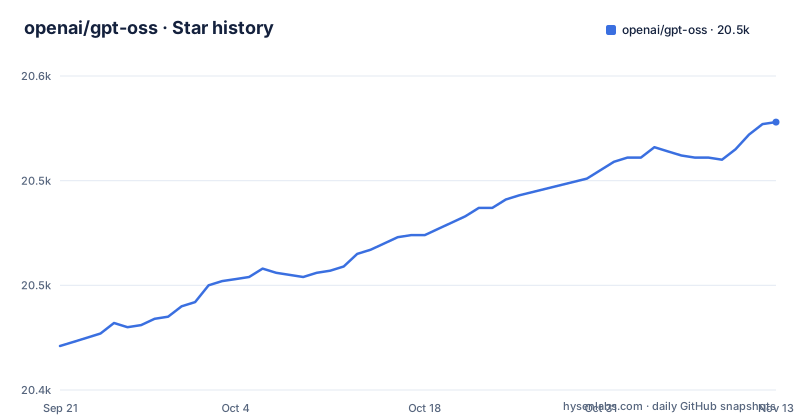
Star history
- openai/gpt-oss20,528 ★ · +107
| Repository | 2026-09-21 | 2026-11-13 |
|---|---|---|
| openai/gpt-oss | 20.4k | 20.5k |
107 Stars in the last 53 days, measured from the daily GitHub snapshot. Compare with other projects
Editorial analysis
Ignore the harmony format and the models will not work correctly
The single hardest constraint in this project is stated in the second paragraph of the README: both models were trained using the harmony response format and should only be used with it, otherwise they will not work correctly. That is not advice, it is a compatibility boundary. Anything that renders the prompt for you has to emit the right roles and analysis channels, and OpenAI's `openai-harmony` Python package, a dependency of this repository, does that rendering when a framework does not.
The Transformers path hides the problem. If you use the Transformers chat template, it applies the harmony format for you automatically. If you call `model.generate` directly, the README tells you to apply the format yourself, either through the chat template or through `openai-harmony`. The difference matters when you move to a different runtime: a server, a desktop app, or your own loop all start from raw text again. The repository answers this partially with a tools section covering the browser and Python code execution capabilities the models were trained on, and with an MCP server directory, but the serialization contract still lives in your code, not in the weights.
MXFP4 quantization is what puts 120b on one 80GB GPU
Two models are released and they are not variants of one size. `gpt-oss-120b` targets production, general purpose, high reasoning use cases and carries 117B parameters with 5.1B active parameters, shaped so it fits into a single 80GB GPU such as an NVIDIA H100 or an AMD MI300X. `gpt-oss-20b` targets lower latency and local or specialized use cases, with 21B parameters and 3.6B active parameters, and runs within 16GB of memory.
The mechanism that makes those numbers possible is named: the models were post-trained with MXFP4 quantization of the MoE weights. The same note fixes the evaluation story, because all evals were performed with the same MXFP4 quantization. So the weights you download are the weights that were measured, and the active parameter counts describe work per token, not what sits in memory. What you cannot derive from this is a quality claim: the README's highlights describe the evaluation condition, not benchmark scores.
The torch reference implementation asks for at least 4x H100
The repository is explicit about the status of its own code. The `torch` implementation is a non-optimized PyTorch implementation for educational purposes only, and it requires at least 4x H100 GPUs due to lack of optimization. The PyTorch, Triton, and Metal sections are described as largely reference implementations for educational purposes that are not expected to be run in production.
The `triton` path is the one that is described as more optimized, using PyTorch and Triton, including CUDA graphs and basic caching, and it is scoped to a single GPU. The `metal` path is Metal-specific and exists so the models can run on Apple Silicon hardware. Consequence for a reader: the interesting engineering lives in these directories, and it is written to be read. If you plan to serve gpt-oss in production, the repository is not offering you the serving stack, it is offering you a vLLM command and a description of the format. The list of top-level entries reinforces that framing, with tests/, tests-data/, compatibility-test/, docs/, examples/, and a gpt-oss-mcp-server/ directory alongside the three inference implementations.
vLLM installation pulls a pre-release wheel from two extra indexes
The serving path is a copy-and-paste block, and the flags in it are the interesting part. vLLM recommends `uv` for Python dependency management, and the install pins a pre-release build that has a gptoss suffix:
uv pip install --pre vllm==0.10.1+gptoss \
    --extra-index-url https://wheels.vllm.ai/gpt-oss/ \
    --extra-index-url https://download.pytorch.org/whl/nightly/cu128 \
    --index-strategy unsafe-best-match

vllm serve openai/gpt-oss-20b
Three things follow. You are installing a nightly CUDA 12.8 wheel index alongside a project-specific wheel index, and `--index-strategy unsafe-best-match` tells the resolver to mix them, which trades reproducibility for availability. The model is downloaded by the serve command itself. And the server it starts is OpenAI-compatible, which is the documented way to talk to these weights over HTTP, since this repository does not host an endpoint for you.
The offline path is stricter. It needs `uv pip install openai-harmony` on top of the libraries above, and it sets an environment variable before importing vLLM:
import os
os.environ["VLLM_USE_FLASHINFER_SAMPLER"] = "0"
That sampler flag is set to 0 for the offline example.
Consumer hardware gets ollama or LM Studio, not the reference code
The README splits hardware into two audiences. If you are trying to run gpt-oss on consumer hardware, the named tool is Ollama, and the download is two commands per model:
# gpt-oss-20b
ollama pull gpt-oss:20b
ollama run gpt-oss:20b

# gpt-oss-120b
ollama pull gpt-oss:120b
ollama run gpt-oss:120b
LM Studio is the other named path, using the `lms` client:
# gpt-oss-20b
lms get openai/gpt-oss-20b
# gpt-oss-120b
lms get openai/gpt-oss-120b
The split is about memory, not convenience. 20b is the one described as fitting within 16GB, which is the tier a laptop or a desktop GPU falls into, and 120b is the one described as needing a single 80GB GPU. The browser and Python tools are reference implementations in this repository. The README points to awesome-gpt-oss.md for a wider set of resources and inference partners, and to the cookbook for guides.
requires-python >=3.12 and a custom build backend in the way
The packaging is not a plain pure-Python wheel, and this shows up in pyproject.toml. The project declares `requires-python = ">=3.12"`, so a 3.10 or 3.11 environment is out before anything else happens. The build system requires setuptools 68 or newer and then hands the build to something else: the build backend is `gpt_oss_build_backend.backend` with a backend path of `_build`, and a scikit-build section points CMake at the root CMakeLists.txt with `-DGPTOSS_BUILD_PYTHON=ON`, `-DCMAKE_BUILD_TYPE=Release`, and `-DBUILD_SHARED_LIBS=OFF`.
Consequence for anyone installing from source: you need a working toolchain, because the wheel is produced by compiling rather than by copying a package tree, even though the resulting wheel does copy the whole `gpt_oss` tree. The runtime dependencies confirm the breadth of what the reference implementations pull in, listing openai-harmony, tiktoken, aiohttp, chz, docker, fastapi, uvicorn, pydantic, structlog, tenacity, lxml, html2text, requests, termcolor, and jupyter-client. That dependency list is also a hint about scope: a server, an MCP server, a browser tool, and a Python tool all live in the same package, so a lightweight use of the repo drags in a browser automation stack and an HTTP framework.
Reasoning effort is a setting, and the reasoning trace is marked internal
Two capabilities come with conditions attached. The first is configurable reasoning effort, described as adjustable across low, medium, and high to match a use case and latency needs. The second is full chain-of-thought, where the model gives complete access to its reasoning process, described as helping with debugging and trust, with an explicit note that this information is not intended to be shown to end users.
That second note is a constraint on your application, not a suggestion about display. If you build a product on top of gpt-oss, the reasoning channel is something you receive, log, and keep away from the person using the product. The root of the repository contains a USAGE_POLICY file, and a model card is linked from the README.
The other advertised capability is fine-tuning, described as fully customizing models to your use case through parameter fine-tuning. A reinforcement-fine-tuning notebook and agents SDK examples for Python and JavaScript sit in the examples/ directory, next to gradio and streamlit apps, so the repository shows the surrounding work you would do around the weights rather than a tuning recipe with documented hardware budgets.
Version 0.0.9 describes the tooling, and the tags stopped months ago
The repository version and the model version are different things, and the README makes that clear by pointing at two separate Hugging Face model pages for gpt-oss-120b and gpt-oss-20b. What pyproject.toml versions is the code: 0.0.9, with the previous tags v0.0.8 on 2025-09-29 and v0.0.7 on 2025-09-15, and v0.0.9 released on 2026-01-13. The default branch is main, the repository is not archived, and the most recent push landed on 2026-10-29.
So the package you install from this repository is a pre-1.0 reference codebase, and its version number tells you nothing about the weights. The vLLM install line makes the same point in a different way, pinning a vLLM build to 0.10.1 with a gptoss suffix, so compatibility is expressed as a specific wheel rather than a version range. If you pin anything, pin the model revision from Hugging Face and the wheel you tested with, and treat the repository version as metadata about documentation and examples, since the tagged history shows the last release predating the last push by more than nine months.
Editorial conclusion
Choose gpt-oss if you need open weights under Apache 2.0, full chain-of-thought for debugging, and a model that fits a single 80GB GPU at MXFP4, and you are willing to run an OpenAI-compatible server yourself. Skip the reference implementations in production, budget for Harmony format handling in every client you write, and confirm your Python is 3.12 or newer before installing the package.
Frequently asked questions
What is GPT-OSS?
gpt-oss is OpenAI's series of open-weight models, released as gpt-oss-120b with 117B parameters and 5.1B active, and gpt-oss-20b with 21B parameters and 3.6B active, under the Apache 2.0 license. Both were trained using the harmony response format and should only be used with that format.
Are GPT-OSS free?
The weights are released under a permissive Apache 2.0 license, described as allowing free building without copyleft restrictions or patent risk, and both models are downloadable from Hugging Face. The compute to run them is yours to provide, since gpt-oss-120b is described as needing a single 80GB GPU such as an NVIDIA H100 or AMD MI300X.
Is GPT-OSS any good?
The README's highlights include no benchmark scores to quote. What it does fix is the evaluation condition, since all evals were performed with the same MXFP4 quantization that the models were post-trained with, and the split of intent, 120b for high reasoning and 20b for lower latency and local use.
Can I run GPT-OSS locally?
Yes, through Ollama with ollama pull gpt-oss:20b and ollama pull gpt-oss:120b, or through LM Studio with lms get openai/gpt-oss-20b and lms get openai/gpt-oss-120b. The 20b model is described as running within 16GB of memory, while 120b fits a single 80GB GPU.
how to install gpt oss 20b ollama
Install Ollama first, then run ollama pull gpt-oss:20b followed by ollama run gpt-oss:20b. For serving instead of local runs, vLLM installs from a pre-release wheel with uv pip install --pre vllm==0.10.1+gptoss and starts with vllm serve openai/gpt-oss-20b.
how to install gpt oss on mac
Apple Silicon is covered by the Metal reference implementation, described as a Metal-specific implementation for running the models on Apple Silicon hardware. The repository also names Ollama as the route for consumer hardware, with separate tags for the 20b and 120b models.
Official sources
Add this badge to your README
If you maintain this project, the badge below links readers to this analysis and shows its maintenance status from the daily GitHub snapshot. Paste the markdown into your README; add ?metric=license or ?metric=stars to the image URL for a different field.

[](https://hysenlabs.com/projects/openai-gpt-oss)Star history chart for your README
[](https://hysenlabs.com/projects/openai-gpt-oss)Was this useful?