openai-apps-sdk-examples: MCP servers that render ChatGPT widgets
Example apps for the Apps SDK
At a glance
- What is it?
- A gallery repository from OpenAI holding sample widgets and matching MCP servers, built so engineers can copy a working Apps SDK integration instead of writing the wire format from scratch. Useful as a reference; it is not a library, and there is no packaged build to install.
- Who is it for?
- Adopt this repository if you are writing a ChatGPT connector with custom UI and want a server that already returns widget metadata correctly; the Node and Python pairs for the same widget are the fastest way to see what the contract actually demands. Skip it if you need a maintained component library or a supported package, because nothing here is published for consumption and the last push was on 2026-04-15.
- Can I use it commercially?
- Yes. MIT is a permissive licence: you can use, modify and sell software built on it, as long as you keep its copyright and licence notices.
- Is it still maintained?
- Activity is slowing. The repository last received commits 6 months ago.
- What is it written in?
- Mainly TypeScript, according to GitHub's language statistics.
Answers come from the project's GitHub data, last synced on October 23, 2026, and from our analysis. They are not legal advice.
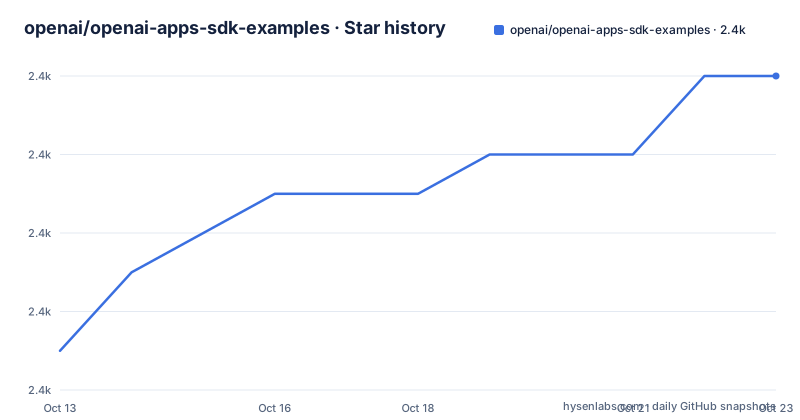
Star history
- openai/openai-apps-sdk-examples2,374 ★ · +7
| Repository | 2026-10-13 | 2026-10-23 |
|---|---|---|
| openai/openai-apps-sdk-examples | 2.4k | 2.4k |
7 Stars in the last 10 days, measured from the daily GitHub snapshot. Compare with other projects
Editorial analysis
Tool results carry widget metadata, not just structured text
The repository exists to show one thing: how an MCP server returns an interface that ChatGPT draws inline next to an assistant message. A tool call normally returns structured content the model parses. Here the response also carries embedded resources in metadata, and the Apps SDK turns those into a widget.
A minimal integration implements three capabilities. The server advertises its tools with JSON Schema input and output contracts and optional annotations such as `readOnlyHint`. When the model picks a tool it issues a `call_tool` request whose arguments follow the user's intent, the server runs the action and returns structured content, and alongside that content it returns embedded resources keyed under `_meta.ui.resourceUri`. That metadata key is what lights up a component. Two demo servers, `shopping_cart_python/` and `pizzaz_server_python/`, both return it.
The protocol is transport agnostic, so the same server can run over Server-Sent Events or streaming HTTP. Standardising the wire format is what lets ChatGPT reason about a third-party connector the way it reasons about its own tools. This is a starting point for engineers building ChatGPT apps, not a package you depend on.
Chrome 142 quietly hides the whole widget layer
One failure mode is documented at the very top of the README and it has nothing to do with your code. If you run Chrome version 142, widget UI does not render. The repository links the Chrome note on local network access restrictions as the cause and gives the exact remedy.
The workaround is a flag change, and it requires a browser restart before it takes effect:
1. Go to chrome://flags/
2. Find #local-network-access-check
3. Set it to Disabled
The underlying cause is structural rather than a bug in the samples. Widget bundles are served from the local static file server at `http://localhost:4444`, and the page itself is rendered inside the ChatGPT client. A browser that restricts local network access blocks that fetch, so the widget silently never paints. Anyone evaluating the gallery on a current Chrome build has to apply the flag first, or they will conclude the MCP server is broken when the server is fine.
Building bundles and pinning them to a static file server
Workspace setup is pnpm first, with npm or yarn usable if you adjust the commands. Node.js 18+ is the floor, and the Python servers need Python 3.10+. Formatting is handled through pre-commit rather than a script.
pnpm install
pre-commit install
The build step is a Vite orchestrator, `build-all.mts`, wired to the `build` script as `tsx ./build-all.mts`. It walks every widget entrypoint and emits hashed HTML, JS and CSS files into the assets directory, with each widget carrying the CSS it needs so a bundle can be hosted directly or shipped with your own server.
pnpm run buildNone of the MCP servers read from source. All of them expect the built files to be reachable over HTTP, so the static server has to be running before any MCP process starts:
pnpm run serve
pnpm run dev
The `serve` script is `serve -s ./assets -p 4444 --cors`, exposing the assets on port 4444 with CORS enabled so MCP inspectors and other local tooling can fetch them. The `dev` script starts Vite using the config file vite.config.mts for iterating on components.
Running the Python servers, where the module path stops matching the folder
The Node demo is a two-line change of directory. The Python demos each create a virtual environment, install their own requirements file and bind uvicorn to port 8000.
cd pizzaz_server_node
pnpm startpython -m venv .venv
source .venv/bin/activate
pip install -r pizzaz_server_python/requirements.txt
uvicorn pizzaz_server_python.main:app --port 8000The authenticated server is where a close read pays off. Its requirements come from `authenticated_server_python/requirements.txt`, but the launch command targets `authenticated_python_server.main:app`. The directory is `authenticated_server_python` and the importable package named in the command is `authenticated_python_server`, with the words transposed. Nothing in the repository structure section explains the difference. Anyone copying that snippet into their own layout will either need to match the transposed package name or adjust the uvicorn argument.
The solar system server has a second gap. Its README section stops after `pip install -r solar-system_server_python/requirements.txt` and never gives the uvicorn line that the other two Python sections include.
widgetState survives across turns only through widgetSessionId
State between tool calls is the problem the shopping cart example exists to solve. A cart that resets every time the model calls another tool is useless, so the Python server reads `_meta["widgetSessionId"]` and threads it through so `widgetState` stays in sync across turns for the shopping-cart widget.
That mechanism is echoed on the client side in the kitchen sink lite sample, which reads `toolInput`, `toolOutput`, `displayMode`, `theme` and `widgetState` from host state, writes host state through `setWidgetState`, calls another MCP tool from inside the widget with `callTool`, and reaches host helpers such as `requestDisplayMode`, `openExternal` and `sendFollowUpMessage`. Together these make the full `window.openai` surface visible in one sample.
One caching trap is called out: the Python Pizzaz server caches widget HTML with `functools.lru_cache`. Edit files in `assets/` and the server keeps serving the old markup until you restart it.
The package manifest describes a different project than the README
The root `package.json` is named `ecosystem_ui` at version 5.0.16, its `main` entry points at `host/main.ts`, and its `license` field reads ISC. The README, meanwhile, presents the repository as an Apps SDK gallery and the root file list has no `host/` directory in it. The manifest looks left over from a different internal project, and anyone treating the package name as an installable identifier will find nothing published under it.
The repository structure section in the README is also incomplete. It names `src/`, `assets/`, six server directories and `build-all.mts`, but the top level of the repository also contains `cards_against_ai_server_node/` and `mcp_app_basics_node/`, neither of which appears anywhere in the README text. A committed `ngrok-v3-stable-linux-amd64.tgz` sits at the root as well, a packaged tunnel binary that no README step asks you to install.
Dependency surface is large for what is meant to be copied
The `dependencies` block is where a team deciding whether to fork should look. Runtime packages include `@modelcontextprotocol/ext-apps`, `@openai/apps-sdk-ui`, `react-intl`, `immer`, `partial-json`, `embla-carousel`, `mermaid`, `framer-motion`, `mapbox-gl`, `lucide-react`, `clsx` and `dotenv`, plus a three.js stack built on `@react-three/fiber`, `@react-three/drei`, `@react-spring/three` and `@react-three/postprocessing` for the solar system viewer. Pinning `[email protected]` through `packageManager` is required for reproducible installs.
Much of that weight belongs to individual widgets rather than to the integration pattern. If your own connector needs a table and a form, forking this repository means carrying a 3D renderer and a map client along with it. The lighter path is to read how one tool returns `_meta.ui.resourceUri` metadata and implement that contract in your own stack.
Editorial conclusion
Adopt this repository if you are writing a ChatGPT connector with custom UI and want a server that already returns widget metadata correctly; the Node and Python pairs for the same widget are the fastest way to see what the contract actually demands. Skip it if you need a maintained component library or a supported package, because nothing here is published for consumption and the last push was on 2026-04-15. Before building on any sample, check that the module path you pass to uvicorn matches your own folder name, since the authenticated example does not.
Frequently asked questions
What do I need to run the openai-apps-sdk-examples MCP servers?
Node.js 18+ with pnpm (npm or yarn work if you adjust the commands), Python 3.10+ for the Python servers, and pre-commit for formatting. After `pnpm run build` you also need `pnpm run serve` running, because every MCP server expects the bundled assets on `http://localhost:4444`.
Why is my widget not showing in ChatGPT when I use openai-apps-sdk-examples?
On Chrome 142 the widget UI will not render until you disable the `local-network-access-check` flag in chrome://flags and restart the browser. The bundles are fetched from localhost, and local network access restrictions block that request.
How does openai-apps-sdk-examples keep widget state between tool calls?
The shopping cart server reads `_meta["widgetSessionId"]` so `widgetState` stays in sync across turns for the shopping-cart widget. Note that the Python Pizzaz server caches widget HTML with `functools.lru_cache`, so you must restart it after rebuilding or editing files in `assets/`.
Can I install the openai-apps-sdk-examples widgets as a package?
No, this is a gallery meant to be cloned and read as a starting point. The root package is named `ecosystem_ui`, and the README points developers at building their own apps rather than consuming a published artifact.
Official sources
Add this badge to your README
If you maintain this project, the badge below links readers to this analysis and shows its maintenance status from the daily GitHub snapshot. Paste the markdown into your README; add ?metric=license or ?metric=stars to the image URL for a different field.

[](https://hysenlabs.com/projects/openai-openai-apps-sdk-examples)Star history chart for your README
[](https://hysenlabs.com/projects/openai-openai-apps-sdk-examples)Was this useful?