fli prices a round trip at one plus N upstream requests, and says so
Google Flights MCP, CLI and Python Library
At a glance
- What is it?
- fli is a Python library with a command line interface and an MCP server for flight search. It is worth reading for two reasons: the page is unusually honest about how it reaches its data, and it documents the cost of a query in requests rather than leaving you to discover it. What it cannot do is give the endpoint it calls a stability guarantee, because nobody published it.
- Who is it for?
- fli suits someone who needs flight search in a script, a command line pipeline or an agent, and who is comfortable depending on an endpoint whose shape is not published. Two things to settle before you build on it.
- Can I use it commercially?
- Yes. MIT is a permissive licence: you can use, modify and sell software built on it, as long as you keep its copyright and licence notices.
- Is it still maintained?
- Yes. The repository last received commits 4 days ago.
- What is it written in?
- Mainly Python, according to GitHub's language statistics.
Answers come from the project's GitHub data, last synced on November 13, 2026, and from our analysis. They are not legal advice.
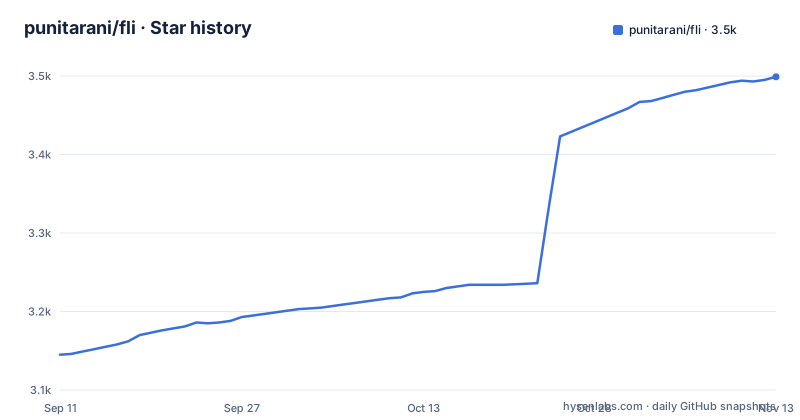
Star history
- punitarani/fli3,499 ★ · +354
| Repository | 2026-09-11 | 2026-11-13 |
|---|---|---|
| punitarani/fli | 3.1k | 3.5k |
354 Stars in the last 63 days, measured from the daily GitHub snapshot. Compare with other projects
Editorial analysis
The page is explicit about how it gets the data
The second paragraph of the readme answers the question every flight library page avoids, and it is worth quoting in its own shape rather than paraphrasing around.
It contrasts itself with the other flight search libraries that rely on web scraping, and says it interacts directly with the flights service's API through reverse engineering. From that it derives four claims: direct access is faster and more reliable, there is no HTML parsing and no browser automation, it is less prone to breaking from user interface changes, and the architecture is modular and extensible.
Only the last two are about design. The first three are claims about an endpoint that nobody published, and that is the trade the reader is making. Reverse engineering gets you a structured response instead of parsing markup, which is a large practical improvement. It also means the contract can change without notice and without a deprecation period, because there is no owner announcing changes.
The honest way to hold both is that the third claim is a comparison with scraping rather than a promise. Scraping breaks when a page redesigns. This breaks when a request parameter changes. Neither is a supported interface, and one of them is much more pleasant to consume.
A round trip is priced in requests, and the cap is ten
One note in the tool reference is the most useful engineering sentence on the page, and it changes how you should call the library.
A round trip costs one request plus one more for each outbound candidate that gets expanded into return flights, so the number of requests is not a constant. The expansion count is therefore capped at ten, with a default of five, and the parameter is documented as applying only to round trips.
The same note then explains a failure mode people will otherwise read as a bug. If every result in a round-trip set comes from the same airline, the advice is not that the route has one carrier. It is that the default sort only ever expands the cheapest outbound options, and those frequently share a carrier, so the fix is to raise the expansion count or to sort differently.
That is a quality and cost trade documented in the same paragraph, which is rare. Most wrappers hide the fan-out and let you infer it from a bill or a timeout; this one prints the arithmetic.
Twenty filters, three of which are named after upstream parameters
The flight search tool's parameter table is long, and its structure is worth reading as a description of the underlying service.
Two parameters take airport codes and accept a comma-separated list for multiple airports. The date is a plain year-month-day string, with an optional return date. Cabin class and maximum stops are both closed enumerations, with three named stop categories and four named cabins. A departure window takes a pair of hours as a string. Two parameters take lists of airline codes, one to include and one to exclude, and two do the same for the three named alliances. Two take minimum and maximum layover durations in minutes, documented as applying only to multi-stop itineraries.
Then three parameters that name the upstream query string directly. The currency takes an ISO code and is documented as flowing to a currency parameter on the request; the language takes a BCP-47 tag and flows to a language parameter; and the country takes an alpha-2 code and flows to a country parameter.
Naming your own query parameters in a public table is the clearest possible confirmation that the request shape is being constructed by hand. It is also what makes the library's own compatibility surface visible to anyone reading the documentation.
Traveller counts have rules, and the date tool has a different sort flag
Two details that only show up when you compare the two tools side by side.
First, the traveller parameters are four separate counts rather than one: adults, children aged between two and eleven, infants under two with their own seat, and infants under two on a lap. The note under the first table states that the total must be between one and nine and that lap infants cannot exceed the adult count. The second table repeats that constraint verbatim, which is the kind of duplication that keeps a rule from drifting between two independent parameter lists.
Second, the sort control differs between the tools. The date-flexible search has a boolean flag for sorting by price, lowest first. The specific-date search has an enumeration instead, with four named values covering cheapest, duration, departure time and arrival time.
So the two tools are not the same query with a different date field. One is an enumeration over four orderings, the other is a single boolean. That is a small inconsistency, and it is the kind of thing an agent calling either tool will trip over.
The install line and the MCP commands are not obviously consistent
The quick start is short, and there is a gap in it.
The first line installs the distribution with a Python package isolation tool, and the following lines start the MCP server on standard input and output, or over HTTP at a loopback address and port:
pipx install flights

# Run the MCP server on STDIO
fli-mcp

# Run the MCP server over HTTP (streamable)
fli-mcp-http  # serves at http://127.0.0.1:8000/mcp/
The manifest puts the MCP dependencies in an optional extra, alongside an extra that pulls in the MCP extra itself and a development extra. The quick start does not mention that extra.
So the page tells you to install one thing and then run two commands that live behind an extra of that distribution. That may be harmless if the base install happens to pull them in, and it will be a missing entry point if it does not. The page does not address it, so the safe reading is that the install line and the extra are both correct and one of them is incomplete.
The rest of the quick start is careful. The client configuration block shows an absolute path to the command, and the note under it says to substitute your own user name and that the path can be found with a which invocation. That is the correct way to write a client configuration block, since a relative path is the most common thing to get wrong.
Retries, rate limiting and a fingerprinting HTTP client
The dependency list is where the project's approach to an undocumented endpoint becomes legible.
Three of the ten runtime dependencies exist because the upstream is an interface rather than an API. One is an HTTP client that presents a browser-like TLS fingerprint, one is a retry library, and one is a rate limiter. A validation library, a settings library, a terminal library, a command line library, a plotting library, an internationalisation library and a dotenv loader fill out the rest.
The combination is a resilience strategy rather than a feature list. A client that can impersonate a browser avoids being rejected outright, retries with backoff handle transient failures, and a rate limiter keeps the caller inside whatever tolerance the upstream has. None of those is documented in the prose, and together they are the most accurate description of how this library behaves against its data source.
Which also means the project is explicitly managing the risk that the upstream is not expecting programmatic callers. That is worth knowing before you point it at anything that matters to you.
A scheduled canary against the live service, and a heavier set that is opt-in only
The make file's test targets are the clearest statement of how this project is validated, and they are arranged by how much they cost.
Four targets run the offline suites, distinguished by flags for the protocol tests, the fuzzing tests and the combination of both. Then two live targets.
The first live target runs a small, stable set of tests against the real service, and the comment beside it says it matches a workflow that runs the same set on a schedule, and explicitly that it is not part of continuous integration.
The second runs a fuzzing live case, and the comment is blunter: it hits the real network about a hundred times back to back, is noticeably flakier under that burst than the stable set, and is therefore never scheduled.
So the testing story is: everything offline in continuous integration, a small live canary on a timer to notice when the upstream changes shape, and an expensive live probe available on demand for whoever is changing the request code. For a wrapper around a reverse-engineered interface, that is the correct arrangement, and writing it in the make file rather than in a wiki page is the right place for it.
Four deploy targets, a documentation site, and a JavaScript port with its own tags
The repository root shows how many audiences this project serves.
There is a Dockerfile with a lock file installed by a pinned resolver, a compose file for the HTTP server, and two more platform manifests: one for a build-pack based platform and one for a managed railway-style deployment. So four deployment shapes, three of which are named after specific hosting products.
There is documentation built with a static site generator and an API reference generator, plus a development container definition and a tox configuration alongside a pytest configuration, which is two test runners' worth of configuration for one suite.
There is a directory holding a JavaScript version of the library, and that is where the release tags point: all three recent releases are for the JavaScript port, published within about fifty minutes of each other on one day, while the Python package carries its version in the manifest and has no tag of its own in the visible history. If you are pinning the Python distribution, the tags will not help you.
There are also agent instruction files at the root, a skills directory, and a data directory. And the homepage recorded for the repository is a generated wiki rather than the documentation site the manifest points at.
Editorial conclusion
fli suits someone who needs flight search in a script, a command line pipeline or an agent, and who is comfortable depending on an endpoint whose shape is not published. Two things to settle before you build on it. The data source is undocumented, so treat the return shape as something that can change without a major version bump, and keep your own parsing behind a small adapter. And read the cost model: a round trip is one outbound search plus one request per candidate expanded into returns, so the expansion count is the dial that trades cost for result quality.
Frequently asked questions
Is there a free API that can search for flights?
This project is not one. It is a Python wrapper whose own page says it reaches the flights service's interface by reverse engineering rather than through an official public API, so there is no key to obtain and no published terms attached to what it calls.
Is the Google Flight API free?
The page does not say, and the question is the reason the project is worth reading: it states that other flight libraries rely on web scraping while it interacts directly with the service's interface through reverse engineering. That is an undocumented contract, which is a different thing from a free one.
How do I install and run the fli MCP server?
Install the distribution with a Python package isolation tool, then run either the standard input and output command or the HTTP one, which serves at a loopback address and port. The manifest places the MCP dependencies in an optional extra, which the quick start does not mention.
Which tools does the fli MCP server expose?
Two. One searches flights on a specific date with roughly twenty filters covering airports, dates, cabin, stops, departure window, airline and alliance inclusion and exclusion, layover bounds, sort order, currency, language, country and traveller counts. The other finds the cheapest dates across a flexible range with a similar filter set and a boolean price sort.
How many requests does a fli round-trip search make?
One outbound search plus one for each outbound candidate expanded into return flights, so the expansion count is capped at ten and defaults to five. The page also notes that the default sort only expands the cheapest outbound options, which often share a carrier, so a single-airline result usually means the expansion count is too low.
Does fli rate limit or retry its requests?
Yes, in the library rather than in the caller: the runtime dependencies include an HTTP client that presents a browser-like TLS fingerprint, a retry library and a rate limiter. Its make file also runs a small scheduled canary against the live service outside continuous integration, with a hundred-request fuzzing case available only on demand because it is markedly flakier.
Official sources
Add this badge to your README
If you maintain this project, the badge below links readers to this analysis and shows its maintenance status from the daily GitHub snapshot. Paste the markdown into your README; add ?metric=license or ?metric=stars to the image URL for a different field.

[](https://hysenlabs.com/projects/punitarani-fli)Star history chart for your README
[](https://hysenlabs.com/projects/punitarani-fli)Was this useful?