openai-java: OpenAI API Access for Java Applications
The official Java library for the OpenAI API
At a glance
- What is it?
- openai-java is the official Java SDK for calling the OpenAI REST API, with generated model and service types for Responses, Chat Completions, administration, evaluation, and related APIs. It targets applications that need typed Java or Kotlin access while supporting OkHttp clients and an optional Amazon Bedrock transport.
- Who is it for?
- Adopt openai-java for a Java application that already uses the OpenAI REST API and values typed models, builder-based request construction, and direct Responses API access. Do not choose it merely for Amazon Bedrock compatibility if the required transport is not acceptable, or if your application cannot use Java 8 or later.
- Can I use it commercially?
- Yes. Apache-2.0 is a permissive licence: you can use, modify and sell software built on it, as long as you keep its copyright and licence notices.
- Is it still maintained?
- Yes. The repository received new commits within the last day.
- What is it written in?
- Mainly Kotlin, according to GitHub's language statistics.
Answers come from the project's GitHub data, last synced on October 23, 2026, and from our analysis. They are not legal advice.
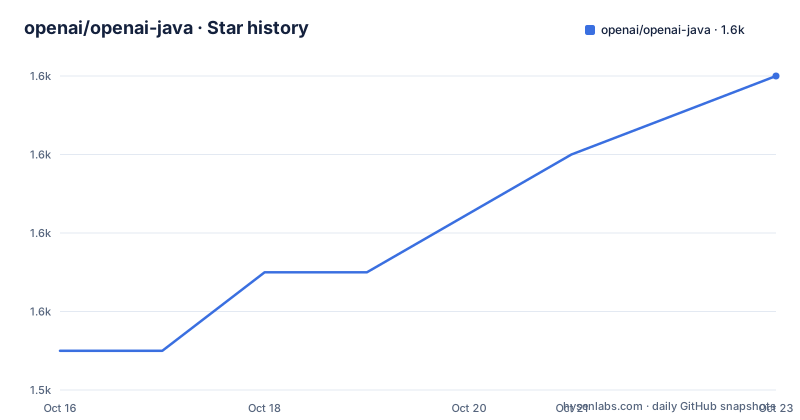
Star history
- openai/openai-java1,556 ★ · +7
| Repository | 2026-10-16 | 2026-10-23 |
|---|---|---|
| openai/openai-java | 1.5k | 1.6k |
7 Stars in the last 7 days, measured from the daily GitHub snapshot. Compare with other projects
Editorial analysis
What openai-java solves for Java callers
This is useful for server-side services, command-line programs, internal tools, and other JVM software that need to send model requests or work with other OpenAI endpoints.
The library covers more than text generation. Its repository layout includes modules for common models, Responses services, administration, beta Responses, beta services, evaluations, foundation, general, realtime, and runtime compatibility. That organization indicates a generated and modular client surface rather than a small hand-written wrapper. The user-facing starting point is `OpenAIClient`, with concrete clients supplied by `openai-java-client-okhttp` and related artifacts. The API is broad enough to fit applications that need structured response types, but its size also means that developers must identify the relevant module instead of importing every type indiscriminately.
Responses and Chat Completions request flow
The documented primary path uses the Responses API. An application creates `ResponseCreateParams` through a builder, supplies an input string and a model, then calls `client.responses().create(params)`. The returned value is a typed `Response` object from `com.openai.models.responses`. This flow keeps request construction separate from client creation, which allows configuration to be centralized while different operations construct their own parameter objects.
The older Chat Completions API remains supported indefinitely according to the README. Its flow is structurally similar but uses `ChatCompletionCreateParams`, `addUserMessage`, and `client.chat().completions().create(params)`. The result is a `ChatCompletion`. This is a meaningful choice for existing applications because the README explicitly distinguishes the Responses API as primary while preserving Chat Completions for compatibility. Developers should select the API according to the endpoint required by the application rather than assuming that the newest API is automatically a drop-in replacement for every existing integration.
The concrete transport shown in the examples is `OpenAIOkHttpClient`. Client configuration can come from environment variables or Java system properties. The documented properties include `openai.apiKey`, `openai.adminKey`, `openai.orgId`, `openai.projectId`, `openai.webhookSecret`, and `openai.baseUrl`. The corresponding environment variables are `OPENAI_API_KEY`, `OPENAI_ADMIN_KEY`, `OPENAI_ORG_ID`, `OPENAI_PROJECT_ID`, `OPENAI_WEBHOOK_SECRET`, and `OPENAI_BASE_URL`. Manual builder configuration is also supported when an application needs to provide values directly.
Gradle, Maven, and a first Responses call
The README publishes Maven and Gradle coordinates for version 4.81.0. Add the dependency to the build tool used by the application, configure the required credential, then make a request through the documented client class. The following Gradle block is the exact dependency shown in the README.
implementation("com.openai:openai-java:4.81.0")For Maven, add this dependency to the project file:
<dependency>
  <groupId>com.openai</groupId>
  <artifactId>openai-java</artifactId>
  <version>4.81.0</version>
</dependency>
Set the API key before running the application. The README documents `OPENAI_API_KEY` for environment-based configuration and also lists `OPENAI_BASE_URL` as required in the configuration table. A minimal first use can follow the README example:
import com.openai.client.OpenAIClient;
import com.openai.client.okhttp.OpenAIOkHttpClient;
import com.openai.models.ChatModel;
import com.openai.models.responses.Response;
import com.openai.models.responses.ResponseCreateParams;

OpenAIClient client = OpenAIOkHttpClient.fromEnv();
ResponseCreateParams params = ResponseCreateParams.builder()
        .input("Say this is a test")
        .model(ChatModel.GPT_5_2)
        .build();
Response response = client.responses().create(params);
The reader should see the request execute through `OpenAIOkHttpClient.fromEnv()`, with the response represented by `Response`. The repository points to `openai-java-example/src/main/java/com/openai/example` for complete runnable examples, so that directory is the documented next place to inspect for application-level patterns.
Credential precedence and Amazon Bedrock transport
Configuration is designed for both deployment environments and Java process settings. `OpenAIOkHttpClient.fromEnv()` reads the documented environment variables, while the builder can set values directly, including `apiKey` and `adminApiKey`. The README also documents combining `fromEnv()` with an explicit `.apiKey("My API Key")` call. The exact precedence between individual settings is not explained in the README, so applications that mix sources should verify behavior rather than assuming that one source always wins.
The repository includes a separate optional artifact for Amazon Bedrock. It is installed with the following coordinate:
implementation("com.openai:openai-java-bedrock:4.81.0")Instead of `OpenAIOkHttpClient`, the documented Bedrock client is created through `BedrockOpenAIOkHttpClient`. It uses the standard AWS credential chain, including environment credentials, `~/.aws/credentials`, `AWS_PROFILE`, workload roles, and instance metadata. Requests are signed with fresh AWS credentials on every attempt. `AWS_BEARER_TOKEN_BEDROCK` remains supported as a compatibility fallback. This is a transport and credential integration, not a replacement for the OpenAI API endpoint or model selection shown in the Java example.
The main operational distinction is that the standard client uses OpenAI configuration variables, while the Bedrock artifact depends on AWS credentials and an AWS region. A team must decide which credential system belongs in its runtime and should read `bedrock.md` for named profiles, temporary credentials, custom providers, async streaming, precedence rules, and security guidance.
Version support, licensing, and upgrade work
The README states that framework-neutral SDK artifacts require Java 8 or later, but it also points to `docs/version-support-policy.md` for runtime floors and lifecycle states declared per artifact. That distinction matters when selecting dependencies. The main Java requirement is not the whole compatibility contract, because individual artifacts may declare different runtime floors and lifecycle states. Repository maintainers should inspect that policy before upgrading a JVM application with older build tooling or constrained runtime environments.
The library is licensed under Apache-2.0. The repository includes `LICENSE`, `CHANGELOG.md`, `CONTRIBUTING.md`, and `SECURITY.md`, but the README excerpt does not describe a separate compatibility promise for every generated service or beta module. The recent release list includes v4.81.0 on 2026-10-13, v4.80.0 on 2026-10-10, and v4.79.0 on 2026-10-09. The repository's last push was on 2026-10-16, so the repository is not archived. Upgrade work includes checking changed generated types, reviewing the changelog, and confirming that the selected artifact and runtime policy agree.
Limits of the Java SDK design
The first limitation is scope. A typed client does not remove the need to understand the OpenAI API itself. Request parameters, model identifiers, response fields, endpoint availability, and API versioning still come from the OpenAI REST API documentation. The README points developers to `platform.openai.com/docs` for that contract. The SDK can make a request more convenient, but it cannot guarantee that a particular model, parameter, or endpoint is available for every account or runtime.
A second limitation is configuration ambiguity when environment variables and system properties are combined. The README lists both mechanisms and documents a builder that can combine `fromEnv()` with an explicit key, but it does not provide a complete precedence table for every setting. The `baseUrl` entry is also marked as required in the table, while the examples focus on `OPENAI_API_KEY`. Developers should verify the effective base URL and credential selection in the environment where the application will actually run.
The optional Bedrock path introduces another boundary. It is appropriate only when the application can use the separate `openai-java-bedrock` artifact and AWS credential chain. It is not the right choice for a Java application that needs the ordinary `OpenAIOkHttpClient` and does not need Bedrock support. Adding the artifact solely for AWS deployment can increase dependency and configuration complexity without changing the model request design.
Choosing the Responses API, Chat Completions, or another client approach
The clearest project-specific alternative is the Chat Completions API exposed by the same library. It uses a different service accessor, `client.chat().completions()`, and a different parameter class, `ChatCompletionCreateParams`. That difference matters when migrating or maintaining an existing integration. The README describes Chat Completions as the previous standard and says it is supported indefinitely, while identifying Responses as the primary API. An application already built around Chat Completions can retain that call shape instead of rewriting it solely to use the newer endpoint.
The second alternative is not another named Java client but a different transport supplied by this repository: `openai-java-bedrock` with `BedrockOpenAIOkHttpClient`. Compared with `OpenAIOkHttpClient.fromEnv()`, it obtains AWS credentials through the AWS credential chain and signs requests with AWS credentials on each attempt. It is appropriate for an application intentionally targeting OpenAI-compatible APIs on Bedrock, not for an application that merely wants another way to set `OPENAI_API_KEY`.
At the API design level, direct REST access would avoid adopting this generated SDK, but the repository does not provide a comparison with a separate competitor. The practical distinction is therefore between using this typed, artifact-based client and maintaining HTTP calls directly. The SDK is the better fit when typed builders, model packages, shared configuration, and multiple OpenAI services are part of the application.
Editorial conclusion
Adopt openai-java for a Java application that already uses the OpenAI REST API and values typed models, builder-based request construction, and direct Responses API access. Do not choose it merely for Amazon Bedrock compatibility if the required transport is not acceptable, or if your application cannot use Java 8 or later. Verify artifact versions, credential sources, API surface compatibility, and the runtime support policy before upgrading. The library is published under Apache-2.0, and the last push was on 2026-10-16.
Frequently asked questions
Which Java version does openai-java require?
The framework-neutral SDK artifacts require Java 8 or later. The README also directs users to `docs/version-support-policy.md` for runtime floors and lifecycle states declared per artifact.
How do I install openai-java with Maven or Gradle?
Add the `com.openai:openai-java:4.81.0` dependency using the Gradle or Maven syntax documented in the README. The library is published under the `com.openai` group and the `openai-java` artifact.
How do I configure the openai-java client?
The README shows `OpenAIOkHttpClient.fromEnv()` for configuration through documented environment variables and system properties. It also shows manual builder configuration for values such as `apiKey` and `adminApiKey`.
Can openai-java call the OpenAI Responses API and Chat Completions API?
Yes. The README presents the Responses API as the primary API and also documents Chat Completions through `ChatCompletionCreateParams` and `client.chat().completions().create(params)`. Chat Completions is described as supported indefinitely.
How does openai-java support Amazon Bedrock?
The optional `openai-java-bedrock` artifact provides `BedrockOpenAIOkHttpClient`, which uses the standard AWS credential chain and signs requests with fresh AWS credentials on every attempt. The README also states that `AWS_BEARER_TOKEN_BEDROCK` remains supported as a fallback.
Official sources
Where developers are discussing it
Posts on Hacker News, dev.to and Lobsters that link to this repository, found by our scan of those communities. 1 in the last 30 days; newest first.
- State of AI Instruction Quality: Coding Agent Comparisondev.to · Oct 21, 2026 · 6 points · 0 comments
Add this badge to your README
If you maintain this project, the badge below links readers to this analysis and shows its maintenance status from the daily GitHub snapshot. Paste the markdown into your README; add ?metric=license or ?metric=stars to the image URL for a different field.

[](https://hysenlabs.com/projects/openai-openai-java)Star history chart for your README
[](https://hysenlabs.com/projects/openai-openai-java)Was this useful?