JiuwenSwarm's Leader decomposes, and the desktop build never touches Linux
JiuwenSwarm is an intelligent AI Agent built on openJiuwen. It extends the powerful capabilities of large language models directly to your fingertips through various communication apps you use daily.
At a glance
- What is it?
- JiuwenSwarm is a Python multi-agent system where a Leader splits a task and Teammates negotiate it, reachable from a browser, a terminal, or the chat apps you already run. The judgement worth making early is about the seams: the project is called JiuwenSwarm but installs and declares itself as workswarm, the manifest version trails the newest release, and there is no Linux desktop build.
- Who is it for?
- Adopt JiuwenSwarm if you want a swarm you drive from a chat app you already use, and if you can point it at one of the named model providers or a local deployment. Hold off if you need a signed-off schema for how skills rewrite themselves, since the README's feature table describes the self-evolution loop without describing a rollback for it.
- Can I use it commercially?
- Yes. Apache-2.0 is a permissive licence: you can use, modify and sell software built on it, as long as you keep its copyright and licence notices.
- Is it still maintained?
- Yes. The repository received new commits within the last day.
- What is it written in?
- Mainly Python, according to GitHub's language statistics.
Answers come from the project's GitHub data, last synced on November 15, 2026, and from our analysis. They are not legal advice.
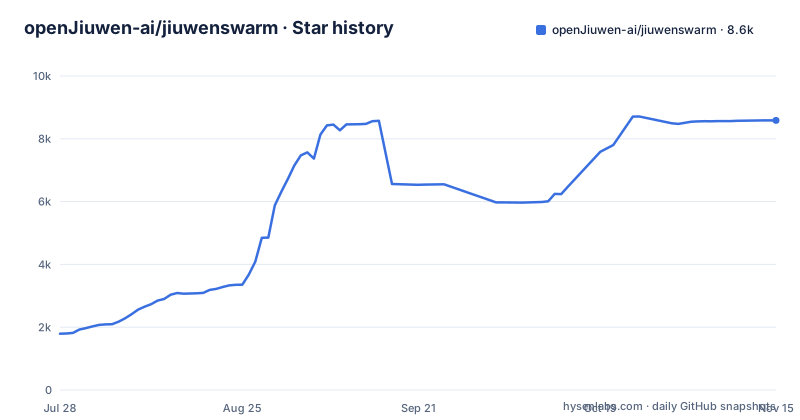
Star history
- openJiuwen-ai/jiuwenswarm8,587 ★ · +6,793
| Repository | 2026-07-28 | 2026-11-15 |
|---|---|---|
| openJiuwen-ai/jiuwenswarm | 1.8k | 8.6k |
6,793 Stars in the last 110 days, measured from the daily GitHub snapshot. Compare with other projects
Editorial analysis
The Leader decomposes, Teammates negotiate
The core claim of JiuwenSwarm is that multi-agent collaboration has to work rather than merely be claimed. The mechanism is a Leader that decomposes a complex task and assembles a team, after which multiple agents specialize and negotiate dynamically. That is a different shape from a single agent with tools, and the project treats it as the default rather than an option.
Cluster mode is what runs by default in the workbench, and the Leader in it orchestrates several specialized agents. The stated use for it is large, complex work needing multi-role collaboration. The README gives one example input for it: conducting an in-depth research pass on the new energy vehicle industry and generating an analysis report. A task with research, structuring, and writing phases is the kind that splits cleanly across roles.
Distribution is the second half of the story. Leader and Teammates deploy across processes and machines, coordinating at scale, which means the swarm is not confined to one interpreter. The system runs on a single machine or across a cluster, and you can reach it from a browser, a terminal, or the chat apps you already use.
Set against a single-agent setup, the trade is real rather than rhetorical: you give up a predictable trace for a team that can divide work you did not think to divide.
Swarmflow replaces the model's routing with a Python script
Swarmflow is the part that makes a swarm repeatable, and it is a deliberate move away from letting the model decide what happens next. Multi-stage workflows are written as Python scripts, and the Leader hands off between stage agents along that script. Determinism is the point: the sequence of stages is yours, not a sampling artifact.
Three controls sit on top of that script. HITL is supported with the values human and human_session, so a stage can stop for a person. A team token budget caps spend across the run rather than per agent. And the TUI carries a /swarmflows command that shows a run tree, which is how you inspect which stage a run is sitting in rather than reading a scrollback buffer.
The cost side deserves attention. Cluster mode is the default, so a request nobody asked to be multi-agent still pays for a Leader assembling teammates, and the token budget is a per-run ceiling rather than a per-model price guarantee. If you want the cheap path, the mode selector in the chat input area is where you change it, and the same choice exists in the IM channels and the TUI through the /mode command.
Skill self-evolution has no documented off switch
This is the capability that deserves the most scepticism, because it is the one that changes your own configuration without you. The stated mechanism: JiuwenSwarm automatically detects error signals and user dissatisfaction, then optimises Skill definitions. The Skill Hub sits alongside it, where capability assets are built once and reused, with search, install, remix, and publish. Auto Harness is the third layer, driving end-to-end optimisation of the Harness itself through evaluation, which the project says learns and improves in practice with no model-weight training.
Taken at face value, that is a system editing the instructions that govern its own behaviour. The README's feature table does not describe an off switch for self-evolution, the signal thresholds that trigger an edit, an audit format for a changed Skill definition, or a way to roll one back, so check the docs before relying on any of them.
The practical consequence is that Skills have to be treated as code you own and version yourself, regardless of whether the Hub already gives them a name and a remix workflow. Before letting this loop run unattended, pin the definitions yourself and diff them. The Auto Harness claim deserves the same treatment: evaluation-driven self-improvement is worth trying on a sandbox, not on the directory holding your real work.
Tool calls wait for approval and file reads go through a whitelist
The security story is concrete rather than decorative, and it is the part of the feature table with the most operational weight. Every step is under your control. Tools require approval before execution. File access goes through a whitelist. Sensitive operations are intercepted.
Three distinct gates, and they are not the same gate. Approval sits in front of an action about to run, a whitelist constrains what paths are reachable at all, and interception catches operations classified as sensitive. A whitelist you have never configured plus a prompt you click through reflexively gives you one gate, not three.
The dependency list shows where the reach extends. python-telegram-bot, discord.py, slack-bolt, dingtalk-stream and wecom-aibot-sdk are all present, so the swarm can be driven from Slack, Discord, Telegram, DingTalk and WeCom rather than only from localhost:5173. fastmcp and mcp are both required, which is an outward-facing tool protocol surface, and uvicorn[standard] with fastapi is the server that fronts it.
Worth noting on the dependency floor: python-multipart is pinned to >=0.0.31,<0.1 with an inline comment naming CVE-2026-42561, a MultipartParser denial-of-service issue, and lxml is floored at 6.1.0 for the same reason. Those caps are the project surfacing transitive floors early to stop a resolver downgrade, which is a more careful default than most.
Three install paths, and a package that calls itself workswarm
The quickest route is the one-click desktop build, and it covers Windows 10 or 11, macOS on Intel or Apple Silicon, and HarmonyOS PC. There is no Linux desktop build. Linux users are pointed at the command line or the source route instead, so the word one-click does not apply to them.
The command line path is four commands. Initialisation is a separate step from starting, which matters when something goes wrong and you are deciding whether the config was ever written:
pip install workswarm
pip install workswarm -i https://pypi.tuna.tsinghua.edu.cn/simple
jiuwenswarm-init
jiuwenswarm-start
The second line is the China mirror, flagged as recommended in the project's own text. After starting, the frontend is at http://localhost:5173. The terminal interface is a different distribution: jiuwenswarm-tui, installed and launched on its own, and it has to be started in a new terminal after JiuwenSwarm is already running.
Here is the naming wart. The README tells you to install workswarm, matching pyproject.toml, which declares name = "workswarm" and version = "0.2.5.beta1" with description = "WorkSwarm". The newest GitHub release is v0.2.8, so the version inside the manifest trails the newest release. The default branch is develop rather than main. None of this blocks an install, but it means grepping a log for the release you are running needs the tag, not the manifest.
config.yaml under your home directory is the one setting you cannot skip
JiuwenSwarm supports Huawei Cloud MaaS, OpenAI, DeepSeek, DashScope, SiliconFlow, OpenRouter and other OpenAI-compatible APIs, as well as local model deployment. What you cannot do is skip choosing one. A default model is named as the single piece of configuration with no way around it, and there are two places to set it: the web UI under More, then Configuration, or the file at ~/.jiuwenswarm/config/config.yaml.
The file is created on your first jiuwenswarm-start, so it does not exist to edit before the first run. Saving it reloads the configuration without a restart, which is the detail that makes iteration bearable. A DeepSeek setup looks like this:
model_name: deepseek-v4-flash
api_base: https://api.deepseek.com
api_key: sk-your-api-key
model_provider: OpenAI
Four keys, and model_provider is set to OpenAI even for a non-OpenAI endpoint, because the compatibility surface is the OpenAI one. Copy api_key into a checked-in file and you have leaked a credential into git, so this file belongs in ignore rules from the first commit.
Behind that YAML sits a heavy dependency set. openjiuwen itself is not a version range but a git reference pinned to one commit, chromadb and pgvector and sqlite-vec sit side by side for retrieval, and skillnet-ai is pinned exactly. uv.lock exists, so pin from the lock file rather than resolving afresh.
Work and Code are separate spaces, Agent and Cluster are separate moods
The workbench has two spaces, switched from the top-left selector. Work covers office, collaboration, and general tasks. Code is for viewing and modifying code in a project directory. Separating them at the top level is a small design decision with a large effect on blast radius, because an agent that can edit a project is not the same tool as one that drafts a report.
Inside a conversation, the mode selector in the chat input area picks between two execution models. Agent mode is a single agent handling tasks independently, with task planning and dynamic adjustment; the stated use is most daily tasks, question answering, and code generation. Its example input is checking the weather in Beijing and recommending three books about artificial intelligence. Cluster mode is the multi-agent path described earlier, and it is the default.
The /mode command switches between finer-grained sub-modes (agent.plan, agent.fast, code.normal, code.team, team) in the IM channels and in the TUI, so a chat-driven deployment can change shape per request instead of per install. That is the piece that makes the multi-agent cost manageable in practice: the swarm is available when a task earns it, and the single agent handles the rest.
One gap worth naming. The README describes the Work and Code selector and the two modes but does not say what separates them at the permission level, and given that file access runs through a whitelist, whether the Code space widens it is worth checking in the settings before pointing the Code mode at a real repository.
Editorial conclusion
Adopt JiuwenSwarm if you want a swarm you drive from a chat app you already use, and if you can point it at one of the named model providers or a local deployment. Hold off if you need a signed-off schema for how skills rewrite themselves, since the README's feature table describes the self-evolution loop without describing a rollback for it. Verify first that jiuwenswarm-init and jiuwenswarm-start both succeed on your Python, because the manifest and the README both require Python >=3.11,<3.15.
Frequently asked questions
What is swarm AI and how does it work in JiuwenSwarm?
A Leader decomposes a complex task and assembles a team, then multiple agents specialise and negotiate dynamically. Leader and Teammates can deploy across separate processes and machines, and Swarmflow adds deterministic multi-stage workflows written as Python scripts where the Leader hands off between stage agents.
Is JiuwenSwarm free to use?
The framework is Apache-2.0 licensed and installs from PyPI with pip install workswarm. The cost is the model, not the swarm: a default model must be configured with an api_key before use, whether that points at DeepSeek, Huawei Cloud MaaS, OpenRouter or a local deployment.
Which model providers does JiuwenSwarm support?
Huawei Cloud MaaS, OpenAI, DeepSeek, DashScope, SiliconFlow, OpenRouter and other OpenAI-compatible APIs, plus local model deployment. You set one in the web UI under More, then Configuration, or edit ~/.jiuwenswarm/config/config.yaml directly.
Which port does the JiuwenSwarm frontend use, and what is the TUI?
After jiuwenswarm-start, the frontend is at http://localhost:5173. The terminal interface is a separate distribution called jiuwenswarm-tui, installed with pip and launched on its own in a new terminal once JiuwenSwarm is already running.
Official sources
Add this badge to your README
If you maintain this project, the badge below links readers to this analysis and shows its maintenance status from the daily GitHub snapshot. Paste the markdown into your README; add ?metric=license or ?metric=stars to the image URL for a different field.

[](https://hysenlabs.com/projects/openjiuwen-ai-jiuwenswarm)Star history chart for your README
[](https://hysenlabs.com/projects/openjiuwen-ai-jiuwenswarm)Was this useful?