Kraken: a Flutter rendering engine whose support table stops at Flutter 2.8
GitHub describes it as A web standards-compliant, high-performance rendering engine based on Flutter.. The repository metadata lists TypeScript as its primary language. The metadata lists the Apache-2.0 license. This article stays within the project description and details documented in the GitHub repository README.
At a glance
- What is it?
- Kraken renders web standard DOM code inside a Flutter app, ships a global CLI for running a bundle and builds a native bridge per platform. The catch is stated in the first line of its own README: on Flutter 3.x or later you are meant to use the openwebf fork instead, and the last push to this repository is dated 2022-12-30.
- Who is it for?
- Kraken makes sense for an app that already runs Flutter 2.x and wants its web facing surface written as DOM code instead of widgets. It does not make sense on Flutter 3.x or later, where the README itself routes you to the openwebf fork.
- Can I use it commercially?
- Yes. Apache-2.0 is a permissive licence: you can use, modify and sell software built on it, as long as you keep its copyright and licence notices.
- Is it still maintained?
- Probably not. The repository last received commits 46 months ago, on December 30, 2022.
- What is it written in?
- Mainly TypeScript, according to GitHub's language statistics.
Answers come from the project's GitHub data, last synced on October 4, 2026, and from our analysis. They are not legal advice.
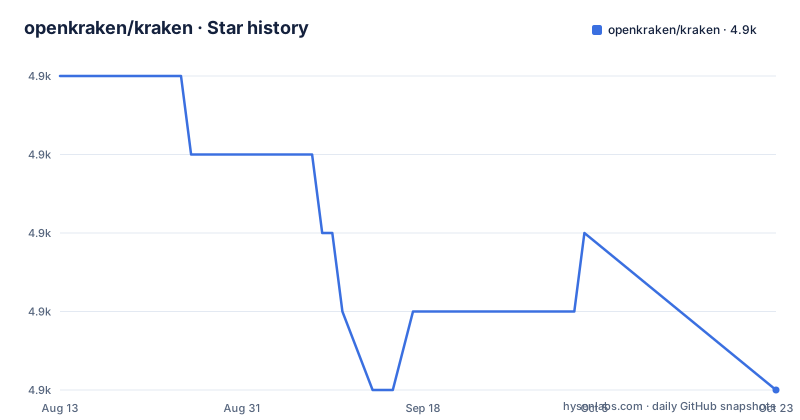
Star history
- openkraken/kraken4,926 ★ · -2
| Repository | 2026-08-13 | 2026-10-04 |
|---|---|---|
| openkraken/kraken | 4.9k | 4.9k |
-2 Stars in the last 52 days, measured from the daily GitHub snapshot. Compare with other projects
Editorial analysis
Flutter 3.x means the README points you at a fork
The first thing the README says, in English and again in Chinese, is that if your project uses Flutter 3.x or later you should use Kraken's fork project, openwebf, at github.com/openwebf/webf. That recommendation sits above the project title, not in a compatibility note at the bottom, which tells you how the maintainers see the current state of this repository. Everything that follows describes a rendering engine for the Flutter 2.x line: the SDK, the bridge builds and the version table all stop below the point where Flutter moved on. Reading this repository as current guidance for a new Flutter app means ignoring the sentence the authors put first.
The CLI is one global npm install, macOS and Linux only
Trying the engine means two steps. Install the CLI globally:
$ npm i @openkraken/cli -gThen point it at a bundle to open:
$ kraken run https://raw.githubusercontent.com/openkraken/kraken/master/kraken/example/assets/bundle.jsThe URL is the example bundle that ships in the repository, so the quick path needs no project of your own. Note the parenthetical in the README: macOS and Linux only currently. There is no Windows entry in that flow, and no documented alternative for it, so a Windows developer has neither the CLI nor a stated substitute. The Dart side of the engine is published separately as the `kraken` package on pub.dev, which is what an app depends on rather than this CLI.
The support table pairs Kraken ranges with exact Flutter patches
Compatibility is expressed as four rows, and only stable released Flutter versions are fully tested:
| Kraken | Flutter | | ------------- | ------------- | | >= 0.7.0 < 0.8.0 | 1.22.0 ~ 1.22.6 | | >= 0.8.0 < 0.10.0 | 2.2.0 ~ 2.2.3 | | >= 0.10.0 < 0.11.0 | 2.5.0 ~ 2.5.3 | | >= 0.11.0 | 2.8.0 ~ 2.8.1 |
Two things follow from reading it as written. Each Kraken range covers a narrow band of Flutter patch releases rather than a minor version, so a Flutter 2.8.2 install has no supported Kraken row at all. And the newest row, `>= 0.11.0`, is open ended on the Kraken side while its Flutter side stops at 2.8.1, which leaves later Flutter versions undefined rather than unsupported. If your Flutter version is not in a cell, the table does not answer what happens.
The bridge is compiled per platform by hand written scripts
Cross platform support is real work in this tree, and `package.json` shows it as one script per target: `node scripts/build_darwin_dylib` for macOS, `node scripts/build_linux`, `node scripts/build_android_so`, `node scripts/build_ios_framework`, plus `node scripts/prepare_kraken_release_binary` for all of them at once. Each has a release variant driven by `KRAKEN_BUILD=Release` and a profile variant driven by `ENABLE_PROFILE=true`. Separate SDK builds exist too, `build:android:sdk` and `build:ios:sdk`, and the top level carries `bridge/`, `sdk/`, `plugins/` and `third_party`. Nothing here calls a Flutter build system for you: on Windows there is no target script at all, which lines up with the CLI's platform note. The `kraken/` directory at the root is the Flutter package itself, the one an application depends on, and `start` is the only script that enters it.
Tests, plugins and benchmarks each have their own entry point
The test side is split three ways. `test` is `node scripts/run_test.js` and it is bracketed by hooks: `pretest` runs `npm install && ENABLE_ASAN=true node scripts/build_darwin_dylib`, so a sanitizer build of the macOS bridge happens before any test, and `posttest` runs the lint task. `plugin_test` is `node scripts/run_plugin_test.js`, and the benchmark is `npm install && ENABLE_PROFILE=true KRAKEN_BUILD=Release node scripts/run_benchmark.js`, a profiling build with `performance_tests/` and `integration_tests/` sitting at the top level as the suites. To look at the engine by hand, `start` moves into the example app and runs `flutter run`.
The pitch is that your web surface stays DOM code
Kraken's argument is that web standards compatibility means you do not have to change your stack, and the example it puts under that claim is two lines:
const text = document.createTextNode('Hello World!');
document.body.appendChild(text);
No widget tree, no platform channel, just the DOM API a web developer already knows. The package supports web, mobile on iOS and Android, and desktop on macOS, Linux and Windows, and the performance claim is native-like behavior for navigation, animation and infinite list scrolling. The honest reading is that this applies to the part of your app rendered through Kraken; what surrounds it is still a Flutter application, so the bridge is the boundary where the two models meet.
Governance in two languages, Apache-2.0, copyright 2019-present
The repository carries `GOVERNANCE.md` and `GOVERNANCE.zh-CN.md` side by side, `AUTHORS.txt`, an `.editorconfig` and `LICENSE`, and contributions are accepted under the Apache-2.0 license with the guide at `.github/CONTRIBUTING.md`. Copyright runs from 2019 to present as stated in the README, which reads as continuous rather than as a statement about current activity. The activity record is elsewhere: releases are 0.10.3 on 2022-03-25, 0.10.4 on 2022-04-02 and 0.11.0 on 2022-04-07, and the last push to the default branch is dated 2022-12-30. Treat the code as a snapshot to read, fork or patch rather than as a dependency with a release cadence.
Editorial conclusion
Kraken makes sense for an app that already runs Flutter 2.x and wants its web facing surface written as DOM code instead of widgets. It does not make sense on Flutter 3.x or later, where the README itself routes you to the openwebf fork. Before adopting it, check the compatibility row for your exact Flutter patch version and note the maintenance position: releases stop at 0.11.0 from 2022-04-07 and the last push is dated 2022-12-30.
Frequently asked questions
Which Flutter versions does Kraken support?
Only stable released Flutter versions are fully tested. The table maps Kraken 0.7.0 to 0.8.0 onto Flutter 1.22.0 through 1.22.6, Kraken 0.8.0 up to 0.10.0 onto 2.2.0 through 2.2.3, Kraken 0.10.0 up to 0.11.0 onto 2.5.0 through 2.5.3, and Kraken 0.11.0 and later onto 2.8.0 through 2.8.1.
How do I install the Kraken CLI?
Run npm i @openkraken/cli -g to install it globally, which the README lists for macOS and Linux only. You then open a bundle with kraken run and a URL, for example the example bundle shipped in the repository.
Should I use Kraken with Flutter 3.x?
No. The README recommends the openwebf fork for projects on Flutter 3.x or later, and the compatibility table here stops at Flutter 2.8.1 for Kraken 0.11.0. This repository is scoped to the Flutter 2.x line.
What does the Kraken benchmark script run?
npm run benchmark installs packages and runs node scripts/run_benchmark.js with ENABLE_PROFILE=true and KRAKEN_BUILD=Release, producing a profiling build. The suites live in performance_tests/ and integration_tests/ at the top of the repository.
What are the licensing terms for contributing to Kraken?
By contributing you agree that your contributions are licensed under the project's Apache-2.0 license. Governance is written twice, as GOVERNANCE.md and GOVERNANCE.zh-CN.md, contributors are listed in AUTHORS.txt, and the copyright line reads 2019-present, The Kraken authors.
Official sources
Add this badge to your README
If you maintain this project, the badge below links readers to this analysis and shows its maintenance status from the daily GitHub snapshot. Paste the markdown into your README; add ?metric=license or ?metric=stars to the image URL for a different field.

[](https://hysenlabs.com/projects/openkraken-kraken)Star history chart for your README
[](https://hysenlabs.com/projects/openkraken-kraken)