OpenMake routes one request across several models, and the installer is one line
Open-source, self-hosted AI workspace for local and open-weight LLMs with vLLM, LiteLLM, autonomous agents, MCP tools, deep research, artifacts, and BYOK.
At a glance
- What is it?
- OpenMake is a self-hosted TypeScript workspace that puts a LiteLLM gateway, local vLLM or Ollama, agents, MCP tools and deep research behind one interface. The quick start is a curl pipe, and the price is five required environment variables before first launch.
- Who is it for?
- OpenMake suits a team already running open-weight models that wants agents, approvals and a research pipeline around them on its own hardware, and that is prepared to fill in five environment variables before the first launch. It does not suit a laptop with a single API key and no container runtime, since the full install asks for Colima or Docker Engine plus PostgreSQL, Redis and a LiteLLM proxy.
- Can I use it commercially?
- Yes. Apache-2.0 is a permissive licence: you can use, modify and sell software built on it, as long as you keep its copyright and licence notices.
- Is it still maintained?
- Yes. The repository received new commits within the last day.
- What is it written in?
- Mainly TypeScript, according to GitHub's language statistics.
Answers come from the project's GitHub data, last synced on October 22, 2026, and from our analysis. They are not legal advice.
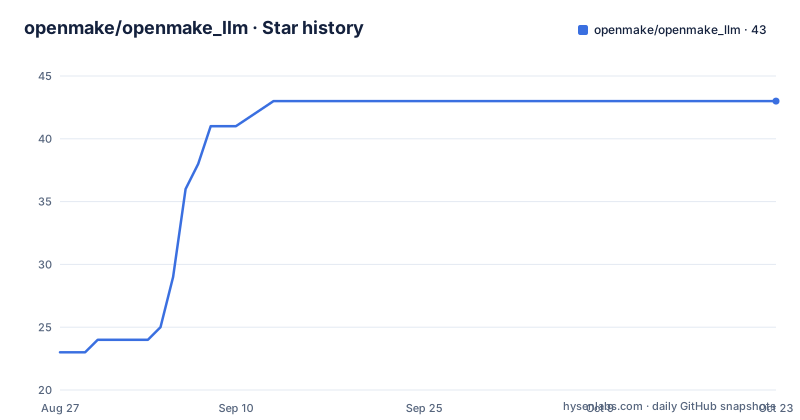
Star history
- openmake/openmake_llm43 ★ · +20
| Repository | 2026-08-27 | 2026-10-22 |
|---|---|---|
| openmake/openmake_llm | 23 | 43 |
20 Stars in the last 56 days, measured from the daily GitHub snapshot. Compare with other projects
Editorial analysis
install.sh hands off to install_linux.sh or install_mac.sh by platform
The quick start is a pipe from the repository's raw main branch:
curl -fsSL https://raw.githubusercontent.com/openmake/openmake_llm/main/install.sh | bashThat entry script does not do the work itself. It dispatches on the operating system, to `install_linux.sh` on Linux and WSL2 and `install_mac.sh` on macOS. Windows is supported by running the whole thing inside WSL2.
On a fresh machine the installer asks its questions once, then puts the prerequisites in place. macOS needs Xcode Command Line Tools, Homebrew and Colima for Docker; Linux needs distro packages and Docker Engine. After that the full stack is assembled through `scripts/env/omk.sh`, covering the LiteLLM gateway, SearXNG for search, the sandbox images, internal HTTPS, backups and auto-start after reboot.
Once it finishes, you open the URL it prints, sign in as the administrator and connect a model: a local vLLM or Ollama server, or any OpenAI-compatible endpoint.
--minimal keeps the app and drops the model stack
The full installer is heavy, because it provisions infrastructure you may already have. Passing `bash -s -- --minimal` installs only the app, and the sequence it follows is specific enough to be worth reading before you run it.
It checks the toolchain first, namely Node.js 24, Docker and PM2. Then it writes a `.env` file with fresh secrets, starts PostgreSQL and Redis, builds OpenMake, launches it under PM2 and runs a health check.
What you give up is everything `omk.sh` adds, meaning the LiteLLM gateway, SearXNG, the sandbox images, internal HTTPS, backups and reboot auto-start. In practice that means pointing LLM_BASE_URL at a gateway you run yourself.
For an unattended install, the model backend has to be passed on the command line as well, either as `--yes --dgx-host <host> --vllm-api-key <key>` or as `--yes --llm-provider <name> --llm-model <id> --llm-api-key <key>`. Without one of those forms the installer has nothing to point the gateway at.
Five variables block first launch, and three of them generate themselves
The `.env.example` template is annotated in Korean and marks five variables as required for first launch:
DATABASE_URL
JWT_SECRET
API_KEY_PEPPER
ADMIN_PASSWORD
LLM_BASE_URL
`LLM_BASE_URL` is the LiteLLM proxy endpoint, which is the reason the gateway is not optional in the full install. Two more are recommended for production: `TOKEN_ENCRYPTION_KEY`, which encrypts OpenRouter keys and produces a plaintext-storage warning when unset, and `DEFAULT_ADMIN_EMAIL` for the administrator login.
The three secrets have an escape hatch. If `JWT_SECRET`, `API_KEY_PEPPER` or `TOKEN_ENCRYPTION_KEY` are missing, the first boot generates them and appends them to the file, through a step called `boot/ensure-secrets`. The cost is stated plainly: lose that file and every session and every piece of stored ciphertext are invalid, so the file is worth backing up. Secret values are 64 hex characters, generated with `openssl rand -hex 32`.
`ADMIN_PASSWORD` has a different fallback. Leave it unset with no admin accounts and the first visit to `/setup` opens a wizard that creates the administrator and connects the LLM gateway.
Admin UI values outrank .env, except for the bootstrap keys
Most operational settings can live in either place. OAuth, web search, operational alert webhooks, web push through VAPID and the LLM gateway values are all editable from the admin interface under system settings, and the precedence rule is explicit: the database value wins over the `.env` value, and resetting from the UI restores whatever `.env` says.
The five required variables and the secret keys are the exception. They are described as `.env`-only because of their bootstrap role, since the process needs them before there is an admin account to log into and change them.
That split has a practical consequence for operators. Anything that must exist on a cold boot belongs in `.env` and in version-controlled templates. Anything an operator tunes after deployment belongs in the UI, where the value survives a `.env` edit without being silently reverted. The recommended topology in the template makes the same point in a diagram, an OpenMake API process pointing at a LiteLLM proxy on port 13401, which in turn points at a vLLM instance.
Seven model roles and five capability slots, and gaps are reported not hidden
Routing is split in two. Model roles are named slots you fill with a model of your choice: `agent`, `judge`, `research`, `spawn`, `review`, `summary` and `planner`. Users pick their own models for those, while administrators set the defaults and can hand out shared server keys with daily and monthly token budgets attached.
Capabilities are a separate set of assignments covering text and code, vision and OCR, image generation and editing, speech to text, text to speech, video, and embedding. The behaviour when a slot is empty is the detail that matters: a capability without an assignment is reported as unavailable rather than falling back to the chat model, so a request that needs an image model fails visibly instead of quietly returning something else.
Underneath, a request is either simple or split. A simple question goes straight to the chat model. Anything needing an image, a transcript, a web search or several steps is divided into tasks assigned to the models and tools you named, and the chat model writes the final answer around the results.
BYOK keys are encrypted and upstream failures keep their names
Provider keys are stored AES-256-GCM encrypted and passed through the gateway per request rather than held in a prompt or a config file in the clear.
The error handling is the part worth reading. Rate limits, insufficient credit and restricted models are each reported as themselves, not collapsed into a generic upstream error. For a self-hosted stack that is the difference between a configuration mistake and a mystery, since an exhausted balance and a throttled key produce completely different fixes.
A context-fit safety net sits alongside this. Prompts, images included, are measured against the target model's context window, and oversized input is trimmed rather than sent and rejected. Models reached through the gateway can be your own vLLM instances, BYOK providers such as OpenRouter, NVIDIA NIM, Ollama Cloud, Open AI Service Hub or B.AI, or a direct ChatGPT subscription login for users who bring one.
It claims a layer, not a feature set, against Open WebUI and Dify
The comparison table in the README is organised by layer, which is a more honest framing than a feature matrix. Ollama and vLLM run models. Open WebUI is for using models through a self-hosted interface. Dify builds AI apps and workflows. OpenHands is agents for software development. OpenMake's own row claims general AI work: orchestrating models, agents and tools.
The README says explicitly that these are different layers and are not mutually exclusive, and the practical version of that claim is concrete. OpenMake serves local models through vLLM and can use an Ollama server as its model endpoint, so a machine already running Ollama does not need a second inference server to try OpenMake.
What sits on top of that plumbing is an agent loop with a pause button. An agent handed a goal plans, browses, edits files, runs code inside a Docker sandbox, and stops for approval before risky steps. MCP brings external services, with Notion, Context7, Tavily and NotebookLM named, and there is a catalog of 23 built-in tools plus skills and extensions.
A four-workspace TypeScript monorepo with Playwright on top
The repository is a monorepo whose `package.json` builds packages before apps, which is the ordering to respect if you build by hand. `build` runs `build:packages`, then the backend, then the Next frontend, and the package step covers the `@openmake/shared-types`, `@openmake/config`, `@openmake/api-client` and `@openmake/local-bridge-core` workspaces. The server entry point is `apps/api/dist/server.js`, with `apps/web` as the frontend.
Tests come in three shapes: the package and backend unit tests behind `npm test`, Playwright for end to end through `npm run test:e2e`, and a UI mode behind `test:e2e:ui`. There is also `npm run audit:gate`, which runs a script rather than a linter, and a `contracts:export` script that dumps an OpenAPI document.
Around that sit the operational files. `ecosystem.config.js` is the PM2 definition the installer uses, `mise.toml` and `.node-version` pin the toolchain, `release-please-config.json` matches the v1.90.0, v1.90.1 and v1.91.0 release cadence visible on the repository, and `uninstall.sh` sits next to the three install scripts. Releases v1.91.0, v1.90.1 and v1.90.0 came out on 2026-09-30, 2026-09-27 and 2026-09-25.
Editorial conclusion
OpenMake suits a team already running open-weight models that wants agents, approvals and a research pipeline around them on its own hardware, and that is prepared to fill in five environment variables before the first launch. It does not suit a laptop with a single API key and no container runtime, since the full install asks for Colima or Docker Engine plus PostgreSQL, Redis and a LiteLLM proxy. Before deploying, run npm run audit:gate and read .env.example, where TOKEN_ENCRYPTION_KEY is only a recommendation and leaving it unset stores provider keys in plaintext.
Frequently asked questions
How do I install OpenMake on Linux or macOS?
Run curl -fsSL https://raw.githubusercontent.com/openmake/openmake_llm/main/install.sh | bash. That entry script hands off to install_linux.sh on Linux or WSL2 and install_mac.sh on macOS, and Windows is supported by running it inside WSL2.
What does the minimal install of OpenMake leave out?
Passing bash -s -- --minimal installs only the app: it checks Node.js 24, Docker and PM2, writes a .env with fresh secrets, starts PostgreSQL and Redis, builds OpenMake, launches it under PM2 and runs a health check. It skips the LiteLLM gateway, SearXNG, sandbox images, internal HTTPS and backups.
Which environment variables does OpenMake require on first launch?
DATABASE_URL, JWT_SECRET, API_KEY_PEPPER, ADMIN_PASSWORD and LLM_BASE_URL, which points at the LiteLLM proxy endpoint. TOKEN_ENCRYPTION_KEY and DEFAULT_ADMIN_EMAIL are recommended for production, and secret values are 64 hex characters from openssl rand -hex 32.
Can OpenMake use a model I run myself?
Yes. It serves local and open-weight models through vLLM behind a LiteLLM gateway that speaks the OpenAI-compatible API, and it can also use an Ollama server or any OpenAI-compatible endpoint as its model backend.
What happens when OpenMake has no model assigned to a capability?
The capability is reported as unavailable instead of silently falling back to another model. Vision, image generation, speech, video and code each get their own assignment, separate from the agent, judge, research, spawn, review, summary and planner roles.
How does OpenMake relate to Open WebUI, Dify and OpenHands?
The README places them on different layers rather than as competitors: Ollama and vLLM run models, Open WebUI provides a self-hosted interface, Dify builds AI apps and workflows, and OpenHands is for software development agents. It says these are not mutually exclusive.
Official sources
Add this badge to your README
If you maintain this project, the badge below links readers to this analysis and shows its maintenance status from the daily GitHub snapshot. Paste the markdown into your README; add ?metric=license or ?metric=stars to the image URL for a different field.

[](https://hysenlabs.com/projects/openmake-openmake-llm)Star history chart for your README
[](https://hysenlabs.com/projects/openmake-openmake-llm)