desktop-cc-gui puts eleven AI coding CLIs behind one Tauri window
Multi-engine AI coding desktop client (Tauri). Claude Code, Codex, Gemini, OpenCode, DeepSeek Harness and more in one GUI.
At a glance
- What is it?
- ccgui wraps Claude Code, Codex, Kimi, OpenCode and seven other command line coding runtimes in a Tauri desktop client with streaming output, session history and inline permission handling. It is a genuine front end for the CLIs, not a substitute for them, and its per engine compatibility gaps are wide enough to read before you switch.
- Who is it for?
- Adopt ccgui if you already run at least two of these CLIs daily and want one chat surface with streaming output, session history and a model picker. Skip it if your workflow depends on team mode, which the compatibility matrix marks unsupported for every engine, or on Kimi per token streaming, which is marked unsupported.
- Can I use it commercially?
- Yes. MIT is a permissive licence: you can use, modify and sell software built on it, as long as you keep its copyright and licence notices.
- Is it still maintained?
- Yes. The repository received new commits within the last day.
- What is it written in?
- Mainly TypeScript, according to GitHub's language statistics.
Answers come from the project's GitHub data, last synced on November 14, 2026, and from our analysis. They are not legal advice.
Star history
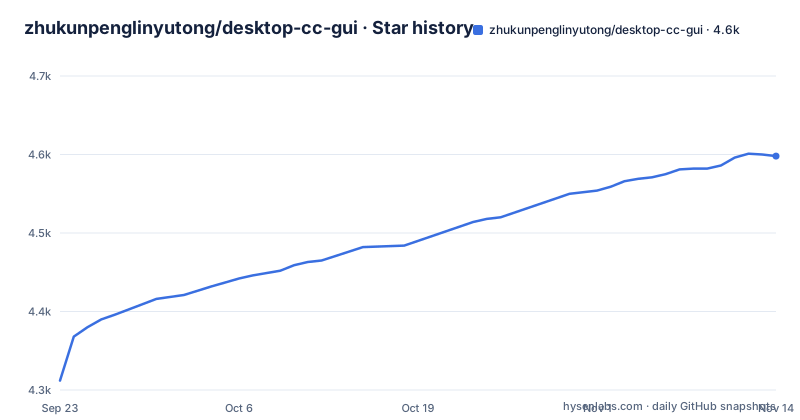
- zhukunpenglinyutong/desktop-cc-gui4,598 ★ · +286
| Repository | 2026-09-23 | 2026-11-14 |
|---|---|---|
| zhukunpenglinyutong/desktop-cc-gui | 4.3k | 4.6k |
286 Stars in the last 52 days, measured from the daily GitHub snapshot. Compare with other projects
Editorial analysis
Ten CLIs driven through dedicated Rust protocol adapters
Most AI coding assistants still ship as a terminal program that prints text, asks permission questions inline and holds session state in files you cannot see. ccgui is a Tauri 2 desktop client whose stated job is to put a window around those programs for people who write code all day but do not want to read raw console output.
The claim worth checking is how it talks to them. The README says each engine is wired in through a dedicated protocol adapter in the Rust backend, so streaming events, session history and provider channels are handled natively instead of being scraped off a terminal screen. That distinction decides a lot. A screen scraper has to guess where a prompt ends and a model reply begins, and it inherits whatever ANSI noise the CLI decides to print. A protocol adapter consumes structured events, which is what makes per token streaming, interrupt and a message queue possible on the same window.
The supported list is Claude Code, Codex CLI, Kimi CLI, Grok CLI, Pi CLI, OMP CLI, DeepSeek Harness, Antigravity, OpenCode, Qoder in both global and CN distributions, and MiniMax Code. You pick the engine per session from the composer rather than restarting an app. Settings and state persist locally, and the stack is Tauri 2 with React 18, TypeScript and Rust, shipping for macOS, Windows and Linux.
One detail sits oddly next to the eleven-engine headline. The repository declares a workspace plugin package, `@ccgui/plugin-sdk`, alongside `patches/`, `deploy/` and `packages/` directories, so extension work is a stated part of the layout. The compatibility matrix marks the native `/plugins` command as supported only for OMP.
Provider channels go into each CLI's own config, not a ccgui credential store
Switching an AI coding engine usually means editing a JSON or TOML file by hand, which is why people end up with five accounts and no memory of which key belongs to which tool. ccgui's answer is that provider channels are written into each CLI's own native config files, with no parallel credential store alongside them.
That is a real architectural commitment and it has a real cost. Because ccgui edits the config of a tool it does not own, it inherits whatever version of that config the CLI expects. Presets are offered for GLM, Kimi, DeepSeek, MiniMax, MiMo, Bailian, LongCat, OpenCode Go, OpenRouter and Requesty, and Claude, Codex and Grok channels can be imported from CC Switch. The importer covers three engines. For Kimi, Pi, OMP, DSH, Antigravity, OpenCode, Qoder and MiniMax Code, the matrix row for CC Switch import is a cross, so those users write their own channel configuration.
The privacy line in the README is narrower than it first looks: content sent to an AI provider follows the boundary of the channel you configured for that CLI. The boundary is the channel, not the app. Whatever provider you pointed the CLI at receives what you send it, and ccgui's role ends at writing that configuration correctly.
Running from source with pnpm dev and the macOS build scripts
The README points to the project homepage at mossx.ai/download for packaged builds. For source work, the repository is a pnpm workspace pinned to pnpm 10.29.3, and every entry point lives in the root package.json scripts.
Start the desktop client in development mode. The dev script runs the Vite frontend and the Tauri shell together:
tauri devYou need the Rust toolchain and the platform prerequisites Tauri expects on your machine. Two mac specific scripts exist for producing a signed build, and the second sets SKIP_NOTARIZE to 1, which is the one to use while iterating locally:
./scripts/build-signed-macos.shSKIP_NOTARIZE=1 ./scripts/build-signed-macos.shThe production build type checks before it bundles, so a type error fails the build rather than shipping:
tsc --noEmit && vite buildThe test script runs Node's built-in test runner over `tests/*.test.ts` and then vitest:
vitest runFor first use, the sequence is short. Launch the app, pick a project directory, choose an engine from the composer, and configure a provider channel in Settings before your first message. Because the app drives installed binaries, a CLI that is not on PATH will not work regardless of how the channel is set. One more constraint belongs here: the desktop client targets all three of macOS, Windows and Linux, but the two build scripts above are macOS only.
The compatibility matrix is narrower than the ten engine headline
The README carries a per feature matrix across all eleven engines, and it is the most useful page in the project. It is also where the marketing outruns the software.
Streaming output is marked unsupported for Kimi CLI while being supported everywhere else. Image attachments are unsupported for Antigravity. Reasoning effort, which maps directly to the thinking level controls that modern coding models expose, is unsupported for Kimi, Grok, DSH and OpenCode and only partial for Antigravity and MiniMax Code. Token usage and context window reporting is partial for OpenCode. Todo list rendering works only for Claude Code, Pi and OMP.
Two rows deserve closer reading. Provider and channel switching is partial for Pi, OMP, DSH, Antigravity, OpenCode and Qoder and unsupported for MiniMax Code, so the channel feature that ccgui is built around works fully for only 4 of the 11 engines. And team mode, multi agent orchestration, is marked unsupported for every engine in the table: 11 crosses in a single row. Sub agent display is partial for Antigravity, OpenCode and Qoder and unsupported for Grok and MiniMax Code, leaving 6 engines with full support.
Provider channel switching being partial for six engines is the row that would make me pause before switching a working setup. The feature is the app's reason for existing and it is uneven across most of the list.
WSL workspaces lose Kimi question cards and plan mode
The README describes Kimi question cards in unusual detail, which tells you they were hard to build. They run over the local Kimi CLI's ACP form channel, were verified with Kimi 2.0.2, and cover multiple questions, multiple selections, dismissal and interruption.
The same paragraph states two limits that a skim would miss. Kimi currently accepts declared options only, so the cards cannot offer a free text Other answer. And WSL workspaces keep the non interactive CLI fallback, which means they support neither Kimi question cards nor plan mode. ccgui detects a WSL workspace and degrades the interactive surface rather than failing.
That degradation is the correct call, and it comes with a rule that explains why prompt mode launches never add incompatible interactive permission flags. When the environment cannot support interactive permission prompts, ccgui launches without them instead of passing flags the target CLI will reject. The same reasoning sits behind the permission mode column, where Grok and Qoder are bypass only, DSH and Pi are auto only, and Claude Code and MiniMax Code get the widest set: auto, manual, plan and bypass.
Plan mode existing at all is notable. It is a per engine feature, not an app setting, so a capability you rely on can vanish when you switch engines for a task.
Sessions live in the CLIs' own files and are read back by a scanner
Session history and resume are marked supported for all eleven engines, which is the one row with no cross anywhere. Session rename and the native `/new` and `/clear` commands are also supported across the board.
Context compaction via `/compact` is full for 2 engines (Claude Code and OMP) and partial for the other nine.
Around this core, streaming output, thinking traces and tool calls are visible as they happen, and token usage appears when the engine reports it.
Where ccgui differs from driving the CLI in a terminal
The honest comparison is not against another GUI. It is against the terminal, because ccgui does not replace the thing it wraps.
A terminal gives you the CLI's full surface, including anything ccgui has not wired: raw flags, shell composability, piping, tmux, and features the compatibility matrix does not list. ccgui gives you structure the terminal does not: a dispatch panel for sub agents where the engine supports one, and fast mode (service tier) for Codex and OMP.
Against a single engine, this is a layer rather than a competitor. It wins on readability of long agent runs and loses on reach. That is a fair trade for most people and a bad one for anyone who pipes CLI output into their own scripts.
The repository is licensed under MIT. The root package.json sits at version 1.2.2 while the most recent tagged release is v1.2.1 dated 2026-11-02, so pin to a tag rather than tracking main.
Editorial conclusion
Adopt ccgui if you already run at least two of these CLIs daily and want one chat surface with streaming output, session history and a model picker. Skip it if your workflow depends on team mode, which the compatibility matrix marks unsupported for every engine, or on Kimi per token streaming, which is marked unsupported. Before switching, open the engine you care about on the compatibility matrix and confirm your two or three most used features are full checkmarks, then confirm the CLI itself is installed and on PATH, since ccgui drives the binaries rather than replacing them.
Frequently asked questions
Does desktop-cc-gui include the AI coding CLIs or do I install them myself?
ccgui drives the command line runtimes rather than bundling them, and each engine is wired in through a protocol adapter in the Rust backend. You need the CLI for your chosen engine installed and available on your machine.
Can I run team mode or multi agent orchestration in desktop-cc-gui?
No. The compatibility matrix marks team mode, multi agent orchestration, as unsupported for all eleven engines. Sub agent display is supported for some engines and partial for Antigravity, OpenCode and Qoder.
Which engines does desktop-cc-gui support fully for provider and channel switching?
Claude Code, Codex CLI, Kimi CLI and Grok CLI are marked supported. Pi CLI, OMP CLI, DeepSeek Harness, Antigravity, OpenCode and Qoder are marked partial for provider and channel switching, and MiniMax Code is marked not yet supported.
Does desktop-cc-gui support Kimi CLI streaming output?
The compatibility matrix marks per token streaming output as not yet supported for Kimi CLI. Session history, resume, interrupt, message queue, model picker and session rename are supported for it.
Where are provider credentials stored in desktop-cc-gui?
Provider channels are written to each CLI's own native config files, with no parallel credential store. Claude, Codex and Grok channels can also be imported from CC Switch.
Will desktop-cc-gui lose my sessions if I restart the app?
No. Settings and state are persisted locally, and the compatibility matrix marks session history and resume as supported for all eleven engines.
Official sources
Add this badge to your README
If you maintain this project, the badge below links readers to this analysis and shows its maintenance status from the daily GitHub snapshot. Paste the markdown into your README; add ?metric=license or ?metric=stars to the image URL for a different field.

[](https://hysenlabs.com/projects/zhukunpenglinyutong-desktop-cc-gui)Star history chart for your README
[](https://hysenlabs.com/projects/zhukunpenglinyutong-desktop-cc-gui)Was this useful?