openmediavault owns the whole Debian host, and says so up front
openmediavault is the next generation network attached storage (NAS) solution based on Debian Linux. Thanks to the modular design of the framework it can be enhanced via plugins. openmediavault is primarily designed to be used in home environments or small home offices.
At a glance
- What is it?
- openmediavault is a Debian based NAS written in PHP that bundles SSH, (S)FTP, SMB/CIFS and rsync and extends itself with plugins. It also states two hard limits: openmediavault itself cannot run inside a container, and a desktop environment cannot be installed in parallel.
- Who is it for?
- openmediavault fits a home or small office that wants a dedicated Debian box owning its own shares, with the patience to read docs.openmediavault.org before each upgrade. It does not fit a deployment that requires openmediavault itself to run inside a container, or a host shared with a graphical desktop.
- Can I use it commercially?
- Check first. The repository uses a licence we do not classify automatically, so read its LICENSE file before any commercial use.
- Is it still maintained?
- Yes. The repository last received commits 5 days ago.
- What is it written in?
- Mainly PHP, according to GitHub's language statistics.
Answers come from the project's GitHub data, last synced on November 13, 2026, and from our analysis. They are not legal advice.
Star history
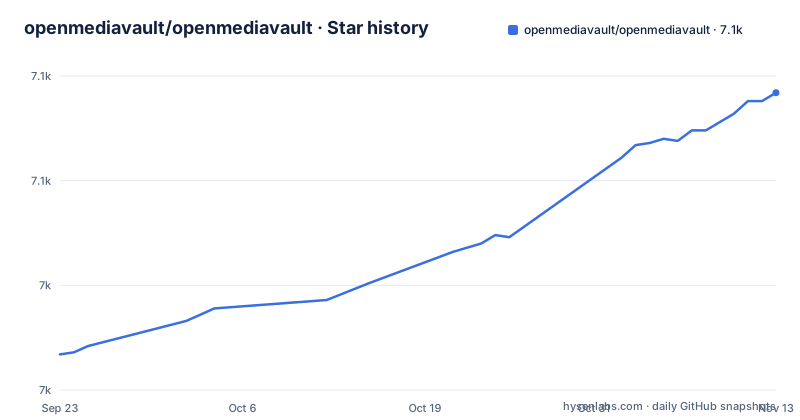
- openmediavault/openmediavault7,092 ★ · +125
| Repository | 2026-09-23 | 2026-11-13 |
|---|---|---|
| openmediavault/openmediavault | 7k | 7.1k |
125 Stars in the last 51 days, measured from the daily GitHub snapshot. Compare with other projects
Editorial analysis
deb/, pbuilder/ and buildenvadm.sh describe how a system is assembled
The top level of the repository is where the packaging story lives. deb/ is a Debian packaging directory, and pbuilder/, buildenvadm.sh and install.sh are build and install scripts sitting next to it. Alongside them are AGENTS.md, CONTRIBUTING.md, SECURITY.md and a .github/ directory, plus editor and formatter settings (.editorconfig, .prettierrc, .prettierignore, .vscode/). None of that appears in the README, so the source tree says more about how a system gets assembled than the front page does. What is missing from both is a version. The repository has no GitHub releases, and the last push to master landed on 2026-11-02, which tells you the code moves but leaves an installed system with no tag to check itself against.
The install line pipes get.openmediavault.io into a root shell
Installing on an existing Debian system is one command, run as the root user:
wget -O - https://get.openmediavault.io | sh -The line carries no package name, no version pin and no confirmation step. wget fetches the installer from that endpoint and sh executes it right away, so whatever is served at that moment is what runs on your machine. The README calls this the quick path and points to the official documentation for the detailed walkthrough, which lives on the stable installation page under docs.openmediavault.org. Read the fetched script before running it. A root shell executing a downloaded script is the mechanism the project chose for a one line install.
openmediavault itself requires control of the host
openmediavault states its own constraint plainly: it expects full, exclusive control over OS configuration and cannot be used within a container. That is a design position rather than a defect to work around. A NAS arranges users, shares, mounts, services and network rules, and it arranges them on the host itself; a container boundary would drop someone else's configuration manager into the middle of that. The practical effect is that the Docker shaped deployment people try first is closed off at the source. The README offers no image, no compose file and no rootless mode as an alternative. This restriction concerns running openmediavault itself inside a container; it does not establish that the host cannot run other containerized applications.
No desktop environment may live beside the NAS
The second restriction is about what else can occupy the machine: no graphical desktop user interface can be installed in parallel. It belongs to the same note as the container limit and removes another common plan, using the box as a general purpose workstation with a NAS on the side. The README states both restrictions together and softens neither with an exception or a configuration flag. Two things it does not say are worth settling before hardware is committed: whether the restriction reaches a minimal window manager, and what happens to a desktop already installed when the NAS arrives. The installation documentation at docs.openmediavault.org is where those answers have to come from, because the repository does not settle them.
SSH, (S)FTP, SMB/CIFS and rsync are the base, not plugins
The service list is short and concrete: SSH, (S)FTP, SMB/CIFS, rsync, and many more. That is the real scope of the project, a Debian system sharing files over protocols that already exist on most networks. The project bills itself as the next generation network attached storage solution based on Debian Linux, says it is primarily designed to be used in home environments or small home offices, and immediately adds that it is not limited to those scenarios. What the README does not enumerate is the account model, the default credentials or the exact ports each service opens, so the firewall plan has to come from the documentation.
Plugins are the extension path, and the repository names none
Extensibility is the stated payoff of the modular design: the framework can be enhanced via plugins. No plugin is named in the README, no plugin directory appears among the top level entries, and no compatibility rule between a plugin and a base installation version is documented. Because the repository also carries no tagged releases, nothing in the source tree matches a plugin to the installation it expects. Plugin availability therefore has to be established from the documentation and the forum rather than from the code. For a home deployment that means the NAS is only as extensible as its plugins on the day you install it, and that set can change without any release note appearing in this repository.
Free software with a stated bill for the people who build it
openmediavault is free, and the README says so while being equally direct about the price elsewhere: producing, supporting and distributing it costs money and time. The page carries a supporter credit for jb.gg/OpenSource and a PayPal donation link pointed at the developer. Nothing in that section describes a support contract, a response time or a subscription for anything. The last push to the default branch master was on 2026-11-02 and the repository is not archived, so work is continuing. Continuing work is not a service level. For a home or small office install the realistic commitment is your own time on upgrades, and the channels the project names for that are the documentation, the forum and the blog.
LICENSE-GPL3 and COPYING in the tree, NOASSERTION in the metadata
The licensing needs reading rather than trusting. GitHub's license field for this repository reports NOASSERTION, meaning nothing was detected automatically, yet the top level carries both a LICENSE-GPL3 file and a COPYING file. Where you consult the terms matters, because the files in the repository are the text itself and the metadata field is only a guess. This is a distribution rather than a hosted service, and a Debian based system that takes over the configuration of your operating system is a machine you will eventually rebuild or hand over. Check which of those two files matches your intent before adopting openmediavault on hardware you intend to keep, since it is not the kind of dependency you link into something and forget.
Editorial conclusion
openmediavault fits a home or small office that wants a dedicated Debian box owning its own shares, with the patience to read docs.openmediavault.org before each upgrade. It does not fit a deployment that requires openmediavault itself to run inside a container, or a host shared with a graphical desktop. Before installing, read the script that get.openmediavault.io hands your root shell, and read LICENSE-GPL3 and COPYING in the tree rather than the NOASSERTION license field GitHub shows.
Frequently asked questions
What is openmediavault used for?
It is a network attached storage solution based on Debian Linux. The base system ships SSH, (S)FTP, SMB/CIFS and rsync, and the modular framework can be extended with plugins.
Is openmediavault a NAS?
Yes. It describes itself as a network attached storage solution based on Debian Linux, primarily designed for home environments or small home offices while not being limited to those scenarios.
What does openmediavault (OMV) stand for?
It is the short form of openmediavault, the Debian based NAS carrying SSH, (S)FTP, SMB/CIFS and rsync services and extended with plugins.
How do I install openmediavault?
On an existing Debian system, run the installer as root: wget -O - https://get.openmediavault.io | sh - . A detailed walkthrough sits in the official documentation under docs.openmediavault.org.
Official sources
Add this badge to your README
If you maintain this project, the badge below links readers to this analysis and shows its maintenance status from the daily GitHub snapshot. Paste the markdown into your README; add ?metric=license or ?metric=stars to the image URL for a different field.

[](https://hysenlabs.com/projects/openmediavault-openmediavault)Star history chart for your README
[](https://hysenlabs.com/projects/openmediavault-openmediavault)Was this useful?