Udev rules for every hidraw node, a bridge for protected collections, no releases
Browser-based control panel for supported gaming mice — change DPI, polling rate, and sensor settings without installing a driver.
At a glance
- What is it?
- OpenMouse is a browser control panel that reconfigures gaming mice over WebHID, split across four repositories and pinned to one protocol library. Its Linux path needs udev access to every hidraw node rather than the one it uses, and its default branch is deployed as a development control panel.
- Who is it for?
- Use OpenMouse if your mouse is supported and you would rather not install a vendor app, and read the Linux section before your first attempt, because the permissions requirement is the difference between working and a device that appears in the browser picker and then refuses to open.
- Can I use it commercially?
- Yes, with strict conditions. AGPL-3.0 is a network copyleft licence: if people use a modified version over a network, for example as a hosted service, you must offer them its source code under the same licence.
- Is it still maintained?
- Yes. The repository last received commits 1 day ago.
- What is it written in?
- Mainly TypeScript, according to GitHub's language statistics.
Answers come from the project's GitHub data, last synced on November 22, 2026, and from our analysis. They are not legal advice.
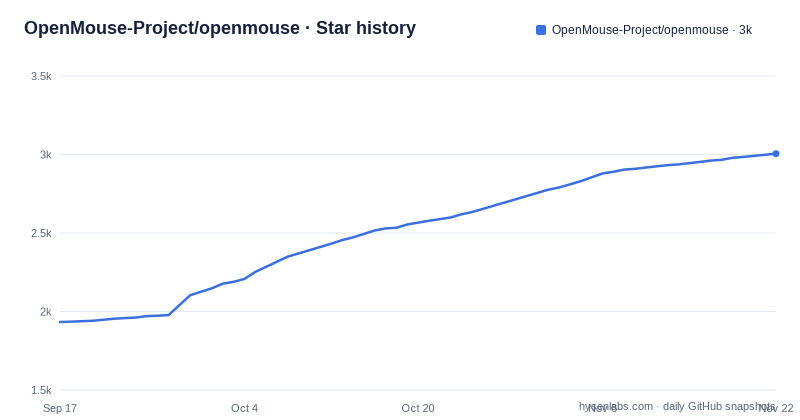
Star history
- OpenMouse-Project/openmouse3,005 ★ · +1,072
| Repository | 2026-09-17 | 2026-11-22 |
|---|---|---|
| OpenMouse-Project/openmouse | 1.9k | 3k |
1,072 Stars in the last 66 days, measured from the daily GitHub snapshot. Compare with other projects
Editorial analysis
The default branch is deployed as a development control panel
One line of the page settles what a visitor gets: this branch is deployed as the public development control panel. So what is served at the project's site is the development state of the default branch rather than a tagged release, and the repository indeed publishes no GitHub releases. The only version marker is the manifest, which reads 2.0.0 and is marked private. The build itself is a static site: Vite for the dev server and the build, TypeScript for types, and Preact as the only view library, with an icon package and the protocol library as the other two runtime dependencies. The environment template shows what the deployed page talks to, naming a Supabase URL and anonymous key alongside a site key for a bot-check widget. Next to the template sits a committed `.env.production` file, which is the sort of file that should be generated per deployment and is worth a look before anyone treats this branch as a deployment baseline.
Chrome protects Razer collections, so a loopback bridge carries the reports
The bridge is the most interesting thing in the project and the reason is a browser restriction. When the bridge app is reachable, the control panel prefers its loopback native HID transport over browser WebHID, and the stated consequence is that Razer control interfaces protected by Chrome 153 and later stay usable without relying on the browser's former protected-collection bypass. That is a design decision worth naming plainly: a vendor's collections are protected in the browser for good reasons, and the project's answer was a local helper that carries the HID reports, not a workaround in the page. The division of labour is clean. The same protocol drivers still handle device discovery and settings, and the bridge only carries reports, so the driver layer is unaware of the transport. The update path is conservative in the same spirit: the Settings page compares the connected bridge against its latest stable GitHub release and retrieves only the version, the changelog and a download link, never downloading or installing anything in the background, and the check can also be run by hand.
You need access to every hidraw node, not just the one you use
The Linux failure mode is documented with its exact message, which saves an afternoon. If a device shows up in Chromium's picker but OpenMouse reports `Failed to open the device`, the cause is permissions on the device nodes, because Linux does not grant user access to every HID device by default. The page starts with `lsusb` to read the connected identifiers, then gives a worked case: VXE R1 SE and later hardware ships with more than one receiver implementation, so the mouse and its 1K receiver appear as two different product IDs, and each needs its own narrowly scoped rule:
SUBSYSTEM=="hidraw", ATTRS{idVendor}=="3554", ATTRS{idProduct}=="f58f", TAG+="uaccess"
SUBSYSTEM=="hidraw", ATTRS{idVendor}=="3554", ATTRS{idProduct}=="f58e", TAG+="uaccess"
Save it as `/etc/udev/rules.d/70-openmouse.rules`, then reload and reconnect:
sudo udevadm control --reload-rulesThe page is explicit that access has to be granted to every hidraw node for each product, and gives the reason, which is the part most write-ups miss: Chromium opens the HID device before OpenMouse selects its vendor configuration collection, so permission on just the node for one collection is not enough.
A pinned protocol library and a build that only typechecks
The manifest is small enough to read in one go, and two entries matter. The protocol library is pinned to an exact version, `0.23.0`, with no range, which means the control panel and the library that speaks to the hardware have to move together and there is no automatic pickup of a new release. The other is the build script, which runs the TypeScript compiler in no-emit mode before Vite, so a build is a typecheck plus a bundle and no JavaScript is emitted by the compiler itself. Tests are run by Node's built-in test runner over both the source and the build directories, with no test framework in the dependency list at all, and the check script that the page asks you to run before pushing is exactly those two steps, build then test. There is also a size check as its own script, which is the shape you expect from a page meant to be served to browsers that do not install anything. Two dev dependencies carry the toolchain: TypeScript and Vite.
Adding a vendor means writing down which hardware was tested
New device support does not go in this repository. The contribution guide, hosted separately, sets out a four-step procedure: add transport-independent packet definitions and codecs under the vendor's folder in the protocol library, add the WebHID implementation under the drivers folder there, register the driver and its browser filters in the shared driver layer, and add or extend codec and driver tests while stating which product IDs were verified on hardware, running the checks in both repositories. That last clause is the interesting one, because it makes tested-hardware evidence part of the contribution rather than something a maintainer has to chase afterwards. The guide also draws a line for this repository: the control panel should only need changes when a driver introduces a genuinely new interface capability, and otherwise discovers supported clients through the library registry automatically. Hardware-specific validation checklists live in the protocol repository's documentation, and the guide covers per-repository setup and safe reverse-engineering practices, which is what a project reading undocumented vendor protocols needs to say.
Diagnostics log lifecycle events and never HID payloads
There is an explicit privacy line in the logging story, and it is the kind that saves an argument later. Bridge connection attempts, disconnects, request failures, scan durations and device inventory changes are all written to the browser console under an `[OpenMouse Bridge]` prefix, and the same lifecycle events appear in the diagnostics you can download from a connected device's Advanced panel. HID report payloads are not written to the console. So the logs answer the question you ask when a device misbehaves, when it connected, how long a scan took, what the inventory looked like, without writing the traffic itself into a log that a browser extension or a screen share might pick up. The code layout matches that care about boundaries. One module coordinates the application, and the template, event handling, DOM helpers, persisted preferences, battery history, device selection and rendering each live in their own files under the source directory, with no framework owning the page.
AGPL-3.0 in the page and or-later in the manifest
The licence is the last section and it is short: GNU AGPL-3.0, with contributions accepted under the same licence. The manifest says something slightly different, recording it as AGPL-3.0-or-later, which is a wider grant because it permits relicensing under later versions. For a project whose stated purpose is to replace per-brand vendor software with something people can host and change, the copyleft choice is the load-bearing part of the decision, and the gap between the two spellings is the kind of thing that matters to a downstream packager. Elsewhere the same care about wording shows up in smaller places, such as the bridge update check retrieving a changelog and a link and stopping there. The project is one of four: a desktop app, the protocol library, the bridge, and this control panel, with the guide explaining how they fit together.
Editorial conclusion
Use OpenMouse if your mouse is supported and you would rather not install a vendor app, and read the Linux section before your first attempt, because the permissions requirement is the difference between working and a device that appears in the browser picker and then refuses to open. Decide in advance whether you want the browser path or the bridge path: WebHID is simpler, while the bridge exists because Chrome 153 and later protect certain vendor collections, and the page is explicit that it replaced a bypass it used to rely on. Two housekeeping notes. The default branch is what gets deployed as a public development control panel, and the repository publishes no releases, so version 2.0.0 in the manifest is the only version marker. And the licence reads AGPL-3.0 in the documentation and AGPL-3.0-or-later in the manifest.
Frequently asked questions
how to use openmouse
OpenMouse is a browser-based control panel for supported gaming mice: connect a mouse, view its information, and change settings such as DPI and polling rate without a per-brand app. It runs over the browser's WebHID interface, or over a loopback native HID transport when the OpenMouse Bridge app is reachable.
What does OpenMouse need on Linux?
Access to the device nodes. If a mouse appears in Chromium's picker but OpenMouse reports `Failed to open the device`, Linux has not granted user access to its hidraw nodes. Run `lsusb`, add narrowly scoped udev rules with `TAG+="uaccess"` for the vendor and product IDs, reload with `sudo udevadm control --reload-rules`, then unplug and reconnect both devices.
Why does OpenMouse offer a bridge app instead of using WebHID only?
Because Chrome 153 and later protect certain vendor control interfaces, and the page says the loopback native HID transport keeps Razer interfaces usable without relying on the browser's former protected-collection bypass. The same protocol drivers still handle discovery and settings; the bridge only carries HID reports.
How is support for a new mouse vendor added to OpenMouse?
In the protocol repository: packet definitions and codecs under the vendor's folder, the WebHID implementation under its drivers folder, registration of the driver and browser filters, and tests that state which product IDs were verified on hardware. The control panel usually needs no change, because it discovers clients through the library registry.
Is OpenMouse open source and how is it licensed?
Yes, under the GNU AGPL, with contributions accepted under the same licence. The documentation says AGPL-3.0 while the package manifest records AGPL-3.0-or-later. The repository publishes no GitHub releases, and its default branch is deployed as a public development control panel.
Official sources
Add this badge to your README
If you maintain this project, the badge below links readers to this analysis and shows its maintenance status from the daily GitHub snapshot. Paste the markdown into your README; add ?metric=license or ?metric=stars to the image URL for a different field.

[](https://hysenlabs.com/projects/openmouse-project-openmouse)Star history chart for your README
[](https://hysenlabs.com/projects/openmouse-project-openmouse)Was this useful?