ConnectOnion keeps one command line for the agent, and one pasted index for the tools
The Best AI Agent Framework for Agent Collaboration. Living Our Philosophy Step 1: Simple - Create and Use Step 2: Add Your Tools Step 3: Debug Your Agent Step 4: Production Ready Step 5: Multi-Agent - Make it Remotely Callable Why ConnectOnion?
At a glance
- What is it?
- ConnectOnion is a Python package that hands an AI agent Gmail, a browser, files and chat apps through a single co command, with a Markdown memory layer called co rem. Its generated tool index, its pinned alpha install and its hosted Host endpoint are where the interesting friction sits.
- Who is it for?
- ConnectOnion is worth reading if you are standardising on shell tools instead of per-agent tool schemas, but adopt it as the alpha it declares itself to be. Read the marker arithmetic in its Makefile before trusting a green suite, check what co rem sends to the configured model, and decide in advance whether a Host address at the vendor domain is acceptable for your context.
- Can I use it commercially?
- Yes. Apache-2.0 is a permissive licence: you can use, modify and sell software built on it, as long as you keep its copyright and licence notices.
- Is it still maintained?
- Yes. The repository last received commits 1 day ago.
- What is it written in?
- Mainly Python, according to GitHub's language statistics.
Answers come from the project's GitHub data, last synced on November 15, 2026, and from our analysis. They are not legal advice.
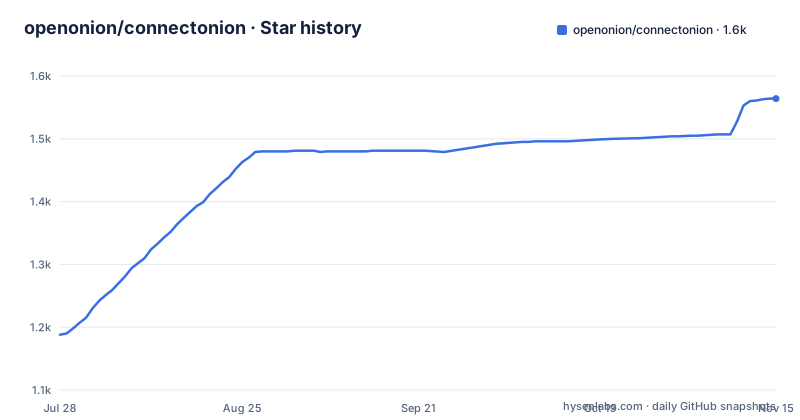
Star history
- openonion/connectonion1,564 ★ · +376
| Repository | 2026-07-28 | 2026-11-15 |
|---|---|---|
| openonion/connectonion | 1.2k | 1.6k |
376 Stars in the last 110 days, measured from the daily GitHub snapshot. Compare with other projects
Editorial analysis
The command index is fetched from a URL and pasted between two comments
The top of the README is not written by hand, and the file says so in an HTML comment. The connections block is marked generated, do not edit by hand, and the refresh instruction is a single fetch: `curl -s https://www.connectonion.com/connections.md`, then paste the output between the two marker comments. So the inventory of what this project can reach is served by the project's own website and copied into the repository by a person.
What landed in this copy is visibly untidy. Under Mail, calendar and notes, gcalendar appears twice and outlook twice. Under Browser and files, browser appears twice and search twice. Under Coding agents, skills appears four times across four different rows. Under Models, models.md is repeated six times with local-models.md at the end. Each entry is also an anchor with no link text at all, an `<a href>` element whose body is empty, so the rendered list is a grid of blank badges pointing at docs pages.
Underneath, the block does give the whole surface area of the tool, and it is wide: init, email, rem, env, gmail, outlook, gcalendar, onenote, whatsapp, telegram, discord, slack, feishu, sms, browser, gdrive, youtube, synology, search, linear, canny, ai, skills, sub, audit, call, proxy, server, schedule, with `co commands` named as the way to see everything else and --help on any one of them. Roughly thirty surfaces, one binary.
co rem keeps context in Markdown but reads through an online Host
The flagship feature is called decentralized context flow, and the mechanics are concrete. co rem init builds a map and the first pages, co rem open reads the resulting local notebook, co rem start approves a daily schedule. Pages are local Markdown under `~/.co/rem`, linked around people, projects, skills and decisions, and the point is traceability: each fact is meant to lead back to the source it came from. There is also `co rem open --live`, which opens the online Host at `https://chat.openonion.ai/<address>/rem`, and the README restricts that address to the Host owner.
Three qualifications sit in the same block. The feature is in the opt-in preview, not the default path. Daily scheduling currently requires macOS, so the recurring refresh that keeps the notebook current is platform-limited. And selected source content is sent to the configured model during investigation, with the costs documented separately in docs/cli/rem.md, which means mail and coding sessions leave the machine by design.
The demo image carries a caption naming the version it was produced with, 1.9.0a20, while the install line beside it pins 1.9.0a28. Eight alpha steps of drift between the screenshot and the command, and the release list shows three of those alphas cut on the morning of 2026-10-03 alone, at 08:15:54Z, 09:00:20Z and 09:55:34Z, against a last push dated 2026-09-25.
Two install lines, one of them pinned to an alpha
The general install is a single line with a version constraint in a comment:
pip install connectonion   # Python 3.10+
co init                    # your identity and ~/.co/keys.env
co auth microsoft          # or: co auth google
co outlook                 # or: co gmail
co commands                # everything else; add --help to any
The preview takes a different shape, pinning an exact alpha:
pip install --upgrade 'connectonion==1.9.0a28'
co rem init                # build your map and first pages
co rem open                # read the local notebook
co rem start               # approve a daily schedule (macOS)
Both forms are live at once, and the file that ships them declares itself alpha: the classifiers carry Development Status :: 3 - Alpha, requires-python is >=3.10, and the per-version classifiers stop at Python 3.13. The pyproject version field reads 1.9.0a28, matching the newest release tag, so the pin tracks releases rather than drifting behind them.
The build backend is hatchling and MANIFEST.in sits at the root, which is the conventional pair for a package that ships example material. A uv.lock is also checked in. Two lockfile worlds for one repository, one of them belonging to a tool the build system does not use, is a small inconsistency that costs nothing at install time and shows up the first time someone asks which file is authoritative for reproducible installs.
The dependency caps carry a written justification in the file
A CLI harness that claims tool schemas cost context until used still needs a floor to stand on, and this floor is not small. The runtime list names openai>=1.0.0 and anthropic>=0.18.0, so two provider SDKs ship by default, then pydantic>=2.0.0,<3, python-dotenv>=1.2.2, requests>=2.33.0, rich>=13.0.0, PyNaCl>=1.6.2, qrcode>=8.2, mnemonic>=0.20, questionary>=2.0.0, websockets>=11.0.0, google-auth>=2.0.0 and google-api-python-client>=2.0.0, with httpx appearing in the next line of the block.
The one entry that explains itself is the pydantic cap. A three-line comment above it says upper bounds are added only where the next major is known to break them and not by habit, names pydantic 3 as the announced end of the v2 API the models are written in, and notes that openai and anthropic already cap the same package below 3, so the bound costs nothing today and keeps an old connectonion from resolving against it tomorrow. That is a better dependency note than most projects ship.
The crypto and identity layer is visible in the same list: PyNaCl for signing and encryption, mnemonic for seed phrases, qrcode for the pairing surface, websockets for whatever long-lived connection the server and Host commands open. None of those are optional extras, which is the practical cost of the claim that one command line is all an agent needs.
make test drops twenty-one browser runs by subtracting markers
The Makefile is five targets and a long argument about pytest markers, and the argument is the interesting part. The default target runs `pytest -n auto -m "not real_api and not network"`. A comment directly above it explains the reason with unusual candour: a `-m` on the command line replaces the expression in pytest.ini rather than adding to it, and leaving `not network` off had put twenty-one browser-stealth runs, real Chrome against third-party fingerprinting sites, back into the offline suite. It cites the same mechanism behind two earlier tickets, 578 and 444.
The other four targets draw the rest of the boundary. test-unit and test-cli keep the same exclusions and narrow further. test-e2e runs `pytest -m "e2e and not real_api"` and deliberately does not exclude network, because that marker covers the relay end-to-end tests, described as the most valuable eight in the gate, as well as the stealth runs. The comment admits the two are conflated and that separating them needs a marker they do not share yet. test-real is the opt-in that runs `-m real_api` against paid providers, which the file says need four funded accounts. Its rationale is worth quoting in spirit: a release gate that turns red because a laptop is unfunded teaches people to ignore red. The cov target reruns the default selection and writes an HTML coverage report.
pytest.ini is what makes the override dangerous, and it is at the root next to the Makefile.
Packaging keywords still point at an xray debugger
The project keywords in pyproject.toml read ai, agent, llm, tools, openai, anthropic, automation, debugging, interactive-debugging, breakpoints, xray. The last five describe a different product from the one the README sells. The repository agrees with the keywords rather than the README: the examples directory still holds xray_debug_example.py and auto_debug_mvp_example.py next to three more auto_debug variants, and auto_debug_exception_example.py appears alongside an enhanced version of itself.
A file called BRAND-FDE-Repositioning.md sits at the root of the tree, which suggests the shift from that debugging tool to an agent harness was a deliberate repositioning rather than a rewrite. Supporting it are VERSIONING.md and CHANGELOG.md, AGENTS.md and CLAUDE.md as parallel instruction files, and a subagents directory, so the project eats its own dog food at the instruction level. MANIFEST.in and pytest.ini complete the root.
Also at the root is action.yml, a GitHub Action definition, and no visible line of the README describes it. The docs directory does cover a Claude Code plugin at docs/claude-code-plugin.md, plus trust, proxy, server, schedule and audit pages, which is the shape of a project whose agent surface extends past the local machine. The README's own argument for a command line over MCP is that every agent already has a shell, no server to start and nothing to install into the agent, and the action file sits quietly next to that claim.
co init writes an identity and a key file into your home directory
The second line of the quick start is the one to read twice: `co init` creates your identity and `~/.co/keys.env`. That is a key file in a dotfile directory, created by a package you just installed from PyPI, before you authenticate anything. Authentication comes next as `co auth microsoft` or `co auth google`, and the README offers no third path in that pair.
The identity layer has its dependencies pinned in pyproject.toml rather than its behaviour described: PyNaCl>=1.6.2 supplies the signing primitives, mnemonic>=0.20 supplies seed words, qrcode>=8.2 supplies something to scan, and python-dotenv is there to read the file. google-auth and google-api-python-client cover the Google side, and the Outlook command implies a Microsoft equivalent on the same pattern.
What the visible text does not settle is the operational half: whether the file has restrictive permissions, whether a key can be rotated without redoing every connection, what regenerating it costs, and whether the Host address at chat.openonion.ai is derived from that identity in a way that has to be revoked. The docs tree has pages for trust, for audit and for proxy, which are exactly the places those answers belong, and the commands exist to reach them.
Editorial conclusion
ConnectOnion is worth reading if you are standardising on shell tools instead of per-agent tool schemas, but adopt it as the alpha it declares itself to be. Read the marker arithmetic in its Makefile before trusting a green suite, check what co rem sends to the configured model, and decide in advance whether a Host address at the vendor domain is acceptable for your context.
Frequently asked questions
How do I install ConnectOnion, and what does the pinned version mean?
Two forms appear in the README. `pip install connectonion` for the general case with Python 3.10 or newer, and `pip install --upgrade 'connectonion==1.9.0a28'` for the co rem preview. pyproject.toml classifies the project as Development Status :: 3 - Alpha and sets requires-python to >=3.10.
Where does co rem keep the pages it builds?
As local Markdown under `~/.co/rem`. Selected source content is sent to the configured model during investigation, and `co rem open --live` opens the online Host at `https://chat.openonion.ai/<address>/rem` for the Host owner only. Daily scheduling through `co rem start` currently requires macOS.
Does the ConnectOnion test suite touch real accounts by default?
No. `make test` runs pytest in parallel with the real_api and network markers excluded, while `make test-real` is the opt-in that needs keys and four funded accounts. The Makefile notes that test-e2e intentionally leaves network in, which is why the two kinds of test still share a marker.
Where does ConnectOnion keep credentials after co init?
In `~/.co/keys.env`, created alongside your identity. The dependency list carries PyNaCl, mnemonic and qrcode for that layer, and authentication then runs through `co auth microsoft` or `co auth google`.
Official sources
Add this badge to your README
If you maintain this project, the badge below links readers to this analysis and shows its maintenance status from the daily GitHub snapshot. Paste the markdown into your README; add ?metric=license or ?metric=stars to the image URL for a different field.

[](https://hysenlabs.com/projects/openonion-connectonion)Star history chart for your README
[](https://hysenlabs.com/projects/openonion-connectonion)Was this useful?