Two Strands entry points: create_harness() for a finished agent, strands-py for the raw loop
Build an agent harness and control it end-to-end. Open-source SDK for production AI agents in Python & TypeScript - any model, any cloud.
At a glance
- What is it?
- The Strands harness-sdk monorepo publishes six packages: a prebuilt agent harness for Python and TypeScript, the two bare SDKs, a terminal CLI and an MCP server. What decides whether it fits your team is that the agent runs inside your own process with no hosted control plane.
- Who is it for?
- Strands harness-sdk suits a Python or TypeScript team that would rather own the agent loop than run someone else's runtime, and it earns its place when you need turn limits, token budgets, hooks and guardrails instead of a hand-written while loop. It does not suit a team that needs a hosted control plane, because the agent runs in your process.
- Can I use it commercially?
- Yes. Apache-2.0 is a permissive licence: you can use, modify and sell software built on it, as long as you keep its copyright and licence notices.
- Is it still maintained?
- Yes. The repository last received commits 1 day ago.
- What is it written in?
- Mainly Python, according to GitHub's language statistics.
Answers come from the project's GitHub data, last synced on November 14, 2026, and from our analysis. They are not legal advice.
Star history
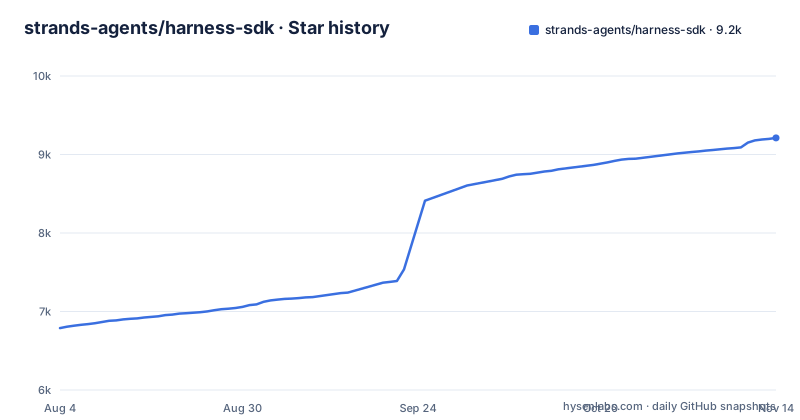
- strands-agents/harness-sdk9,211 ★ · +2,423
| Repository | 2026-08-04 | 2026-11-14 |
|---|---|---|
| strands-agents/harness-sdk | 6.8k | 9.2k |
2,423 Stars in the last 102 days, measured from the daily GitHub snapshot. Compare with other projects
Editorial analysis
The harness hides the loop, the SDK hands it back
Two entry points ship from one repository, and the choice between them decides how much of the agent loop you own. The harness packages give you a finished agent from a single call: `create_harness()` in Python, `createHarness()` in TypeScript. The SDK packages, `strands-agents` on PyPI and `@strands-agents/sdk` on npm, are the agent loop, model providers and tools with nothing assembled around them.
The README calls the harness the easiest way to get started, while the SDKs carry the agent loop, model providers and tools. One structural fact shapes every deployment decision that follows: the agent runs in your process with no hosted control plane. There is no vendor-side runtime to hand a session to, so anything resembling a managed agent service has to be built around infrastructure you already run.
pip install strands-harness, then one call
Installation is one command per language. In Python it is a single pip install, and the first call returns a callable agent:
pip install strands-harnessfrom strands_harness import create_harness
agent = create_harness()The TypeScript harness is published to npm as `@strands-agents/harness` and exposes `createHarness()`:
npm install @strands-agents/harnessWhat you get from that call is an agent with benchmarked defaults for the model, tools, memory, sessions and context management. The README points to the harness quickstart and harness docs; expect to read them before your first production run rather than after it.
Five published packages from one monorepo
The package names do not mirror the directory names. `harness-py/` publishes to PyPI as `strands-harness`. `harness-ts/` publishes to npm as `@strands-agents/harness`. `strands-py/` publishes as `strands-agents`, and `strands-ts/` as `@strands-agents/sdk`. `strands-cli/` publishes as `@strands-agents/cli`, the terminal tool for prototyping and chatting with a harness agent.
Alongside them sit `site/`, the source for the strandsagents.com documentation site built on Astro and Starlight; `team/`, which holds governance and cross-SDK process docs including tenets, decisions, PR and compatibility guidelines and a `designs/` folder for proposals; and `strands-mcp/`, an MCP server that gives coding agents knowledge about building with Strands, published to PyPI as `strands-agents-mcp-server`. Directory names will mislead you on most of these packages. The mapping table near the top of the README is the reliable index, and it is the one to check before a first install rather than after a broken import.
Model providers, and which model create_harness() picks
Model selection is separated from agent code. Amazon Bedrock, Anthropic, OpenAI and Gemini have first-class support, alongside a longer list of other providers and custom ones, and the stated benefit is that you swap backends when you scale without touching your code. For the harness specifically, `create_harness()` arrives with a model already chosen for you, which is convenient right up to the moment you need to know which one it was.
Two things follow for a team. A provider change is configuration rather than a rewrite, which is the reason to reach for this SDK over one that hardwires a vendor client into the loop. And because the harness picks a model for you, the first concrete step after your first run is checking the harness docs for which one it uses instead of inferring it from your inference bill.
Turn limits, token budgets, hooks and steering handlers
The agent loop is where hand-rolled versions rot, so that is where this SDK spends its surface area. Lifecycle controls cover turn limits, token budgets, cancellation and stop reasons, which are the four limits a hand-written loop usually omits and then discovers in production. Every decision the loop makes is traced by default, and hooks let you intercept any step to log it, validate it or redirect it before it runs.
Two safety features sit around the loop rather than inside it. Guardrails catch mistakes before they run, which is the difference between an agent that trips a check and an agent that emits the wrong action. Steering handlers let agents correct themselves instead of failing silently. Sessions and memory are handled alongside the loop, and streaming, structured output, MCP tools and multi-agent patterns are part of the same SDK rather than separate add-ons.
The monorepo root installs nothing on purpose
Installing at the repository root gets you nothing, and that is deliberate. The root `pyproject.toml` names the project `strands-monorepo-tools`, describes itself as shared Python tooling that is not published, and sets `packages = []` to suppress setuptools auto-discovery. The root `package.json` is equally inert: private, pinned at version 0.0.0, declaring only `strands-ts` as a workspace, so `npm run build` and `npm run test` forward into that single workspace with `-w strands-ts`.
The conventions those root files pin are worth knowing before you adopt them. Python tooling requires 3.10 or newer. Ruff runs with a 120 character line length and the B, E, F, I and UP rule sets, configured once at the root because ruff walks up from the file it is linting. Pyright runs in `standard` type checking mode with `reportMissingTypeStubs` off and `reportMissingImports` reported as a warning, so a missing third-party import will not fail a type check in this repository.
Where LangGraph fits, according to the repo's own skill folder
The project offers a Strands plugin for Claude Code, Codex and Cursor aimed at coding agents, and it names its main migration target. The plugin adds framework selection, scaffolding, tool authoring, MCP server connections, web framework guides and LangGraph migration guidance.
That placement is the clearest statement the project makes about itself against LangGraph. Strands describes its own approach as model-driven and in-process, while LangGraph is handled as a system teams migrate away from, with the migration itself framed as a mechanical task an agent can be handed. The difference in approach reduces to who drives control flow: a graph you define, or a loop that lets the model choose what runs next and relies on turn limits, hooks and guardrails to keep that choice inside a budget.
Version skew: Python at 1.57.x, the CLI at 0.1.4
Package versions here move independently, and the recent tags show the spread. `python/v1.63.0`, `typescript/v1.23.0` and `harness-typescript/v0.3.3` were all published on 2026-10-30. The Python SDK is past 1.60 while the TypeScript harness is still at 0.3.x, and that gap is the number to weigh before making the harness part of a shared developer workflow rather than a scratch tool.
The last push to the default branch was on 2026-11-02. Governance lives in `team/`, holding the tenets, decisions and compatibility guidelines that apply across both SDKs, and the tree also carries SECURITY.md, CONTRIBUTING.md and CODE_OF_CONDUCT.md next to LICENSE.APACHE. The licence is Apache-2.0, and that is the term that applies if you vendor this into a product you ship.
Editorial conclusion
Strands harness-sdk suits a Python or TypeScript team that would rather own the agent loop than run someone else's runtime, and it earns its place when you need turn limits, token budgets, hooks and guardrails instead of a hand-written while loop. It does not suit a team that needs a hosted control plane, because the agent runs in your process. Install strands-harness if you want the assembled agent rather than strands-agents, and confirm which model create_harness() picked before you trust its output.
Frequently asked questions
What is the Strands harness-sdk and who is it for?
It is an Apache-2.0 SDK for building and running AI agents in Python and TypeScript, aimed at teams that would otherwise write their own agent loop. It runs inside your process with no hosted control plane, and covers lifecycle controls, tools, structured output, MCP, multi-agent patterns, memory, sessions, model portability, streaming, guardrails, tracing and evals.
How do I install and start a Strands agent in Python?
Run `pip install strands-harness`, then import `create_harness` from `strands_harness` and call it with no arguments. The result is an agent preconfigured with benchmarked defaults for model, tools, memory, sessions and context management.
What is the difference between strands-harness and strands-agents on PyPI?
`strands-harness` is the assembled agent returned by `create_harness()`, while `strands-agents` is the bare Python SDK holding the agent loop, model providers and tools. The README calls the harness the easiest way to get started.
Does Strands need a hosted control plane or a managed runtime?
No. The agent runs in your process with no hosted control plane, so there is no vendor-side runtime to deploy to. Amazon Bedrock, Anthropic, OpenAI and Gemini have first-class support, plus other providers and custom ones, and the intent is that you swap backends without changing your code.
How does the project handle migration from LangGraph?
The project offers a Strands plugin for Claude Code, Codex and Cursor that adds framework selection, scaffolding, tool authoring, MCP server connections, web framework guides and LangGraph migration guidance; the documentation page 'Use Strands with AI coding agents' covers install and verification.
Official sources
Where developers are discussing it
Posts on Hacker News, dev.to and Lobsters that link to this repository, found by our scan of those communities. 1 in the last 30 days; newest first.
- 17 things your agent harness should have!dev.to · Nov 6, 2026 · 2 points · 1 comments
Add this badge to your README
If you maintain this project, the badge below links readers to this analysis and shows its maintenance status from the daily GitHub snapshot. Paste the markdown into your README; add ?metric=license or ?metric=stars to the image URL for a different field.

[](https://hysenlabs.com/projects/strands-agents-harness-sdk)Star history chart for your README
[](https://hysenlabs.com/projects/strands-agents-harness-sdk)Was this useful?