SenseNova-Vision runs detection, depth and 3D from one prompt, on one 80GB card
Vision as Unified Multimodal Generation
At a glance
- What is it?
- One 7B multimodal model, one wrapper script and four mode words stand between a reader and any of these tasks. The formulation is the interesting part; the 80GB requirement and the empty results table are the parts you have to plan around.
- Who is it for?
- The judgment: this is a research release with a clean idea and a large hardware bill. Casting boxes, masks, OCR strings, depth maps and 3D point maps onto the native generation spaces of one unified multimodal model, with no per-task heads, is worth studying, and the wrapper keeps the demo cost to a single 80GB card.
- Can I use it commercially?
- Yes. Apache-2.0 is a permissive licence: you can use, modify and sell software built on it, as long as you keep its copyright and licence notices.
- Is it still maintained?
- Yes. The repository last received commits 75 days ago.
- What is it written in?
- Mainly Python, according to GitHub's language statistics.
Answers come from the project's GitHub data, last synced on November 15, 2026, and from our analysis. They are not legal advice.
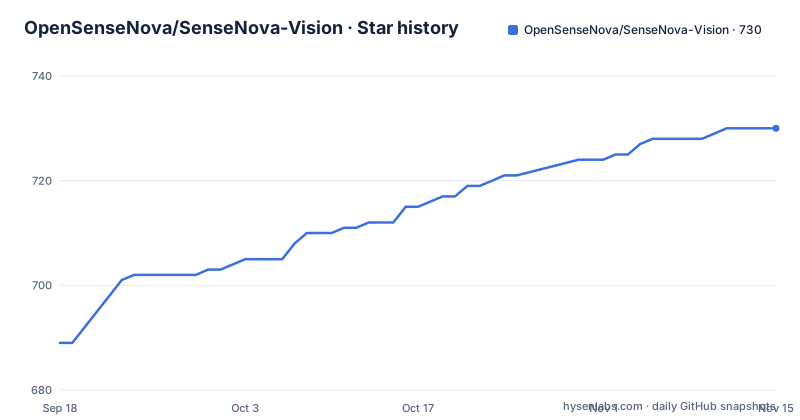
Star history
- OpenSenseNova/SenseNova-Vision730 ★ · +41
| Repository | 2026-09-18 | 2026-11-15 |
|---|---|---|
| OpenSenseNova/SenseNova-Vision | 689 | 730 |
41 Stars in the last 58 days, measured from the daily GitHub snapshot. Compare with other projects
Editorial analysis
One wrapper, four mode words, and no usage string
`scripts/run_sensenova_vision.sh` is the only command surface the overview names, and it takes a mode word as its first argument. `example` runs the curated example, `inference` handles one request, `demo` starts the Gradio web interface, and `benchmark` drives the evaluation sweep across the prepared datasets. The mode word is positional, and nothing in the overview prints a usage string for the wrapper.
The environment has to exist before any of them work, and the setup step is the one place where a name matters twice:
git clone https://github.com/OpenSenseNova/SenseNova-Vision.git
cd SenseNova-Vision
bash setup.sh sensenova-vision
conda activate sensenova-vision
`setup.sh` takes the conda environment name as an argument, and the next line has to activate that exact string. A typo in either place leaves you in the base environment, where every later command still runs and fails on a missing package rather than on the name mismatch. The sample run needs no arguments at all:
bash scripts/run_sensenova_vision.sh exampleThe task name is a bare positional string with no published enum
The second argument to `inference` is the task, and exactly one value of it is ever shown:
bash scripts/run_sensenova_vision.sh inference \
  binary_seg \
  "person" \
  examples/images/2.jpg
`binary_seg` selects binary segmentation, the quoted word is the class or target named in the instruction, and the third argument is an image path relative to the repository root. No enumeration of legal task strings appears anywhere in the overview, so the failure mode for a wrong guess is a wrapper error rather than a helpful list.
The closest thing to a catalogue sits one level down, in `examples/`: folders named `OCR`, `bbox`, `binary_seg`, `depth`, `gcg_val`, `keypoint`, `normal`, `open_editing`, `open_generate`, `pan_val`, `point` and `recon3d`, plus `images/` and a `panoptic_val2017.json`. Those directory names read like task identifiers, but nothing states that the wrapper accepts them verbatim. Two of them, `open_editing` and `open_generate`, imply free-form instructions rather than fixed slots, which makes the gap between directory naming and command-line contract wider than it looks.
38,226 MiB is the number that decides who gets to try this
Hardware is where the project states its limits most plainly. The web demo was validated in one configuration: BF16 on a single NVIDIA A800 80GB GPU, with no CPU offload and no disk offload. The recorded request peaked at 38,226 MiB of process GPU memory. That is a peak for one request rather than a reservation, but on an 80GB card it leaves the headroom for a second request, a longer context or a concurrent evaluation process small.
The overview then draws a boundary. An 80GB GPU is what it suggests, and GPUs with less memory have not been validated across the full task set. Nothing is claimed for 24GB or 48GB parts, and no quantization recipe appears, even though `bitsandbytes==0.49.2` and `accelerate==1.7.0` are both pinned in the manifest, which means the loading machinery is installed whether or not anyone has tuned it. The demo passes the model path in as an environment variable:
MODEL_PATH=/path/to/SenseNova-Vision-7B-MoT \
  bash scripts/run_sensenova_vision.sh demo
No GitHub releases, but five dated news entries in two weeks
Release history lives outside the repository. The GitHub repository has no releases at all, and the overview carries its own dated news list in their place. On 2026.07.08 the technical report, the inference code, the initial 7B weights and the 50M corpus dataset all went out. On 2026.07.17 came the training pipeline adapted for open-source datasets and benchmark support for multi-view reconstruction and camera pose estimation. On 2026.07.22 the end-to-end training data preparation workflow was revised. Five changes in fourteen days, none of them versioned.
Identification therefore comes from the model and dataset repositories on Hugging Face and from a ModelScope mirror, not from a tag or a manifest line. The dependency pins sit further back still: `torch==2.5.1`, `torchvision==0.20.1` and `transformers==4.49.0`, against a reference runtime of Linux, Python 3.10, PyTorch 2.5.1 and CUDA 12.4. Moving any of those is an unsupported experiment on a repository that offers no release history to fall back to.
The results table stops right after the Keypoint header
The benchmark section is the weakest published part. It groups evaluation into structured visual understanding and promises coverage of dense geometric prediction, segmentation and multi-view visual geometry, then opens an HTML table. Its header row names Object Detection across six columns (COCO-Com., HR/RefCOCOg V/T, LVIS, Dense200 and VisDrone across two), OCR across two (HierText, ICDAR15), GUI (ScreenSpot-V2), and Keypoint. The header ends at Keypoint. No method row follows, no score appears, and no competing system is named in that table.
So the claim that the model shows strong results across those families cannot be checked from the repository front page. Numbers have to be fetched from the evaluation guide at `docs/EVAL.md`, the arXiv report, or the paperswithcode results anchor. What the prose does describe is the parsing contract: textual output is parsed into benchmark structures such as categories, boxes, points, OCR strings, keypoints and camera parameters, while image output is decoded into masks, depth maps, normal maps or 3D point maps. That contract, plus the fact that `pycocotools==2.0.10` and `pycocoevalcap==1.2` ship in the pinned manifest, is the closest thing here to a description of how scores would be produced.
Three root manifests, one of them conditional on Linux
Three dependency files sit at the repository root and answer different questions. `requirements.txt` is pinned to exact versions and opens with a reference runtime comment naming Linux, Python 3.10, PyTorch 2.5.1 and CUDA 12.4. `constraints.txt` sits next to it, and `environment.yml` describes the conda environment that `setup.sh sensenova-vision` is meant to build. Only the pinned file has its contents spelled out in the overview, so the division of labour between a hard constraint list, a solver manifest and an environment definition cannot be traced from the root listing alone.
Two pins carry more weight than the rest. `triton==3.1.0; sys_platform == "linux"` is the only environment-conditional line in the file, which makes the manifest incomplete as written anywhere but Linux. And experiment tracking plus benchmark scoring share one install with the serving stack: `wandb==0.19.11`, `pycocotools==2.0.10`, `pycocoevalcap==1.2` and `xlsxwriter==3.2.9` land in the same environment as `gradio==5.38.2` and `torch==2.5.1`.
Two machines minimum, thirty-two recommended, a config named v9
Training is described as two stages. `docs/train_data_prepare.md` covers turning heterogeneous vision annotations into instruction-response examples, and `docs/TRAIN.md` covers the run, which `scripts/train_cv_unify.sh` launches from a config path:
bash scripts/train_cv_unify.sh data/configs/cv_unify/cv_unify_baseline_v9.yamlThe filename is the ninth iteration of a baseline series, and none of the earlier eight are described anywhere in the overview, so the deltas between versions are unreadable. The hardware requirement is given twice and agrees with itself: at least two machines carrying eight 80GB GPUs each, with 32 or more such machines suggested. Evaluation wants a comparable envelope, at least one 8 x 80GB machine, run as:
bash scripts/run_sensenova_vision.sh benchmark all \
  --num_gpus 8 \
  --tasks_per_gpu 2
That sweep also needs `datas/` and `jsonl_generate/` prepared first, per `docs/data_prepare.md`. For anyone without a cluster, the reachable surface is three commands: the curated example, a single inference call, and the demo.
Editorial conclusion
The judgment: this is a research release with a clean idea and a large hardware bill. Casting boxes, masks, OCR strings, depth maps and 3D point maps onto the native generation spaces of one unified multimodal model, with no per-task heads, is worth studying, and the wrapper keeps the demo cost to a single 80GB card. What it is not is something you can evaluate in an afternoon. There are no GitHub releases, no visible scores under the results table header, no published enumeration of legal task names, and a pinned stack that predates the weights. Before committing, confirm one thing: whether the checkpoints on Hugging Face or ModelScope load under the exact pins in requirements.txt. Then budget 80GB of VRAM per process and treat the training numbers as out of reach.
Frequently asked questions
What hardware does SenseNova-Vision need for the Gradio demo?
The validated configuration is BF16 on one NVIDIA A800 80GB GPU with no CPU or disk offload, and the recorded request peaked at 38,226 MiB of process GPU memory. GPUs with less memory have not been validated across the full task set.
Does SenseNova-Vision ship a separate prediction head for each vision task?
No. The overview states that the model requires no task-specific prediction heads, decoders or architectural branches. Boxes, points, OCR strings, keypoints and camera parameters come out of the text generation space, while masks, depth maps, normal maps and 3D point maps come out of the image generation space.
Where do the SenseNova-Vision-7B-MoT weights and the 50M corpus live?
The weights are published on Hugging Face as sensenova/SenseNova-Vision-7B-MoT with a ModelScope mirror, and the dataset as sensenova/SenseNova-Vision-Corpus-50M. The GitHub repository itself has no releases, so the Hugging Face and ModelScope repositories are the versioning surface.
Which task names can be passed to the SenseNova-Vision inference wrapper?
Only one is shown, binary_seg, passed as the second positional argument after the inference mode word. The examples directory holds folders named OCR, bbox, depth, keypoint, normal, point, recon3d, open_editing, open_generate, pan_val and gcg_val, but no enumeration of accepted task strings is published.
How much hardware does training SenseNova-Vision take?
At least two machines with 8 x 80GB GPUs each, with 32 or more such machines suggested. The run is launched by scripts/train_cv_unify.sh with a config path under data/configs/cv_unify, after the data preparation stage described in docs/train_data_prepare.md.
Are SenseNova-Vision benchmark scores published in the repository itself?
Not in the overview. The results table sets out header columns for Object Detection, OCR, GUI and Keypoint and then stops, so the numbers live in docs/EVAL.md, the arXiv technical report and the paperswithcode results anchor instead.
Official sources
Add this badge to your README
If you maintain this project, the badge below links readers to this analysis and shows its maintenance status from the daily GitHub snapshot. Paste the markdown into your README; add ?metric=license or ?metric=stars to the image URL for a different field.

[](https://hysenlabs.com/projects/opensensenova-sensenova-vision)Star history chart for your README
[](https://hysenlabs.com/projects/opensensenova-sensenova-vision)Was this useful?