GP2040-CE quotes a 0.76ms average while its own table shows one sample in sixty arriving late
Multi-Platform Gamepad Firmware for Raspberry Pi Pico and other RP2040 boards
At a glance
- What is it?
- Gamepad firmware for the Raspberry Pi Pico and other RP2040 boards, with an embedded web configurator and fourteen claimed input modes. The latency figures come from a third party methodology, the raw spreadsheets live in a different repository, and both describe a tagged build that is close to eleven months behind the newest commit.
- Who is it for?
- GP2040-CE fits a builder assembling an arcade stick or a custom gamepad who wants one firmware image across PC, PS3, PS4, PS5, Switch and Xbox targets, with input mapping and lighting changed from a browser rather than from a build host. Before trusting its numbers, separate the build from the measurements: the latency table describes v0.7.12, the newest tag, while the branch has moved on, so the figures characterise a release rather than current code.
- Can I use it commercially?
- Yes. MIT is a permissive licence: you can use, modify and sell software built on it, as long as you keep its copyright and licence notices.
- Is it still maintained?
- Yes. The repository received new commits within the last day.
- What is it written in?
- Mainly C++, according to GitHub's language statistics.
Answers come from the project's GitHub data, last synced on November 15, 2026, and from our analysis. They are not legal advice.
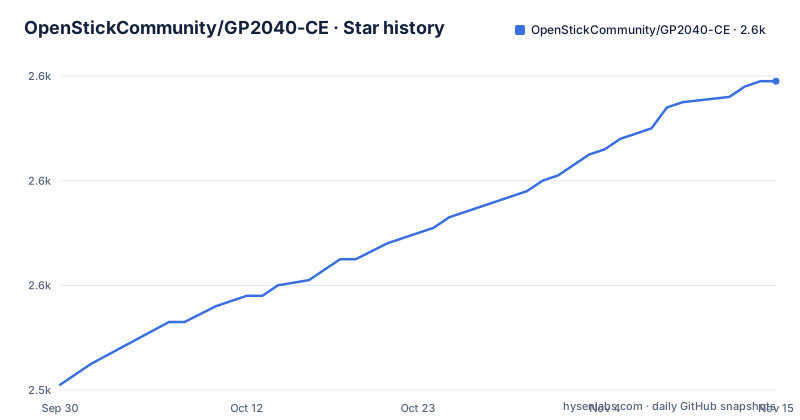
Star history
- OpenStickCommunity/GP2040-CE2,599 ★ · +58
| Repository | 2026-09-30 | 2026-11-15 |
|---|---|---|
| OpenStickCommunity/GP2040-CE | 2.5k | 2.6k |
58 Stars in the last 46 days, measured from the daily GitHub snapshot. Compare with other projects
Editorial analysis
Fourteen input modes are claimed and seven are named
The feature list opens by offering a choice of 14 input modes, then names them: X-Input, Nintendo Switch, Playstation 4/5, Xbox One, D-Input and Keyboard, which is seven if the two Playstation entries are counted separately. The compatibility paragraph above it names a different set again, PC, PS3, PS4, PS5, Nintendo Switch, Xbox One, Steam Deck, MiSTer and Android, mixing console targets with host platforms rather than listing modes. Neither list reaches fourteen, and neither is presented as a subset of a longer list. A third naming turns up further down, where the latency table has a row for HID USB, a mode name that appears in neither of the two lists. Reading all three together is the only way to know what the count covers, and no mode beyond those named has a stated name anywhere in the file.
The headline average hides a one-in-sixty sample arriving late
The feature bullet reports an average input latency of 0.76ms in Xinput and 0.91ms for Playstation 5, and the table below it supports both numbers. It also qualifies them in ways the bullet does not. Every row records a 1 ms polling rate and an on-time share between 98.18 and 98.53 percent, with the shortfall landing entirely in a one-frame-late column that runs from 1.47 to 1.82 percent, so roughly one sample in sixty misses the polling window in every mode measured. The two rows the bullet leans on are not the extremes. PS4 and PS5 carry the widest spread and the largest standard deviation at 0.32 ms against 0.24 ms elsewhere, and PS5 reaches 2.38 ms at the slow end against 1.28 ms for Xinput. The minimum column is the odd one, dipping to 0.41 ms at a 1 ms poll rate.
The latency evidence lives in another repository, as spreadsheets
None of the measurement material is in this repository. The methodology is attributed to a third party site, inputlag.science, and the setup used for the testing is described in a readme inside a separate OpenStickCommunity/Site repository. The results themselves are spreadsheets: a linked workbook for v0.7.12, another for v0.7.11, both fetched from a raw path on that other repository, with earlier results said to sit in a latency_testing folder. So the six rows of the table in the firmware readme are a copy, the conditions are documented elsewhere, and the individual samples are not present here at all. Anyone who wants to check the on-time percentages or the minimum values has to follow three separate links and open two spreadsheet files to do it.
Three ways to resolve opposite directions pressed at once
The most concrete mechanism in the feature list is the set of cleaning modes for simultaneous opposing cardinal inputs, where the firmware has to pick a position out of a contradiction. Three are offered. Up Priority, also called stickless, resolves to the up direction. Neutral resolves to the centre. Second Input Priority resolves to whichever of the two arrived second. Each is a different physical behaviour for a lever with four switches wired as two pairs, which is why the choice is exposed in firmware rather than left to the game. Two neighbouring features work on the same kind of remapping: left and right stick emulation driven from the D-pad with dedicated toggle switches for each, and a reversed input option bound to a button so the whole mapping can be inverted without rewiring.
The configurator is served by the board, and its assets are built into the image
The web configurator is described as built in and embedded, with no download required, and it is where the custom startup splash screen and image upload happen. The repository layout explains how that fits together: a www/ directory holds the page, CMakeLists.txt drives the build, and pico_sdk_import.cmake pulls in the Pico SDK. A compile_proto.cmake script sits beside a proto/ directory, so message definitions are compiled as part of the build rather than hand-written into the sources. Alongside them sit src/, headers/, configs/ and docs/, with lib/ and modules/ covering the vendored code and .gitmodules pointing at it. A package-lock.json at the root records a Node dependency tree, which belongs to the web side of the build rather than to the firmware, since the browser page has to be assembled before it can be embedded in the image the board serves.
The newest tag is close to eleven months behind the newest commit
Three releases are named, and all three sit on the same 0.7 line: v0.7.10 dated 2024-10-04, v0.7.11 dated 2025-04-11 and v0.7.12 dated 2025-11-10. The most recent push to the default branch main is dated 2026-10-02, close to eleven months after that last tag. That gap is the practical boundary for anyone reading the readme. The latency table is headed v0.7.12 in every row, so the only measured figures in the file describe the newest tagged build rather than the current state of the branch, and the setup instructions linked from the readme may describe behaviour added after it. Nothing in the file states that the branch is between releases, and nothing links the newer commits to a build, so a reader has to treat the release notes for v0.7.12 as the last point at which anything is pinned.
The acknowledgement list is a dependency map with one purchased license in it
The acknowledgements double as a map of what the firmware is standing on. GP2040-CE is the community edition of GP2040, built by FeralAI, which the file credits with laying the foundation. The USB layer rests on examples from Ha Thach's TinyUSB library and on a tinyusb-xinput sample from fluffymadness. Display support comes from OneBitDisplay and BitBang_I2C by bitbank2, ported for use with the Pico SDK, and the 128x64 monochrome panel support is limited to the SSD1306, SH1106 and SH1107 families. Settings storage borrows an approach for using RP2040 flash memory as emulated EEPROM from a blog post by Kevin Boone. Static code analysis is credited to PVS-Studio. One line is not software at all: Youssef Habchi allowed the project to purchase a license for the Road Rage font.
Every user-facing link leaves the repository, though the tree carries docs/
The readme is an index rather than a manual. Downloads, installation, wiring, usage and a general FAQ are five separate pages on a documentation site, and the contributing section adds an issue tracker and a Discord channel. Nothing about wiring a board, flashing a first image or changing settings during a session appears in the repository text, and the tree does carry a docs/ directory while the readme points every reader at the website instead of it. What the repository does state about contributions is short: pull requests are welcome for enhancements, bug fixes and documentation updates, contributors are asked to respect the coding style of the files they touch, and the .editorconfig file is to be enforced where it is present. That file is one of the eight dot entries at the root, alongside .gitattributes and .gitignore.
Editorial conclusion
GP2040-CE fits a builder assembling an arcade stick or a custom gamepad who wants one firmware image across PC, PS3, PS4, PS5, Switch and Xbox targets, with input mapping and lighting changed from a browser rather than from a build host. Before trusting its numbers, separate the build from the measurements: the latency table describes v0.7.12, the newest tag, while the branch has moved on, so the figures characterise a release rather than current code. The raw results and the test methodology sit in a separate repository as spreadsheets, so verifying them means leaving this one. And for the question the readme leaves open, it names PS5 as supported and lists a PS5 input mode, but never states which mode carries authentication, so that has to be settled on the documentation site or by testing rather than from this file.
Frequently asked questions
What is GP2040-CE?
It is gamepad firmware for the Raspberry Pi Pico and other boards built on RP2040 microcontrollers, and it is the community edition of GP2040. It is described as compatible with PC, PS3, PS4, PS5, Nintendo Switch, Xbox One, Steam Deck, MiSTer and Android.
is gp2040 ce compatible with ps5
Yes, PS5 appears in the compatibility list and again as a selectable input mode, and the v0.7.12 latency table includes a PS5 row measured at 1 ms polling with a 0.91 ms average.
gp2040 ce vs rp2040
They are not alternatives to each other. RP2040 is the microcontroller family the board is built around, while GP2040-CE is the firmware image that runs on it, the community edition of the original GP2040 project.
Which PS5 mode runs the GP2040-CE as an authenticated PS5 arcade stick?
The repository does not say. PS5 is listed as a supported platform and as one of the selectable input modes, and the latency table has a PS5 row, but no passage states which mode carries authentication or how a stick is authenticated, and the acknowledgements credit third-party code for the PS4 implementation only.
Is GP2040-CE an alternative to a Brook adapter board?
Brook is not mentioned anywhere in this repository, so no comparison can be drawn from it. What the file states is its own scope: firmware for RP2040 boards with a built-in web configurator, fourteen claimed input modes and an MIT license.
Official sources
Add this badge to your README
If you maintain this project, the badge below links readers to this analysis and shows its maintenance status from the daily GitHub snapshot. Paste the markdown into your README; add ?metric=license or ?metric=stars to the image URL for a different field.

[](https://hysenlabs.com/projects/openstickcommunity-gp2040-ce)Star history chart for your README
[](https://hysenlabs.com/projects/openstickcommunity-gp2040-ce)Was this useful?