Stylus, the user styles manager: how a 10kB script, three galleries and four sync targets actually work
Stylus - Userstyles Manager
At a glance
- What is it?
- Stylus is a GPLv3 browser extension for applying and writing CSS themes, kept deliberately free of analytics after its predecessor was sold to an analytics company. It reads external galleries, installs UserCSS from raw URLs, lints with two engines, and ships two extension manifest generations at once.
- Who is it for?
- Stylus suits someone who wants to restyle a handful of sites from existing galleries, or write CSS against a local build step, and who will read the rules of a style before installing it. It suits less well anyone who needs a single manifest generation, a signed nightly build, or documented conflict handling when two machines sync the same styles.
- Can I use it commercially?
- Yes, with conditions. GPL-3.0 is a copyleft licence: if you distribute software that includes it, you must release that software's source code under the same licence. Running it internally without distributing it does not trigger that obligation.
- Is it still maintained?
- Yes. The repository last received commits 2 days ago.
- What is it written in?
- Mainly JavaScript, according to GitHub's language statistics.
Answers come from the project's GitHub data, last synced on November 13, 2026, and from our analysis. They are not legal advice.
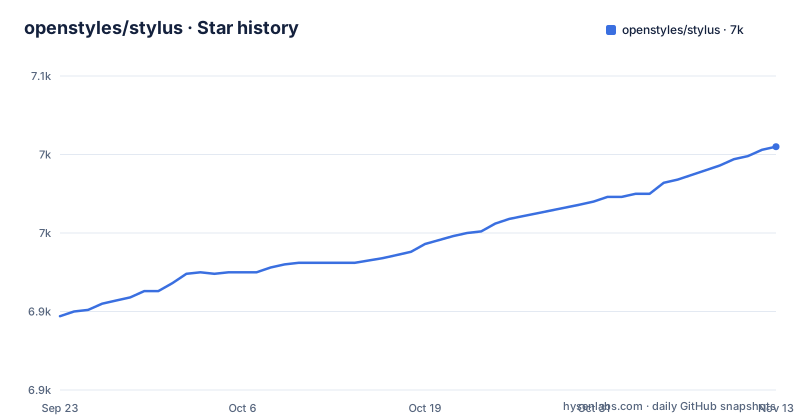
Star history
- openstyles/stylus7,005 ★ · +108
| Repository | 2026-09-23 | 2026-11-13 |
|---|---|---|
| openstyles/stylus | 6.9k | 7k |
108 Stars in the last 51 days, measured from the daily GitHub snapshot. Compare with other projects
Editorial analysis
The 10kB content script that has to stay out of the way
Stylus is a browser extension that restyles websites with CSS themes, and it works on Chrome, Firefox and any Chromium based browser. The mechanism that makes it tolerable with a full set of tabs open is small and worth quoting exactly: a lightweight content script of about 10kB runs in the web pages in about a millisecond. That is the entire per tab cost the README claims, and it is why the extension can stay installed permanently rather than being toggled per site.
Everything else is the manager wrapped around that script. The tree separates the extension source under src/ from build tooling under tools/, and the package metadata names version 2.4.17 under GPL-3.0-only, matching the v2.4.17 release published on 2026-10-20. The runtime dependencies are few and oddly specific: a draggable list helper, CodeMirror at 5.65.20, a fork of CSSLint, a cloud sync package, LESS, a compression fork, Stylelint bundled at 17.16.0, a Stylus language bundle, a UserCSS metadata parser and a web authentication flow launcher. Every one of those maps onto a feature the README names rather than onto general purpose infrastructure.
Find, click, click again: how a gallery style lands
The install path for most people never opens the built-in editor. Stylus reads external galleries, and three are named: USW at userstyles.world, the USO archive at uso.kkx.one, and the by-site CSS listings on Greasy Fork. The flow is three steps with no typing involved. Press the Find button in the popup interface, click the screenshot of a site to apply that style, click the same screenshot again to uninstall it.
That screenshot as button design is the part that confuses newcomers. Nothing in the flow tells you which stylesheet is about to be applied, and the uninstall gesture is the install gesture reversed. If a gallery style misbehaves, clicking the screenshot again uninstalls it.
The other route is UserCSS, a wrapper format for styles that need advanced customization, installable from any raw plain text URL. Take that route when the style carries metadata, because a plain hosted stylesheet has nowhere to declare a name or where its updates come from.
Auto-update is per style and global, which cuts both ways
Stylus updates styles on its own, and the README is specific that this is configurable in two separate places: in each individual style, and globally in the options. For a style you wrote yourself, that removes work. For a gallery style, it means a theme can start injecting something different after you approved it once.
That is a trust decision rather than a defect, and the extension gives you two dials instead of one. The per style setting is the escape hatch for the themes you have decided you want, and the global option is the blunt instrument for switching the whole mechanism off across everything you have installed.
The third piece is backup. Stylus can write a JSON file that other userstyles managers can read, which matters if you ever move to a different extension: the list of styles, including ones that arrived from a gallery, is not trapped in a browser profile in a format only Stylus understands. The reverse direction is not promised, so read the export as the portable half of that arrangement.
Cloud sync covers four targets, and three of them need OAuth
Sync is described as cloud sync for Dropbox, GDrive, OneDrive, or any WebDAV compatible server. The generic WebDAV option is the one that matters, because it means the feature is not limited to the three named vendors: any host that speaks WebDAV can hold the same backup.
The dependency list hints at the shape of it, since there is a package named db-to-cloud and another that launches a web authentication flow. What is absent from the README matters just as much. No end to end encryption claim is made for the stored styles, and nothing says what happens when the same style has been changed on two machines. The useful question for someone syncing a large collection is therefore not whether sync works, but which copy wins.
The lighter alternative sits in the same feature set: the JSON export has none of those provider dependencies and none of those unanswered questions.
CodeMirror 5, two linters, and a build step for SASS authors
The built-in editor handles three languages, CSS, LESS and the Stylus preprocessor language itself, and it checks what you type with two separate engines, Stylelint and a modified CSSLint, both with rules you can customize. CodeMirror 5.65.20 is the editor underneath, and it is the one dependency in the list that announces its own generation.
The more interesting route is live reload. If you would rather write in an external IDE, Stylus will track a CSS file that some other tool produces, which is how SASS and SCSS authors keep their existing build step and simply point the extension at the compiled output. Preview updates as the build runs. That inverts the usual arrangement, where the extension is the editor and everything else waits for it, and it is the option to take when your styles already live in a repository with its own toolchain.
A UserCSS metadata parser and a compression fork round out the runtime list, and neither gets a mention in the README beyond the features they serve.
Chrome v128 and an mv2 zip are two support eras at once
Installing the extension forks by browser, and the boundaries are stated precisely. The Chrome Web Store carries stable and beta listings for modern Chrome, v128 and up, and for Chromium based browsers including Brave, Opera and Vivaldi. Mozilla addons carries stable and beta listings for Firefox and any Gecko based browser, with the beta shipped as an xpi file. A third path is a zip file with a -mv2 suffix, meant to be loaded as an unpacked extension on older Chromium based browsers that only support ManifestV2.
That third path is the tell. Stylus still ships a ManifestV2 build in 2026, so the project maintains two manifest generations at the same time, and someone on an old Chromium browser runs a different artifact from the store listing rather than an older version of it.
Behind the stores sit nightly builds from the project's own CI. Pick a workflow entry in ci.yml, download the file from the Artifacts section, which requires a github.com account, then install it. Nothing in that sequence is scripted, and no signing or verification step is described, so a nightly is something you install by hand on a machine you already trust.
GPLv3, a Stylish lineage, and what a fork costs
Stylus is GPLv3, and package.json states it as GPL-3.0-only. The README credits two lineages: copyright 2017 to 2025 for the Stylus Team, and copyright 2005 to 2014 for Jason Barnabe for what it calls the ever diminishing parts of the original Stylish. A file listing licences of modified external libraries sits under src/vendor-overwrites, which matters because several dependencies are forks rather than published releases: a CSSLint fork, a compression fork and a language bundle tracked to a git tag instead of an npm version.
GPLv3 is copyleft, so a distributed modification carries an obligation to publish the corresponding source. Whether that reaches any particular deployment is a question for the licence text rather than for this README. What the repository does show is that a clean rebrand is harder than swapping a name, because the forks are load bearing for the linter and for the editor's language support.
Activity is easy to judge from the dates. Three releases landed in October 2026, v2.4.15 on the 17th, v2.4.16 on the 19th and v2.4.17 on the 20th, and the last push to the repository was on 2026-11-01.
Editorial conclusion
Stylus suits someone who wants to restyle a handful of sites from existing galleries, or write CSS against a local build step, and who will read the rules of a style before installing it. It suits less well anyone who needs a single manifest generation, a signed nightly build, or documented conflict handling when two machines sync the same styles. Before you install anything from a gallery, click the thumbnail once and read what the style actually injects, because auto-update means an approved style can change later without asking again.
Frequently asked questions
How do I use the Stylus browser extension to restyle a site?
Press the Find button in the Stylus popup interface to search the galleries it reads, click the screenshot of a site to apply that style, and click the same screenshot again to remove it. To write your own theme, the built-in editor handles CSS, LESS and Stylus, and an external IDE can be used instead through the live reload feature.
Does the Stylus extension collect analytics or tracking data?
No. The README states no analytics and no tracking as its foundational principle, and gives the reason the project exists: the original Stylish extension was sold to a web analytics company. A privacy-policy.md also sits at the root of the repository.
Can Stylus sync my styles between two machines?
Cloud sync is offered for Dropbox, GDrive, OneDrive and any WebDAV compatible server, and a backup can be written to a JSON file that other userstyles managers can read. The README does not describe how conflicts are resolved when the same style changed in two places.
Official sources
Add this badge to your README
If you maintain this project, the badge below links readers to this analysis and shows its maintenance status from the daily GitHub snapshot. Paste the markdown into your README; add ?metric=license or ?metric=stars to the image URL for a different field.

[](https://hysenlabs.com/projects/openstyles-stylus)Star history chart for your README
[](https://hysenlabs.com/projects/openstyles-stylus)Was this useful?