uBlock Origin: The MV2 Blocker That Outlived Its Browser Era
uBlock Origin is an efficient, low-memory content blocker for Chromium and Firefox that filters ads, trackers, and other unwanted content.
At a glance
- What is it?
- uBlock Origin is a wide-spectrum content blocker for Chromium and Firefox, but its future on Chromium is tied to Manifest V2 deprecation. This review covers its mechanism, deployment, and the hard limits it now faces.
- Who is it for?
- Adopt uBlock Origin if you run Firefox, where it remains the recommended blocker and works best, or if you manage an enterprise Chromium fleet that can delay MV2 removal. Do not adopt it for consumer Chrome after August 31, 2026, when MV2 extensions disappear from the Web Store.
- Can I use it commercially?
- Yes, with conditions. GPL-3.0 is a copyleft licence: if you distribute software that includes it, you must release that software's source code under the same licence. Running it internally without distributing it does not trigger that obligation.
- Is it still maintained?
- Yes. The repository received new commits within the last day.
- What is it written in?
- Mainly JavaScript, according to GitHub's language statistics.
Answers come from the project's GitHub data, last synced on November 13, 2026, and from our analysis. They are not legal advice.
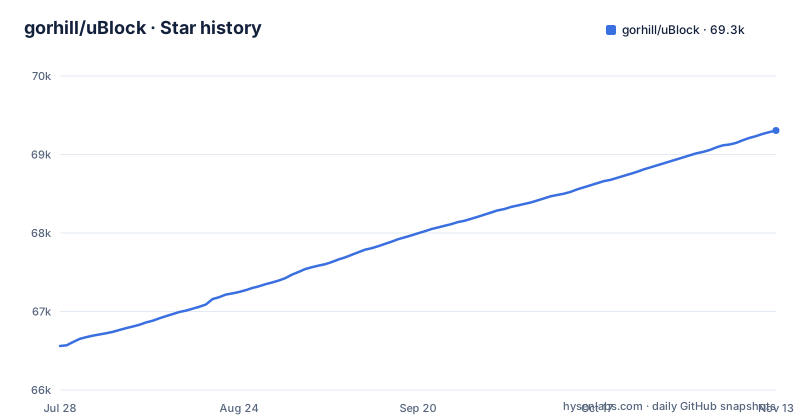
Star history
- gorhill/uBlock69,306 ★ · +2,745
| Repository | 2026-07-28 | 2026-11-13 |
|---|---|---|
| gorhill/uBlock | 66.6k | 69.3k |
2,745 Stars in the last 108 days, measured from the daily GitHub snapshot. Compare with other projects
Editorial analysis
What uBlock Origin Actually Blocks and Who Needs It
uBlock Origin (uBO) is a content blocker that targets ads, trackers, coin miners, popups, anti-blockers, and malware sites. It ships with five default filter lists: EasyList, EasyPrivacy, Peter Lowe's Blocklist, the Online Malicious URL Blocklist, and uBO's own filter lists. The README stresses that its primary goal is to neutralize privacy-invading methods, not just to hide ads. The intended user is someone who wants an install-and-forget blocker with no configuration, or an advanced user who wants per-site control through a point-and-click firewall. The project explicitly warns against running uBO alongside another content blocker, because other blockers can break uBO's privacy features and anti-blocker defusing. That warning matters for anyone who thinks layering blockers adds safety; the documentation says it does the opposite.
The Filtering Mechanism: EasyList Syntax and Dynamic Rules
uBO uses the EasyList filter syntax and extends it with custom rules and filters. The README mentions hosts files are also supported, which is a separate mechanism that maps domains to 127.0.0.1 or similar null routes. The advanced mode adds a dynamic filtering firewall that operates per site. This is not a static list; you can allow or block specific domains and types of requests from the popup UI. The README describes this as a point-and-click firewall. The mechanism is fundamentally different from MV3 declarativeNetRequest, which requires static rule sets and cannot evaluate dynamic patterns as freely. uBO's strength comes from that flexibility, but it is exactly what makes it incompatible with MV3's constraints.
Installation Paths and Their Trade-offs
Firefox users install from the Mozilla Add-ons store, and the README states uBO works best on Firefox. Firefox desktop and Android are both supported. For Chromium browsers, the Chrome Web Store listing was removed on August 31, 2026, according to the linked Chrome developer timeline. Edge is transitioning away from MV2 by the end of 2026, with enterprise deprecation in early 2027. The README notes that the Edge add-on was published by Nicole Rolls until version 1.62, with ownership transferring at version 1.64. For those who still want uBO on Chromium after store removal, the GitHub Releases page offers stable and development builds, but they must be placed manually into the browser. The Chromium versions usually will not auto-update, which means you are responsible for tracking new releases and re-installing them. Thunderbird users face a worse situation: the add-on is stuck at 1.49.2 and no longer updated, and later versions require GitHub Releases.
Running uBO: Basic Mode Versus Advanced Mode
The documentation splits usage into two modes. Basic Mode is the simple popup interface, configured optimally by default, for an install-it-and-forget-it experience. Advanced Mode exposes the dynamic filtering firewall, which lets you control requests on a per-site basis. For enterprise deployment, the README links to a Deploying uBO page. You can unselect any preselected filter lists if uBO blocks too much. That is the main configuration lever for reducing false positives.
The Manifest V2 Expiration Problem
The biggest limitation is not technical but temporal. Chrome removed all remaining MV2 extensions from the Web Store on August 31, 2026, and Edge will complete its consumer transition by the end of 2026. uBO is an MV2 extension. The README links to a Chrome page about the 'This extension may soon no longer be supported' warning. For new users, there will be no store listing to install from. The only path is manual installation from GitHub Releases, which the README says usually will not auto-update. That creates a maintenance burden: you must manually track new versions and re-install them. For most users, this is a dealbreaker. For enterprise environments that can delay MV2 deprecation, there is a window, but it is closing.
Alternatives: uBlock Origin Lite and the MV3 Shift
The README links uBlock Origin Lite as a related project. uBOL is the MV3-compliant version of uBO. The difference in approach is fundamental: UBO uses dynamic filtering and full EasyList syntax, while uBOL must work within MV3's declarativeNetRequest API, which limits rule sets and dynamic behavior. uBOL runs on Chromium browsers after MV2 is gone, but it is a different product with different capabilities. Another alternative is to switch to Firefox, where uBO works best and continues to be supported. The README explicitly says uBO works best on Firefox, and Firefox still supports MV2 extensions. So the real choice is between staying on Chromium with uBOL's constraints, or moving to Firefox to keep full uBO functionality.
Licence, Maintenance, and Upgrade Cost
uBO is licensed under GPL-3.0, which means you can use, modify, and redistribute it, but derivative works must also be GPL-3.0. That is a strong copyleft licence; if you embed uBO code into a proprietary project, that project must open its source. The maintenance cost is visible in the release history: the latest stable release is 1.75.2, published on 2026-11-02, followed the same day by the 1.75.3rc1 release candidate. This is an actively maintained project. However, the upgrade cost for Chromium users is high because manual installations do not auto-update. You must check the Releases page regularly and re-install. The README also notes that the project seeks no donations, and it directs contributors to help maintain the filter lists instead, which are free. That points to a community model where the filter lists are the real ongoing cost, not the code.
Editorial conclusion
Adopt uBlock Origin if you run Firefox, where it remains the recommended blocker and works best, or if you manage an enterprise Chromium fleet that can delay MV2 removal. Do not adopt it for consumer Chrome after August 31, 2026, when MV2 extensions disappear from the Web Store. Before deploying, verify your browser's MV2 support window and your ability to sideload from GitHub releases, since Chromium versions usually will not auto-update. For Thunderbird, note that the add-on is stuck at version 1.49.2 and no longer updated, so only use it if that version suffices.
Frequently asked questions
Why is uBlock being removed from Chrome?
Because of the Manifest V2 deprecation rather than anything the project did. The browser table marks the Chrome Web Store row Removed on 2026-08-31 and quotes Google's timeline: Aug 31st 2026, all remaining Manifest V2 extensions removed from the Chrome Web Store. The remaining full featured route is a manual install from GitHub Releases that usually will not auto-update.
how to install ublock origin
The browser table lists Firefox Add-ons, Edge Add-ons, Opera Add-ons and GitHub Releases, with the Chrome Web Store row marked Removed on 2026-08-31. The README says uBO works best on Firefox and is available for desktop and Android, and that the GitHub Releases build must be placed manually into a web browser, with the Chromium and Thunderbird versions usually not auto-updating.
how to use ublock origin on android
Through Firefox. The Firefox row says uBO works best on Firefox and is available for desktop and Android versions, installed from Firefox Add-ons. The repository also links uBlock Origin Lite as a related project at a separate site, and provides a manual installation guide and a deploying uBO page for other cases.
how to use ublock origin on iphone
This repository gives an iPhone user no install path of its own. The browser table covers Firefox, Edge, Opera, Thunderbird and manual GitHub Releases, with no iOS row, and the only mobile entry is the Firefox Android one. The README links uBlock Origin Lite as a related project, which is where a reader looking for the lighter option is pointed.
Is uBlock still working?
The project is active: the last push was 2026-11-02, with 1.75.2 published on 2026-11-02 alongside the 1.75.3rc1 release candidate. What changed is distribution rather than the software, with the Chrome listing removed, the Thunderbird add-on described as no longer updated and stuck at 1.49.2, and Edge moving to Manifest Version 3 by the end of 2026.
Official sources
Add this badge to your README
If you maintain this project, the badge below links readers to this analysis and shows its maintenance status from the daily GitHub snapshot. Paste the markdown into your README; add ?metric=license or ?metric=stars to the image URL for a different field.

[](https://hysenlabs.com/projects/gorhill-ublock)Star history chart for your README
[](https://hysenlabs.com/projects/gorhill-ublock)Was this useful?