MyContext keeps a work context vault local under a source-available license
MyContext is a local-first desktop app for everyday communication and knowledge work
At a glance
- What is it?
- A TypeScript monorepo for a local-first Electron and React desktop app that turns messaging, document and meeting records into a personal context graph with search, a digital self and agent access. The constraints that shape adoption are not the features: the Elastic License 2.0 forbids offering it as a hosted service, the dist scripts target macOS, and local data lives in a SQLite vault whose migrations can ask you to collect again.
- Who is it for?
- Use MyContext if you work on macOS, want your work context to stay on your own disk, and are willing to run a preview whose migrations are not guaranteed reversible. Do not plan on reselling it as a hosted or managed service, and do not assume an installer exists for Windows or Linux.
- Can I use it commercially?
- Check first. The repository uses a licence we do not classify automatically, so read its LICENSE file before any commercial use.
- Is it still maintained?
- Yes. The repository last received commits 76 days ago.
- What is it written in?
- Mainly TypeScript, according to GitHub's language statistics.
Answers come from the project's GitHub data, last synced on November 15, 2026, and from our analysis. They are not legal advice.
Star history
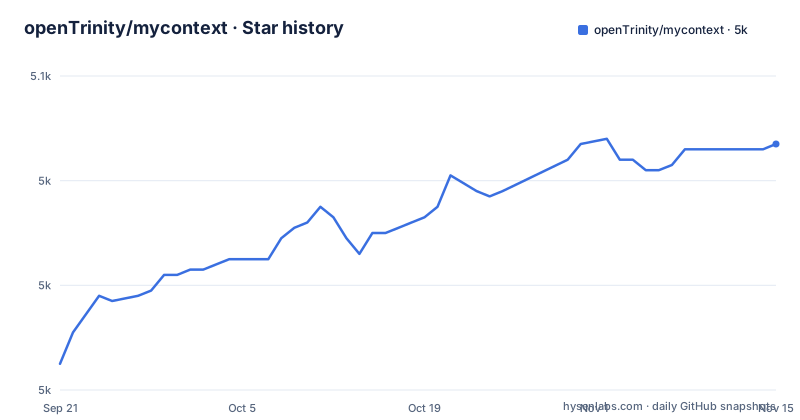
- openTrinity/mycontext5,047 ★ · +42
| Repository | 2026-09-21 | 2026-11-15 |
|---|---|---|
| openTrinity/mycontext | 5k | 5k |
42 Stars in the last 55 days, measured from the daily GitHub snapshot. Compare with other projects
Editorial analysis
Elastic-2.0 forbids the one move an AI product usually wants
The license is the first constraint to read, because it decides who may run this at all. It is licensed under the Elastic License 2.0, a source-available license: you may use, modify and self-host it, including inside a company, but you may not offer it to third parties as a hosted or managed service. package.json repeats that as `"license": "Elastic-2.0"` and adds `"private": true`, so the workspace root is not published either. Read the LICENSE file for the full terms, and note that third-party components under `kl-graph/` and `vendor/` keep their own licenses rather than the project's. In practice: internal deployment, a research team, a personal machine, all fine. Putting it behind your own login page for paying customers is exactly the case the license removes, and no amount of local-first architecture changes that.
Every distribution script targets macOS, and no release exists
The packaging scripts cover one platform:
"dist:mac": "pnpm run build:app && electron-builder --mac --dir --config apps/desktop/electron-builder.yml",
"dist:mac:dmg": "pnpm run build:app && electron-builder --mac dmg --config apps/desktop/electron-builder.yml",
"dist:repack": "electron-builder --mac --dir --config apps/desktop/electron-builder.yml",
Three scripts, all passing `--mac` to electron-builder, and there is no Windows or Linux target anywhere in them. There are also no GitHub releases, so there is no artifact to download on any platform. The consequence is that a Windows or Linux user is a source user: they clone the workspace and run the dev or build scripts instead of an installer, which means a working Node and pnpm toolchain is the price of entry rather than a packaged app. The configuration file those scripts point at, `apps/desktop/electron-builder.yml`, is the place to look if you want to add a target, and the fact that `build:app` also runs `scripts/rebuild-electron.mjs` and `scripts/build-python-bundle.mjs` says the build is more than one bundler.
Node is pinned to one major version and pnpm is declared twice
The toolchain is fenced in three places. package.json declares `"packageManager": "[email protected]"` and an engines block:
"engines": {
  "node": ">=22.17.0 <23",
  "pnpm": ">=10.13.0"
},
The `<23` ceiling is the part that bites: a machine on Node 23 or newer is outside the supported range, and the patch floor of 22.17.0 is just as specific. A `.nvmrc` at the top level is there to make that easy to honour, and the workspace is pnpm based, with `pnpm-workspace.yaml`, `pnpm-lock.yaml` and a `.npmrc` alongside `apps/`, `packages/`, `tests/` and `scripts/`. The dev and build scripts each chain several steps:
"dev": "pnpm run verify:toolchain && pnpm run prepare:bin && pnpm run native:electron && pnpm --filter @mycontext/desktop dev",
"build": "pnpm run typecheck && pnpm run prepare:bin && pnpm --filter @mycontext/desktop build",
The dev script verifies the toolchain before anything else, so a wrong Node version fails at the start instead of somewhere inside Electron.
A migration can require you to collect everything again
The status is developer preview, iterating rapidly, and the project states there will be compatibility-breaking changes. The part with data consequences is this: local data lives in an on-disk SQLite vault under versioned migrations, a migration can require you to re-run collection, and some changes may not be reversible. The advice that follows from it is explicit, do not treat this build as the only home for anything you cannot re-derive. Since the ingestion sources are instant messaging conversations, documents and meeting records, re-running collection means re-reading sources, so the cost of an irreversible migration is paid in wall-clock time and in source access, not just in a schema version. Copy the vault directory before you upgrade, and treat the data as a cache of sources you can still reach rather than as a system of record. The same warning appears in the Chinese section of the README, so it is a policy and not an oversight in translation.
The dev port is 5273 on purpose, and .env is dev only
The environment example is unusually explicit about why it looks the way it does:
MYCONTEXT_DEV_PORT=5273
MYCONTEXT_LLM_BASE_URL=https://llmapi.llm-gateway.com
MYCONTEXT_MODEL_MAIN=glm-5.2
MYCONTEXT_EMBED_MODEL=text-embedding-v4
The port is not Vite's default 5173, because the comment explains that running several Vite projects on one machine makes the default collide, and a taken port raises an error instead of silently moving, since a silent move leaves the main process unable to connect and the window blank. Configuration priority is stated as built-in defaults, then .env in development only, then real environment variables, so anything you put in .env is a development convenience rather than a deployment mechanism. The other three switches in that file are `MYCONTEXT_LOG_LEVEL` taking debug, info, warn or error, `MYCONTEXT_DATA_DIR` which falls back to the system userData directory when empty, and `MYCONTEXT_DEV_TOOLS` as a 0 or 1 flag for opening developer tools.
One model name drives four call paths, with a separate KL outlet
Model configuration is centralised to a degree worth understanding before you change anything. `MYCONTEXT_MODEL_MAIN` is described as the main model for all model calls: digital self replies on both the agent path and the fallback direct path, the search agent, work layer extraction, and knowledge graph building when no separate KL model is set. The value in the example file is `glm-5.2`, and the settings page in the app overrides the file. `MYCONTEXT_EMBED_MODEL=text-embedding-v4` is separate, for embeddings. The knowledge graph has an optional dedicated gateway, `MYCONTEXT_KL_LLM_BASE_URL`, `MYCONTEXT_KL_LLM_API_KEY` and `MYCONTEXT_KL_MODEL_MAIN`, which fall back to the main configuration when empty and run in Anthropic mode, and that separate outlet exists precisely because switching the main model once broke Chinese extraction. The search agent, driven by opencode, reuses the same gateway, and `ANTHROPIC_BASE_URL` with `ANTHROPIC_AUTH_TOKEN` take priority over `MYCONTEXT_LLM_*` when you want search pointed elsewhere.
Nine layers, with the agent kept outside the vault
The repository is split into independent layers: Channels for authorization, source discovery, reading and controlled actions; Ingest for scheduling, normalization, checkpoints, retries and incremental sync; Store for the local database, migrations, source records and message indexes; the context pipeline; Retrieval; the knowledge graph; Persona for the digital self runtime, drafting and safety controls; the agent runtime for isolated sessions, tool access and streaming events; and Desktop, the Electron and React application that ties it together. Two design decisions sit across those layers. Action guardrails keep sending, deletion and other consequential operations behind explicit user confirmation, and the agent runtime gives search and the digital self isolated workspaces with scoped permissions. Search combines local full-text search, semantic retrieval and graph queries, and when the agent runtime is unavailable it falls back to ranked local results rather than inventing an answer. That fallback is the honest boundary of the safety story: a confirmation dialog plus a degraded mode, not a sandbox you configure.
Editorial conclusion
Use MyContext if you work on macOS, want your work context to stay on your own disk, and are willing to run a preview whose migrations are not guaranteed reversible. Do not plan on reselling it as a hosted or managed service, and do not assume an installer exists for Windows or Linux. Before your first upgrade, back up the SQLite vault, and before wiring a model, read the .env.example notes on MYCONTEXT_MODEL_MAIN because that one value drives several call paths.
Frequently asked questions
What is MyContext and what stage is it at?
It is a local-first desktop app for everyday communication and knowledge work, currently in developer preview with compatibility-breaking changes expected. The core desktop flow, local data layer, search and answers, personal context graph and digital-self workflow are implemented.
Can I host MyContext as a service for my customers?
No. It is licensed under the Elastic License 2.0: you may use, modify and self-host it, including inside a company, but you may not offer it to third parties as a hosted or managed service.
Which platforms can MyContext be packaged for?
The scripts cover macOS only, passing --mac to electron-builder for the dir, dmg and repack targets, and no GitHub releases are published. On other platforms you run it from the repository scripts.
What Node and pnpm versions does MyContext need?
node >=22.17.0 <23 and pnpm >=10.13.0, with [email protected] declared as the packageManager. A .nvmrc is at the top level and the dev script verifies the toolchain first.
What happens to my local data when I upgrade MyContext?
Local data lives in an on-disk SQLite vault under versioned migrations. A migration can require you to re-run collection and some changes may not be reversible, so the build should not be the only home for anything you cannot re-derive.
How does MyContext keep AI from acting on its own?
Action guardrails keep sending, deletion and other consequential operations behind explicit user confirmation, the agent runtime runs isolated sessions with scoped permissions, and search falls back to ranked local results when the agent runtime is unavailable.
Official sources
Add this badge to your README
If you maintain this project, the badge below links readers to this analysis and shows its maintenance status from the daily GitHub snapshot. Paste the markdown into your README; add ?metric=license or ?metric=stars to the image URL for a different field.

[](https://hysenlabs.com/projects/opentrinity-mycontext)Star history chart for your README
[](https://hysenlabs.com/projects/opentrinity-mycontext)Was this useful?