ZCode: one binary, three front ends, and a dev script that means production
Z.ai's coding agent harness. Powerful, intelligent, extensible.
At a glance
- What is it?
- ZCode is Z.ai's Apache-2.0 coding workbench, a pnpm monorepo holding an Electron desktop app, a web client, an HTTP and WebSocket backend and a terminal agent, with the terminal, web and agent paths shipped through one zcode entry point. The interesting parts are the seams: a dev script that defaults to the production backend, a token that appears only when the listener leaves loopback, and a packaging step that never touches the zcode already on your PATH.
- Who is it for?
- Read this repo as one product with three delivery shapes rather than three products, because every rough edge comes from that shared core. The desktop app is the richest path and the one with the most moving parts at build time.
- Can I use it commercially?
- Yes. Apache-2.0 is a permissive licence: you can use, modify and sell software built on it, as long as you keep its copyright and licence notices.
- Is it still maintained?
- Yes. The repository last received commits 1 day ago.
- What is it written in?
- Mainly TypeScript, according to GitHub's language statistics.
Answers come from the project's GitHub data, last synced on November 14, 2026, and from our analysis. They are not legal advice.
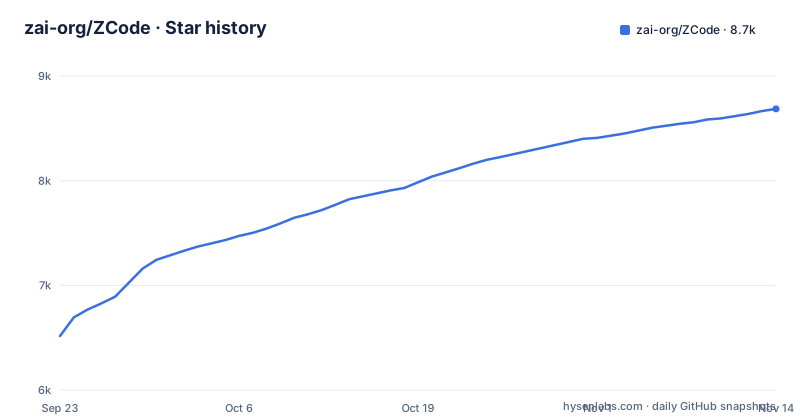
Star history
- zai-org/ZCode8,686 ★ · +2,170
| Repository | 2026-09-23 | 2026-11-14 |
|---|---|---|
| zai-org/ZCode | 6.5k | 8.7k |
2,170 Stars in the last 52 days, measured from the daily GitHub snapshot. Compare with other projects
Editorial analysis
One zcode binary routes its first argument between TUI, web, and the agent
The command line distribution is a single entry point that dispatches on argv. No arguments opens the terminal interface, a first argument of --web starts the web interface, and anything else falls through to the existing agent CLI. Both of the first two modes run on your own machine and never start Electron, so the terminal and browser paths do not need the desktop shell.
That dispatcher is why the docs keep three separate run instructions. There is a source level entry that skips it, pnpm --filter @zcode/cli dev, which goes straight to the agent CLI, so a --web flag you pass there is handled by the agent's own parser instead. Verifying the unified zcode command means running the unpacked bin/zcode.mjs, not that filter entry.
The practical trap is that build:zcode only produces a release package and deliberately does not replace a zcode already sitting in your PATH. After a fresh install, confirm which binary resolves before you assume your change shipped.
Web mode stays on loopback until you pass --host, and the token follows the host
Web mode binds 127.0.0.1 by default, works in the current directory, picks a free port itself, and opens the browser for you. It prints the address to reach it and you stop it with Ctrl+C. No access token is generated while the listener is local.
Move the listener off the loopback interface and the security model changes with it. Passing --host 0.0.0.0 makes the server generate an access token by default and print a link that carries it, so a naive LAN share works but is not open. You can supply the token yourself with --token or remove authentication entirely with --no-token, and the second flag is the one to think about twice, because it turns a LAN reachable agent into an unauthenticated one.
A second path reaches the same setting for anyone embedding the server rather than launching the binary. Starting the generic web service HTTP entry directly configures API and WebSocket authentication through ZCODE_SERVER_AUTH_TOKEN, while the programmatic interface takes an authToken option. Two names for one job, depending on how you start the service.
bootstrap skips remote assets, and remote work then uploads over SFTP
pnpm bootstrap installs workspace dependencies, prepares desktop local runtime assets, and runs build:bootstrap. On purpose it skips remote asset preparation, which is why it is the right default for local desktop development and the wrong default for remote work.
The remote path is SSH and WSL, and it has its own preparation command, pnpm bootstrap:with-remote, which sets up dependencies, local and remote assets, and builds the relevant packages serially while skipping the desktop app bundle. Once that is in place you run pnpm dev:desktop as usual and pick the download locally then upload option when connecting to a remote project.
What that option means for your bandwidth and your debugging is worth stating plainly: development assets come from the local packages/desktop/mock-cdn directory and local build output, and they reach the remote machine over SFTP. No CDN request happens at all. A remote session therefore exercises your own build output rather than published artifacts, which helps debugging and means a change you did not rebuild will not be there.
dev:desktop is the production service config wearing a dev script name
The desktop dev script is an alias. pnpm dev:desktop runs pnpm run dev:desktop:prod, which resolves to the production environment script, so the default desktop dev session talks to production services. The launch script prepares local runtime assets, builds the desktop agent, then starts Electron and source watching. Switching to the test environment is a separate command, pnpm dev:desktop:test, and there are also bytecode and remote production variants behind their own scripts.
Data isolation is your job, and the escape hatch is one variable. ZCODE_DATA_BASE_DIR sets the application data base directory, with data written into a .zcode subdirectory beneath it, so pointing the test build at a separate home keeps your real session history out of the run.
ZCODE_DATA_BASE_DIR="$HOME/.zcode-dev-home" pnpm dev:desktop:testThe one thing to verify before trusting a desktop dev session is which backend it reaches, because the convenient default is the production one and the script name does not warn you.
build:zcode writes dist/zcode and refuses to touch the zcode on your PATH
The release package is assembled by pnpm build:zcode, which builds the CLI and TUI, then the backend, then the web client, collects the TUI native libraries plus worker and runtime dependencies, and only then packs the result. Running that package still needs Node.js at the version pinned in mise.toml. Before packing you must set ZCODE_DIST_BASE_URL, in .env, .env.local or the environment, or pass --base-url. The version comes from the root package.json and the output lands in dist/zcode/ as releases/<version>/zcode-<version>.tar.gz, a sha256.txt digest, plus latest.json and install.sh.
For local verification you never touch the download root. Unpack the tarball and run the binary directly:
zcode_version=$(node -p "require('./dist/zcode/latest.json').version")
mkdir -p dist/zcode/debug
tar -xzf "dist/zcode/releases/$zcode_version/zcode-$zcode_version.tar.gz" \
  -C dist/zcode/debug
# 默认启动 TUI
node dist/zcode/debug/zcode/bin/zcode.mjs
First use of the web path adds one flag:
node dist/zcode/debug/zcode/bin/zcode.mjs --web \
  --workspace "$PWD" --port 3030 --no-open
Open http://127.0.0.1:3030 and the same backend serves both the web pages and the agent. The port has to be free, so if pnpm dev:web is already running, pass a different --port.
The installed layout is fixed in install.sh: the runtime lands in ~/.zcode/runtime by default and the zcode command is created in ~/.local/bin, with ZCODE_DIST_HOME and ZCODE_DIST_BIN_DIR to move each. The script downloads from the configured base URL, so nothing works until the whole dist/zcode/ directory is uploaded there.
Two warnings repeat for a reason. A fresh install will not delete an old Lite directory, and it will not migrate or delete existing session data, so those sessions stay where they are and Lite users have to move to the new build commands, environment variables and install script by hand. And because the build never overwrites a PATH entry, confirm resolution order with command -v zcode on macOS or Linux, or where.exe zcode on Windows, before assuming the command you are typing is the one you just built.
The oauth token route proxies somewhere other than your local backend
pnpm dev:web starts two processes under concurrently, named server and web. The web dev server listens on http://localhost:5173 by default and the backend on http://localhost:3030, and you drive the browser against the first one.
The proxy split inside that setup is the part that bites. Requests to /ws and general /api calls go to the local backend, so the web UI talks to code you just edited. The single exception is /api/v1/oauth/token, which is proxied to whichever product service is currently configured instead of your local backend. Sign-in never comes from local code, so an auth failure you cannot reproduce by editing the server package is behaving as designed.
Two more details ride along with the command. ZCODE_SERVER_WORKSPACE sets the workspace path the web backend operates on, and changing agent source needs pnpm --filter @zcode/cli... build followed by a restart, because the CLI compiles separately from the servers. Check that workspace path before you assume an agent is reading the directory you have open.
The desktop bundle defaults to macOS arm64 and ships unsigned
pnpm bundle:desktop produces a macOS arm64 build by default into packages/desktop/dist/. Targets are explicit flags: --os takes mac, win or linux, and --arch takes x64 or arm64, as in pnpm bundle:desktop -- --os win --arch x64. Behind those two values sits a platform constraint, because actually packaging and signing needs the tools and configuration belonging to the target platform, so cross building from one machine is not a flag you set and forget.
Distributing a locally built app is two steps. Open the DMG and drag ZCode into Applications, and if macOS blocks the first launch because the build is unsigned, clear the quarantine attribute:
sudo xattr -rd com.apple.quarantine /Applications/ZCode.appThat command needs sudo and it is a trust decision: it tells the OS to stop treating an app you built as a quarantined download. Past your own machines, that is where unsigned builds stop being convenient.
Other entries follow the same pattern of friendly script names hiding real commands. dev:desktop:bytecode runs the production desktop environment with --agent-bytecode, and dep:graph and dep:refs run the dependency-graph and dep-refs scripts.
Editorial conclusion
Read this repo as one product with three delivery shapes rather than three products, because every rough edge comes from that shared core. The desktop app is the richest path and the one with the most moving parts at build time. The terminal and web paths are the cheapest to try, and unpack the tarball to run one without touching your PATH. Before you commit, check three things: that command -v zcode resolves to the build you think it does, whether your desktop dev session is pointed at the production backend because you never switched it, and whether you started the web server with --host 0.0.0.0 and --no-token, which makes it reachable from your LAN without a token.
Frequently asked questions
What is a ZCode?
It is Z.ai's AI coding workbench, an Apache-2.0 TypeScript monorepo holding the Electron desktop app, the web client, the HTTP and WebSocket backend, and the agent CLI and runtime source.
how to install zcode
Build the package with pnpm build:zcode, upload the dist/zcode/ directory to the configured ZCODE_DIST_BASE_URL, then run install.sh, which installs the runtime into ~/.zcode/runtime and creates zcode in ~/.local/bin.
What is the ZCode system?
The unified zcode command dispatches on its first argument: no arguments starts the TUI, --web starts the web server, and anything else is handed to the existing agent CLI, with both modes running without Electron.
Official sources
Where developers are discussing it
Posts on Hacker News, dev.to and Lobsters that link to this repository, found by our scan of those communities. 0 in the last 30 days; newest first.
- ZCode, embroiled in a controversy over stealing user code, is now open sourceHacker News · Sep 21, 2026 · 5 points · 0 comments
- ZCode: Z.ai's coding agent harness. Powerful, intelligent, extensibleHacker News · Sep 21, 2026 · 4 points · 0 comments
Add this badge to your README
If you maintain this project, the badge below links readers to this analysis and shows its maintenance status from the daily GitHub snapshot. Paste the markdown into your README; add ?metric=license or ?metric=stars to the image URL for a different field.

[](https://hysenlabs.com/projects/zai-org-zcode)Star history chart for your README
[](https://hysenlabs.com/projects/zai-org-zcode)Was this useful?