OpenTTD saves load forward, and its content arrives in two separate pipelines
OpenTTD is an open source simulation game based upon Transport Tycoon Deluxe
At a glance
- What is it?
- OpenTTD is a C++ transport simulation game modelled on Transport Tycoon Deluxe, with a GPL-2.0 grant over its own code and a practical caveat: the graphics, sound and music all come from separate data packages you install yourself. The savegame guarantee runs forward only.
- Who is it for?
- OpenTTD suits someone who wants a transport simulation they can extend with add-ons and keep running through future versions, and who is willing to manage data packages and a wiki-documented directory layout. It does not suit a mobile player, since Android is absent from the supported platform list, nor a builder who needs a licence identifier the metadata resolves cleanly.
- Can I use it commercially?
- Check first. The repository uses a licence we do not classify automatically, so read its LICENSE file before any commercial use.
- Is it still maintained?
- Yes. The repository received new commits within the last day.
- What is it written in?
- Mainly C++, according to GitHub's language statistics.
Answers come from the project's GitHub data, last synced on November 15, 2026, and from our analysis. They are not legal advice.
Star history
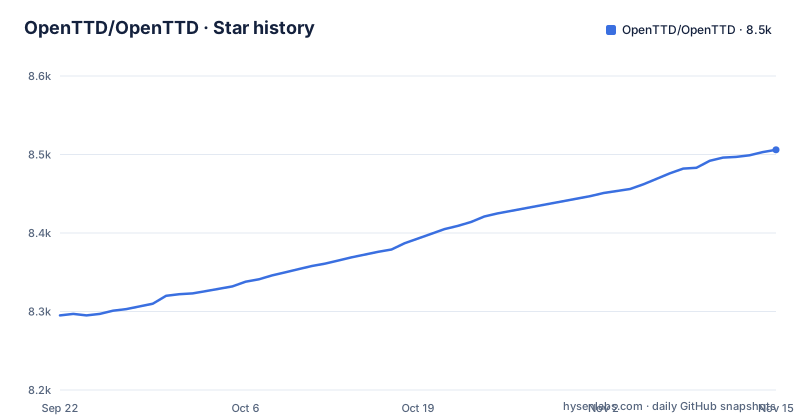
- OpenTTD/OpenTTD8,506 ★ · +211
| Repository | 2026-09-22 | 2026-11-15 |
|---|---|---|
| OpenTTD/OpenTTD | 8.3k | 8.5k |
211 Stars in the last 54 days, measured from the daily GitHub snapshot. Compare with other projects
Editorial analysis
Savegames load forward, never backward
OpenTTD makes one compatibility promise and it is worth reading in one direction at a time. Every revision of the game will be able to load savegames from every older revision, except where the savegame is corrupt, and a save that fails to open is meant to be reported as a bug.
That is forward compatibility, not interchangeability. A save from many years ago should open in whatever build you install today. A save you make in tonight's nightly carries no promise of opening in an older binary, and none is claimed. Anyone running a server or a shared campaign that pins a version should plan around that asymmetry: upgrading is cheap, downgrading means keeping old saves somewhere else.
The same thinking governs platforms. Support for old ones continues as long as someone is interested in maintaining them, except where holding them back would stop the project moving forward with language and compiler features. That exception is the one to watch, because it can end a platform's life without a deprecation notice.
Two download channels, and the 16 line is still in beta
The official site offers a stable build and a nightly build, and the guidance about which to take is blunt. Stable has been more extensively tested. Nightly includes the latest changes and features but may sometimes be less reliable. That is the entire trade, stated without hedging.
Where the project sits inside that split is visible in the tags. The three most recent releases are 16.0-RC1 from 2026-10-31, 16.0-beta5 from 2026-10-24 and 16.0-beta4 from 2026-09-20, which means the 16 line has reached a release candidate but has not shipped a stable cut. Wanting the 16 features today puts you on the less-tested channel by definition.
The game is also sold through Steam, GOG.com and the Microsoft Store, and on some platforms arrives via an OS package manager. Those routes carry their own update timing, so a distribution channel's copy and a nightly build are not the same upgrade schedule, and a bug fixed on master may not reach a store copy for a while.
OpenGFX, OpenSFX and OpenMSX are three separate downloads
OpenTTD does not ship its own art or audio. Three free data packages have to be fetched independently: OpenGFX for graphics, OpenSFX for sounds and OpenMSX for music, each with its own releases page under openttd.org/downloads. Their readmes carry the installation procedure, which makes content installation a second operation after the game itself rather than part of the same installer.
The platform decides how much work that is. On some systems these files download during installation when required, and the Windows installer can optionally fetch and install them. Elsewhere you follow the package readme yourself.
The supported platform list is short enough to memorise: Linux through SDL in both OpenGL and non-OpenGL builds, macOS as a universal Cocoa build, and Windows through Win32 GDI or OpenGL. Other systems, BSD in particular, may run the game but are neither tested nor maintained. Android does not appear on that list at all, which matters if that is where you wanted to play.
baseset/ is where the original Transport Tycoon files go
If you own Transport Tycoon Deluxe and want its original look, the data comes off the CD-ROM and into the baseset/ directory. Either the DOS or the Windows copy serves, and the Windows install can do the copying for you. Six files are involved:
sample.cat
trg1r.grf or TRG1.GRF
trgcr.grf or TRGC.GRF
trghr.grf or TRGH.GRF
trgir.grf or TRGI.GRF
trgtr.grf or TRGT.GRF
Music is a separate step into the same folder. On Windows that means every file in gm/ from gm_tt00.gm through gm_tt21.gm. On DOS it is the GM.CAT file. On the earlier Transport Tycoon release it is GM.CAT again, renamed to GM-TTO.CAT. So a finished installation has two independent content pipelines, one from the free data packages and one from your own disc, and neither substitutes for the other. Past that point the project calls installation straightforward, with a fuller guide on the wiki for the cases where it is not.
Social integration plugins do not arrive through Check Online Content
Add-on content has two install paths and they are not equivalent. Most add-ons download from inside the game through the 'Check Online Content' button in the main menu. Manual installation also works, but the project describes it as more complicated and points at the wiki or the directory structure guide kept in docs/. OpenTTD uses its own directory structure for game data and add-ons, which is why that guide exists.
Social integration is the exception. Plugins that link the game to platforms like Steam or Discord are not fetched through that button. The plugin for the platform you want has to be downloaded on its own and stored in the `social_integration` folder, and the list of what exists sits on the project website under Downloads. Anyone writing a provisioning script has to treat those two content types as separate fetches with separate failure modes, which is a small thing that becomes annoying quickly.
CMake, vcpkg.json and a regression directory
Building from source is documented in COMPILING.md at the repository root, and the tree shows what the build expects. CMakeLists.txt and a cmake/ directory hold the build definition, vcpkg.json is the dependency manifest, sources live in src/, platform code in os/, and shared assets in media/ and bin/. The default branch is master and the primary language is C++.
Two directories deserve a closer look before you plan contributions. regression/ holds regression coverage, and known-bugs.md sits at the root next to changelog.md, which says the project keeps a written list of known defects rather than leaving them only in the issue tracker. Doxyfile.in configures generated documentation, while CODINGSTYLE.md and CONTRIBUTING.md set out the conventions and the route in, with code repositories and issue reports handled on GitHub.
Multiplayer ships in the same build rather than as a separate product, and games can be played cooperatively or competitively with other people. Community documentation is not centralised either: the project calls the wiki community-maintained, and points at a wiki page that lists OpenTTD communities including ones in languages other than English.
GPL-2.0, with third-party code under other terms
The README states that OpenTTD is licensed under the GNU General Public License version 2.0 and that it includes some third-party software under different licenses, pointing to its Licensing section for the detail. The repository metadata does not resolve that usefully: the licence field records NOASSERTION rather than a licence identifier, which is what a mixed-licence tree tends to look like to an automated reader.
The combination matters if you intend to redistribute a build. The GPL-2.0 grant covers the game's own code and not the bundled libraries, and the only dependable inventory of what sits under which terms is the Licensing section itself, with COPYING.md at the root as the companion file. A packaging pipeline that keys off licence metadata will get this tree wrong.
Development is active rather than ceremonial. The last push to the default branch was on 2026-11-02, two days after the 16.0-RC1 release, and the community runs on forum.openttd.org, an official Discord server, and #openttd on irc.oftc.net, with a wiki maintained by the community rather than the core team.
Editorial conclusion
OpenTTD suits someone who wants a transport simulation they can extend with add-ons and keep running through future versions, and who is willing to manage data packages and a wiki-documented directory layout. It does not suit a mobile player, since Android is absent from the supported platform list, nor a builder who needs a licence identifier the metadata resolves cleanly. Read the Licensing section before redistributing anything, because the repository records NOASSERTION while the README states GPL-2.0 plus third-party code.
Frequently asked questions
Is OpenTTD still being developed?
Yes. The last push to the default branch was on 2026-11-02, and the three most recent releases are 16.0-RC1 from 2026-10-31, 16.0-beta5 from 2026-10-24 and 16.0-beta4 from 2026-09-20, so the 16 line has reached a release candidate.
What is the purpose of OpenTTD?
It is a transport simulation game based on Transport Tycoon Deluxe, which was written by Chris Sawyer. The stated aim is to mimic the original game as closely as possible while extending it with new features.
How do you install OpenTTD?
Download it from the official OpenTTD website, taking the stable build unless you want the newest features and accept that nightly may be less reliable, or get it from Steam, GOG.com, the Microsoft Store or an OS package manager. The game needs additional graphics and sound files, provided by the separate OpenGFX, OpenSFX and OpenMSX packages.
How do you install OpenTTD on Linux?
Linux is a supported platform through SDL, in both OpenGL and non-OpenGL builds, and the game comes from the official website or through an OS package manager where one carries it. OpenGFX, OpenSFX and OpenMSX are separate downloads whose readmes cover installation, and on some platforms they are not fetched automatically during setup.
Official sources
Add this badge to your README
If you maintain this project, the badge below links readers to this analysis and shows its maintenance status from the daily GitHub snapshot. Paste the markdown into your README; add ?metric=license or ?metric=stars to the image URL for a different field.

[](https://hysenlabs.com/projects/openttd-openttd)Star history chart for your README
[](https://hysenlabs.com/projects/openttd-openttd)Was this useful?