opentype.js: an ArrayBuffer in, a bézier path out, and WOFF2 left to you
Read and write OpenType fonts using JavaScript.
At a glance
- What is it?
- opentype.js is a JavaScript font parser and writer that runs in the browser and in Node.js. It reads WOFF, OTF and TTF, it can build a font from scratch, and it deliberately refuses to decompress WOFF2 for you.
- Who is it for?
- Use opentype.js when you need letterforms as geometry, such as outlines for rendering, export or inspection, and when you want the same code in the browser and on the server. Skip it if you need WOFF2 straight out of a file, if you need a font editor, or if you want text layout, since the library hands you paths and glyph objects rather than lines of text.
- Can I use it commercially?
- Yes. MIT is a permissive licence: you can use, modify and sell software built on it, as long as you keep its copyright and licence notices.
- Is it still maintained?
- Yes. The repository last received commits 99 days ago.
- What is it written in?
- Mainly JavaScript, according to GitHub's language statistics.
Answers come from the project's GitHub data, last synced on November 15, 2026, and from our analysis. They are not legal advice.
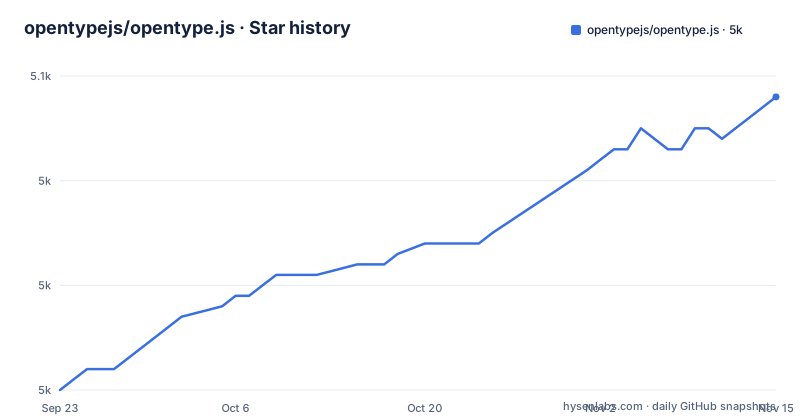
Star history
- opentypejs/opentype.js5,048 ★ · +28
| Repository | 2026-09-23 | 2026-11-15 |
|---|---|---|
| opentypejs/opentype.js | 5k | 5k |
28 Stars in the last 53 days, measured from the daily GitHub snapshot. Compare with other projects
Editorial analysis
Loading a font is two steps, and the first one is yours
Nothing in this library fetches anything for you. You first put the font bytes into an ArrayBuffer, then you hand that buffer to parse() and get a Font instance. The README shows three ways to fill the buffer, one per environment: a fetch against a URL, require('fs').promises.readFile on the filesystem for Node, and the files list of an input element in the browser. The parse call then has two shapes, depending on whether you are inside an async function.
npm install opentype.jsconst opentype = require('opentype.js');
import opentype from 'opentype.js'
import { load } from 'opentype.js'const buffer = fetch('/fonts/my.woff').then(res => res.arrayBuffer());
const buffer = require('fs').promises.readFile('./my.woff');
const buffer = document.getElementById('myfile').files[0].arrayBuffer();
const font = opentype.parse(await buffer);The consequence is that caching, authentication, progress reporting and retries all stay in your code. parse() takes bytes and nothing else, so a font behind a signed URL is your problem to solve before the library ever sees it.
WOFF2 stays outside the library because of a 1400KB bundle
WOFF2 is the one common web font format this library does not read directly, and the reason given is size rather than difficulty. Brotli compression performs better than its WOFF predecessor by a documented margin, but the decompressor is heavier, and shipping it inside opentype.js would turn a library of roughly 120KB into one of roughly 1400KB, more than ten times the weight. The fix offered is to decompress the font before parsing it, with a separate tool such as fontello/wawoff2.
const path = 'https://unpkg.com/[email protected]/build/decompress_binding.js'
const init = new Promise((done) => window.Module = { onRuntimeInitialized: done});
So if a user hands you a WOFF2, you add a script tag, wait for its runtime to initialise, and only then call parse(). The trade is deliberate: everyone pays nothing, and WOFF2 users pay for a decompressor they load themselves.
A font can be built from scratch, and .notdef is not optional
The library is not only a reader. You can construct a Font from nothing but bézier paths, one glyph at a time, by creating Path objects, drawing into them with moveTo and lineTo, wrapping each in a Glyph with a name, a unicode value and an advanceWidth, and passing the whole list to the Font constructor along with familyName, styleName, unitsPerEm, ascender and descender. The example marks its first glyph, .notdef, as required and puts it at the front of the array.
Writing the result back out is your job too. In Node the example writes a buffer with fs.writeFileSync and font.toArrayBuffer(), and in the browser it builds a Blob with the type font/opentype, turns it into an object URL, and clicks a generated download link.
The consequence is that the glyphs you supply are the entire font. Anything you leave out is simply absent, so a font you assemble can be missing pieces the rest of the toolchain expects.
getPath puts the baseline at y and defaults the size to 72 pixels
The Font object is a loaded font file: an indexed list of glyphs plus methods that draw text on a drawing context or return a path for it. Its numbers are in font units, not pixels, and that is the part worth reading twice. unitsPerEm sets the grid that the integer X and Y coordinates sit on, with 2048 and 4096 given as the common values. ascender and descender are distances from the baseline to the highest and lowest extremes, again in font units.
The drawing call mixes the two systems on purpose. Font.getPath(text, x, y, fontSize, options) takes a horizontal position defaulting to 0, a vertical position that is the baseline and also defaults to 0, a fontSize given in pixels that defaults to 72, and an options object of GlyphRenderOptions passed down to each glyph.
The consequence is that fontSize is in pixels while unitsPerEm, ascender and descender are in font units, so a mismatch between your intended pixel size and the font's grid is where scaling bugs come from.
Kerning, ligatures and colour glyphs depend on what the file carries
The feature list is a list of font capabilities the library reads rather than invents. Kerning is taken from GPOS or from the kern table. Ligatures and composite glyphs, the accented letters built from a base glyph plus marks, are handled. TrueType hinting is supported, so hinted outlines survive the trip. Arabic text rendering is called out with the issue and pull requests behind it, and colour glyphs come in the SVG and COLR/CPAL forms, which is how emoji are covered. A low memory mode exists as an option rather than as the default.
Two consequences follow. The same call against two different fonts can behave differently, because one file may carry a kern table and GPOS while the other carries neither, so spacing differences are a property of the input and not a bug in your pipeline. And the low memory mode is opt-in, which means the default build holds more in memory than the trimmed one, a choice you make when the font is large or the device is small.
dist/ is not in the repository, so nothing imports until you build
The manifest points at build output that the repository does not carry. main and browser both resolve to ./dist/opentype.js, module resolves to ./dist/opentype.mjs, and the top level of the repository holds src/, bin/, docs/, externs/, test/, eslint.config.mjs and package.json with no dist directory among them.
"main": "./dist/opentype.js",
"module": "./dist/opentype.mjs",
"build": "npm run b:umd && npm run b:esm",
"test": "npm run build && npm run dist && mocha --recursive && npm run lint",
"lint": "eslint src",
The build runs esbuild over src/opentype.mjs, targets es2018, and writes both an IIFE bundle and an ESM bundle, with DEBUG defined to false and the global name set to opentype. The test script builds, then distributes, then runs mocha recursively, then lints, so a lint error fails the same command as a failing test. The consequence for a contributor is that a fresh clone cannot be required until npm run build has run, and for a reader of the CDN instructions that the dist files they load were produced by that step.
The module form needs the full file path, the global form does not
There are two ways to get the library into a page, and they differ in how much you must name. The global declaration loads a script and leaves the library on the window, after which you call opentype.parse(...). The module declaration needs the full path, down to the file name, because a bare package specifier inside a script tag has nothing to resolve against. Three sources are offered for the global form: the project's own dist file, jsDelivr, and unpkg.
<script src="https://your.favorite.cdn/opentype.js"></script>
<script>opentype.parse(...)</script>
For local work the README asks for a fork, a clone, npm install, then either npm run build for a plain build or npm run start for a development server, after which you navigate to the /docs folder, and npm run test before opening a pull request. The consequence is that your import style is fixed by where the library comes from: a CDN page uses the global, a bundler uses the module build, and mixing the two in one page gives you two copies of the same code.
The 1.3.5 tag on npm is a 2.0.0 prerelease
The release history has a wrinkle worth reading before you pin a version. A release published 2026-04-29 is titled 2.0.0 prerelease and notes in parentheses that it was accidentally released as 1.3.5, and 2.0.0 itself followed on 2026-05-06. Before that, 1.3.4 dates from 2023-11-13, so the gap between the two older lines is more than two years. The repository is not archived and its last push is dated 2026-08-08, on the master branch, which is the branch the release process names.
Publishing is a manual workflow with a dry run, and the steps are spelled out: confirm the target version, for example 1.3.5, make sure master is green, run the workflow with dryRun: true and npmDistTag: latest, inspect the output for the package version and the packed files, then run it again with dryRun: false.
The consequence is concrete. If you ask for 1.3.5 expecting the old stable line, you get a prerelease of 2.0.0, and the inspect step exists because a version string and a file list are exactly what goes wrong in a manual publish.
Editorial conclusion
Use opentype.js when you need letterforms as geometry, such as outlines for rendering, export or inspection, and when you want the same code in the browser and on the server. Skip it if you need WOFF2 straight out of a file, if you need a font editor, or if you want text layout, since the library hands you paths and glyph objects rather than lines of text. Before you pin a version, check three things: whether the version you want is 2.0.0 or the 1.3.5 line, since 1.3.5 was published as a 2.0.0 prerelease, whether your build targets the dist files you import, and whether you have a WOFF2 decompressor ready for the fonts your users actually have.
Frequently asked questions
What is opentype.js?
It is a JavaScript library, released under the MIT licence, that gives you access to the letterforms of text from the browser or from Node.js. You can create a bézier path out of a piece of text, read and write WOFF, OTF and TTF files with both TrueType glyf and PostScript cff outlines, and build a font from scratch by defining glyph paths yourself.
How do I use opentype.js to load a font and draw text?
Load the font into an ArrayBuffer first, with fetch for a URL, require('fs').promises.readFile in Node, or the files list of an input element in the browser, then call opentype.parse(await buffer) to get a Font instance. From the Font you call getPath(text, x, y, fontSize, options), where fontSize defaults to 72 pixels and y is the baseline position.
What is an OpenType font, in the terms opentype.js uses?
It is a font file that a Font object represents, holding an indexed list of glyphs. Coordinates inside it are integers on a grid whose size is unitsPerEm, with 2048 and 4096 named as common values, and the ascender and descender are distances from the baseline expressed in those font units rather than in pixels.
Is OpenType better than TrueType for opentype.js users?
The project does not rank them, it reads both. Support covers WOFF, OTF and TTF, with both TrueType glyf and PostScript cff outlines, and all of them arrive through the same parse() call, so the choice of file does not change your code.
Is OTF or TTF better for the web, and what does opentype.js read?
The library reads WOFF, OTF and TTF, and it reads WOFF2 only after you decompress it, since bundling a Brotli decompressor would grow the library from roughly 120KB to roughly 1400KB. The suggested route is to decompress beforehand with a separate tool such as fontello/wawoff2 and hand the resulting bytes to parse().
Official sources
Add this badge to your README
If you maintain this project, the badge below links readers to this analysis and shows its maintenance status from the daily GitHub snapshot. Paste the markdown into your README; add ?metric=license or ?metric=stars to the image URL for a different field.

[](https://hysenlabs.com/projects/opentypejs-opentype-js)Star history chart for your README
[](https://hysenlabs.com/projects/opentypejs-opentype-js)Was this useful?