operacle/checkcle publishes its admin password and expects port 8090 on every interface
CheckCle is a self-hosted, open-source monitoring platform for seamless, real-time full-stack systems, applications, and infrastructure. It provides real-time uptime monitoring, distributed checks, incident tracking, and alerts. All deployable anywhere.
At a glance
- What is it?
- CheckCle is a self-hosted monitoring platform written in Go: uptime checks over HTTP, DNS, Ping and TCP, server agents, incident tracking and six notification channels. The README hands out the panel login, the compose file binds 8090 to all addresses by default, and the newest release tag is about a year older than the last push to the default branch.
- Who is it for?
- CheckCle covers the ordinary uptime and certificate monitoring ground in one self-hosted service, with a documented agent script for servers and channels for email, Telegram, Discord, Slack and Matrix.
- Can I use it commercially?
- Yes. MIT is a permissive licence: you can use, modify and sell software built on it, as long as you keep its copyright and licence notices.
- Is it still maintained?
- Yes. The repository last received commits 130 days ago.
- What is it written in?
- Mainly Go, according to GitHub's language statistics.
Answers come from the project's GitHub data, last synced on November 24, 2026, and from our analysis. They are not legal advice.
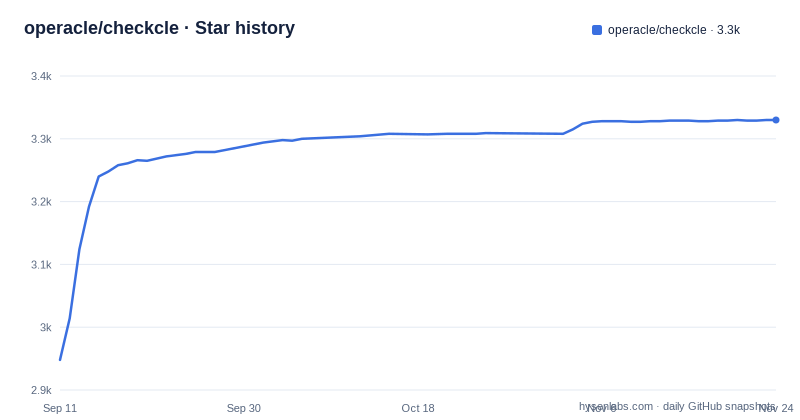
Star history
- operacle/checkcle3,330 ★ · +382
| Repository | 2026-09-11 | 2026-11-24 |
|---|---|---|
| operacle/checkcle | 2.9k | 3.3k |
382 Stars in the last 74 days, measured from the daily GitHub snapshot. Compare with other projects
Editorial analysis
[email protected] with Admin123456 is printed in the install steps
The getting started section hands over the web management login in plain text: user [email protected], password Admin123456, and a default URL of http://0.0.0.0:8090. The same pair is repeated for the live demo at demo.checkcle.io, so these are published constants rather than a per-installation secret. No step in the documentation says to change them on first login, and the admin web management item in the numbered list sits between the two install methods and the link to the quick start guide, with no warning attached. The URL is awkward in its own way, since 0.0.0.0 is the address a service binds rather than one a browser can reach, and no reverse proxy appears in the compose file to be the front door instead. For anything reachable from a network, changing that password before the first request is the whole job.
The compose file binds 8090 on every interface by default
docker-compose.yml maps "8090:8090" and carries a comment on the same line: Map ports for external access, if local only "127.0.0.1:8090:8090". The narrower binding is documented in the repository file as the alternative, not as the default, so a plain bring-up of that service exposes the management panel on every address the host has. The rest of the definition is short enough to read before deploying. restart is unless-stopped, one volume mounts the host directory /opt/pb_data at /mnt/pb_data, and an ulimits block sets nofile to soft 4096 and hard 8192. The README's first install method pastes the same service definition into a fence labelled bash, and it carries the same values without the two comments, so the two copies agree on what matters and differ only in the commentary. The second method collapses the file into one command, and it is the shortest complete statement of the deployment the project asks for:
docker run -d \
  --name checkcle \
  --restart unless-stopped \
  -p 8090:8090 \
  -v /opt/pb_data:/mnt/pb_data \
  --ulimit nofile=4096:8192 \
  operacle/checkcle:latest
Every one of those flags reappears in the compose file, including the loopback alternative that the run command has no way to express.
The persistent directory is /opt/pb_data
Both install paths mount /opt/pb_data on the host to /mnt/pb_data inside the container, and that abbreviated name is PocketBase's convention rather than CheckCle's, in a repository whose recorded language is Go. It is the only host directory the compose file asks for, which makes it both the thing to back up and the directory whose permissions decide who can read the stored uptime history. The repository root also carries a docker-compose.yml next to a docker/ directory, so there are two places to look when a running deployment does not match the file in front of you. Worth noting for anything reading the documentation mechanically: the compose YAML is the first install method and its fence is tagged bash rather than yaml, so a tool that picks fences by language tag will treat a service definition as a shell command.
The newest release is ten months older than the last push
Releases stop at v1.6.0, published 2025-09-13, with v1.5.0 from August 2025 and v1.4 from July 2025 behind it. The default branch is develop, and the last push to it is dated 2026-07-17, so the branch has moved roughly ten months past the newest tag. The version scheme slips along the way too: the third release is tagged v1.4 while its own title reads CheckCle v1.4.0. Nothing in the documentation says which branch a release is cut from, which is what makes that gap worth stating rather than assuming. A tag and the head of the default branch are two different versions of the same project, and only one of them is what the image tag latest is built from. Planned work would be recorded in docs/DEVELOPMENT_ROADMAP.md, which the feature list links from its first item.
A Go project whose root carries package-lock.json
The language field says Go, and the top level of the repository holds application/, server/, scripts/, docker/ and docs/, the shape you would expect from a separated frontend and backend. What sits at the root instead of a Node manifest is package-lock.json, and no go.mod appears among the root entries, so the module file is either below the root or absent from what is published. The repository does not say which, and that matters to anyone vendoring the source rather than pulling the image. The non-code files say more about how the project expects to be run: SECURITY.md, CODE_OF_CONDUCT.md and CONTRIBUTING.md are all present, and .talismanrc is the configuration for the secret scanner that inspects commits, which is a reasonable thing for a monitoring service to carry and a visible sign the repository takes leaked credentials as a real risk.
Four check protocols and a one-line server agent
The check surface is HTTP, DNS and Ping, plus TCP based services with FTP, SMTP and HTTP given as the examples. Servers are watched through a one-line installation agent script and report CPU, RAM, disk usage and network activity. Supported hardware is x86_64 machines, Raspberry Pi 3, 4 and 5 on a 64-bit OS, and Apple Silicon Macs, with Linux named as Debian, Ubuntu, CentOS and Red Hat, and Windows marked Beta. Distributed regional monitoring is a separate bullet, and it changes what a red check means, because the path between you and the region running the probe is now inside the measurement. The agent is also a remote execution surface, so the line that installs it is worth reading before it is run on anything that holds state.
Incidents have four states and certificates have a countdown
Incident history is recorded as UP, DOWN, WARNING and PAUSE. PAUSE sitting next to the three real states is the useful part: a check can be held quiet without deleting its record. Scheduled maintenance and incident management are listed as their own item, which is the same concern from the other end, since an outage you planned should not page anyone. Certificate and domain monitoring records the domain, the issuer, the expiration date, days left, a status and the date last notified. Those last two fields are the ones to watch, because they are what stops a monitoring system from sending the same expiry notice every hour for a month. Public status pages and reports fall in the same group of features, and the notification channels behind all of it are email, Telegram, Discord, Slack and Matrix.
Sponsorships are refused and the docs run on GitBook
The sponsorship section states that sponsorships will no longer be accepted, and that support is taken only in the form of ecosystem and community partnerships providing infrastructure such as cloud servers, domains or hosting credits, with a direct contact address offered to tech companies. The documentation site is GitBook, which the README credits as the sponsor of the OSS site plan, and the partner row carries GitBook, Cloudflare and JetBrains among the logos. The install path points at a quick start guide on that documentation site rather than in the repository, so the install steps a reader sees here are a summary and the detail lives elsewhere. The README itself exists in four languages, English, Khmer, Japanese and Chinese, with the other three kept as separate files under docs/.
Editorial conclusion
CheckCle covers the ordinary uptime and certificate monitoring ground in one self-hosted service, with a documented agent script for servers and channels for email, Telegram, Discord, Slack and Matrix. Two things have to be dealt with before it is exposed anywhere but a laptop: the README prints [email protected] with Admin123456 for both a fresh install and the public demo, and docker-compose.yml maps 8090:8090 with the loopback binding written as an alternative in a comment. Third, pin deliberately, because the newest tag is v1.6.0 from September 2025 while the default branch develop has been pushed to since July 2026. Nothing in the docs says releases are cut from develop, so a tag and the default branch are two different versions of the same project.
Frequently asked questions
What does CheckCle actually monitor?
HTTP, DNS and Ping endpoints, TCP based services such as FTP and SMTP, and servers through a one-line agent script that reports CPU, RAM, disk usage and network activity. It also tracks SSL and domain expiration and keeps incident history. Distributed regional monitoring means probes do not all run from one machine.
What are the default credentials for the CheckCle admin panel?
The install section lists user [email protected] and password Admin123456 at http://0.0.0.0:8090, and the same pair is used for the public demo at demo.checkcle.io. Change the password before the service is reachable from anywhere but your own machine.
Is the docker run command equivalent to the compose file?
They set the same values: the same image, restart unless-stopped, port 8090, the /opt/pb_data volume, and the nofile limit at 4096:8192. The compose form states the limit as soft and hard numbers under ulimits, while the run command passes them as a single --ulimit pair.
Which platforms does the CheckCle server agent support?
Linux on x86_64 is listed with Debian, Ubuntu, CentOS and Red Hat, and Windows support is marked Beta. The documented architecture support also names Raspberry Pi 3, 4 and 5 on a 64-bit OS and Apple Silicon Macs.
Does the CheckCle project accept sponsorships?
No. The sponsorship section says sponsorships will no longer be accepted, and that support comes only as ecosystem or community partnerships providing infrastructure such as servers, domains or hosting credits. Tech companies are invited to contact the author directly.
Official sources
Add this badge to your README
If you maintain this project, the badge below links readers to this analysis and shows its maintenance status from the daily GitHub snapshot. Paste the markdown into your README; add ?metric=license or ?metric=stars to the image URL for a different field.

[](https://hysenlabs.com/projects/operacle-checkcle)Star history chart for your README
[](https://hysenlabs.com/projects/operacle-checkcle)Was this useful?