gdu: a disk usage analyzer that admits SSDs are the point
Fast disk usage analyzer with console interface written in Go
At a glance
- What is it?
- A Go disk usage analyzer that leans on parallel scanning and ships a terminal UI plus a web UI.
- Who is it for?
- gdu is the disk usage tool to reach for when you are on an SSD and the usual suspects feel slow, which is most of the time on a modern machine. The parallel scanning is the reason, and the README is honest that the gain shrinks on spinning disks.
- Can I use it commercially?
- Yes. MIT is a permissive licence: you can use, modify and sell software built on it, as long as you keep its copyright and licence notices.
- Is it still maintained?
- Yes. The repository received new commits within the last day.
- What is it written in?
- Mainly Go, according to GitHub's language statistics.
Answers come from the project's GitHub data, last synced on November 26, 2026, and from our analysis. They are not legal advice.
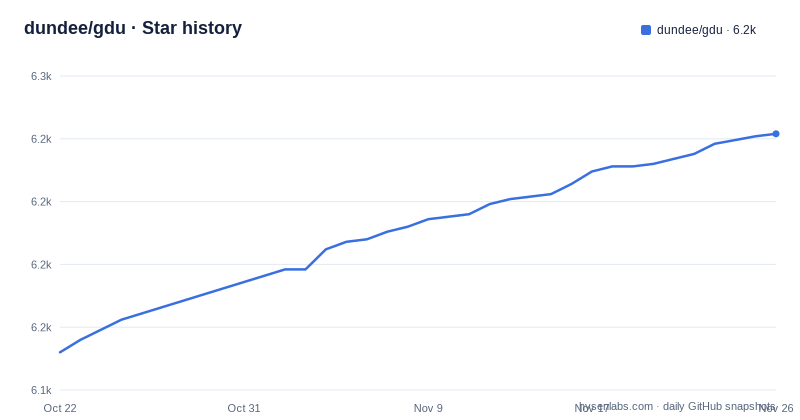
Star history
- dundee/gdu6,227 ★ · +87
| Repository | 2026-10-22 | 2026-11-26 |
|---|---|---|
| dundee/gdu | 6.1k | 6.2k |
87 Stars in the last 35 days, measured from the daily GitHub snapshot. Compare with other projects
Editorial analysis
Installing a single static binary with curl
The README's install path is a release binary and nothing to compile:
curl -L https://github.com/dundee/gdu/releases/latest/download/gdu_linux_amd64.tgz | tar xz
chmod +x gdu_linux_amd64
mv gdu_linux_amd64 /usr/bin/gdu
Anything beyond that, including package manager installs, is pushed to a separate `INSTALL.md` at the repository root, and the README carries a Repology badge for tracking how many distributions package it.
There is also a container path, which matters because scanning a filesystem you do not own usually needs elevated privileges:
docker run --rm --init --interactive --tty --privileged --volume /:/mnt/root ghcr.io/dundee/gdu /mnt/rootNote the flags. `--privileged` plus mounting the host root is how the analyzer sees the real filesystem rather than the container's view of it, and the image is published to GitHub Container Registry under the same owner as the source. The `Dockerfile` in the repository builds from `golang:1.26.1` and then assembles a `FROM scratch` image with a single copied binary, so the container carries no shell and no package manager.
Why parallelism is the whole argument
The README states the design intent directly: gdu is intended primarily for SSD disks where it can fully utilize parallel processing, and it notes that HDDs work as well but the performance gain is not so huge. That is an unusually honest framing for a performance tool, and it tells you which machine to expect the speedup on.
The `go.mod` shows the storage and build choices. The Go version is 1.26.0, and the storage layer pulls in `github.com/dgraph-io/badger/v4` for BadgerDB alongside `modernc.org/sqlite`, a pure Go SQLite implementation that needs no cgo. That cgo-free property is what allows the release build to be static, and the `Makefile` confirms it by setting `CGO_ENABLED=0` in both the `build` and `build-static` targets.
There is a second, smaller performance lever visible in the same file: a committed `default.pgo`, referenced in the Makefile as `-pgo=default.pgo`. Profile-guided optimization ships with the repository rather than being generated per build, so the compiler is given committed profile data.
Persisting scans to SQLite or BadgerDB
The flag list includes `-D, --db string`, documented as storing the analysis in a database with `*.sqlite` for SQLite and `*.badger` for BadgerDB, and paired with `-r`, which the README examples describe as reading saved analysis data from persistent storage instead of re-scanning.
That pair is the feature that most distinguishes gdu from ncdu, and it changes what the tool is for. A one-shot scan answers a question and is discarded. A stored scan can be reopened days later, which is what makes gdu usable for tracking a directory over time rather than only cleaning it once.
The web UI added in v5.37.0, and its security note
gdu also offers a browser interface alongside the terminal one, started with the `--web` flag:
gdu --web /                           # analyze and browse the results in a web browser
gdu --web --web-listen localhost:8080 /   # serve the web UI on a fixed address
The README examples show that you pass the flag and a directory, and that gdu opens the results in a browser unless `--web-open=false` is given, in which case it prints the URL instead.
Two details are worth more attention than the feature itself. First, the compiled web assets are embedded in the binary, so there are no extra files to distribute. The `Makefile` shows how that works: a `build-web` target compiles and minifies the React frontend into `webui/dist`, which is committed and embedded, and its comment notes that the pure-Go build targets do not need Node.js because they use the committed output. Second, the address is under your control: use `--web-listen` to pin one, as in the README's `localhost:8080` example, and `--web-open=false` to print the URL without launching a browser.
The flag surface for narrowing a scan
The filtering options are the substance of the tool, and they cluster into groups worth naming.
Path exclusion has four separate mechanisms: `-i` for listed paths, `-I` for regular patterns, `-X` reading patterns from a file, and `-G` reading `.gitignore`-style patterns.
That last one is the flag a developer will reach for first when measuring a repository. Archive handling is controlled by `--archive-browsing` for zip, jar and tar archives including the compressed tar variants.
Two flags exist purely for safety. `--no-delete` prevents write operations, and `--no-view-file` prevents viewing file contents, both of which matter more than they look if you point the tool at a directory you did not create. There is a `--trash-command` flag for routing deletions to `trash-put` instead of the built-in trash, and a `--config-file` flag defaulting to `$HOME/.gdu.yaml`.
Repository layout and what it implies
The tree separates the three ways gdu can present results, which matches the flags above. `tui/` is the terminal interface and depends on `gdamore/tcell/v2` and `rivo/tview` in the module manifest. `webui/` holds the React frontend, and `stdout/` is the non-interactive path, which is where `-p`, `-s`, `--depth`, `--top` and `--reverse-sort` all apply.
Underneath those sit `internal/`, `pkg/` and `cmd/gdu`. The README carries CodeScene, CodeClimate maintainability, Go Report Card and Codecov badges.
There is more documentation in the repository than the README suggests. Beyond `INSTALL.md` and `CONTRIBUTING.md` there is `configuration.md` for the YAML config file, a full manual page in `gdu.1.md` with the generated `gdu.1` alongside it, `gdu.spec` for RPM packaging and `snapcraft.yaml` for Snap. Two files stand out as unusual: `AGENTS.md` and `CONTEXT.md`, which suggest the author keeps working notes in the repository for coding agents, and a `.golangci.yml` for lint configuration. There is also `.tool-versions` and a `Dockerfile` at the root. The repository is not archived and the last push was on 2026-10-26, after v5.38.0 shipped on 2026-10-05.
Editorial conclusion
gdu is the disk usage tool to reach for when you are on an SSD and the usual suspects feel slow, which is most of the time on a modern machine. The parallel scanning is the reason, and the README is honest that the gain shrinks on spinning disks. Two features separate it from ncdu: scan results can be persisted to SQLite or BadgerDB and re-read without rescanning, and the same data can be served as a web UI. Read the project's documentation before exposing that web UI beyond localhost. Start with the curl one-liner, add --no-delete if you want a read-only survey, and serve the web UI on localhost as the README example does.
Frequently asked questions
What is a faster alternative to ncdu?
gdu is written as one. The README describes it as a pretty fast disk usage analyzer in Go, intended primarily for SSDs where it can fully use parallel processing, and notes that HDDs work too but with a smaller gain. It also adds scan persistence to SQLite or BadgerDB, which ncdu does not have.
Is the gdu web UI safe to expose on a network?
The README examples serve the web UI on localhost, with --web-listen localhost:8080 for a fixed address and --web-open=false to print the URL without opening a browser; check the project's own documentation on authentication before binding it to any other address.
How do I keep gdu from deleting anything?
Use --no-delete, which the README examples describe as preventing write operations. There is also --no-view-file to prevent viewing file contents, and --trash-command if you would rather route deletions to a tool such as trash-put than to the built-in trash.
Can gdu scan only certain file types?
The README examples narrow a scan by path rather than by type: -i ignores listed paths, -I ignores paths matching a regular pattern, -X reads patterns from a file, and -G reads .gitignore-style patterns.
Official sources
Add this badge to your README
If you maintain this project, the badge below links readers to this analysis and shows its maintenance status from the daily GitHub snapshot. Paste the markdown into your README; add ?metric=license or ?metric=stars to the image URL for a different field.

[](https://hysenlabs.com/projects/dundee-gdu)Star history chart for your README
[](https://hysenlabs.com/projects/dundee-gdu)Was this useful?