Optiland turns a surface list into traced rays, merit functions and printable prescriptions
Comprehensive optical design, optimization, and analysis in Python, including GPU-accelerated and differentiable ray tracing via PyTorch.
At a glance
- What is it?
- Optiland is a Python optical design platform that builds, traces, analyzes and optimizes lens systems. Its own build file keeps PyTorch, the Qt GUI and the PDF writer outside the base install, while two of its most advanced subsystems carry their own status labels in the same table as everything else.
- Who is it for?
- Optiland fits research groups and graduate students who want sequential ray tracing, tolerance analysis and glass search inside one Python process, and it fits poorly for anyone who needs stray-light and illumination modelling now, since that subsystem carries an unfinished label in the same table.
- Can I use it commercially?
- Yes. MIT is a permissive licence: you can use, modify and sell software built on it, as long as you keep its copyright and licence notices.
- Is it still maintained?
- Yes. The repository last received commits 3 days ago.
- What is it written in?
- Mainly Python, according to GitHub's language statistics.
Answers come from the project's GitHub data, last synced on November 4, 2026, and from our analysis. They are not legal advice.
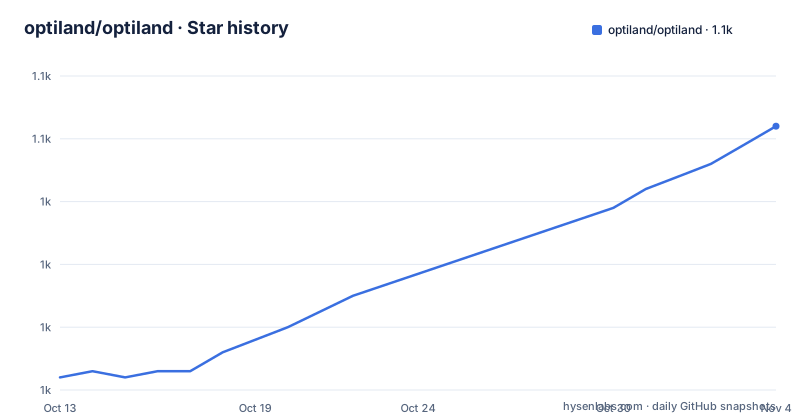
Star history
- optiland/optiland1,052 ★ · +40
| Repository | 2026-10-13 | 2026-11-04 |
|---|---|---|
| optiland/optiland | 1k | 1.1k |
40 Stars in the last 22 days, measured from the daily GitHub snapshot. Compare with other projects
Editorial analysis
Building a singlet: surfaces, aperture, fields, one wavelength
Optiland represents a lens as an ordered list of surfaces, and its shortest complete example is a singlet built from four entries. Index 0 is the object, written with `float("inf")` as its thickness. Index 1 carries the front curvature of 25.0, a 6.0 thickness, the glass name N-BK7 and the flag that marks it as the stop. Index 2 leaves the glass with a radius of -75.0 and a 34.0 gap ahead of the image. Index 3 is the image surface itself, added with no arguments at all.
from optiland.optic import Optic

lens = Optic()
lens.surfaces.add(index=0, thickness=float("inf"))                                     # object
lens.surfaces.add(index=1, radius=25.0, thickness=6.0, material="N-BK7", is_stop=True)  # front
lens.surfaces.add(index=2, radius=-75.0, thickness=34.0)                               # back
lens.surfaces.add(index=3)                                                             # image
lens.set_aperture(aperture_type="EPD", value=20)
lens.fields.set_type("angle")
lens.fields.add(y=0)
lens.fields.add(y=5)
lens.wavelengths.add(value=0.587, is_primary=True)

lens.draw()                       # 2D layout with traced rays
print(lens.paraxial.f2())         # effective focal length -> 37.04 mm
Three calls after the surface list do the rest of the work. The aperture type EPD sets an entrance pupil diameter of 20, field definition switches from object height to angle, and y=0 and y=5 become two field points. One wavelength at 0.587 goes in, flagged `is_primary=True`. Then `lens.draw()` renders a 2D layout with traced rays, and `paraxial.f2()` prints an effective focal length of 37.04 mm.
What comes back is a number rather than a verdict. Nothing in that output says whether the prescription is even sensible, so 37.04 mm is the only feedback the quickstart hands you before you reach the diagnostics module.
The base install ships NumPy and numba, not PyTorch
One claim in the introduction does not survive contact with the build file. The project description advertises GPU-accelerated and differentiable ray tracing via PyTorch, and the opening section says the package uses NumPy for CPU work and PyTorch for GPU acceleration and automatic differentiation under the hood. The dependency list in pyproject.toml holds no torch at all: numpy, scipy, pandas, pyyaml, matplotlib, vtk, tabulate, requests, seaborn, `numba>=0.60.0` and `typing-extensions>=4.1.0`.
pip install optiland[gui]
pip install optiland[torch]
Differentiable tracing therefore arrives only through the torch extra, and that extra is declared as a bare torch with no floor and no ceiling. pip resolves whatever build fits the interpreter, which on a CUDA machine means a CPU wheel until a second command supplies the CUDA one.
The opposite situation hides in the same list. numba carries a floor at 0.60.0 and gets a line of its own, yet numba is never mentioned anywhere in the README prose, which credits only NumPy and PyTorch for the compute layer. A JIT compiler you never read about still has to install cleanly before a single ray is traced.
Extras pick the GUI, the print target, and the PDF
Five extras sit under optional dependencies, and two of them have nothing to do with tracing. `rich>=13.0` backs prescription-console, `reportlab>=4.0` backs prescription-pdf, prescription combines both, gui pulls in PySide6 and qtconsole, and torch stays the differentiable path. Output formatting was broken out on purpose: a finished prescription is meant to leave Python as a styled console table or as a PDF file.
The wheel ships two packages, `optiland` and `optiland_gui`, and declares three empty plugin groups that tell third-party code where to register surfaces, materials and analyses.
[project.entry-points."optiland.surfaces"]
[project.entry-points."optiland.materials"]
[project.entry-points."optiland.analyses"]
Nothing in this repository fills those groups. The comment above them points at `optiland/plugins.py` and CONTRIBUTING.md for the walkthrough, so extending the surface or material set means writing a separate package that registers itself. That is a real cost for anyone who needs a glass or a surface shape the built-in set does not carry.
One declaration deserves a second look, because it is unconditional.
[project.scripts]
optiland = "optiland_gui.run_gui:main"
Since PySide6 arrives only with the gui extra, a core install leaves you holding a working optiland command aimed at a Qt binding that was never installed.
check_system answers with a runnable fix, not a traceback
The five-minute example ends with a printed focal length and nothing else, so a system can be wrong in ways that still return a number. The answer sits one import away.
from optiland.diagnostics import check_system; print(check_system(lens))That function reports what is missing or inconsistent about a system, and each finding arrives with a runnable fix attached rather than a bare assertion. The choice matters more than the checks themselves, because you get code to paste back instead of a message saying a surface is invalid.
The line appears in the README immediately after the quickstart, at the exact point where a reader has just typed a prescription that may well contain errors. What is not written down anywhere is how many rules the module applies, which of them are warnings, or whether a returned fix can be applied automatically or has to be reviewed first. Read them before pasting.
The documentation links around it split by intent rather than topic: a Start Here page, a Conventions page, a page framed as questions, the quickstart, an Example Gallery and a Full Learning Guide. A page named for questions tells you the authors expect readers to arrive with specific unknowns, and the gallery is the only route given to fully assembled systems.
Three optimizers, and one that searches where gradients cannot
Optimization splits three ways, and the capability table names all three without ranking them. Operand-based merit functions feed the traditional local and global optimizers. Autograd support covers the differentiable path, where the loss closes with `loss.backward()` and the gradient travels back through the traced rays instead of a finite difference. GlassExpert handles the third case, described as categorical variable search.
That third case is a different problem from the first two. Choosing a glass is a discrete move through a catalogue, and a derivative says nothing about which neighbour to switch to, so GlassExpert has to wrap the continuous optimizer rather than stand in for it. Read as a search layer around a merit function that makes sense. Read as another optimizer to call, and it will not behave like one.
Material data is the second constraint. The table gives integrated access to refractiveindex.info plus support for custom dispersion models, and requests is a core dependency rather than an extra, which puts catalogue traffic on the base install path. Whether anything gets cached after the first fetch is not documented, so a machine without network access may not resolve a glass name at all.
Two subsystems carry their own status word in the feature table
Two rows in the capability table carry a status word inside the label itself. Non-Sequential tracing is marked pre-release, covering illumination, stray-light and ghost analysis, coatings and absorption, optimizable through `loss.backward()`. Multi-Sequence Tracing is marked beta, and its description is specific about the trick: ghost paths, reverse traces and sub-component views traced as ordered sub-sequences over the same surfaces, with geometry and materials left linked to the base system.
Both sit in the same table as tolerancing and spot diagrams, in the same bold cell formatting, with the same kind of sentence. A skim reads one uniformly finished list. A closer read finds the two subsystems that expand what the package can do, the two that change most between point versions, each carrying an explicit caveat.
Neither has a landing page in the documentation row, which points at start_here, conventions, how_do_i, gallery/introduction and learning_guide. If you are evaluating the stray-light path, the source tree and tests are where the detail has to come from.
Homepage field and every documentation link name different domains
The project file and the README disagree about where the documentation lives. The homepage field records a readthedocs address, while every documentation link in the README, including the docs badge, the logo target and the installation line, points at a different domain on optiland.org. One of the two is stale, and the README is what a reader reaches first, so use optiland.org and treat the other as a leftover.
Python support is handled in the same loose way. A badge advertises 3.11, 3.12, 3.13 and 3.14, and `requires-python = ">=3.11"` puts a floor under all four without an upper bound. The classifiers say something weaker, naming only a generic Python 3 marker and an OS Independent marker with no per-version entries at all. A 3.14 interpreter is claimed in a badge and constrained by nothing else.
Two smaller signals point the same direction. The default branch is master rather than main, and the introduction promises full support for tolerancing with no qualifier, while the same table flags non-sequential tracing as unfinished work.
The distribution metadata is looser than the feature list. This code sits under an MIT license, a Zenodo DOI badge and a CITATION.cff file in the root let a specific build be cited rather than guessed at, and the last push was on 2026-10-06, close enough that the version pip resolves and the version on master are the same thing in practice.
Tolerancing runs Monte Carlo; benchmarks publish nothing
Tolerancing is the settled half of the analysis story. The table describes Monte Carlo and parametric sensitivity analysis with the stated purpose of evaluating robustness and manufacturability, which is a different question from spot size. A design that traces well and a design that survives a tolerance stack are separate results, and this is the feature that answers the second question.
The repository root carries a benchmarks/ directory, a tests/ tree and badges for tests, docs, coverage and maintainability. None of the README prose quotes a timing, a coverage figure or an accuracy result from any of them, so there is no published comparison between the NumPy path and the PyTorch path even though switching engines is presented as a one-line decision. Anyone measuring that for themselves starts from zero.
Scattering appears in the analysis bullets beside paraxial properties, wavefront errors and PSF and MTF data, while polarization, birefringence and coatings appear under ray tracing. Both are feature-table entries, so treat them as surfaces to explore rather than as documented workflows.
Editorial conclusion
Optiland fits research groups and graduate students who want sequential ray tracing, tolerance analysis and glass search inside one Python process, and it fits poorly for anyone who needs stray-light and illumination modelling now, since that subsystem carries an unfinished label in the same table. Check three things before adopting: whether refractiveindex.info lookups work on your network, whether your interpreter falls inside what pip actually resolves, and whether your tolerance budget expects Monte Carlo output rather than a single trace. The base install gives you NumPy and numba only, so the differentiable path costs a second command.
Frequently asked questions
Does pip install optiland include PyTorch and GPU support?
No. PyTorch arrives through the `optiland[torch]` extra, and a CUDA 12.6 build has to be installed separately with `pip install torch torchvision torchaudio --index-url https://download.pytorch.org/whl/cu126`. For Apple Silicon or a non-NVIDIA GPU the README points at the CPU-only extra instead.
Which Python versions can run Optiland?
`requires-python = ">=3.11"` sets the floor, and a README badge advertises 3.11, 3.12, 3.13 and 3.14. The classifiers in pyproject.toml are looser, naming only `Programming Language :: Python :: 3` alongside an OS Independent marker.
How do I check that my Optiland lens system is set up correctly?
`check_system` in the diagnostics module reports what is missing or inconsistent about a system, and each finding comes back with a runnable fix attached. The README does not say how many checks run or which of them are warnings rather than errors.
Where does Optiland get its glass catalogue data?
The feature table gives integrated access to refractiveindex.info, and requests is a core dependency rather than an extra, so catalogue lookups sit on the base install path. The README does not document whether that data is cached after the first fetch.
Is the Optiland GUI part of the standard install?
No. PySide6 and qtconsole arrive with the `optiland[gui]` extra, yet pyproject.toml declares the optiland console script unconditionally and points it at `optiland_gui.run_gui:main`, a module inside the GUI package.
Official sources
Add this badge to your README
If you maintain this project, the badge below links readers to this analysis and shows its maintenance status from the daily GitHub snapshot. Paste the markdown into your README; add ?metric=license or ?metric=stars to the image URL for a different field.

[](https://hysenlabs.com/projects/optiland-optiland)Star history chart for your README
[](https://hysenlabs.com/projects/optiland-optiland)Was this useful?