Workflow Engine embeds approvals and long-running state into your .NET app
Workflow Engine by Optimajet, the embeddable workflow engine for .NET and C#. Approvals, state machines and long-running processes with a visual Workflow Designer, BPMN import and six databases.
At a glance
- What is it?
- Workflow Engine by Optimajet is an embeddable workflow engine for .NET and C# that runs inside your process, stores process state in one of six databases and gives business users a browser designer for the schemes. The free edition caps you at ten schemes and four execution threads.
- Who is it for?
- Workflow Engine fits .NET teams whose processes have grown past a status column, that need role-based commands, timers that survive a restart and a history of who moved each request, and that want business users to edit schemes without a deployment.
- Can I use it commercially?
- Check first. The repository uses a licence we do not classify automatically, so read its LICENSE file before any commercial use.
- Is it still maintained?
- Yes. The repository last received commits 9 days ago.
- What is it written in?
- Mainly C#, according to GitHub's language statistics.
Answers come from the project's GitHub data, last synced on November 7, 2026, and from our analysis. They are not legal advice.
Star history
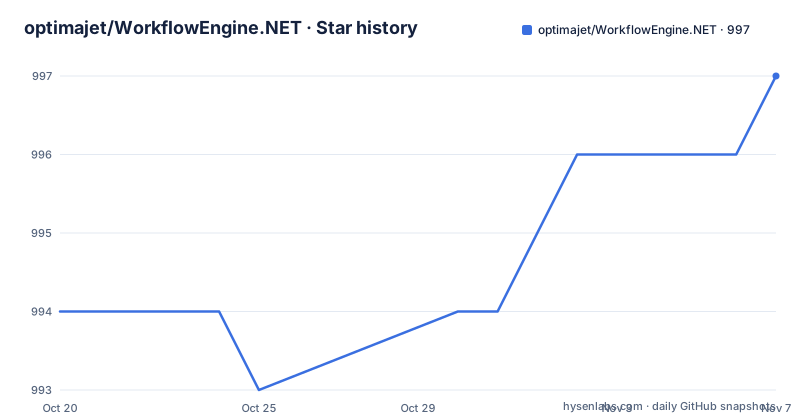
- optimajet/WorkflowEngine.NET997 ★ · +3
| Repository | 2026-10-20 | 2026-11-07 |
|---|---|---|
| optimajet/WorkflowEngine.NET | 994 | 997 |
3 Stars in the last 18 days, measured from the daily GitHub snapshot. Compare with other projects
Editorial analysis
The engine runs inside your process, not beside it
Workflow Engine by Optimajet is an embeddable workflow engine for .NET and C# applications. It installs from NuGet as WorkflowEngine.NETCore-Core, it runs inside your own process with no separate server to operate, and it keeps process state in SQL Server, PostgreSQL, MySQL, Oracle, MongoDB or SQLite, with a provider package for each. Optimajet has been developing it since 2014, and the official site is workflowengine.io. What you get is approvals, state machines and long-running business processes expressed as schemes, plus a visual Workflow Designer that developers and business users open in the browser. The embedding model is the reason to care. There is no orchestration cluster to run, no deployment topology to design and no network hop between your code and the state machine, and the cost of a licence is a number in your app's configuration rather than an invoice per workflow run.
The hand-written state machine, and when it is still enough
The project makes its case against the alternative directly. Most business applications start with a status column and a few if statements, and the README lists what then accumulates: the commands a given user may run right now based on their roles, timers and escalations that survive a restart, a new version of the process while old requests still run on the old one, a history of who moved each request and when, and a way to change the process without a release. Each of those is a feature the engine supplies rather than an application concern. The project also names the point where the engine is not the answer. If your process has a few states, one user and nothing to keep between restarts, a state machine library such as Stateless is enough. That comparison is the honest framing for an evaluation, because the gap between the two approaches is not the feature list, it is the number of things your process has to remember.
What the runtime actually owns at run time
You describe a process as a scheme, either in the Workflow Designer or in C#, and the Workflow Runtime takes over the mechanics. It stores every process instance, lists the commands each user may run, executes them, fires timers and writes the transition history. The command list is the interesting part, because it is a question rather than a branch: a runtime call asks which commands the given user may run right now and returns the list, and the application decides which one to execute. That moves the role logic out of your code and into the scheme, where a business user can see it. The timers and the history are what make the engine durable in practice, since a request that sits in an escalation queue for a week still has a deadline and still has a record attached to it after a restart.
A scheme built in C#, and the packages that carry it
The quick start in the project documentation creates a console project and adds the engine plus a provider:
dotnet new console -n WorkflowQuickstart && cd WorkflowQuickstart
dotnet add package WorkflowEngine.NETCore-Core
dotnet add package WorkflowEngine.NETCore-ProviderForSQLite
The runtime is created once per application, with the provider passed to the builder, the persistence provider, and a migration step that creates the tables on first start:
var provider = new SqliteProvider("Data Source=workflow.db");
var runtime = new WorkflowRuntime()
    .WithBuilder(new WorkflowBuilder<XElement>(provider, new XmlWorkflowParser(), provider).WithDefaultCache())
    .WithPersistenceProvider(provider)
    .RunMigrations()   // creates the tables on first start
    .Start();
The scheme itself is built with a fluent builder, where each activity is created, transitions are wired to commands, and the result is saved under a name:
var scheme = ProcessDefinitionBuilder.Create("Approval");
scheme.CreateActivity("Draft").Initial().Ref(out ActivityDefinition draft);
scheme.CreateActivity("Review").Ref(out ActivityDefinition review);
scheme.CreateActivity("Approved").Final().Ref(out ActivityDefinition approved);
scheme.CreateCommand("Submit").Ref(out CommandDefinition submit);
scheme.CreateCommand("Approve").Ref(out CommandDefinition approve);
scheme.CreateTransition("Submit", draft, review).TriggeredByCommand(submit);
scheme.CreateTransition("Approve", review, approved).TriggeredByCommand(approve);
await runtime.Builder.SaveProcessSchemeAsync("Approval", scheme.ProcessDefinition);
The designer is the friendly alternative to that code, and both produce the same scheme.
Running the first process against SQLite
The example then starts a process instance and moves it with the commands a user is allowed to run, which is the loop your application will repeat for every request:
var processId = Guid.NewGuid();
await runtime.CreateInstanceAsync("Approval", processId);
foreach (var name in new[] { "Submit", "Approve" })
{
    var commands = await runtime.GetAvailableCommandsAsync(processId, "alice");
    await runtime.ExecuteCommandAsync(commands.First(c => c.CommandName == name), "alice", "alice");
    Console.WriteLine($"{name} -> {await runtime.GetCurrentActivityNameAsync(processId)}");
}
Running the console project prints the activity the process moved to after each command:
Submit -> Review
Approve -> Approved
Two details in that snippet are worth copying. The available commands are fetched for a named user, so the same call enforces who may act, and the current activity name is read back from the runtime rather than tracked by the application. The documented paths were built and run against version 22.1.0 on .NET 8, and the same steps work in a worker service or any other .NET host, with a different provider package standing in for the SQLite one when you pick another database.
The designer path runs through a separate ASP.NET package
Bringing the browser designer into an application is a different installation from the engine itself. The documented ASP.NET Core path creates a web project and adds the API packages:
dotnet new web -n WorkflowWeb && cd WorkflowWeb
dotnet add package OptimaJet.Workflow.Api
dotnet add package OptimaJet.Workflow.Api.Sqlite
The API package is what exposes the designer, so the runtime and the designer are separated packages rather than one bundle. That separation has consequences for how you plan an adoption. The designer is where business users change the process, which is the point of the product, but it also means the application has to serve an editing surface to people who are not developers, with whatever access control and hosting that implies. The repository layout mirrors the product: a Designer directory, an Interfaces directory, a Providers directory for the database providers, a Samples directory that includes an ASP.NET Core sample, and a SnippetCode directory, plus release notes and an end user licence agreement file. You can read the sample to see how the pieces are meant to be composed.
The free edition's limits are the real adoption decision
Workflow Engine Free, previously called the Community Edition, needs no licence key and no sales call, and it includes the full Workflow Designer. It is free for personal projects and for internal commercial use, provided you carry the attribution, and it allows up to ten workflow definitions, called schemes, and four execution threads. Those two numbers are the whole decision for many teams, because a real approval flow often has a scheme per request type, and four execution threads is a small number for a server that processes many requests. Beyond the free edition there are Team and Complete editions with public prices, no royalties and no per-execution fees, and the upgrade path is deliberately gentle: you register the licence key in the same application and your existing schemes and code keep working. Since the engine runs in your process and charges nothing per execution, the cost model is a one-time licence rather than a metered bill, which is unusual for infrastructure of this kind.
Where the engine stops being the answer
The failure mode to watch for is a process simple enough that the engine costs more than it returns. With a few states, one user and no state to carry across restarts, the scheme, the persistence layer and the designer are infrastructure around a switch statement, and the project says so in plain terms. A second limit is operational: the runtime is stateful and lives in your database, so a team adopting it takes on migrations, provider packages and a schema it did not have before, and a process that must run across a version change of the scheme has to keep old instances on the old definition while new ones use the new one. A third is scope: the project description lists BPMN import among the capabilities, while the documented walkthrough only shows schemes written in C# or in the designer, so an existing BPMN file is not something the documentation shows you importing. The free edition's ceilings of ten schemes and four execution threads will also end a trial faster than the technology will.
Editorial conclusion
Workflow Engine fits .NET teams whose processes have grown past a status column, that need role-based commands, timers that survive a restart and a history of who moved each request, and that want business users to edit schemes without a deployment. It does not fit a process with a handful of states, one user and nothing to carry between restarts, where a state machine library is enough, and it does not fit an application that needs more than ten schemes or more than four execution threads on the free edition. Before adopting it, check three things: the free edition limits, which cover schemes and execution threads and internal commercial use with attribution; the hosting model, since the engine runs inside your process with no separate server and no per-execution fees on the paid editions; and the database choice, since the persistence provider package you install determines where process state lives. The last push was on 2026-10-16, and the current release is 22.1.0 from 2026-08-18.
Frequently asked questions
How do I add a workflow engine to an existing .NET application?
Create a project and add the NuGet packages, for example WorkflowEngine.NETCore-Core together with WorkflowEngine.NETCore-ProviderForSQLite, then build a WorkflowRuntime with the provider, call RunMigrations to create the tables and Start it. The same steps work in a console app, a worker service or any other .NET host.
What are the limits of the free Workflow Engine edition?
Workflow Engine Free, previously the Community Edition, needs no licence key, includes the full Workflow Designer, and allows personal projects and internal commercial use with attribution. It is limited to ten workflow definitions, called schemes, and four execution threads, and the paid Team and Complete editions are registered by licence key in the same app, with no royalties and no per-execution fees.
Which databases can the Workflow Engine store process state in?
SQL Server, PostgreSQL, MySQL, Oracle, MongoDB and SQLite, with a separate provider package for each, such as WorkflowEngine.NETCore-ProviderForSQLite. The provider you install is what determines where the process instances, timers and transition history live.
Do I need a state machine library if my process is simple?
Probably not. The project states that a process with a few states, one user and nothing to keep between restarts is served fine by a state machine library such as Stateless. The engine earns its place when you need role-based commands, timers that survive a restart, scheme versioning and a transition history.
Can business users change a workflow without a new release?
Yes, that is what the visual Workflow Designer is for. It is opened in the browser, and the ASP.NET Core path adds the OptimaJet.Workflow.Api package together with the matching provider package to expose it inside an application.
Official sources
Add this badge to your README
If you maintain this project, the badge below links readers to this analysis and shows its maintenance status from the daily GitHub snapshot. Paste the markdown into your README; add ?metric=license or ?metric=stars to the image URL for a different field.

[](https://hysenlabs.com/projects/optimajet-workflowengine-net)Star history chart for your README
[](https://hysenlabs.com/projects/optimajet-workflowengine-net)Was this useful?