Eole Foobar2000 theme installation and panel behavior
Eole blows gently into your ear his nicest melodies.
At a glance
- What is it?
- Eole is a JavaScript-heavy theme for 32-bit foobar2000 built around Columns UI. It offers cover caching, visualisations, configurable panels, and multi-item layouts, but its strict platform requirements and Shpeck dependency reduce its suitability for 64-bit installations.
- Who is it for?
- Adopt Eole if you use 32-bit foobar2000, already depend on Columns UI, and want a heavily configurable skin with cached artwork and visualisations. Do not choose it for a 64-bit player.
- Can I use it commercially?
- Not without permission. GitHub finds no licence file in the repository, and without a licence all rights are reserved by default: you may read the code but not reuse it. Check the README, or ask the authors, before using it.
- Is it still maintained?
- Yes. The repository last received commits 64 days ago.
- What is it written in?
- Mainly JavaScript, according to GitHub's language statistics.
Answers come from the project's GitHub data, last synced on November 7, 2026, and from our analysis. They are not legal advice.
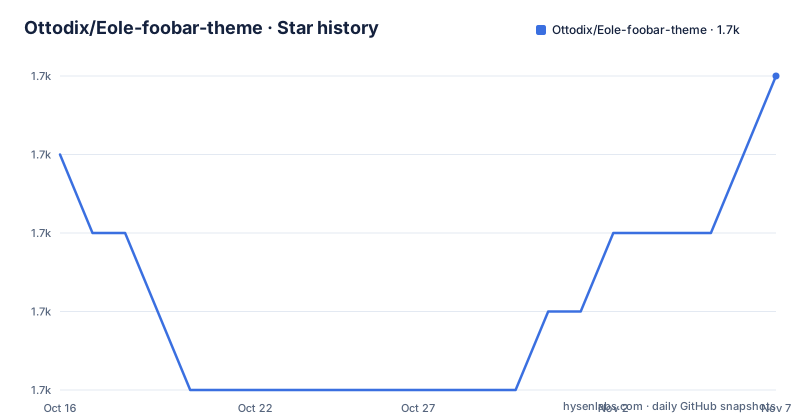
Star history
- Ottodix/Eole-foobar-theme1,725 ★ · +1
| Repository | 2026-10-16 | 2026-11-07 |
|---|---|---|
| Ottodix/Eole-foobar-theme | 1.7k | 1.7k |
1 Stars in the last 22 days, measured from the daily GitHub snapshot. Compare with other projects
Editorial analysis
What Eole changes inside 32-bit foobar2000
Eole is a skin for foobar2000 rather than a standalone music player or JavaScript library. It targets users who want to replace the standard player interface with a custom Columns UI layout containing artwork, library browsing, biographies, visualisations, and several configurable panels. The repository includes separate `user-components`, `themes`, and `plugins` directories, so installation affects multiple parts of the foobar2000 profile rather than adding a single executable or plugin.
The project has a narrow compatibility boundary. Its stated requirement is foobar2000 32-bit version 1.4 or newer, and the README explicitly warns that the required components do not work with 64-bit foobar2000. Eole also assumes Columns UI is available as the selected user interface. A user who cannot run 32-bit foobar2000 or does not want to install its component dependencies is outside the documented support boundary.
The theme is intended for local music-library presentation. Its cover behavior relies on album metadata, while the library browser can preload cached images at startup. That makes artwork handling a central part of the experience rather than a minor panel setting. The README also describes custom group headers, multi-item support, a compact title bar, and a biography panel through the release descriptions for versions `v1.2.3b25`, `v1.2.3b24`, and `v1.2.3b23`.
Columns UI, JavaScript panels, and Eole's data flow
Eole imports `columnsUI_eole.fcl` into Columns UI. That file supplies the theme layout, while the repository's JavaScript and component files support its panels. The credits identify Spider Monkey Panel as the component powering most of the theme, with `foo_jscript_panel`, WSH Panel Mod, a library tree panel, and a biography panel contributing further panel code. Based on the repository layout, this is an assembled desktop theme that depends on external panel components rather than one self-contained JavaScript application.
The most concrete data flow documented by the project concerns cover art. When Eole displays a cover that is not already in its cache, it adds that image to the cache. The cache key is based on `%album artist%` and `%album%` tags. Later displays can retrieve an already cached cover, which is why the first display may be slower. Updated artwork does not replace the cached entry automatically: the README directs users to right click the cover and choose `Refresh this image`.
The library browser can load every cached cover when it starts. That option is enabled by default and makes browsing faster once the cache exists, but it increases foobar memory usage because all covers are loaded into memory. It has no equivalent effect on an empty cache because Eole builds that cache gradually as covers are shown. Most panels expose either a right-click settings menu or a three-dot menu. Holding `SHIFT` while right clicking a panel and choosing `Configure` exposes the files and scripts related to that panel.
Installing Eole through the foobar2000 profile
First close foobar2000, then download the repository archive. Copy every project folder into the matching directories under the foobar2000 profile: `user-components`, `themes`, and `plugins`. For a standard installation, the README locates the profile at `%AppData%\foobar2000` or `%AppData%\foobar2000-v2`. For a portable installation, it places the profile in a folder named `profile` inside the foobar2000 installation directory.
The next step requires Columns UI. Start foobar2000 and choose `Columns UI` in the interface prompt, or use the menu below. If that interface is absent, the README directs users to install the `Columns UI` component from the linked foobar2000 component page, restart foobar2000, and select it afterward.
Open File > Preferences > Display > Columns UI, click Import, and select the theme file below, replacing the profile placeholder with your actual path:
[FOOBAR_PROFILE_DIRECTORY]\themes\eole\columnsUI_eole.fclComplete the import in that dialog. At this stage, Eole is installed as the Columns UI configuration, although its visualisation panel still needs Shpeck configuration before it can use the bundled Winamp visualisations.
Configuring Shpeck visualisations and the system tray
The visualisation tab uses Shpeck, and the README requires its Winamp directory to point to the plugin directory inside the foobar2000 profile. This block shows the exact target path used by the instructions:
[FOOBAR_PROFILE_DIRECTORY]\plugins\winampOpen Shpeck through `File` > `Preferences` > `Visualisations` > `Shpeck`. The `...` button in the upper-right corner opens the directory selector. After selecting the path, validate the setting and close Preferences. Then open the skin's `Visualization` tab, right click it, and select `Milkdrop` from the `Autostart Plugin` submenu.
An optional system tray change is also available. In the Columns UI `Notification area` tab, enable `Use custom icon`, choose `Select icon...`, and select an icon from the theme. This block shows the white icon identified in the README:
[FOOBAR_PROFILE_DIRECTORY]\themes\eole\img\systray icons\white\uniEC4F.icoThe repository also contains alternative icons in that directory. The system tray setting is separate from Shpeck configuration and is not required for basic playback or cover caching.
Shpeck instability and cover-cache costs
Shpeck is the clearest failure boundary in the documentation. The README warns that the visualisation tab may fail or cause foobar2000 to crash and says that diagnosis is left to the user. It suggests checking the linked Shpeck discussion for current information, but the repository does not document a compatibility matrix, recovery procedure, or stable set of visualisation versions. Eole should therefore not be selected solely for its visualisations unless the user is prepared to test that dependency independently.
The theme also permits the unstable portion to be removed without abandoning the rest of Eole. Right click the `Visualization` tab, open `Settings`, and enable `Hide visualization panel`. Removing the Shpeck component from the bottom of the Columns UI panel list provides a further cleanup step. This is a targeted fallback, not a one-click migration path.
Cover caching introduces a different cost. The first display of uncached artwork can be slow, while later displays benefit from the stored image. Loading the complete cache at startup can also raise foobar memory usage because the library browser keeps all covers in memory. When artwork changes, users must invoke `Refresh this image` manually. A library with incomplete or inconsistent `%album artist%` and `%album%` tags will receive no documented fallback behavior, so metadata quality matters before judging cache behavior.
Eole against a plain Columns UI layout
A plain Columns UI configuration is the most relevant alternative because Eole explicitly depends on that component. The difference is not the playback engine. It is the presentation layer and its associated scripts, artwork cache, panel set, and visualisation integration. A user who values predictable behavior, minimal profile changes, or low memory consumption can keep a conventional Columns UI layout and avoid Eole's cover preload and Shpeck configuration.
Eole offers more opinionated interface behavior without introducing another music backend. Its release history records multi-item support, custom group headers, a compact title bar, a biography update, and bug fixes. The repository also invites JavaScript contributors to report bugs, share code, submit fixes, or open pull requests. This indicates that customization is part of the project's purpose, although the README does not publish a separate API for external theme development.
Maintenance evidence is limited but concrete. The last push was on 2026-09-05, and the repository is not archived. The listed releases include `v1.2.3b25` from 2024-12-07, `v1.2.3b24` from 2024-10-20, and `v1.2.3b23` from 2024-03-26. The repository does not state a release cadence or support policy. Its license is also unknown from the repository metadata, so redistribution and modification rights cannot be established from this page. That uncertainty matters for organizations that require a known license before adopting or redistributing theme code.
Editorial conclusion
Adopt Eole if you use 32-bit foobar2000, already depend on Columns UI, and want a heavily configurable skin with cached artwork and visualisations. Do not choose it for a 64-bit player. Before replacing your current setup, verify the required folders, test Shpeck on your system, confirm that your library exposes the expected album metadata, and keep a way to restore your previous Columns UI layout.
Frequently asked questions
Does Eole work with 64-bit foobar2000?
No. The README requires foobar2000 32bit version 1.4 or newer and warns that the components required by Eole do not work with the 64bit release.
Which foobar2000 component must be selected to use Eole?
Eole requires Columns UI as the user interface. If it is not already present, the README directs users to install Columns UI, restart foobar2000, and select it from the interface prompt.
Why is the first Eole album cover slow to appear?
Eole adds a cover to its cache only when that cover is first displayed. Later displays can use the cached image, and users can load all cached covers at library-browser startup at the cost of higher memory usage.
How do I refresh album artwork after replacing a cover?
Right click the displayed cover in foobar2000 and select `Refresh this image`. Eole does not document automatic invalidation based on a changed image.
What should I do if Eole visualisations crash foobar2000?
The README says Shpeck may be unstable and recommends checking its discussion. It also documents hiding the visualisation panel and removing Shpeck from the Columns UI panel list if the user does not want that dependency.
Official sources
Add this badge to your README
If you maintain this project, the badge below links readers to this analysis and shows its maintenance status from the daily GitHub snapshot. Paste the markdown into your README; add ?metric=license or ?metric=stars to the image URL for a different field.

[](https://hysenlabs.com/projects/ottodix-eole-foobar-theme)Star history chart for your README
[](https://hysenlabs.com/projects/ottodix-eole-foobar-theme)Was this useful?